Vertical stock video for Stories and Reels: what to check
Vertical stock video is what you want behind a Story, a Reel or a Short: a clip shot or made in 9:16, so it fills a phone screen without cropping. Cropping a landscape clip instead is tempting, but the result often looks soft. This guide explains why a native vertical clip is better, what to read on a clip's page before you use it, and which Wavecrate license covers each kind of post.
Why a native vertical clip beats a cropped one
Take a landscape clip at 1920 by 1080 pixels and crop it to the 9:16 shape of a phone. To keep the full height of 1080 pixels, you can only keep a slice about 608 pixels wide. Your phone then has to stretch that slice to fill a screen that a 1080-wide file would fill on its own, so each pixel ends up stretched almost twice as wide.
You also lose framing. The crop keeps about the middle third of the picture and throws away the rest, so anything the maker placed near the edges is gone. A clip made for 9:16 was framed for that shape from the start.
Wavecrate, the stock library used as the example in this guide, has a Vertical for social category of clips made for that shape, and each video page lists the clip's size and files.

Finding vertical stock video on Wavecrate
Open Wavecrate's videos. On 10 October 2026 the page listed 70 clips in seven categories, one of them "Vertical for social". You can also set the orientation filter to Portrait, and narrow further:
- Resolution: HD 720p and up, Full HD 1080p and up, or 4K.
- Length: under 10 seconds, 10 to 30 seconds, or over 30 seconds.
- Color and mood: handy when your brand has a set palette.
- Access: All, Free or Premium.
Hover over a clip to preview it before you open its page.
What to read on a vertical clip's page
Each video page has a details panel. For vertical stock video, four lines matter most.
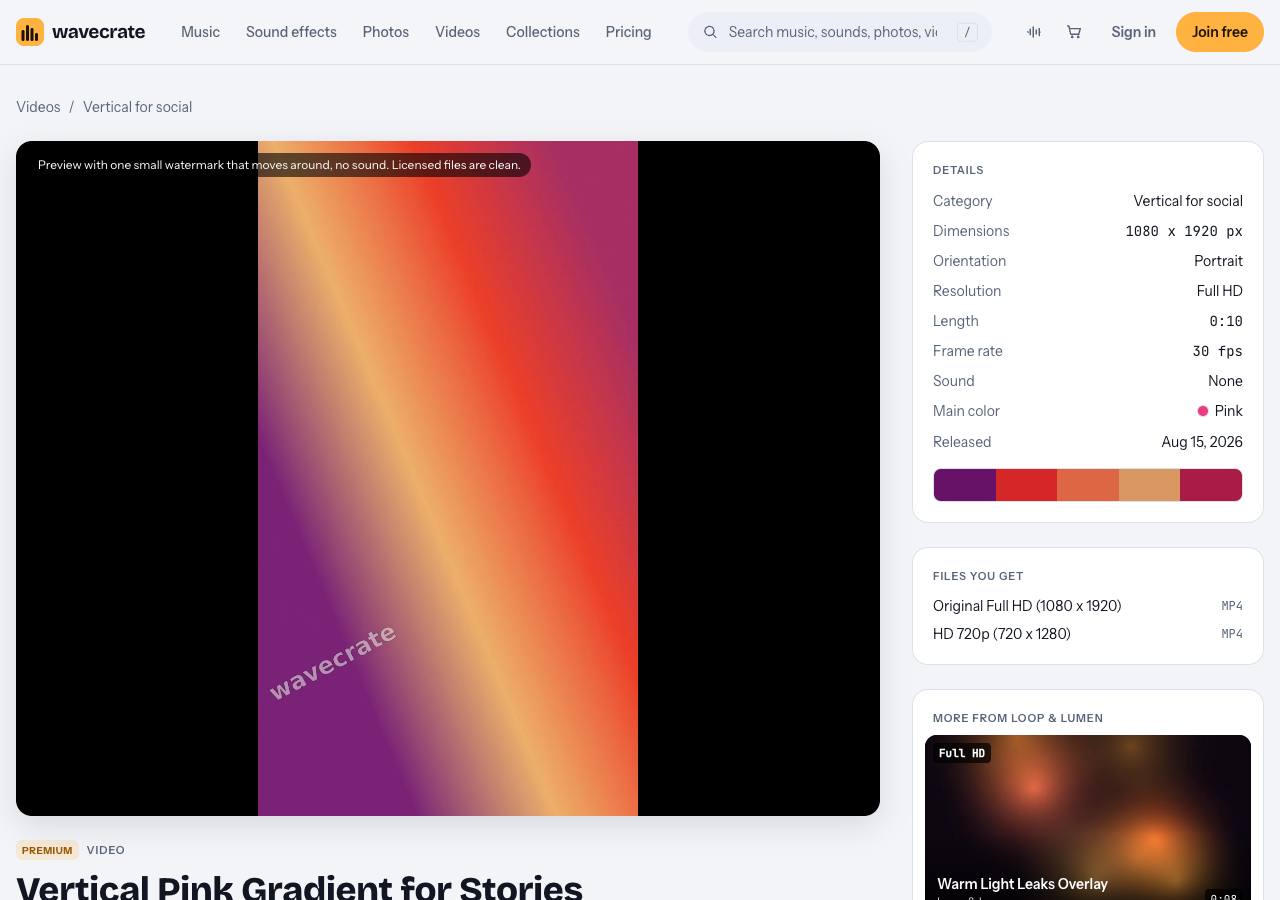
- Dimensions and orientation. Vertical Pink Gradient for Stories is 1080 by 1920 pixels, portrait. The page calls it "A 9:16 pink, coral and violet gradient background for stories, reels and shorts."
- Length. It runs 10 seconds at 30 frames per second, so plan to loop it under longer text.
- Sound. This clip says "None". Others, such as Robotics: Servo (Vertical), say "Included". A silent clip means any music is a separate item you add.
- Files you get. The pink gradient comes as a Full HD original (1080 by 1920) and an HD 720p copy. Robotics: Servo (Vertical) is a 4K clip at 2160 by 3840 and comes in 4K, 1080p and 720p.
One more thing on every video page: the preview has a small watermark that moves around and no sound. The licensed files are clean, so never post the preview.
Which license covers vertical stock video
On the plans and licenses page, the table for photos and videos sets it out:
- Free, only on items marked Free (Cybersecurity: Firewall (Vertical) is one). It covers websites, blogs and social media posts, with "credit text required next to the photo or in the description". "Your own marketing" is not ticked.
- Standard, listed at $29 on the video pages read. It covers your own websites, social, presentations and marketing, with no credit.
- Extended, listed at $99 on the video pages read. It adds paid advertising and TV broadcast, products for resale and client work.
Paid licenses are not on sale yet: Wavecrate says purchases open soon, so those are the listed prices for when sales open. Items marked Free can already be downloaded with a free account.
Two things follow. If the Story promotes a business, it is your own marketing, which starts at Standard. And a Story may not have a description at all; Wavecrate's pages do not say where the credit goes there, so if you cannot place it, Standard, which needs no credit, is the simpler choice.
A worked example: a cafe's Story and Reel
Say you run a cafe and you are launching a new iced drink. You want a Story with the drink's name over a moving background, then a Reel with music, and you might pay to promote the Reel.
- The background. You pick Vertical Pink Gradient for Stories, because its pinks match the drink. It is for your own marketing, so it needs Standard, listed at $29 on its page.
- The music. The clip has no sound, so you add a track. You choose Tea and Tape, a calm and happy lo-fi track at 82 BPM, and use its 30 second edit. It is marked Free, but the music table ticks "Your own business and brand content" only under Standard and Extended, so for your cafe it needs Standard, listed at $15 on its page.
- The boost. If you pay to promote the Reel, it becomes paid advertising, which is Extended only, for both items: listed at $99 for the video and $49 for the track on these pages. The pricing page says that, once purchases open, Standard on each can be upgraded to Extended for the difference.
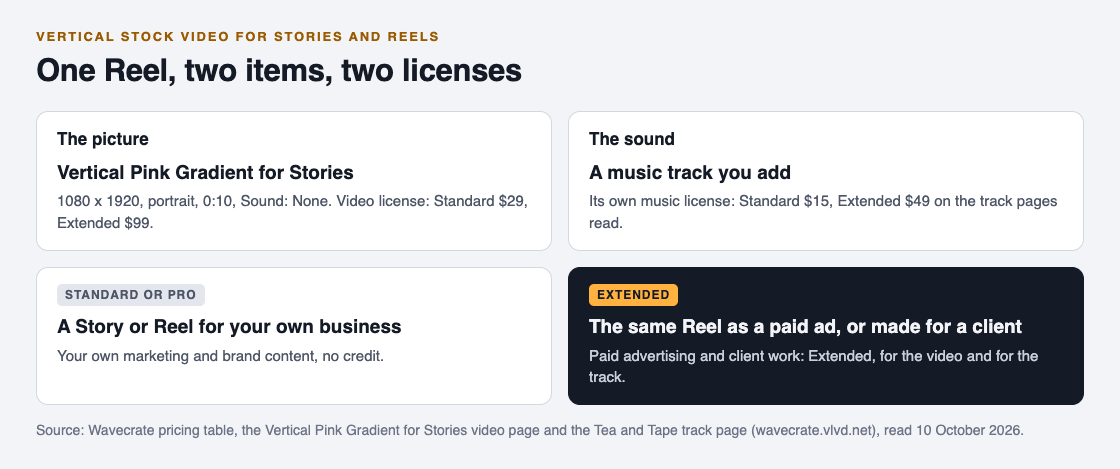
If you post this kind of thing every week, Pro, listed at $99 a year or $12 month to month and not on sale yet, gives Standard licenses on the whole catalog, music and video alike. It does not include Extended, so the boost in step 3 still needs Extended licenses.
Client Reels, templates and keeping proof
If you make Reels for other businesses, the row that decides it is client work, and it is ticked only under Extended. That is true even for a clip marked Free, and Pro does not cover it either.
Selling the clip inside something else is its own line too. A Story template pack that uses a Wavecrate background is a product for resale, and "Products for resale: merchandise, templates, prints, packaging" is Extended only. Wavecrate has no separate license agreement page today, so if a use is not on the table or the item's cards, treat it as not covered.
Whatever you choose, keep the proof. Every download comes with a license certificate and a code, and the verify page shows who holds the license, for which item and what it covers, with no account needed. A Story may not stay up for long, but a note with the item name, the license type and the code lasts.
Frequently asked questions
Can I crop a landscape stock video for Reels?
You can, but a 1920 by 1080 clip cropped to 9:16 keeps a slice only about 608 pixels wide, so it looks soft on a phone. A native vertical clip at 1080 by 1920 or more fills the screen without stretching.
Does a Wavecrate video license cover the music I add?
No. The music is a separate item with its own license, priced on its own track page.
Do I need Extended to post a Reel for my business?
Not for a normal post: your own marketing is covered by Standard. You need Extended once you pay to promote it, or if you make it for a client.
Which file should I post?
The original licensed file, never the preview, which has a moving watermark. Use the 720p copy only if you need a lighter file.
Get started
Browse Wavecrate: you can join free and download items marked Free now, paid licenses are not on sale yet (purchases open soon), and every download comes with a license certificate and a code anyone can check on its verify page. Go to Videos, choose Vertical for social or the Portrait filter, and read each clip's details and license cards before you post.


Comments
No comments yet.
Sign in or make an account to comment.