Virtual patching: shield a flaw until the fix ships
Virtual patching is a way to block attacks on a known flaw without touching the flawed code. You add a rule in front of the app, usually in a web application firewall or a server filter, that stops requests trying to exploit it. It buys time when the real fix will take weeks. This guide follows the OWASP Virtual Patching Cheat Sheet, including the limits OWASP is careful to state.
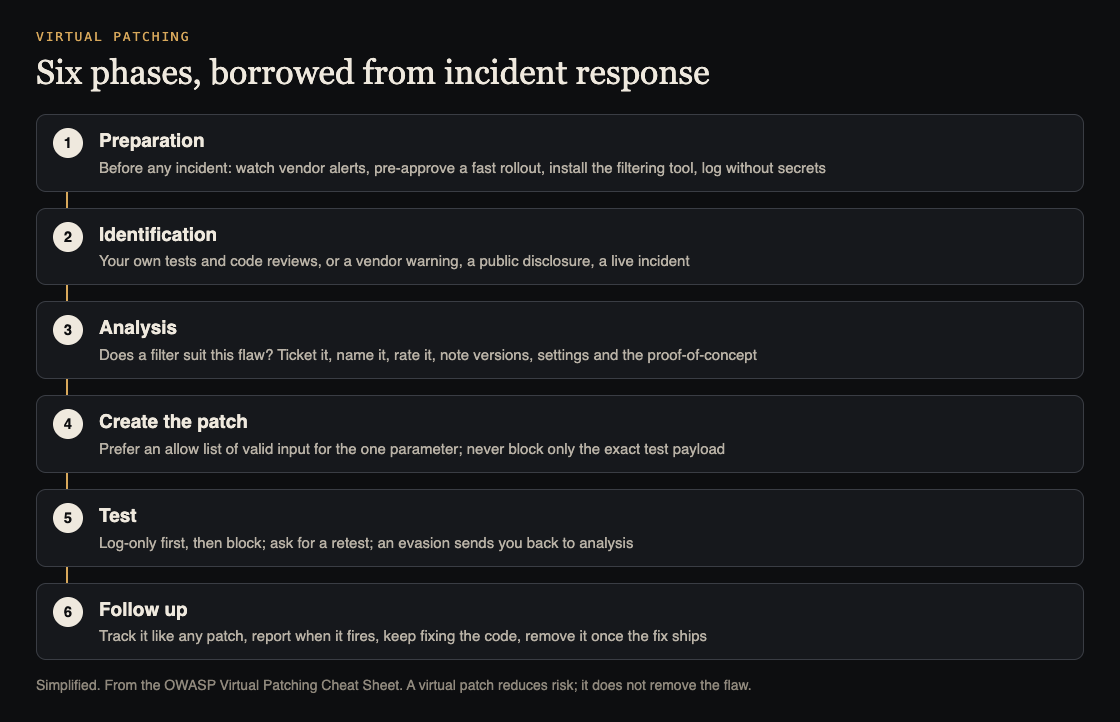
Six phases, modeled on incident response. Simplified from the OWASP Virtual Patching Cheat Sheet.
What virtual patching is, and what it is not
OWASP defines a virtual patch as a policy enforcement layer that detects and blocks attempts to exploit a known vulnerability, without changing the vulnerable code.
The limits come in the same breath. A virtual patch only protects traffic that passes through the layer, and only against attack variants its rules recognise. It does not remove the flaw. OWASP says to test for ways around it and to keep working on the real fix in the code or from the vendor.
Its two goals, in the cheat sheet's words, are to shorten the time to fix and to reduce the attack surface while the permanent fix is prepared.
Why not just fix the code?
OWASP agrees that fixing the source code is the best remedy. But it lists real reasons that can be slow:
- The developers are busy on other projects.
- The software is from a third party, and you cannot change its code.
- The app was built by an outside firm, and a change would need a new project.
The key point from the sheet: code fixes and virtual patches are not either-or. Different people usually run them, builders on the code and defenders on the filter, and they can happen at the same time. Our post on dependency updates covers the patching side for third-party packages.
Prepare before you need it
OWASP stresses this phase most. A live incident is the wrong moment to propose buying and installing a filter. Get ready while things are calm:
- Watch for alerts. Sign up for the security mailing lists of every vendor whose software you run.
- Pre-approve a fast rollout. Agree in advance how a virtual patch gets reviewed and released quickly. Test it against attacks and against normal use, since a rule can block real customers. Decide your monitoring and rollback rules before you switch blocking on.
- Install the tool early. Have the filtering layer in place, even if it sits idle, so no approval is needed on the day.
- Log carefully. Record the rule ID, time, endpoint, outcome and a correlation ID. Do not capture full requests blindly: firewall alerts can expose passwords and payment data, so redact sensitive fields. Our post on log injection covers protecting the logs themselves.
Find and analyse the flaw
You learn of a flaw in one of two ways. Proactively, through your own penetration tests, automated scans or source code reviews. Or reactively: a vendor warns you, the flaw is made public, or an attack is under way, the most urgent case. For custom code, OWASP notes, only the proactive route works, because no vendor will warn you.
Then analyse it. OWASP's checklist:
- Is a virtual patch a good fit? OWASP says it suits injection-type flaws best and may not reduce risk enough for other kinds.
- Open a ticket, so the work is tracked and measured.
- Name it: the public identifier if there is one, or your own ID.
- Rate its impact, list the affected versions and any settings needed to trigger it.
- Collect the proof-of-concept payloads. You will test the patch with them.
Write the patch: allow lists first
OWASP gives two ideals: block no legitimate traffic, and miss no attacks, even ones designed to slip past. You may not reach both fully, and the sheet says business owners should understand that a virtual patch is risk reduction, not a complete fix.
There are two ways to write the rule:
- Allow list (recommended). Describe what valid input looks like for the affected parameter and refuse everything else. In OWASP's example, a parameter that should only ever hold a number is limited to digits, and to appearing once. You need your logs to know what normal input looks like.
- Block list. Detect the known attack pattern, such as a quote character in that parameter. It is quicker to write, but OWASP warns it is easier to evade.
One trap to avoid: a patch that blocks only the exact payload from the test report. OWASP's example is a cross-site scripting test string. Blocking that one string gives a little protection now and very little later. For background on why input rules work, see our guide to input validation.
Test it, then retire it
OWASP's testing steps:
- Switch the patch on in log-only mode first, so you see what it would block without blocking real users.
- Ask whoever found the flaw to retest.
- If the retest gets around the rule, go back to analysis.
The cheat sheet adds that one passing test proves little: try other encodings, other affected endpoints, and paths that skip the filter altogether.
Afterwards, treat the virtual patch like any other patch. Record it with a change ticket and its rule ID. Run reports on when it fires. And reassess regularly so you can remove it once the code fix ships.
Worked example: an injectable report parameter
Say a penetration test finds that id on /admin/export in a third-party admin tool is open to SQL injection, and the vendor's fix is a month out.
- Analyse. It is an injection flaw, a good fit. Ticket it with your own ID, rate it high, note the tool's version and the tester's payload.
- Check normal input. Your logs show
idis always a whole number, sent once. - Write an allow list. On that path only, allow
idto appear once and contain only digits. Refuse anything else. - Log only for a day. Check that no real exports would have been blocked.
- Block, then retest. Ask the tester to try encodings and other routes to the same export.
- Follow up. Keep pressing the vendor. When the fixed version is installed and tested, remove the rule and close the ticket. Our guide to SQL injection testing shows what the tester will look for.
Frequently asked questions
Is a virtual patch a real fix?
No. OWASP says it does not remove the vulnerability and only covers traffic and attack variants its rules see. Keep working on the code or vendor fix.
Which flaws suit virtual patching?
OWASP says injection-type flaws suit it best; for other kinds, analyse whether a filter can detect the attack well enough.
Allow list or block list?
OWASP recommends allow lists, which define valid input. Block lists are quicker but easier to get around.
Get started
Write down today who can approve an emergency filter rule, and where it would go. That is most of the preparation phase.
whitehatstoic's cybersecurity and AI safety testing includes a web app and API review, a written report with fixes, and a retest after you apply them, scoped after a short call. No test finds every weakness, but a retest is how you learn whether a virtual patch actually holds.

Building something that has to be safe? Book a meeting with whitehatstoic: tell us the product, the deadline and your biggest worry, and we reply with a plan and a price.
Comments
No comments yet.
Sign in or make an account to comment.