Visual management at home: see problems at a glance
Visual management at home means you set up your house so that a problem shows itself before anyone has to ask. An empty hook means the keys are missing. A red tag means the dryer vent still needs cleaning. A line on the rice jar means it is time to buy more. This post shows you how to build those cues, and how to turn what you spot into problems you actually track and fix.
What visual management at home means and why it works
Visual management comes from factories. The Lean Enterprise Institute defines it as putting tools, parts, activities and measures of performance in plain view, so the status of the system can be understood at a glance by everyone involved. At home, that means anyone walking past can see the normal state and any break from it, without opening a drawer or reading a report.
At home, the same rule saves you from a lot of repeated questions. Who took the scissors? Are we out of dish soap? Did anyone call about the leak? When the answer is visible, nobody has to keep it in their head.
It works for three reasons:
- It is fast. A glance costs less than a conversation.
- It is shared. Kids, partners and guests read the same signal you do.
- It is honest. An empty spot on a shelf does not forget, and it does not argue.
Signs your household problems are hiding in plain sight
You probably already have problems that a visual cue would expose. Look for these patterns:
- You buy something you already had three of, because you could not see the stock.
- The same chore gets done twice one week and not at all the next.
- A repair keeps coming back up in conversation but never gets a date.
- Tools and chargers drift from room to room and nobody knows where they belong.
- You fix something, then six months later nobody remembers what fixed it.
That last one matters most. A visual cue tells you something is wrong right now. It does not tell you what you tried last time. You need both.
Simple visual cues: labels, color codes, shadow boards, and min/max lines
Start with cheap, physical cues. Pick one area at a time.
Labels
Label shelves, not just boxes. If the shelf says "batteries" and it is empty, you know at once. A labeled box can sit on the wrong shelf for months.
Color codes
Give each person a color for cups, towels or chore cards. Use one color, like red, only for "needs attention." If red means everything, it means nothing.
Shadow boards
Trace the outline of each tool on a pegboard. A missing tool leaves a visible gap. This works for kitchen utensils, garden tools and the family's chargers too.
Min/max lines
Draw a line on a jar or bin at the level where you should restock. Draw a second line for "full." Now anyone can tell whether to buy more, and nobody overbuys.
Build a household problem board everyone can read in five seconds
Cues on shelves catch small things. Bigger problems need a board: one place where every open household problem sits, with a status anyone can read.
Keep it to three rules:
- One line per problem. "Bathroom fan is loud" is enough. Long notes stop people from reading.
- A clear status. Open, trying something, fixed.
- A visible outcome. When you try a fix, mark whether it worked, partly worked or failed.
Try the five second test. Stand at the board, count to five, and ask: can I tell what is broken and what we are doing about it? If not, cut words.
From spotting to solving: turn visual signals into tracked problems
Here is where a home system can stall. The cue catches the problem. Then the problem lives on a sticky note that falls off the fridge.
Problem Graph is a personal problem and solution journal drawn as a map. It fits this step well because it keeps the same "see it at a glance" spirit, but adds memory. You write a problem in one line, attach the fixes you try, and record what happened.
A worked example
Say your min/max line on the dog food bin keeps hitting empty before the delivery arrives. Here is how you would log it:
- Open the app and type the problem in one line:
Dog food runs out before delivery. Put it in the personal lane. Press Enter and it lands on the graph. - Add solutions as ideas:
Move delivery 5 days earlier,Raise the min line on the bin,Buy a bigger bag. - Mark the one you are trying now. After two deliveries, record the outcome: worked, partly or failed. Say the bigger bag comes first and only partly helps: the bin still runs empty, just later. Then you raise the min line so the bin asks for a re-order earlier, and that works. The idea of moving the delivery stays on the map as an idea you have not needed.
- Link related problems. If you also logged
Cat litter runs out mid week, link the two. Patterns show up on the map that never show up in a list, like both problems tracing back to one delivery schedule.
A failed fix stays on the map as a failed fix. That sounds minor. It is the thing that stops you from trying the same useless idea next spring.
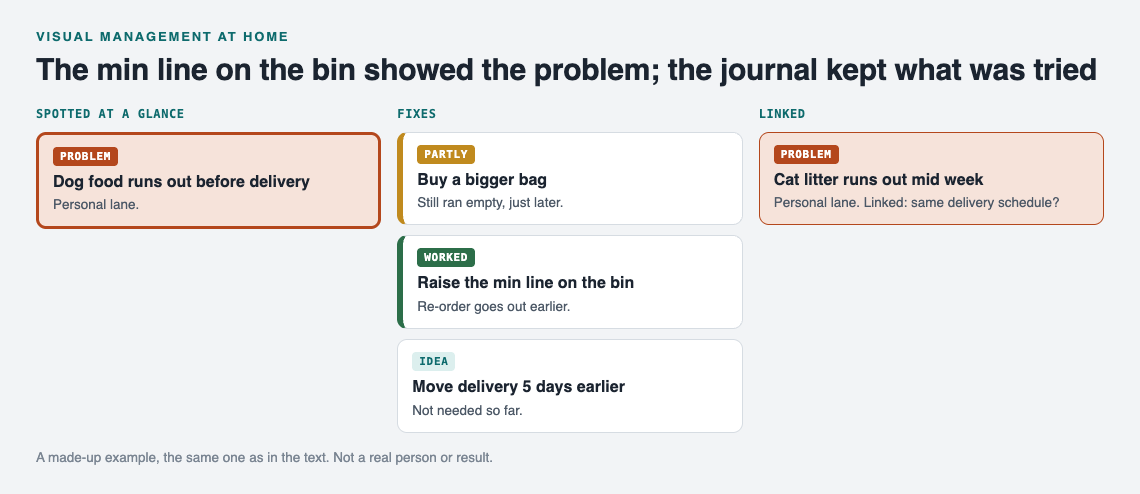
A made-up example: the cue shows the problem, the journal keeps what was tried.
Make the board shared
Problems are private by default. Only you see them, and they follow you to any phone or computer you log in on. For a household board, you want the family to see it too.
To do that, create a private network and give your household the invite code. Then mark a problem as a main node and share it into the network. Only a main node can be shared, and its solutions, their outcomes and the requirements they need go along with it. Note that anyone with the invite code can join, so treat the code like a house key. The same setup works for a community garden's shared list or a coach's team list.
In the app, you can filter by Mine, Network and All shared, so you can glance at only the household problems. If a map feels busy, switch to the List view beside it. It runs in the web browser and works on your phone, so you can log a problem standing in front of the empty bin.
Keep it visible: pair visual cues with standardized work and poka-yoke
A visual cue tells you something drifted. Two other habits stop it from drifting again.
Standardized work means you write down the one way a task is done, so it does not depend on who does it. Once a fix works, turn it into a short standard. The post on standardized work at home walks through that step.
Poka-yoke means error-proofing with simple, cheap devices. The Lean Enterprise Institute names two kinds: a warning, such as a buzzer or light, and a shutdown, where a machine will not start if something is set wrong. A red tag on the dryer is a visual cue, close to the warning kind; a setup that will not let the mistake happen at all is the shutdown kind. See poka-yoke at home for examples.
The flow looks like this: the cue shows the problem, the journal records what you tried, and the standard or poka-yoke locks in what worked. Make sure the fix that became your standard is on the problem as a solution marked worked, next to the ones that failed, so the next person sees which fix held and which ones did not.
Common mistakes that make home visual systems fade
- Too many colors. Five color codes means nobody remembers any of them. Start with two.
- No owner for the board. Someone needs to clear fixed items each week, or the board fills with stale problems and people stop reading it.
- Cues with no follow up. If an empty shadow board slot never leads to action, it becomes wallpaper.
- Deleting failures. Erasing what did not work feels tidy. It throws away the most useful thing you learned.
- Trying to cover the whole house at once. Pick the kitchen or the entryway. Get one area working, then spread.
These mistakes show up outside the house too. The same logic applies to a car problems log or a garden journal for pests: keep it short, keep it visible, and keep the failures.
Frequently asked questions
What is an example of visual management at home?
A min/max line on a pantry jar is a good one. Anyone can see when stock hits the bottom line and needs restocking, with no list and no question.
How do I get my family to actually use a visual board?
Keep each problem to one line and put the board where people already look. Clear fixed items every week so the board stays short and worth reading.
Is a digital board better than a whiteboard for household problems?
Use both for different jobs. A whiteboard or physical cue catches problems in the room, and a digital journal like Problem Graph remembers which fixes worked, partly worked or failed, and lets you share chosen problems with your household through a private network.
How often should I review the problems on my board?
Once a week is a good start. Record outcomes, clear what is fixed, and decide on one next step for anything still open.
Get started
Pick one cue to add this week: a shelf label, a shadow board or a min/max line. When it catches something, log it. If you want to see how a filled graph looks first, an empty graph in the app offers a "Load example set" button.
Try Problem Graph: it is free, and you can look around the public network without an account. Write one problem down in a line and attach the first thing you will try.
Comments
No comments yet.
Sign in or make an account to comment.