Water Drop Sounds for a Spa Treatment Video
Water drop sounds for a spa treatment video do quiet work. A single drip tells the viewer the room is still, the pace is slow and nobody is about to interrupt. This guide shows how to choose and place them, and it starts with one plain fact: on 15 October 2026 Wavecrate had no sound named as a water drop. Below is what the catalog does have, how to build a calm mix from it, and which license a spa video needs.
Why water drop sounds make a spa treatment video feel calm
A treatment video usually shows slow hands, soft light and small movements. The picture is calm, but silence can feel empty, and loud music can feel like a shop. A sparse sound with space around it gives the viewer something to rest on.
Water works because people link it to quiet places. A drip says "no one is rushing." It also lets you keep the music low, because the water carries some of the mood. On Wavecrate, you can preview calm sounds and read each one's license before you pick.

Water drop sounds for a spa treatment video: what Wavecrate has
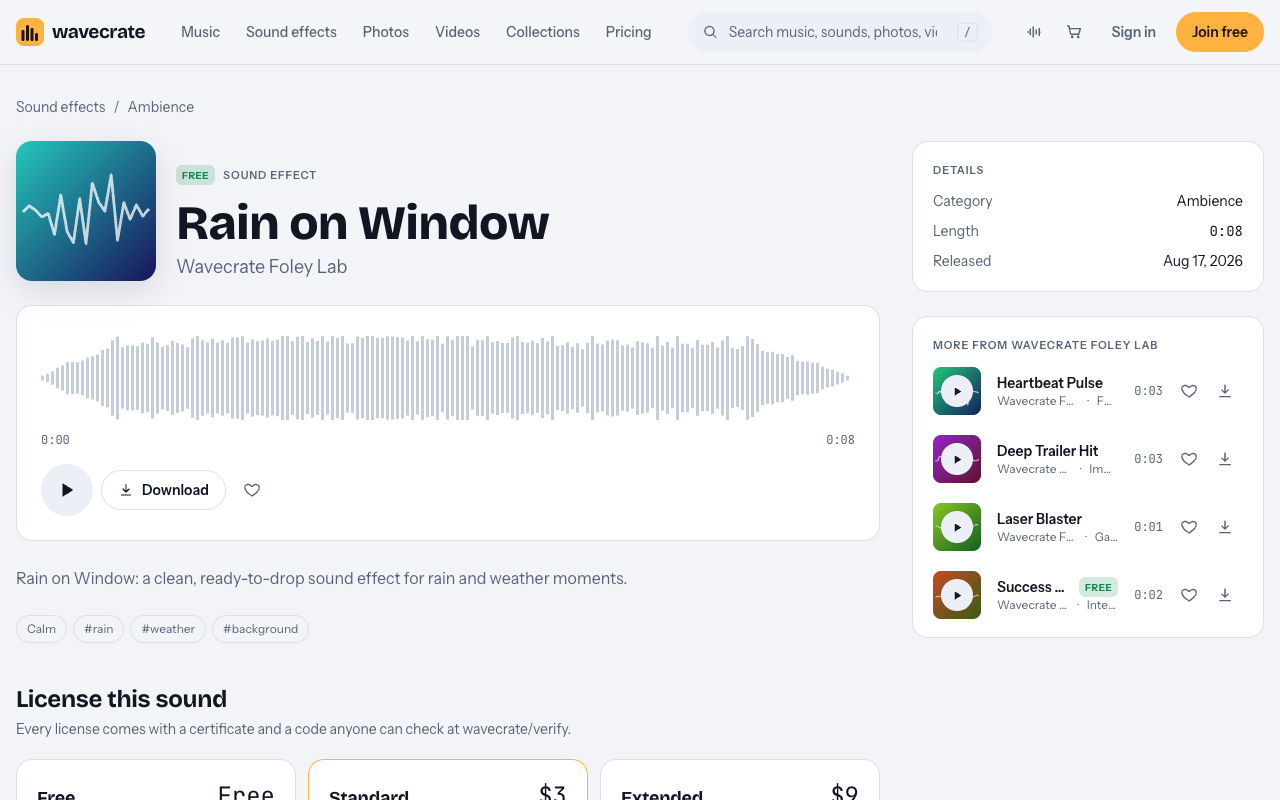
Check the catalog before you plan the edit. On 15 October 2026 the Ambience sound effects held 10 sounds. Rain on Window was the only rain sound; the other nine were room tones for a lab, a control room and a server room. Searches for "water", "drop" and "spa" found no drip either. Catalog contents change, so search again before you lock your plan.
These are the closest options:
- Rain on Window: Ambience, marked Free, 0:08, described as a clean sound for "rain and weather moments." Soft rain on glass suits a warm treatment room better than a drip does.
- Soft UI Click and Gentle Notification from the Interface sound kit: both marked Free and written for button and chime moments. They are not water. A quiet click can read as a small tick, but test it against your picture and drop it if it sounds like an app.
- Bubble Pop: marked Free, described as "for pop and cartoon moments." It is playful, so it fits a bath or foot soak shot better than a facial.
Be honest about the fit. If your edit depends on a clear, realistic drip, none of these is that. Use Rain on Window as the water bed, and let the music and your pacing do the rest. If you need a true drip, record one yourself in a quiet room with a bowl of water and a phone.
Pick the right sound for each treatment scene
Match the sound to what the viewer sees, not to the word "water."
- Arrival and reception shots: keep it very light. A short rain bed under the opening, nothing sharp.
- Face and skin treatments: close, slow shots. Use the quietest sound you have. A single soft tick can mark a hand movement.
- Bath, soak or steam scenes: this is where a bubbly sound like Bubble Pop can work, used once or twice.
- Closing shot: let the rain bed fade out last, after the music has finished.
It also helps to know what each kind of water sound says. A single drip is a pause: it gives the eye a beat to land on a detail. A trickle or steady fall is a texture: it says flow and comfort, and it can sit under a whole scene. Rain on Window sits closest to the trickle idea, so use it as that, not as a stand-in for single drips.
A worked example: a 45 second treatment video
Here is one way to build a short reel for a massage or facial, using only Free items so you can test it before you decide on a license.
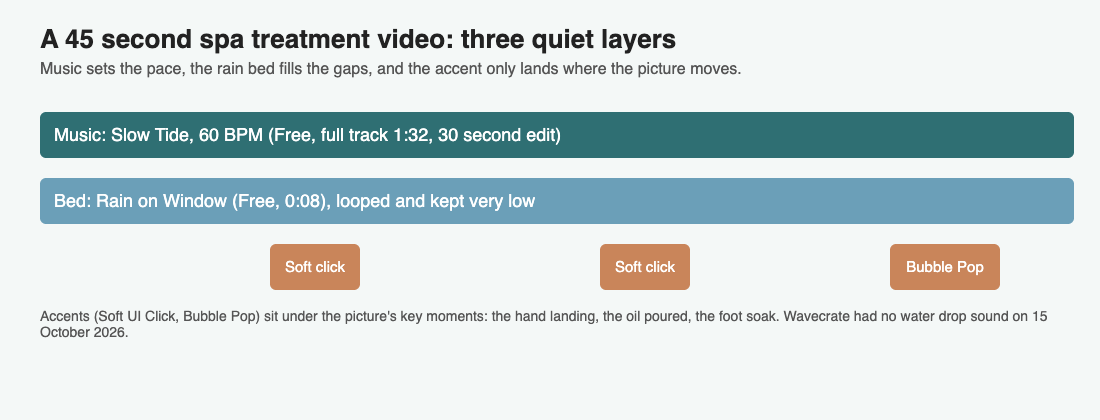
- Music first. Put the ambient track Slow Tide under the whole reel. It runs at 60 BPM and its page says it "leaves plenty of room for voice." Its page lists a full version (1:32), a 30 second edit and an 8 bar loop, so you can pick the length that fits your timeline.
- Add the bed. Loop Rain on Window under it. It is only 0:08, so repeat it and vary the repeat point so the loop is hard to spot. Bring it up until you just notice it, then lower it a little more.
- Add three accents. Place a soft click when the therapist's hand lands, a second when the oil is poured, and Bubble Pop once on the foot soak shot.
- Fade out. End the rain bed a beat after the music, then hold one second of near silence on the final frame.
How to time accents to your visuals
Timing is where a calm video either works or feels fussy. A few rules that hold up:
- Place accents on the action, not the cut. Put a soft sound where a hand lands or lifts, not on the edit point.
- Leave gaps. If a sound repeats every two seconds, it becomes a metronome. Space accents unevenly, with long silences between.
- Start the sound slightly early. A sound a few frames before the picture feels natural. A sound after it feels late.
- Watch with your eyes closed once. If the audio alone still feels calm, the timing is right.
Mix levels so the sounds stay relaxing
Most spa videos that feel wrong are too loud, not too empty. Work in this order:
- Set the music first, low enough that you could talk over it. The music browse page has a tempo filter with a Slow setting (under 90 BPM) to narrow your search.
- Add the rain bed until you only just notice it, then lower it a little more.
- Add accents last. They should be the quietest elements, and none should jump out of the mix.
- If you use a voice-over, mix everything else under it and check the voice stays clear.
Then play the video on a phone speaker, since that is where many people will watch it. A sound that is pleasant on headphones can turn sharp on a small speaker. Cut the high end of any accent that sounds bright.
Check the license before you publish your spa video
Spa videos are often marketing, so the license matters. This is how the pricing page and the item pages lay it out.
- Free license: only on items marked Free. It covers online videos and podcasts, including monetized channels, but needs a credit line in your description. A free account gets 3 free downloads a month.
- Standard: no credit needed, and it covers your own business and brand videos. Pro, listed at $99 a year or $12 month to month and not on sale yet, includes Standard licenses.
- Extended: needed for paid advertising and TV or radio broadcast, apps, games and software, and client work.
A spa owner posting a treatment video on their own channels sits in Standard territory. A freelancer making the video for a spa is doing client work, which the pages place under Extended. Running the video as a paid ad is Extended too. For reference, the Rain on Window page listed Standard at $3 and Extended at $9, and Slow Tide listed Standard at $15 and Extended at $49. Listed prices differ by item, so read the page for each one you use. Paid licenses are not on sale yet: Wavecrate says purchases open soon, so these are the listed prices for when sales open, while items marked Free can already be downloaded with a free account.
You license an item, you do not own it. Each download comes with a certificate and a code. Put the code in your video description, and anyone can check it on the verify page without an account.
Frequently asked questions
Does Wavecrate have a water drop sound effect?
Not on 15 October 2026. The Ambience category had one rain sound, Rain on Window, and searches for water and drop found no drip. Search the catalog again, since contents change.
What can I use instead of a water drop?
Rain on Window works as a soft water bed. For small accents you can test Soft UI Click or Bubble Pop, but they are not water sounds, so judge them against your picture.
Do I need a credit line for a spa treatment video?
Items marked Free need credit text in your description. Standard and Extended licenses do not need a credit line.
Which license do I need for a spa's own marketing video?
The pages list your own business and brand videos under Standard. Paid advertising, broadcast and client work need Extended.
Get started
Start with Rain on Window and Slow Tide, build your three layers, and keep everything quiet. Then confirm the license on each item page before you publish.
Browse Wavecrate: you can join free and download items marked Free now, paid licenses are not on sale yet (purchases open soon), and every download comes with a license certificate and a code anyone can check on its verify page.


Comments
No comments yet.
Sign in or make an account to comment.