Wave interference loops for a podcast studio stream: a guide
A podcast studio stream needs something moving behind the hosts that nobody stares at. Wave interference loops for a podcast studio stream do that job well: slow rings and bands that drift, repeat and stay out of the way of the talk. This guide shows how two waves make the pattern, how to make the loop join with no seam, and how to keep it calm on screen. It also covers what to check if you license a ready-made clip instead of building one.
What a wave interference pattern is
Imagine two stones dropped in a pond. Each makes rings. Where the rings cross, a crest meeting a crest grows taller, and a crest meeting a trough cancels out. The crossing area becomes a woven pattern of bright and dark bands.
That is a wave interference pattern. On a screen it reads as soft, shimmering, never random. Wavecrate's Wave interference Loop is a good picture of it: its page describes rings of light spreading from two sources and crossing into a shimmering interference pattern.
Wavecrate, the stock library used as the example in this guide, has ready-made motion background loops like this one, and every download comes with a license certificate and a code.

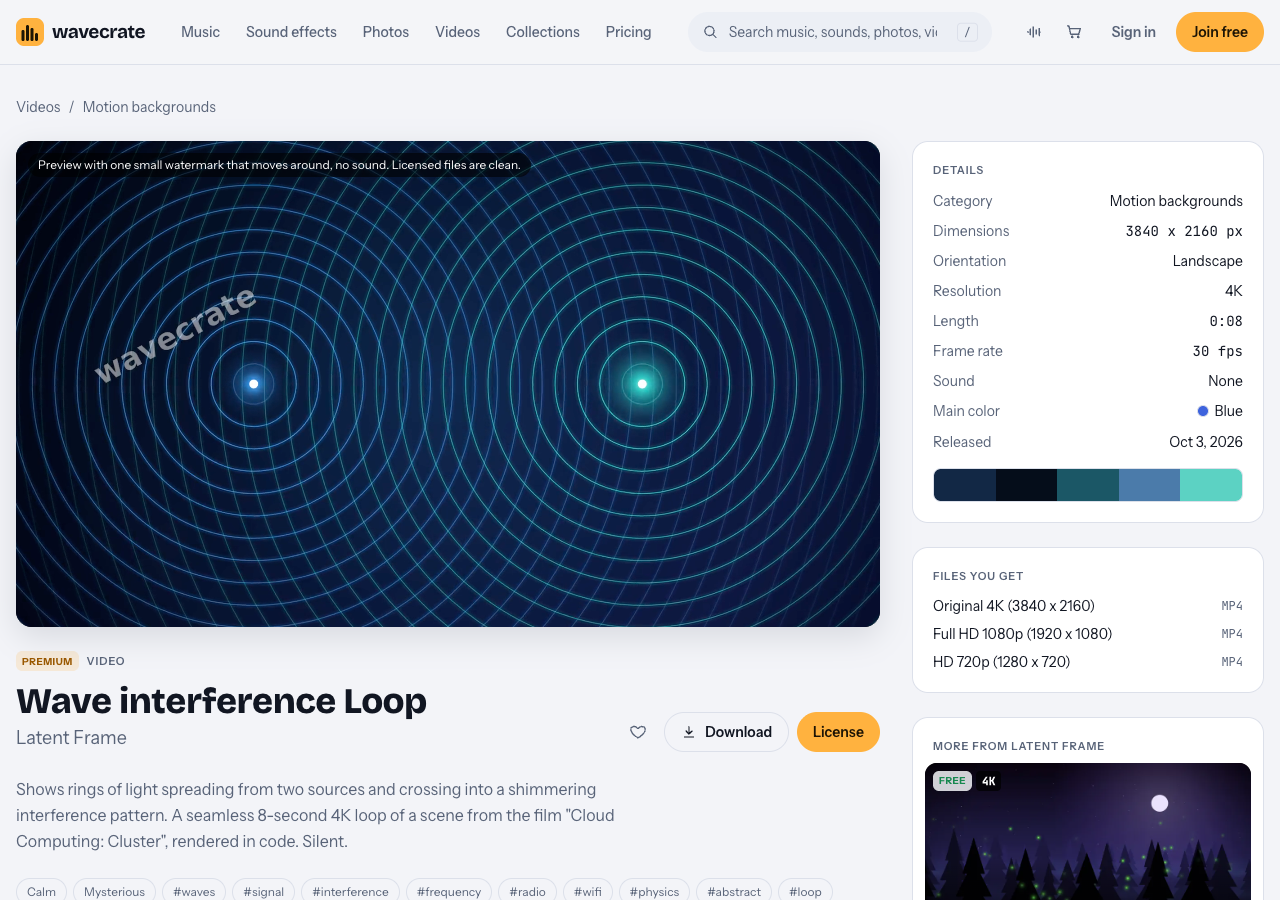
The Wave interference Loop page on Wavecrate, read on 12 October 2026.
The math in plain words
You only need one formula. For a pixel at distance r from a wave source, at time t, the wave height is sin(k * r - w * t).
ksets how tight the rings are. A smallkgives wide, calm rings.wsets how fast the rings travel outward.
Put one source on the left and one on the right. For each pixel, measure the distance to each source, work out the two heights and add them. Map the sum to brightness, or to a blend between two colors. That is the whole pattern.
Two sources with nearly the same w give slow, broad bands that swell and fade. Two sources with very different w give a busy shimmer. For a podcast, pick close values.
Make the loop join with no seam
A loop is seamless when every wave is back at its starting phase after exactly one loop length. So the rule is short: each wave must finish a whole number of cycles per loop.
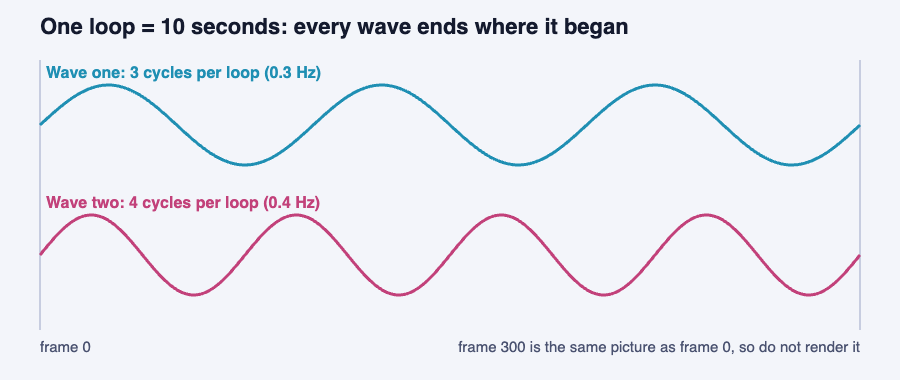
Three cycles and four cycles in a 10 second loop both end where they started.
Here is a worked example for a 10 second loop at 30 frames per second, which is 300 frames.
- Wave one does 3 cycles per loop, so its time speed is 0.3 cycles per second.
- Wave two does 4 cycles per loop, so its speed is 0.4 cycles per second.
- The gap is 1 cycle per loop. The slow bands pulse exactly once per loop, so they line up at the seam.
- Render frames 0 to 299, with
t = frame / 30.
Do not render frame 300. It is the same picture as frame 0, and showing it twice makes a small stutter at every repeat.
The ring spacing (k) has no loop rule. Change it freely to make the pattern wider or tighter. A phase offset between the two waves is free too: it changes how frame 0 looks, not whether the loop joins.
If you can see the repeat, slow the motion down. Do not make the clip longer. Ten to twenty seconds is plenty for abstract motion.
Wave interference loops for a podcast studio stream: two ways to run them
You have two ways to run it.
A rendered video file
Export the 300 frames as a video. Add it to your streaming software as a media source with looping on, and place it below your camera and caption layers. The software only plays a small file, so this is the lightest option.
A live browser source
If you write the pattern as a small web page, your streaming software can show it as a browser source. It can react to sound, but it keeps your graphics card busy. Test it with the whole scene running, not on its own.
Keep it calm behind the talk
People come for the conversation. The background is there to support it.
- Lower the contrast. Use two close colors, such as deep blue and a softer blue, so faces and captions stay readable.
- Slow it down. If your eye can follow one ring across the frame, it is too fast.
- Dim it under text. Put a soft dark layer under names and captions.
- Keep the middle quiet. The people sit in the center, so let the pattern be strongest near the corners.
A quick check: mute the stream, glance at the preview for two seconds, then look away. If you remember the background better than the faces, tone it down.
If you want it to react to the voice, smooth the microphone level (a quick rise and a slow fall) and feed it into one thing only, such as the brightness, in a small range. Leave the frequencies alone. Changing them mid-loop shifts the phase and the pattern jerks instead of swelling.
Or license a ready-made loop
If you would rather not write code, the Motion backgrounds category on Wavecrate has loops that do the same job. The Wave interference Loop is by Latent Frame. On 12 October 2026 its page showed it as an 8 second 4K film (3840 x 2160, 30 fps) with no sound, in a calm and mysterious mood, with Original 4K, Full HD 1080p and HD 720p files. A pink version, Wave interference Loop in Pink, sits in the Abstract category.
Both are marked Premium, so neither offers the Free license. The page lists Standard at $29 and Extended at $99. Paid licenses are not on sale yet: Wavecrate says purchases open soon, so those are the listed prices for when sales open. Items marked Free can already be downloaded with a free account. Pro, listed at $99 a year or $12 month to month and not on sale yet, includes Standard licenses for the whole catalog.
One loop, three uses
Take one clip through three uses of a podcast stream. The license is on the item page and the pricing page, and those are the whole terms the site shows.
- Your own show, with no money spent. Wave interference Loop is Premium, so it has no Free license. A Free loop does: Flow field Loop was marked Free on 12 October 2026. Its Free card lists websites, blogs, social media posts and monetized channels, and asks for credit text "next to the photo or in the description". For a video, the description is the place. The pages give no fixed wording, so paste any credit text you are given as written.
- The show is your business's own marketing. The pricing table starts the row "Apps, presentations and your own marketing" at Standard, not Free. If the stream promotes your brand or product, it needs Standard (listed at $29 for the Wave interference Loop). It needs no credit line, and it comes with Pro.
- A client's show, or a paid ad. "Client work" and "Paid advertising and TV broadcast" are Extended only (listed at $99). So a stream you produce for someone else, or a clip cut into an ad you pay to run, needs Extended.
The video license table names no live streams, studio screens or events. The pages do not say whether a looping background on a live stream counts as an online video, so treat anything not named as not covered, and keep the license code with your show notes. Every license comes with a certificate and a code that anyone can check on the verify page.
Frequently asked questions
What is a wave interference loop?
It is a short animation made by adding two or more moving waves, which makes bands and ripples, timed so the last frame leads into the first. You play it on repeat as a background.
How do I make the loop seamless?
Give every wave a whole number of cycles per loop and do not render the final frame, because it matches frame 0.
Can I use the Wave interference Loop for free?
No. The page shows it as Premium, with Standard listed at $29 and Extended at $99. Some other loops, such as Flow field Loop, were marked Free on 12 October 2026, with credit.
Will a looping background slow down my stream?
A rendered video loop is light, because the software only plays a small file. A live browser source keeps your graphics card busy, so test it with your full scene running.
Get started
Browse Wavecrate: you can join free and download items marked Free now, paid licenses are not on sale yet (purchases open soon), and every download comes with a license certificate and a code anyone can check on its verify page. Read the Wave interference Loop's license cards on its own page, compare the plans on the pricing page, and look through the Motion backgrounds category. You can check any license code on the verify page.


Comments
No comments yet.
Sign in or make an account to comment.