Web service security: a checklist for SOAP and XML endpoints
Web service security starts with a plain fact: a SOAP or XML endpoint takes untrusted text from outside, parses it, and acts on it. That makes it a target in the same way a web form is. The OWASP Web Service Security Cheat Sheet keeps its advice high level, because frameworks differ. This post turns it into a checklist you can run on your own endpoint, one layer at a time.
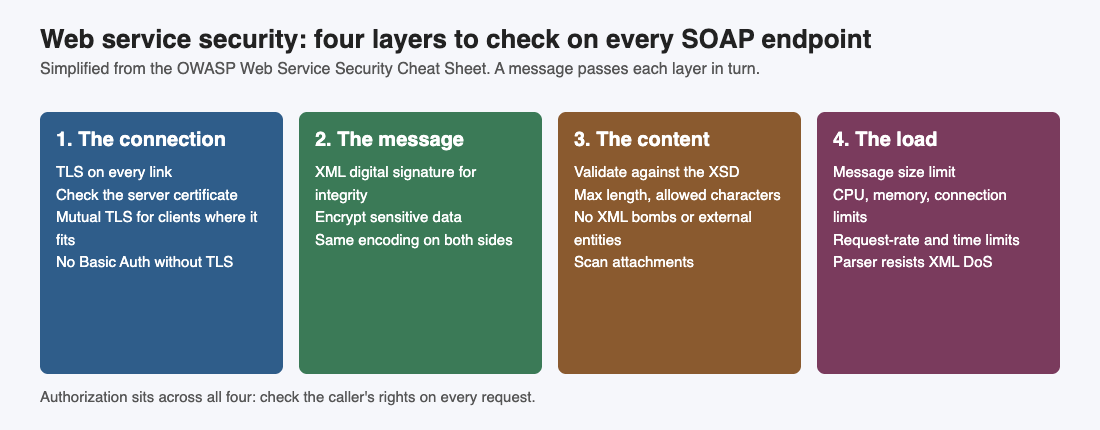
The four layers, simplified from the OWASP Web Service Security Cheat Sheet.
Web service security starts with the connection: TLS and server checks
OWASP's rule is that all communication with and between web services must be encrypted with well-configured TLS when it carries sensitive features, an authenticated session or sensitive data. It adds that this holds even if the messages are encrypted too, because TLS also gives you integrity protection, replay defenses and server authentication.
The client has a job here as well. A service consumer should check that the server certificate comes from a trusted provider, has not expired, has not been revoked and matches the domain name of the service. It should also check that the server has proven it holds the private key. A client that skips these checks has encryption with no idea who is on the other end.
For the settings themselves, see our TLS settings checklist.
Check how callers prove who they are
OWASP says Basic Authentication, if you use it, must run over TLS. It does not recommend it at all, because it puts the secret in the HTTP headers as base64, which is encoding and not protection. For service-to-service calls it points to client certificates with mutual TLS, where each side proves its identity, as a common form of authentication that fits where appropriate.
Ask these questions of every endpoint:
- Does any endpoint accept Basic Authentication over a plain connection?
- Which callers could use a client certificate instead of a shared password?
- Do client and server agree on one SOAP encoding style? OWASP asks you to enforce the same one on both sides.
Protect the message itself
TLS protects the link. The sheet also covers the message. Encryption alone gives confidentiality, but not integrity, and it does not prove who sent it. OWASP's rule for XML data is to use XML digital signatures: the sender signs with a private key, and the recipient checks the signature with the sender's certificate.
Messages with sensitive data must use a strong cipher. If the data has to stay encrypted after it arrives, such as a stored record, OWASP says it needs strong data encryption and not just transport encryption. Decide which fields fit that rule before you build, not after.
Authorize every request
A web service should authorize its clients the way a web app authorizes its users. After the caller has authenticated, the service checks whether that caller may use the method, and whether it may touch the requested data. OWASP asks for this check on every request.
Two extra rules matter. Sensitive actions, such as a password change, new contact details, or payment and delivery instructions, should have a challenge-response step added. And administration functions should be limited to administrators, ideally in an application completely separate from the services they manage. Our broken access control post shows how to test for the gaps.
Validate against the schema
The XML schema definition, the XSD, says what a valid message looks like. OWASP says a web service must validate SOAP payloads against it. At a minimum, the XSD should set the maximum length and the allowed characters for every parameter going in or out. For fixed formats, such as zip codes, phone numbers and lists of allowed values, it should use strong patterns, ideally an allow-list.
Content validation goes beyond the schema. For XML input, OWASP lists checks against malformed XML entities, XML bomb attacks, external entity attacks, and a strong allowlist for the values. Our XXE prevention post covers the parser side. For the data your service sends back, the sheet points to the Cross Site Scripting Prevention Cheat Sheet, which matters when a client puts the output into a web page.
Scan attachments, cap size and limit resources
SOAP can carry files, and attachments are a way to slip malware in. OWASP's rule is to have virus scanning installed, preferably inline, so files are checked before they are saved to disk, and to keep its rules up to date.
Size is the next control. A flood of large messages can cripple a service or take it down. The sheet says to limit SOAP message size to an appropriate value, and warns that a larger limit, or no limit, makes a denial of service attack more likely to work.
Under load, or under attack, a service can use more than the host can give. OWASP asks you to limit the CPU cycles and the memory the service can use, and the number of open files, network connections and started processes. It also asks for request-rate and execution-time limits based on tested capacity and the cost of each operation, with stricter limits for expensive ones. Our denial of service post goes further on this.
The sheet calls XML denial of service probably the most serious attack on web services. The service should validate against recursive payloads, oversized payloads and entity expansion, and reject XML element names over the configured length. The parser or schema validator should do this work. OWASP's advice for checking it is blunt: build test cases to make sure your parser resists these attacks.
One more rule is easy to miss. WS-I Basic Profile conformance is an interoperability requirement, not a security baseline. A service can meet it with no security countermeasures, so enforce transport security, authentication, authorization and resource limits yourself.
A test you can run on staging
Run this against a test copy of one SOAP endpoint, never against production, and write down what happens at each step.
- Call the endpoint over plain HTTP. It should refuse, or move you to TLS.
- Send a valid message with one field over its maximum length, then one with a character outside the allowed set. Both should be rejected by the schema.
- Send a message much larger than the size limit. It should be refused before it is fully processed.
- Send a message with a nested structure deeper than the service should ever see. Check that the parser stops it.
- Call a method with a valid account that should not have access to it. The answer should be a denial.
- Attach a harmless test file that your scanner is meant to flag. Check that it never reaches disk.
Any step that passes through is a finding to fix before launch.
Frequently asked questions
Is HTTPS enough to secure a SOAP service?
No. OWASP asks for TLS, and also for message-level signatures, authorization on every request, schema validation, size limits and resource limits. Each layer covers a different attack.
Why not use Basic Authentication?
It sends the secret in the HTTP headers as base64, which anyone can decode. OWASP does not recommend it, and says that if you use it, it must run over TLS.
What does the XSD do for security?
It sets the maximum length and allowed characters of every parameter, so a malformed or oversized value is rejected before it reaches your business logic.
Does WS-I Basic Profile make a service secure?
No. OWASP calls it an interoperability requirement, not a security baseline, so you must enforce security controls yourself.
Get started
Pick one SOAP endpoint and run the staging test above this week. If you want a second pair of eyes, whitehatstoic's security testing covers web app and API review, with a written report, fixes and a retest after fixes. It is scoped after a short call, and no test can promise to find every weakness.
Building something that has to be safe? Book a meeting with whitehatstoic: tell us the product, the deadline and your biggest worry, and we reply with a plan.
Comments
No comments yet.
Sign in or make an account to comment.