WebSocket security: check your real-time connections
WebSocket security is easy to skip. Your REST API gets reviewed and your login form gets tested, while the chat feature or live dashboard runs over a socket nobody looks at twice. This guide follows the OWASP WebSocket Security Cheat Sheet and walks through the checks in the order you should run them, with tests you can try on your own endpoint.
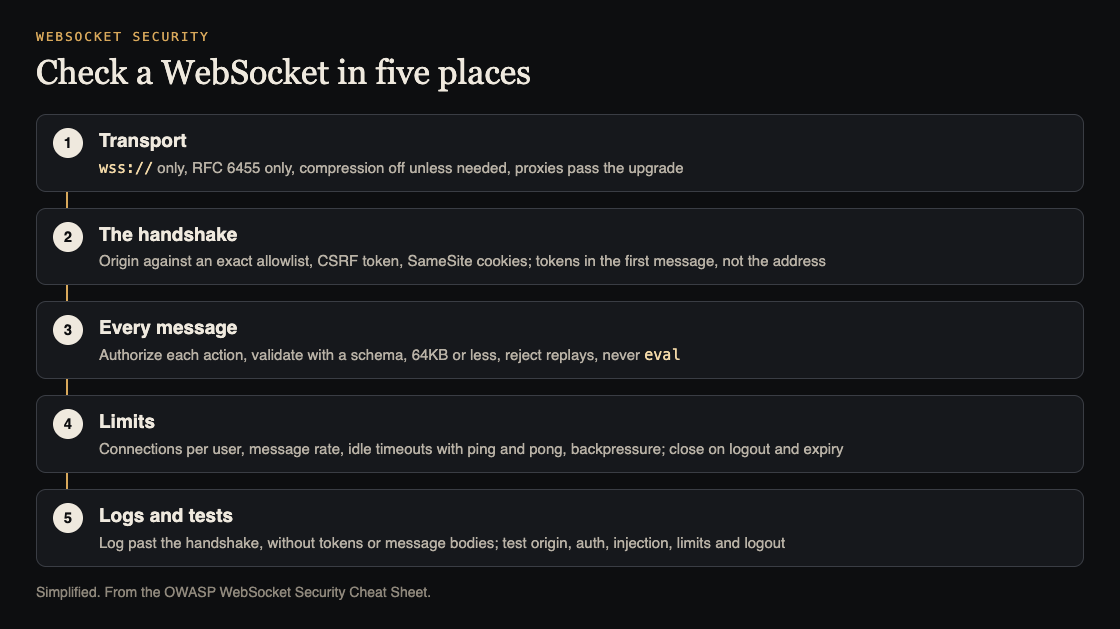
Five places to check a WebSocket. Simplified from the OWASP WebSocket Security Cheat Sheet.
Why WebSocket security needs its own checklist
A WebSocket starts as an HTTP request, then stays open as a two-way channel. OWASP lists what changes once it does:
- WebSockets have no built-in authentication, so access control is easy to forget.
- Browsers send cookies with the handshake, which opens the door to cross-site WebSocket hijacking.
- Messages can carry the same injection payloads as any form field.
- Long-lived connections create new ways to exhaust a server.
- Ordinary HTTP logs record the upgrade request and nothing after it.
So one socket can carry hundreds of actions under one check, with no record of what happened. The fixes are not hard. They just have to be done on purpose.
Lock down the transport
- Use wss:// only. OWASP says never to use plain
ws://in production, since it can be read and changed on the way. Search your frontend forws://; it often hides in a fallback for local development. - Support the current protocol only. That is RFC 6455. Drop old versions such as Hixie-76 and hybi-00.
- Turn compression off unless you need it. Compression mixed with secret data can leak information, much like the CRIME and BREACH attacks on HTTPS.
- Set up the proxy. Load balancers and proxies must pass the
UpgradeandConnectionheaders and allow long read timeouts. If your web application firewall cannot inspect WebSocket messages after the handshake, rely on server-side checks and logging.
Our guide to TLS settings covers the HTTPS side that wss:// sits on.
Stop cross-site WebSocket hijacking at the handshake
OWASP describes the attack in four steps. A user signs in to your app. Later they visit a malicious site. That site opens a WebSocket to your app, and the browser sends the user's cookies with it. If your server accepts, the attacker has a live, signed-in connection.
The defenses:
- Check the Origin header on every handshake against an exact allowlist of your own origins. Browsers set this header and page scripts cannot change it.
- Avoid wildcards and "contains" matching. A substring check can let
https://app.example.com.attacker.examplethrough. - Add a CSRF token to the handshake if your app already uses them. Our CSRF protection guide covers how.
- Set SameSite on the session cookie, Lax or Strict, so it is not sent from other sites.
On Node.js with the ws library, OWASP says to run the origin and sign-in checks in the HTTP server's upgrade event, before the connection is handed over.
Authenticate once, authorize every message
If you use tokens instead of cookies, OWASP prefers sending the token in the first message over wss://, not in the address, because addresses end up in access logs. Until that token checks out, accept only the sign-in message and send nothing protected. Close the connection if the token fails or does not arrive in time, and cap how many connections can sit unauthenticated.
Connections often outlive the session that opened them. Close a connection when its session expires, and re-check long-running ones on a timer; OWASP says every 30 minutes is common. When a user logs out, close all of their connections at once, which means keeping a map from each session to its open sockets. Rotate tokens on long connections.
Being connected is not being allowed. Check authorization for every action in every message, using the identity you attached at sign-in, never a user ID sent in the message. This is broken access control without a URL to inspect.
Treat every message as untrusted input
- Validate the shape. Use a JSON schema and an allowlist of actions. Unknown actions should fail.
- Parse with
JSON.parse, nevereval, which would run code sent by the client. - Cap the size. OWASP says 64KB or less is typical. On Node's
ws, that is themaxPayloadsetting. - Check binary uploads by their first bytes, not by the type they claim.
- Stop replays with a timestamp or a one-time value in each message, and reject repeats.
- Watch where content goes. If it reaches a query or another user's screen, the same rules as XSS testing and SQL injection apply.
Set limits on connections, rate and memory
An open socket costs memory for as long as it lives. OWASP's list:
- Limit total connections, and connections per user (preferred) or per IP address.
- Rate-limit messages; 100 per minute is a common starting point.
- Close idle connections, and use ping and pong frames to find dead ones.
- Add backpressure, so a client sending faster than you can process cannot fill the server's memory.
Our post on denial of service covers the same idea for ordinary requests.
Worked example: log it, then test one endpoint
First, logs. Record each connection's start and end with the user, IP address and origin; sign-in and authorization results; rate-limit and validation failures; and odd disconnects. Never log whole messages, tokens, session IDs or personal data.
Then take one socket endpoint and run OWASP's five tests with wscat, a command-line WebSocket client, and your browser's developer tools:
- Origin: connect with
wscat -c wss://app.example.com/ws -H "Origin: https://attacker.example"and a valid session cookie. The handshake must fail. - Authentication: connect with no cookie or token, then send a protected action. Nothing protected should come back.
- Injection: send a message with a script tag or a quote in every text field, and watch where it lands.
- Limits: send one message over your size cap, then a burst well over your rate limit. Both should be refused while other users stay connected.
- Session: sign out in another tab. The open socket should close.
Put these in a script and run it after each release. OWASP ZAP also has WebSocket testing features if you want a tool.
For an outside review, whitehatstoic runs cybersecurity and AI safety testing on web apps and AI systems, with a web app and API review, a written report with fixes, and a retest after you apply them. It is scoped after a short call. No test finds every weakness, so bring your real-time endpoints to that call.

Frequently asked questions
What is cross-site WebSocket hijacking?
A malicious site opens a WebSocket to your server from the victim's browser, which sends the victim's cookies along. If the server does not check the Origin header, the attacker can read and send messages as that user.
Where should a WebSocket token go?
OWASP prefers the first message over wss://, not the address, since addresses end up in access logs. Accept nothing else until it checks out, and keep it out of your message logs.
Do my HTTP access logs cover WebSocket traffic?
No. They record the upgrade request only. Log connection, sign-in, authorization and limit events yourself.
Which tools can I use to test a WebSocket?
Your browser's developer tools, wscat on the command line, your own scripts, and OWASP ZAP, which includes WebSocket testing features.
Get started
Pick one socket endpoint and run the origin, no-token and logout tests today. If any of them succeed, you have your first fix.
Building something that has to be safe? Book a meeting with whitehatstoic: tell us the product, the deadline and your biggest worry, and we reply with a plan and a price.
Comments
No comments yet.
Sign in or make an account to comment.