Wedding planning problems: one list for both families
Wedding planning problems pile up fast when two families are involved. Each side has its own expectations, its own group chat, and its own idea of what "handled" means. This guide shows you how to keep wedding planning problems on one list for both families: one place where every open issue, every attempted fix, and every result lives, so nobody has to ask "wait, did anyone call the caterer back?"
Why wedding planning problems multiply across two families
One family planning a party already has plenty to track. Two families planning one wedding double the people and the opinions. Your mother assumes your partner's father booked the shuttle. He assumes the venue provides one. Neither says anything, because neither wants to seem pushy.
The problems themselves are rarely hard. A guest count that keeps changing. A seating clash between two cousins. A dress alteration running late. What makes them hard is that the information is split across too many people, and nobody can see the whole picture at once.
The real cost of separate lists, group chats, and side conversations
Separate lists drift apart. Group chats can bury decisions under photos. A fix agreed on the phone between two aunts may never reach the couple.
The cost shows up in three ways:
- Repeated work. Two people call the same florist with different questions.
- Repeated failures. Someone tries a fix that already failed last month, because the failure was never written down.
- Hurt feelings. One family feels left out of decisions they would have liked a say in.
A shared problem list fixes the first two directly. It helps with the third because everyone can see what is open and what has been tried.
What belongs on one shared wedding problem list
Not every task belongs here. "Buy stamps" is a to-do. A problem is something that needs a decision or has more than one possible fix. Good candidates:
- Guest count is 20 over the venue limit.
- Grandma cannot manage the stairs to the ceremony site.
- Both families want to host the rehearsal dinner.
- Caterer has not confirmed the vegetarian options.
- Out-of-town guests have no transport from the hotel.
In Problem Graph, each of these is one line. You type it, press Enter, and it lands on a graph as a problem node. You pick a lane for it: personal, work, expert or scientific. For a wedding, most things go in personal. Then you attach the solutions you are considering, mark the ones you are actually trying, and record how each one went: worked, partly, or failed.
The useful part is linking. "Guest count over the limit" and "Rehearsal dinner host" may look separate, but if the fix for one is "move some guests to the rehearsal dinner instead," they are connected. Link them, and the connection shows on the map. A list would never show you that.
How to write each problem so both families agree on it
A problem written by one side can read as an accusation to the other. "Your side invited too many people" starts a fight. "Guest count is 20 over the venue's 150 limit" starts a conversation.
Follow three rules:
- State the fact, not the blame. Describe the situation as it is.
- Include the number or date. "Caterer needs final menu by June 3" is clearer than "menu stuff."
- Keep it to one line. If it needs a paragraph, it is probably two problems. Split it and link them.
Here is a worked example. Say the problem is: "Grandma Rosa cannot climb the 30 steps to the garden ceremony site." You attach three solutions:
- Ask the venue about a side path. Tried. Failed: no path exists.
- Rent a portable ramp. Idea.
- Move the ceremony to the lower lawn. Trying.
Anyone looking at this sees right away that the side path is a dead end. Nobody calls the venue to ask again. Failures are worth keeping on the map, because the next person needs to know what did not work.
You can also add a requirement to the lower lawn solution, such as "Venue approval for lower lawn by May 15." Requirements are their own node type, so the thing a solution depends on is visible instead of buried in someone's head.
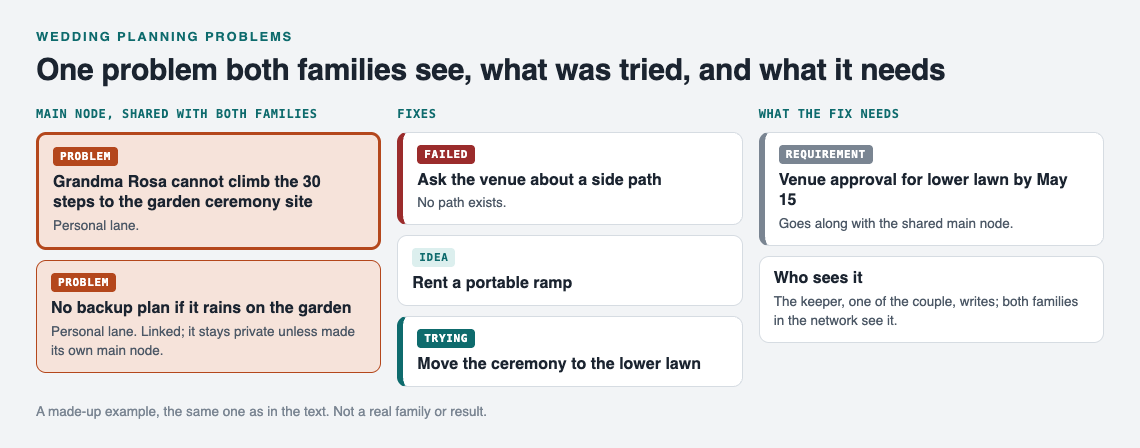
A made-up example: one shared problem, its fixes and what the fix needs.
Assigning owners without stepping on toes
Every problem needs one person who keeps it moving. That does not mean they solve it alone. It means they chase it and report back to the list keeper, one of the couple, who records the outcome on the solution: worked, partly, or failed.
A simple habit works well: put the owner's name at the end of the problem line. "Shuttle from hotel to venue: Dad (Marco)." Now everyone knows who to ask.
To avoid toe-stepping:
- Split ownership across both families on purpose. If one side owns every problem, the other side feels sidelined.
- Let the couple own the touchy ones. Seating conflicts and "who hosts the rehearsal dinner" go to the couple, not to either set of parents.
The same split works in a coach's shared problem list.
Using the list in family check-ins before the big day
Here is how sharing works in Problem Graph, and how to set it up for two families.
Your problems are private by default. Only you see them, and they follow you to any phone or computer you log in on. To share, you mark a problem as a main node. Only a main node gets shared, along with its solutions, their outcomes, and the requirements they need. A problem you only link to a main node stays private, like the rest of your graph. So make each problem both families need to see its own main node, such as the stairs problem and the guest count.
Then create a private network, maybe called "Both families," and give the invite code to the people who should see it. Share your main nodes into that network. Members see them; nobody else does. The keeper writes and updates; everyone else reads and reports. Keep the invite code within the group, because the app says anyone with the code can join.
For check-ins, a short weekly call works. Open the app at problemgraph.vlvd.net/app, filter to the Network view, and switch to the List view if the map feels too busy for a call. Go through it in this order:
- What changed since last week? Owners report, and the keeper records each outcome: worked, partly, or failed.
- What is stuck? Look for problems with only failed solutions.
- What is linked? Check whether one fix affects another problem.
Aim for twenty minutes. The map does the remembering, so the call does not have to. If you have run events before, tracking what went wrong in event planning covers a similar rhythm.
A sample wedding problem list from venue to thank-you notes
Here is a sample list to adapt. Each line is a problem you would type in.
Venue
- Ceremony site has stairs Grandma Rosa cannot climb.
- Venue requires final headcount 3 weeks out; we do not have RSVPs yet.
- No backup plan if it rains on the garden.
Guests
- Guest count is 20 over the 150 limit.
- Two cousins cannot sit at the same table.
- 14 RSVPs still missing two weeks before deadline.
Food
- Caterer has not confirmed vegetarian and gluten-free options.
- Both families want to bring a traditional dessert.
Travel
- Out-of-town guests have no ride from the hotel.
- Hotel room block expires before most guests book.
Link "Guest count over limit" to "Final headcount deadline" and "Missing RSVPs." Those three are really one knot. Link "No rain plan" to "Grandma cannot climb stairs," because moving to the lower lawn could solve both. These links are where the map earns its place.
The same thinking shows up in a shared list for a band and a community garden: many people, one list, honest outcomes.
When you are stuck, you can also ask for suggestions. The AI proposes new solutions grounded in what worked for others on problems like yours. Treat these as ideas to discuss, not answers.
Frequently asked questions
Who should own the shared wedding list?
One of the couple, as the keeper: they create the network, share the main nodes and record outcomes. Individual problems can each have a different owner from either family, written into the problem line, who reports back to the keeper.
How do we handle disagreements between families on the list?
Write the disagreement as a neutral problem, such as "Both families want to host the rehearsal dinner," and attach each side's proposal as a solution. Seeing the options side by side makes it a choice between ideas rather than between people.
Should the wedding planner or vendors see the list?
Think twice about the family list, since it may include sensitive things like seating conflicts. If you want your planner involved, create a separate private network for them and share only the main nodes they need to see.
What do we do with the list after the wedding?
Keep it. The outcomes you recorded, including the failures, become a record for the next family wedding. You can also choose to make a main node public so others can link their own problems to it and borrow the solutions that worked.
Get started
Start small. Write down the one wedding problem that is bothering you most today, attach the first fix you plan to try, and mark it as trying. Once you have five or six, make the shared ones main nodes and invite the other family.
If you want to see how a graph looks before you begin, open the app and press "Load example set" on an empty graph.
Try Problem Graph: it is free, and you can look around the public network without an account. Write one problem down in a line and attach the first thing you will try.
Comments
No comments yet.
Sign in or make an account to comment.