What Are Bitwise Operators in Programming? A Plain Guide
You have seen &, | or >> in code and wondered what they do. So, what are bitwise operators in programming? They are operators that work on the single 0s and 1s inside a number, one position at a time, instead of on the number as a whole. This guide walks through each one with tiny examples. Then you follow one real pixel through the brick rule in a browser tank game, step by step.
What are bitwise operators in programming?
A normal operator like + treats 12 as twelve. A bitwise operator treats 12 as the pattern 1100. It looks at each position on its own and hands you back a new pattern.
C#, the language the game below is written in, lists these bitwise and shift operators in Microsoft's C# reference:
- AND (
&): a 1 only where both inputs have a 1. - OR (
|): a 1 where either input has a 1. - XOR (
^), short for exclusive OR: a 1 where the inputs differ. - NOT (
~), also called the complement: flips every bit. - Left shift (
<<): slides every bit toward the high end. - Right shift (
>>): slides every bit toward the low end.
C# also has >>>, an unsigned right shift, which you will not need here.
A quick refresher on bits and binary numbers
A bit is a single 0 or 1. If that is new to you, read what a bit is and how 0s and 1s add up first.
In binary, each position is worth double the one to its right. From the right, the positions are worth 1, 2, 4, 8, 16 and so on. So 1100 is 8 plus 4, or 12, and 1010 is 8 plus 2, or 10.
That post used the byte 00010110, which is 16 plus 4 plus 2, or 22. Keep 22 in mind; it comes back below.
AND, OR, XOR and NOT, one column at a time
Use the same two numbers for every example: 12 (1100) and 10 (1010). Line them up and compare each column. The rules below follow the Wikipedia article on bitwise operations.
AND: keep only what both share
1100 & 1010 gives 1000, which is 8. Only the leftmost column has a 1 in both. You use AND to test bits, or to keep some and drop the rest.
OR: turn bits on
1100 | 1010 gives 1110, which is 14. Any column with a 1 in either number becomes 1. So OR switches bits on without touching the others.
XOR: spot the differences
1100 ^ 1010 gives 0110, which is 6. A column is 1 only when the two inputs disagree.
NOT: flip everything
NOT works on one number and flips every bit. In four bits, NOT 0111 is 1000, so 7 turns into 8.
Left and right shifts: sliding bits sideways
A shift slides the whole pattern sideways. Bits that fall off the end are thrown away.
3 << 2 takes 11 and makes it 1100, which is 12. Each step left doubles the value, as long as nothing spills off the top. So shifting left by 2 multiplies by 4.
22 >> 2 takes 10110 and drops the last two bits. That leaves 101, which is 5. Each step right halves the value and rounds down. So shifting right by 2 divides by 4: 22 divided by 4 is 5, with 2 left over.
AND gets you that leftover. 22 & 3 keeps only the lowest two bits, 10, which is 2. So a right shift gives the whole number of fours, and AND with 3 gives the remainder.
Masks: picking out the bits you want
The 3 in 22 & 3 has a name. It is a mask. The Wikipedia page on masks) describes a mask as data used with bitwise operations to switch several bits on, off or flip them in one go.
In binary, 3 is 011, so ANDing with it keeps the lowest two bits. A mask of 7 (111) keeps the lowest three, which is the remainder after dividing by 8.
To switch bits on instead, OR with a mask that has 1s where you want them. To flip bits, XOR with it. Same mask, different job.
A worked example: one brick pixel in Tank City Reboot
Tank City Reboot is a free browser tank game where your antivirus tank guards a CPU core. Its field is 208 by 208 pixels, stored as 52 by 52 squares of 4 by 4 pixels. The y count starts at the bottom of the field, not the top. When it paints a firewall (brick) square, it picks each pixel's color with shifts and masks.
Here is the rule from the game's Art.cs file, in plain words:
- The board square for pixel (x, y) is found with
x >> 2andy >> 2. - Odd rows of squares are shifted 4 pixels sideways, so the bricks are staggered. That shift is
((y >> 2) & 1) * 4. - If
y & 3is 0, or(x + shift) & 7is 0, the pixel is mortar. - Otherwise, if
y & 3is 3, it is the light top edge of a brick. - Otherwise it is plain brick.
Now follow pixel x = 13, y = 22.
- Find the square.
13 >> 2is 3, because1101loses its last two bits and becomes11.22 >> 2is 5, as you worked out above. So the pixel sits in column 3, row 5 of squares. - Find the spot inside the square.
22 & 3is 2. The pixel is 2 pixels up from the bottom of its square, so it is not on the mortar line (0) and not on the light top edge (3). - Check for staggering.
5 & 1is 1, so row 5 is odd and the shift is 4. - Check for a mortar gap. 13 plus 4 is 17, which is
10001.17 & 7keeps the last three bits,001, which is 1. That is not 0, so there is no vertical mortar line here. - Answer. None of the tests matched, so pixel (13, 22) is plain brick.
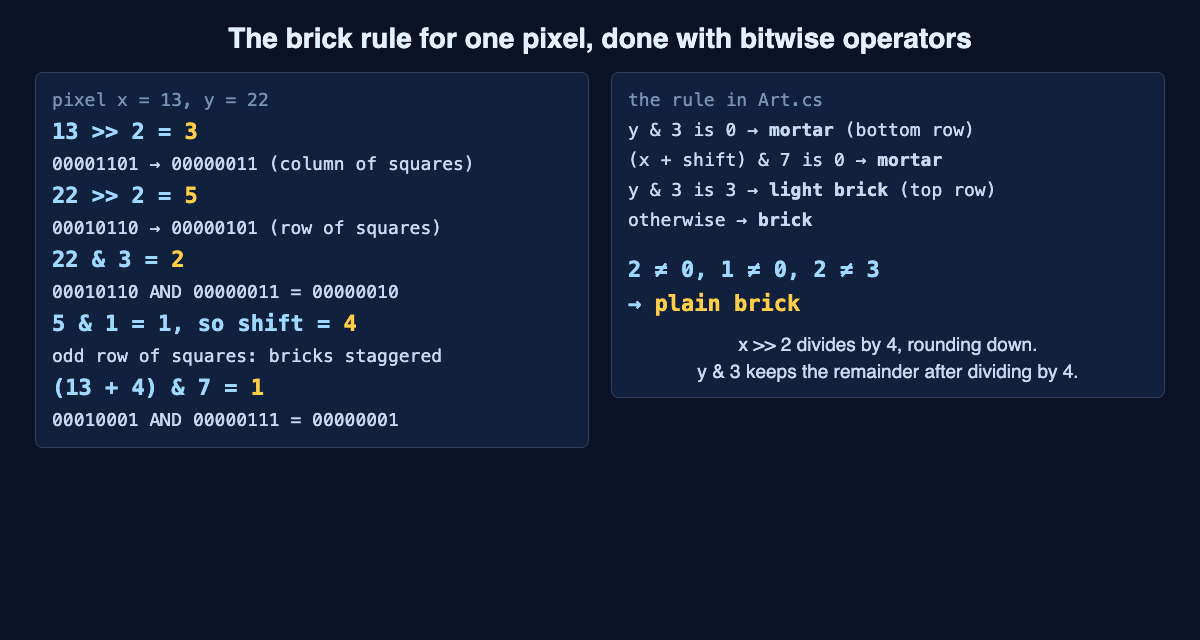
The brick rule for pixel x = 13, y = 22: three shifts and masks, then plain brick.
The same tricks run elsewhere. Silicon (steel) squares use x & 7 and y & 7 to draw their plates. The encrypted zones use XOR to mix x and y into a scrambled number, then & 3 to pick one of two fog shades. And when the wall around the CPU core turns to silicon, it stays that way for 15 seconds and flickers back to firewall in the last 3. That flicker is ((int)(wallT * 4f) & 1) == 0: the timer counts quarter seconds, and AND 1 checks whether the count is even. For how firewall breaks, read this guide to destructible walls in games.
Common mistakes when using bitwise operators
- Reading
^as "to the power of". In C# it is exclusive OR.2 ^ 3is10 ^ 11, which is01, or 1, not 8. - Forgetting the order of operations. In C#, NOT comes first, then shifts, then AND, then XOR, then OR. When in doubt, add parentheses, as the game does in
(px + off) & 7. - Right-shifting negative numbers. In C#,
>>on anintcopies the sign bit into the empty top positions, so a negative number stays negative. Wikipedia notes this kind of shift rounds down, not toward zero. - Forgetting NOT flips every bit. A C#
inthas 32 bits, and NOT flips all of them, not just the few you wrote down.
Frequently asked questions
Are bitwise operators faster than normal math?
On simple, low-cost processors they are often much faster than division. Modern processors usually do addition and multiplication just as fast, though bitwise operations commonly use less power. Pick them when they make your intent clearer, not only for speed.
What is a bitmask used for?
A bitmask is a number whose 1s mark the bits you care about. AND with it keeps or tests those bits, OR switches them on, and XOR flips them.
Does Tank City Reboot teach programming?
No, it is a game, not a course. It teaches the idea behind each name it uses, and this post shows the bitwise operators that run underneath its walls.
Get started
Open the game, find a firewall block and look at its brick pattern. Every mortar line there came from a shift and a mask like the ones you just worked out.
Play Tank City Reboot. It is free, runs in your browser, and playing never needs an account.
Comments
No comments yet.
Sign in or make an account to comment.