What Does a CPU Scheduler Do in an Operating System?
If you have ever asked what does a CPU scheduler do in an operating system?, the short answer is that it decides which ready program runs on the processor next. Your computer usually has more programs wanting to run than it has cores to run them on. The scheduler is the part of the operating system that hands out turns. This post explains how it makes those choices, with a worked example you can check by hand.
What does a CPU scheduler do in an operating system?
You can have a browser, a music player and a chat app open at once. They seem to run together because the operating system keeps switching which one has the processor. Scheduling is what makes that multitasking possible, even on a single CPU.
Wikipedia's article on scheduling names the part that does the picking: the short-term scheduler, also called the CPU scheduler. It decides which of the ready programs in memory gets a CPU next. It makes that choice after a clock interrupt, after an input or output event, after a system call, or after another signal. Microsoft describes the Windows scheduler the same way: it decides which competing thread gets the next processor time slice, and it uses priorities to choose.
The first game on Tank City Reboot has six stages, named FIREWALL, CACHE, COOLANT, ENCRYPTION, DATA BUS and KERNEL. The fact the KERNEL stage opens with puts the idea in two lines: "The kernel is the core of an operating system. It decides which program runs on the processor, and when." That "which, and when" is the scheduler's job.
Processes, threads and the ready queue
A process is a program that is running. A thread is one line of work inside a process. In Tank City Zero Day, the Multithreading upgrade card says it simply: "Several threads let one program do several things at once." Windows, for example, schedules threads.
Not every program wants the processor at every moment; some are waiting for a file or a key press. The scheduler only picks among the ones ready to run, which wait in the ready queue.
Preemptive and cooperative scheduling, and context switches
There are two broad styles. A preemptive scheduler can pause a running program and start another one. A cooperative scheduler, also called non-preemptive, cannot force a program off the processor. It has to wait for the program to give the processor up.
Moving from one program to another is called a context switch. A running task keeps its working state in the CPU's registers. The operating system saves that state, loads the saved state of the next task, and lets it run. Later it can restore the first task exactly where it stopped.
A context switch is not free. It costs the time to run the scheduler, to flush the translation lookaside buffer (a small cache of memory address lookups), and to share the CPU cache between tasks. Switching between threads of one process can be cheaper, because they share a memory map.
Common CPU scheduling methods, with a worked example
The easiest way to understand the methods is to run one example through each. Take three programs, all ready at time 0:
- P1 needs 10 ms of processor time.
- P2 needs 4 ms.
- P3 needs 6 ms.
Here, waiting time means the total time a program spends ready but not running: since all three start at 0, it is the finish time minus the time needed. Switch time is left out to keep the arithmetic simple.
First come, first served
Run them in arrival order: P1, then P2, then P3. P1 waits 0 ms, P2 waits 10 ms, and P3 waits 14 ms. The average is 24 divided by 3, which is 8 ms. The weakness is that short programs get stuck behind a long one. This is known as the convoy effect.
Shortest job first
Run the shortest one first: P2, then P3, then P1. The waits are 0, 4 and 10 ms, an average of 14 divided by 3, about 4.67 ms. That is much better. The catch is that the scheduler has to know or estimate how long each program will need, which it usually cannot know in advance.
Round robin
Round robin gives each program an equal slice of time, called a time quantum, in circular order. Use a slice of 4 ms and follow along:
- P1 runs from 0 to 4. It still needs 6 ms, so it goes to the back of the line.
- P2 runs from 4 to 8 and finishes.
- P3 runs from 8 to 12. It still needs 2 ms.
- P1 runs from 12 to 16. It still needs 2 ms.
- P3 runs from 16 to 18 and finishes.
- P1 runs from 18 to 20 and finishes.
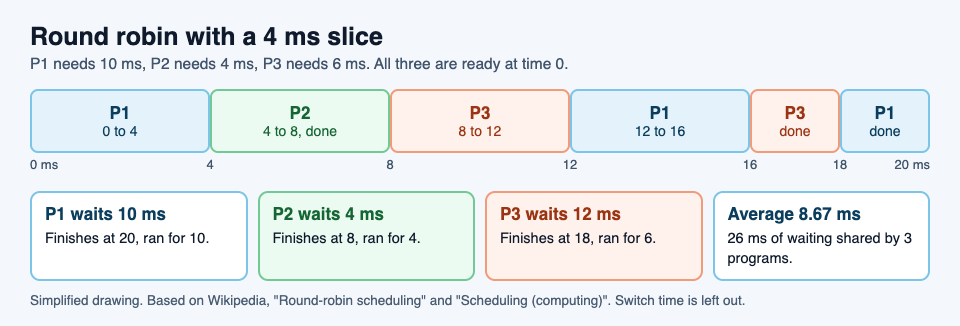
Now the waits: P1 finishes at 20 and needed 10, so it waited 10 ms. P2 finishes at 8 and needed 4, so it waited 4 ms. P3 finishes at 18 and needed 6, so it waited 12 ms. The average is 26 divided by 3, about 8.67 ms.
That average is worse than shortest job first. What round robin buys you is that every program gets a turn soon, and none is left waiting forever. Wikipedia calls it starvation-free for that reason. Try it yourself with a 2 ms slice and count how many more switches you need.
Priority scheduling
In fixed-priority scheduling, each program gets a rank, and the ready queue is kept in priority order. The highest-ranked ready program runs first. The risk is starvation: a low-priority program may never run if higher-priority work keeps arriving.
What the scheduler is trying to balance
No single method wins on every measure, because the goals pull against each other. Wikipedia lists these:
- Throughput: the total amount of work finished per unit of time.
- Wait time: how long work sits ready before it first starts.
- Latency or response time: how long until the job is done, or until the system first responds to you.
- Fairness: a fair share of processor time for each program, according to its priority and workload.
The worked example shows the trade-off: shortest job first gave the lowest average wait, while round robin gave every program an early turn. Wikipedia names throughput versus latency as a common conflict.
How Linux and Windows schedule today
Real operating systems combine these ideas. On Windows, Microsoft says the scheduler picks the next thread using priorities. Linux used the Completely Fair Scheduler from version 2.6.23 until 6.6. Since 6.6 it uses EEVDF, short for earliest eligible virtual deadline first.
The Linux kernel documentation explains EEVDF in plain steps. It tracks a "lag" value for each task, which says whether the task has had its fair share of time. A task with positive lag is owed time; a task with negative lag has had more than its share. Among the tasks with lag of zero or more, it runs the one with the earliest virtual deadline. That lets tasks that need quick responses, with shorter time slices, go first.
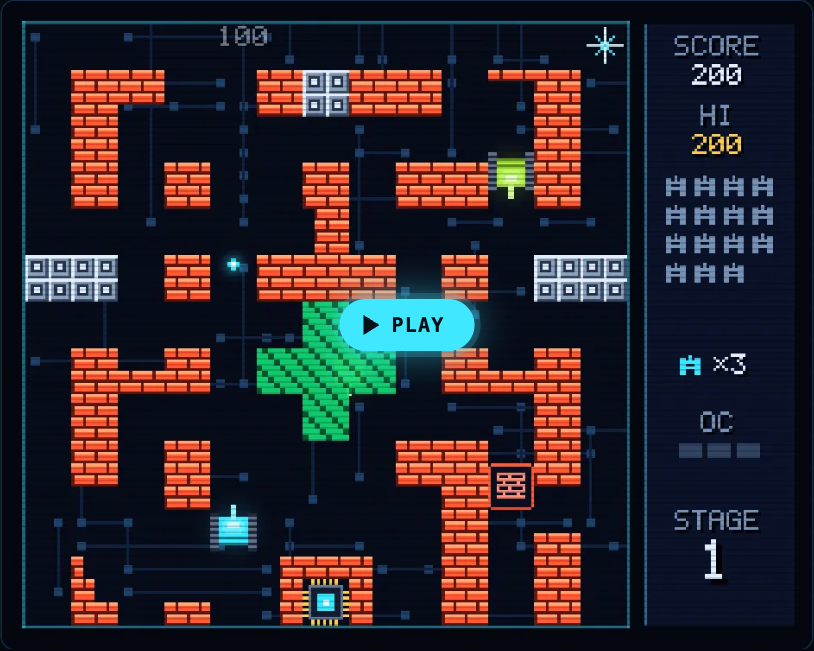
The games on Tank City Reboot borrow these ideas as names. In the first game, your antivirus tank guards the CPU core, and the last of the six stages is KERNEL. In Tank City Zero Day, the Multithreading upgrade gives you more shots per volley. Each name comes with a one-line explanation on the page. The games are a quick reminder of the ideas, not a course in operating systems.
If you want to go further, read what a kernel does in an operating system, what a CPU core is, and what multithreading is.
Frequently asked questions
What is the difference between a CPU scheduler and a dispatcher?
The scheduler decides which ready program should run next. The dispatcher gives the processor to that program, and the time it takes to stop one and start another is called the dispatch latency.
Which CPU scheduling method is best?
None is best everywhere, because throughput, wait time, response time and fairness pull against each other. In the example above, shortest job first had the lowest average wait, while round robin gave every program an early turn.
What is starvation in CPU scheduling?
Starvation is when a program never gets the processor because other work keeps going first. One fix is aging, which slowly raises the priority of programs that have waited a long time.
Does a smaller time slice always make a computer faster?
No. A smaller slice gives each program a turn sooner, but it means more context switches, and each switch has a cost.
Get started: play Tank City Reboot
Tank City Reboot is two tank games set inside a computer. Your antivirus tank guards the CPU core, and every enemy, power-up and wall is named for a real computing or security idea, explained on the page.
Play Tank City Reboot: it is free, plays in your browser on a computer or a phone, and needs no account to play.
Comments
No comments yet.
Sign in or make an account to comment.