What Does Integrity Mean in Cybersecurity? A Plain Guide
If you have ever asked what does integrity mean in cybersecurity, the short answer is this: integrity means data has not been changed in a way nobody allowed. It sounds simple. But integrity is easy to forget, because a changed file can look just like an honest one. This guide explains the idea in plain words, shows what breaks it, and gives you a short routine you can run on your own files this week.
What does integrity mean in cybersecurity, in one sentence
The US standards body NIST defines integrity as "guarding against improper information modification or destruction". Its glossary also gives a plainer version: the property that data has not been altered in an unauthorized manner since it was created, sent or stored.
That idea has three parts worth pulling apart:
- Correct: the data matches what was written or sent.
- Authorized: only people or programs with permission can change it.
- Detectable: if a change slips through, you have a way to notice.
The third part matters most in practice. You cannot stop every bad change. You can make sure you find out.
Integrity in the CIA triad
Security people often describe their goals with three letters: C, I and A. The idea goes back to a 1972 report, and today the balanced protection of confidentiality, integrity and availability is called the CIA triad. Each letter answers a different question.
- Confidentiality: who can read this? A leaked password breaks confidentiality.
- Integrity: can I trust that this is unchanged? A bank balance edited by an attacker breaks integrity.
- Availability: can I get to it when I need it? A server knocked offline breaks availability.
The three can fail on their own. A file can be secret and still be wrong. A file can be public and perfectly intact. A good way to test your understanding is to take any incident you read about and ask which of the three letters it hit. Often the answer is more than one.
What breaks integrity: tampering, accidents and the wrong hands
Integrity breaks in three broad ways. Only one of them needs an attacker.
- Tampering. Someone changes data on purpose. They edit a price in a shopping cart request, swap a download for a version with malware inside, or change a log to hide their tracks.
- Accidents. Data changes with nobody meaning harm. A disk fails, or a program stops halfway through writing a file. The result is still wrong data.
- The wrong hands. A real user with real access changes something they should not. A shared account lets anyone update a payroll file. The change looks normal to the system, which makes it hard to spot.
A few patterns show up again and again: a grade or invoice changed after the fact, a download swapped on a mirror site, or a web app that trusts a price sent from the browser. Ransomware is a harsher case: it encrypts your files and demands payment for the key, so the files are still there but you can no longer use or trust them. The common thread is a system that trusted data it had no way to check.
Four controls that protect integrity
Each control does a different job. Together they stop, detect, trace and undo bad changes.
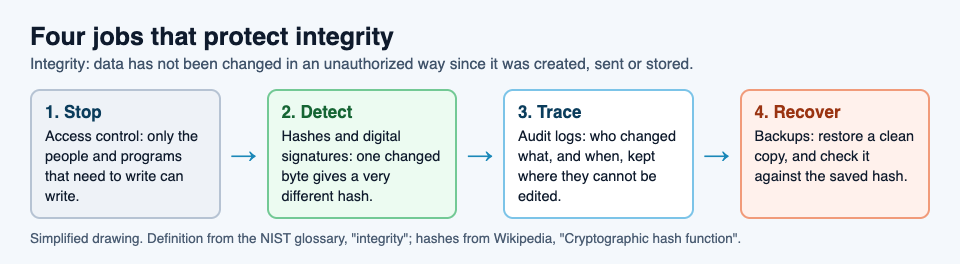
Access control (stop)
Give write access only to the people and programs that need it. Make files read-only by default, and use separate accounts instead of shared ones. This shrinks the number of hands that can touch your data.
Hashes and digital signatures (detect)
A hash function turns any file into a short string of fixed length. Change one small part of the input and the output changes completely, which is called the avalanche effect. If you store the hash somewhere safe, you can work it out again later and compare.
A digital signature goes one step further. It uses a pair of keys, so anyone can check both that the data is unchanged and who signed it. Signatures are common in software distribution for exactly that reason.
Audit logs (trace)
Logs record each change: who, what and when. For them to help, the logs need protection too. Send them somewhere the people being logged cannot edit.
Backups (recover)
A backup is a copy of your data kept somewhere else, so you can restore it after a loss. Backups do not prevent damage, but they let you undo it, and a saved hash tells you which backup is still clean. Our guide to the 3-2-1 backup rule covers how to set one up.
A worked example: check your own files with hashes
You do not need special tools to start. Try this on a folder of files you care about.
- Pick your important files. Contracts, a settings file, a project archive. Start with five.
- Record a hash for each. On Linux, run
sha256sum contract.pdf. In Windows PowerShell, runGet-FileHash contract.pdf, which uses SHA256 by default. Save the output to a text file such ashashes.txt. - Store the hash list somewhere else. A USB stick, a different account, a printed page. If an attacker can edit both the file and its hash, the check means nothing.
- Check again on a schedule. On Linux,
sha256sum -c hashes.txtrechecks every file in one go and prints OK for each one that still matches. In PowerShell, runGet-FileHashagain and compare. - Review who can write. For each file, list who has write access. Remove anyone who does not need it.
- Test a restore. Pull one file from your backup, hash it, and compare it to your list. A backup you have never restored is a guess.
Here is how it plays out. Say you keep a prices.csv that feeds your online shop. On Monday you record its hash. On Friday the check reports that the file no longer matches. Now you know something changed, and you can look at your audit log to see who edited it and when. Without the hash, you might only learn about it when a customer pays the wrong price.
One warning: use SHA-256, not older hashes. SHA-1 is known to be open to collision attacks, where two different files share a hash, so it is no longer a safe check against someone who wants to fool you.
Integrity in a game: the core you defend
Tank City Reboot is a free site of two original tank games that play in your browser, set inside a computer. Every enemy, power-up and wall is named for a real computing or security idea, and the page explains each one in a sentence. It is a game, not a security course, and it does not protect your computer, but it is a light way to keep these words in your head.
In Tank City Zero Day, the CPU core you guard has an integrity score. It starts at 3 and can go up to 5, and the run ends when the core's integrity or your last tank is gone. Keeping it whole pays: the bonus for clearing a wave is 250 points times the wave number, times the share of integrity left. So clearing wave 4 with the core at 3 of 3 earns the full 1,000, while 2 of 3 earns about 667.
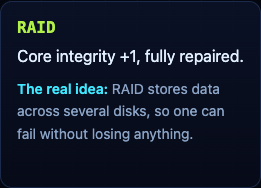
The RAID upgrade raises the core's integrity by 1 and repairs it fully, and you can take it twice. Its card explains that RAID stores data across several disks, so one can fail without losing anything; our post on RAID levels goes deeper. You will also meet Ransomware, an armored tank whose shots lock firewall into silicon. In the first game, the Backup power-up gives you one extra life, and its card explains what a real backup is.
Frequently asked questions
Is integrity the same as authenticity?
Not quite. Integrity means the data has not been changed; authenticity means you know who it came from. NIST's definition of integrity includes authenticity, and a digital signature checks both at once, which is why people often mix them up.
How does a hash prove data has not changed?
A small change to the input gives a very different hash. If you saved a file's hash earlier and the new hash matches it, the file is the same. The proof only holds if the saved hash was kept somewhere an attacker could not edit.
What is an example of an integrity attack?
An attacker edits the amount in a payment request before it reaches the server, and the server accepts it. Replacing a software download with a version that hides malware is another one.
Does encryption protect integrity?
Not on its own. Encryption scrambles data so only the holder of the key can read it, which protects confidentiality. To catch changes you also need a hash, a signature, or authenticated encryption, which is built to do both.
Get started
Run the hash routine on five files today, then play a few waves and keep an eye on the core's integrity. Detecting damage and recovering from it are the two halves of integrity, and the game makes the second one feel real.
Play Tank City Reboot: it is free, plays in your browser on a computer or a phone, and needs no account.
Comments
No comments yet.
Sign in or make an account to comment.