What does royalty-free music mean? A plain guide
What does royalty-free music mean? It means you get a license to use a track, paid for once or free on items marked Free, and then you use it in the ways that license lists without paying a royalty every time someone plays your video or podcast. It does not mean the music has no owner, and it does not mean it costs nothing. This guide explains the term in plain words, sets it beside Creative Commons and public domain, and walks through one track used three different ways.
What does royalty-free music mean, in one sentence
A royalty is a payment made each time a work is used, sold or played. Royalty-free means that per-use payment is gone: the price of the license, if there is one, is the whole price.
Wavecrate's plans and licenses page says it in a few short lines. A single license is described as "Pay once per item, keep it forever", with "No subscription". For people who need many tracks, its Pro plan is listed at $99 a year or $12 month to month and gives a Standard license on everything in the catalog, but it is not on sale yet.

The key word in all of this is license. You are not buying the song. A license gives you permission to use it, under rules the seller writes down.
What royalty-free does not mean
Three wrong readings of the word cause most of the trouble people run into.
- It does not mean free of charge. Most royalty-free tracks have a price. On Wavecrate, the Porch Light track page listed a Standard license at $15 and an Extended license at $49 on 9 October 2026, the prices for when sales open. Some items are marked Free, and those can be used under a Free license with a credit line.
- It does not mean free of copyright. The U.S. Copyright Office says a work is under copyright protection the moment it is created and fixed in a tangible form, and that registration is generally voluntary. Its list of protected works includes musical compositions and sound recordings. A royalty-free track is still someone's copyrighted work.
- It does not mean the track becomes yours. Wavecrate answers this on its pricing page: "Do I own the music? No. You get a license to use it. We keep the copyright, which is how we can promise the license is real."
That last point matters more than it looks. Since the track is not yours, you can only do what the license says. Using it somewhere the license does not list is the same as using it with no license at all.
Royalty-free, Creative Commons and public domain side by side
Three kinds of permission get mixed up all the time, and the differences decide what you are allowed to do.
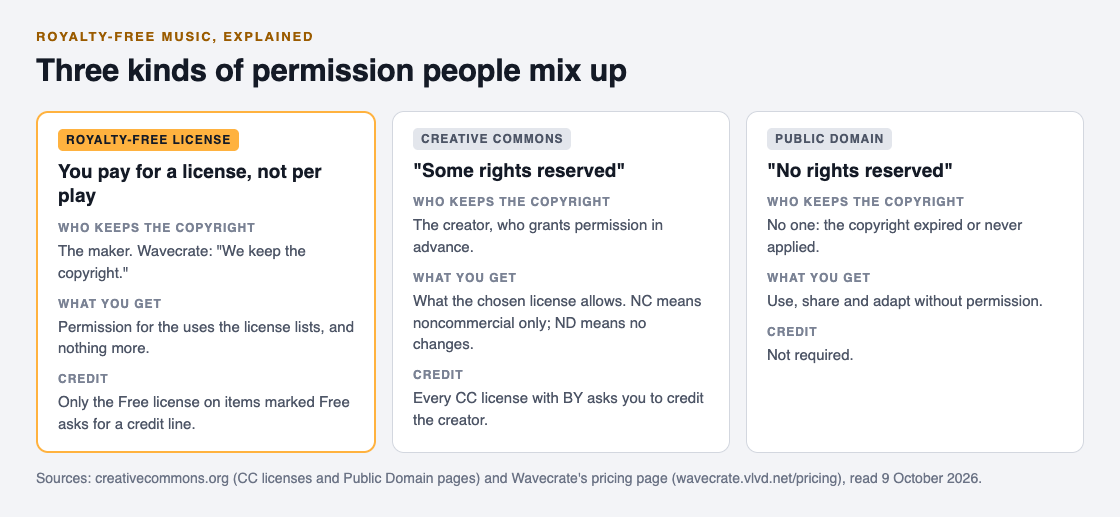
Creative Commons describes plain copyright as offering two extremes, "all rights reserved" or "no rights reserved", and its own licenses as the "some rights reserved" middle. Its license list shows that every one of them asks you to credit the creator, and some add limits: NC means noncommercial use only, and ND means no changes or adaptations. Read those letters before you put a CC track in anything that earns money.
Public domain is different again. Creative Commons describes it as works not restricted by copyright, because the copyright has expired or never applied, which anyone can use, share and adapt without permission. The work is in checking that a recording really is public domain before you rely on it.
A royalty-free license sits closest to "all rights reserved": the maker keeps every right and hands you a written slice of them. What you gain is a slice that is clearly written down, and on Wavecrate it comes with a certificate you can show.
What a royalty-free license covers on Wavecrate
Every royalty-free seller draws its own lines, so the license table is the part to read slowly. Here is Wavecrate's table for music and sound effects.
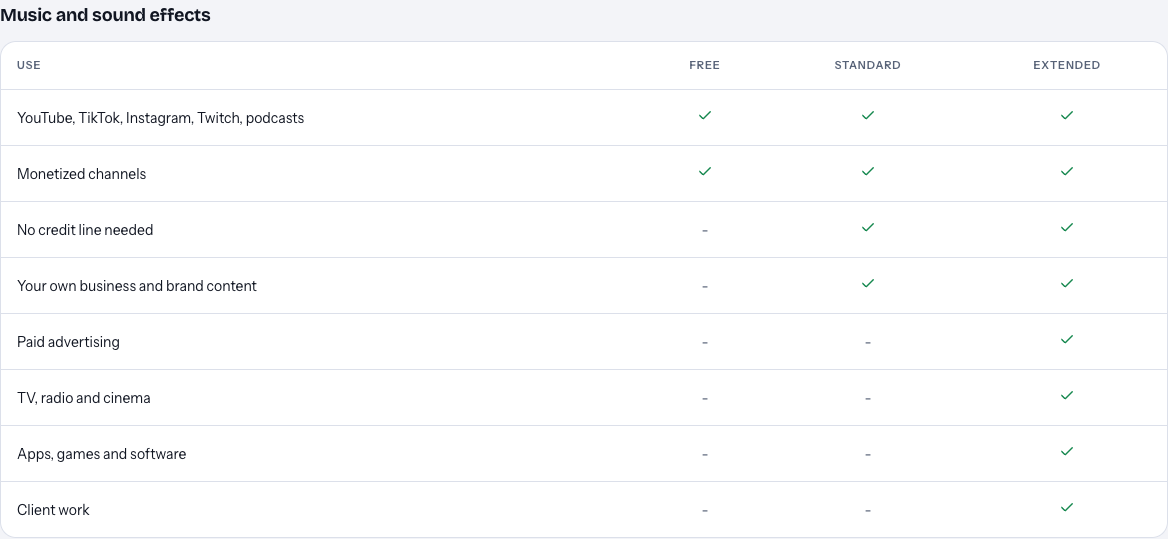
Read it from left to right:
- Free, on items marked Free only: YouTube, TikTok, Instagram, Twitch, podcasts and monetized channels, with a credit line in your description. A free account gets 3 free downloads a month.
- Standard: the same platforms with no credit line, plus your own business and brand content.
- Extended: everything in Standard, plus paid advertising, TV, radio and cinema, apps, games and software, and client work.
Two rules follow from the table. A monetized channel does not on its own push you up to Extended, because all three licenses tick that row. Paid ads, broadcast, games and client work do.
One thing to know before you plan around a paid license: Wavecrate's paid licenses are not on sale yet (the site says purchases open soon), so the prices in this guide are the listed prices for when sales open. Items marked Free can already be downloaded with a free account.
A worked example: one track, three uses
Say you run a small bakery and a weekly baking channel on YouTube. You browse the music by mood and tempo and settle on Porch Light, an acoustic track at 96 BPM in G major. Here is how the license changes as the use changes.
- Your weekly video on your own monetized channel. Porch Light is marked Free, so the Free license covers it as long as you put the credit text in the description. If you would rather not show a credit line, the Standard license, listed at $15 on its page for when sales open, drops that condition.
- A short clip for the bakery's own social account. That is your own business and brand content. The Free license does not tick that row, so this use needs Standard.
- The same clip run as a paid Instagram ad. Now it is paid advertising, and only Extended ticks that row: listed at $49 on the Porch Light page. The pricing page says that once purchases open, for someone who holds Standard, the Extended license "costs only the difference".
The track never changed. The use did, and the use is what the license is about. Before you publish anything, name the use in one line (my channel, my brand, a paid ad, a client) and find that row in the table.
Keep proof of the license, not just the file
A license only helps if you can show it. On YouTube, a copyright claim can be created automatically when an upload matches a file in Content ID, and depending on the copyright owner's settings the claim can block your video, run ads on it, or track its views. If you dispute a claim, the claimant is notified and has 30 days to respond.
YouTube's page on disputing a claim also lists reasons that are not grounds for a dispute, and giving credit to the copyright owner is one of them. A credit line can be a condition of a license. It is not the license itself.
Wavecrate gives every download a license certificate and a code. Its pricing page says that if you get a claim, you send the platform your license code or certificate link. The verify page shows the licensee, the item, the license type and your registered channels, with no account needed, so a reviewer can check it without contacting Wavecrate. That lets someone confirm your license. It does not decide the claim for you.
Frequently asked questions
Is royalty-free music free?
Not usually. Royalty-free means no per-use royalty, not no price. On Wavecrate, only items marked Free have a Free license, and it asks for a credit line.
Can I use royalty-free music on a monetized YouTube channel?
On Wavecrate, yes: the Free, Standard and Extended licenses for music all list monetized channels. Other sellers write their own terms, so read each license table before you upload.
Do I own a royalty-free track once I hold a license?
No. You hold a license to use it in the ways the license lists, and the maker keeps the copyright.
Is royalty-free the same as Creative Commons?
No. Creative Commons licenses give permission in advance on standard terms, always ask for credit, and may rule out commercial use or changes. A royalty-free license is written by the seller and is usually paid for.
Get started
Browse Wavecrate: you can join free and download items marked Free now, paid licenses are not on sale yet (purchases open soon), and every download comes with a license certificate and a code anyone can check on its verify page. If you want to see how the Free license works first, start with the free downloads and keep the code that comes with each one.


Comments
No comments yet.
Sign in or make an account to comment.