What Does the Alpha Channel Do in an Image? A Plain Guide
You drop a logo onto a colored page and it arrives inside an ugly white box. So what does the alpha channel do in an image? It stores how see-through each pixel is. This guide shows how that number works, how a program blends it, and how a small browser game uses it to hide tanks inside encrypted zones.
What does the alpha channel do in an image?
A color image usually stores three numbers per pixel: red, green and blue, or RGB. An image with an alpha channel stores a fourth. That is where the name RGBA comes from: red, green, blue, alpha.
The color channels say what color a pixel is. The alpha channel says how opaque it is, which means how much of that color covers whatever sits behind it. A high alpha is solid. A low alpha lets the background show through.
Alpha is stored per pixel, not once for the whole picture. So one image can be solid in the middle, clear at the corners and partly clear along a soft edge.
Without alpha, every image is a rectangle. With alpha, an image can be any shape: a round button, a tank, a soft glow. Image editors usually show the clear parts as a gray and white checkerboard, so you can tell clear from white.
How alpha values work, from 0 to 255
The most common way to store RGBA uses 8 bits, one byte, for each channel. That makes 32 bits per pixel, and each channel runs from 0 to 255.
- 0 means fully transparent. The pixel beneath shows through completely.
- 255 means fully opaque. The background is hidden.
- Anything between mixes the two. An alpha of 128 is about 50.2% of 255, so roughly half and half.
Putting one image on top of another this way is called alpha compositing. The most common case is called "over": image A sits in front of image B. For a solid background, each color channel is worked out like this, with alpha written from 0 to 1 (divide the byte by 255):
result = A × alpha + B × (1 - alpha)
The alpha comes from the front image. When alpha is 1, you see only A. When it is 0, you see only B. In between, you get a weighted mix.
Worked example: an encrypted zone over a tank
Here is the formula with real numbers from Tank City Reboot. The game draws its circuit board into two layers of 208 by 208 pixels. The "Board" layer sits under the tanks. The "Encrypted zones" layer sits over them. In that top layer, an encrypted zone pixel is a bright green, (30, 214, 120), with alpha 235. Every other pixel of the layer is fully clear: (0, 0, 0, 0).
Now say your tank drives into an encrypted zone. Your tank's body color is (64, 232, 255), a cyan. Follow these steps:
- Turn the alpha into a fraction: 235 / 255 = 0.92. So 1 - 0.92 = 0.08.
- Red: 30 × 0.92 + 64 × 0.08 = 27.6 + 5.0 = about 33.
- Green: 214 × 0.92 + 232 × 0.08 = 197.2 + 18.2 = about 215.
- Blue: 120 × 0.92 + 255 × 0.08 = 110.6 + 20.0 = about 131.
The result is about (33, 215, 131), a green. Now do the same with no tank, only the dark board color (7, 11, 24) behind the zone. You get about (28, 198, 112). The two greens are only a few steps apart, so the tank almost vanishes. Only 8% of its color leaks through.
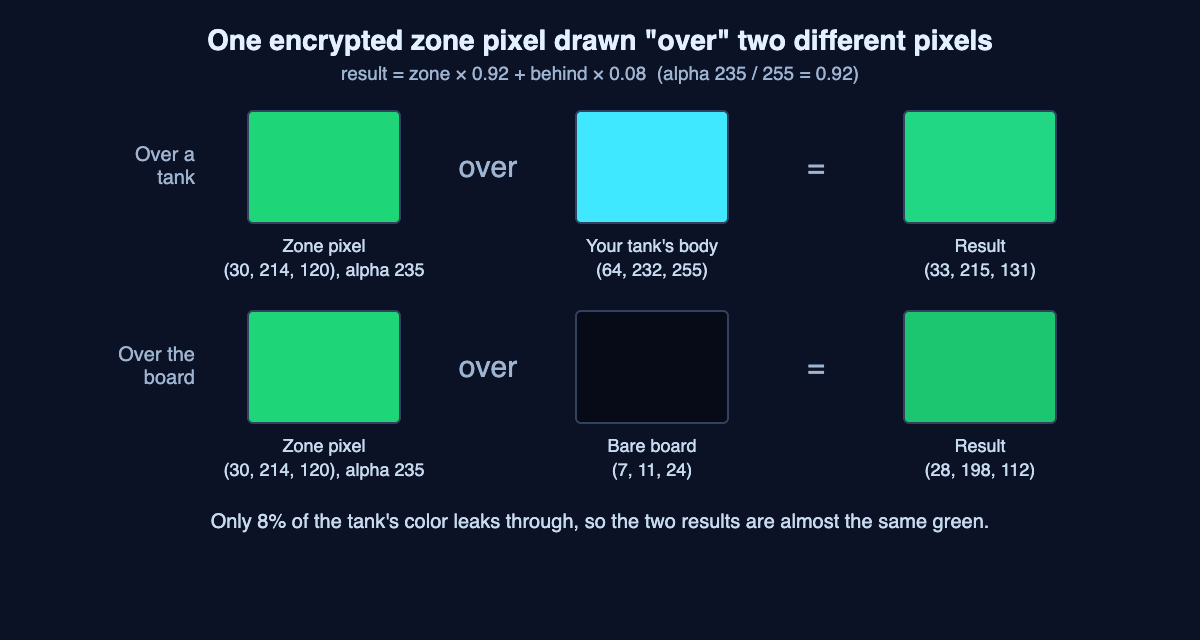
One encrypted zone pixel (alpha 235) drawn over a tank pixel and over the bare board, with the over formula. The results are almost the same green.
The game's card for this terrain says it plainly: "Hides any tank inside it." The idea behind it is on the same card: "Encrypted data looks like random noise to anyone without the key." The zone pixels mix two greens in a scrambled pattern, so the patch looks like noise. If you want the idea behind that line, read how encryption works, with keys and scrambled data.
Straight and premultiplied alpha
Straight alpha
Also called unassociated alpha. The color channels hold the full color and ignore opacity. The alpha sits beside them. The formula above assumes straight alpha.
Premultiplied alpha
Also called associated alpha. The color is multiplied by alpha before it is stored. Written from 0 to 1, a green pixel of (0, 0.7, 0) at alpha 0.5 is stored straight as (0, 0.7, 0, 0.5). Premultiplied, it becomes (0, 0.35, 0, 0.5). The two need different math, so a program has to know which one a file uses.
Why edges get a fringe
A fully clear pixel still holds some color you never see. When a picture is scaled with smoothing, neighbor pixels are averaged. With straight alpha, that hidden color can leak into the edge and show up as a border that was never visible in the original. The main advantage of premultiplied alpha is that blending, smoothing and filtering come out right.
Which image formats keep transparency
- One transparent color: GIF, and PNG with a palette, can mark one color entry as "transparent". Each pixel is either fully shown or fully hidden. That is fine for hard shapes, but soft edges were made for one background color and look wrong on another.
- A full alpha channel: PNG and TIFF are the most popular formats with alpha. Each pixel can be partly clear, so edges stay soft over any background.
- Others with transparency: WebP, BMP, TGA and JPEG 2000 can also keep it, through either a transparent color or an alpha channel.
How Tank City Reboot uses alpha in its sprites
Both games on the site, the first game and Tank City Zero Day, build every texture in code. Each one is an RGBA texture with 32 bits per pixel. So every pixel of every sprite has its own alpha.
A sprite is a small picture drawn over the scene, and alpha is what gives it a shape. Each tank is a 16 by 16 texture. Every pixel outside the tank's shape is set to (0, 0, 0, 0), so the board shows around the treads. For more on how sprites work, see what a sprite is in video games.
Several other layers use in-between alpha values:
- Scan lines: a 64 by 64 texture with a black pixel at alpha 46 on every fourth row, and clear pixels everywhere else. 46 / 255 is about 0.18, so each line darkens the pixels under it by only about 18%. Over the board color, (7, 11, 24) becomes about (6, 9, 20).
- The glow behind tanks and shots: a 32 by 32 white circle whose alpha falls off from the center to 0 at the edge.
- The shield ring: its dashes are a pale cyan at alpha 230, nearly solid, and the gaps are clear.
- Encrypted zones: two greens at alpha 235 and 225, as in the worked example.
The games draw their textures with point filtering, also called nearest-neighbor. Each screen pixel takes the color of the closest texture pixel, so sprites stay sharp and blocky. Clear pixels are never averaged into solid ones, so tank edges do not get the fringe described above. The glow is the one exception: it uses smooth bilinear filtering, which averages the four nearest pixels, because a glow is meant to be soft.
Frequently asked questions
Is the alpha channel the same as transparency?
Not quite. Transparency is the effect you see on screen. The alpha channel is the stored data, one value per pixel, that tells a program how much of the pixel to show.
What does an alpha of 0 mean?
It means the pixel is fully transparent. Its color is ignored and whatever is behind it shows through completely.
Why does my image get a white box around it?
The file you saved probably has no alpha channel, so the clear areas were filled with a solid color. Save to a format that keeps alpha, such as PNG, and make sure the export keeps it.
Does Tank City Reboot teach image editing?
No. The game teaches the idea behind each name on its cards in one sentence. It is not a course, and it does not protect your computer.
Get started
The quickest way to see alpha at work is to watch a tank drive into an encrypted zone. Open tankcityreboot.vlvd.net, and press Play. When a stage has encrypted zones, steer your tank into a patch of noisy green and watch how little of it shows through.
Play Tank City Reboot: it is free, plays in your browser on a computer or a phone, and playing never needs an account.
Comments
No comments yet.
Sign in or make an account to comment.