What Is a Bit in a Computer? The 0s and 1s Explained
If you have ever asked what is a bit in a computer?, the answer is the smallest thing a computer stores: one binary digit, a 0 or a 1. Everything else, from the letters in this sentence to the walls in a game, is built from rows of them. This guide explains bits and bytes, shows you how to count in binary, and then opens up a real browser game to see how it stores its walls.
What is a bit in a computer? The short answer
NIST, the US standards agency, defines a bit as "a binary digit having a value of 0 or 1." The word itself is a squashed form of "binary digit."
A bit answers one yes or no question. Is the sound on? Is this square a wall? People write the two values as 1 and 0, but true and false, yes and no, or on and off mean the same thing. What a 1 stands for is up to the program reading it.
The name has a short history. According to Wikipedia's page on the bit, Claude Shannon first used the word in his 1948 paper "A Mathematical Theory of Communication," and credited John Tukey, who shortened "binary digit" to "bit" in a Bell Labs memo in January 1947.
Why computers use 0s and 1s
A bit can live in anything that has two clear states. The same Wikipedia page lists many of them:
- two voltage or current levels in a circuit,
- the two stable states of a flip-flop, a tiny circuit that holds a value,
- two directions of magnetism on a disk,
- two levels of light,
- two levels of electric charge, in memory chips and solid state drives.
The material changes, but the rule stays the same: two states that are easy to tell apart, read as 0 and 1. That is why the same idea works in a memory chip, a hard drive and a cable.
From bits to bytes
One bit on its own can only say yes or no, so computers group them. NIST defines a byte as "a sequence of eight bits," which can stand for any whole number from 0 to 255.
Why 255? Every extra bit doubles the number of patterns you can make:
- 1 bit: 2 patterns (0 and 1)
- 2 bits: 4 patterns
- 3 bits: 8 patterns
- 4 bits: 16 patterns (four bits are often called a nibble)
- 8 bits: 256 patterns, numbered 0 to 255
- 16 bits: 65,536 patterns
The bits themselves do not know what they mean. The same byte can be a number, part of a letter or one channel of a color. The program decides.
Counting in binary, step by step
Binary is counting with two digits. In everyday counting each place is worth ten times the one to its right: ones, tens, hundreds. In binary each place is worth twice the one to its right: 1, 2, 4, 8, 16, 32, 64, 128.
Try it with the byte 00010110. Read it from the right:
- The 1s place is 0.
- The 2s place is 1, so add 2.
- The 4s place is 1, so add 4.
- The 8s place is 0.
- The 16s place is 1, so add 16.
- Every place to the left is 0.
2 plus 4 plus 16 is 22, so 00010110 is 22. Now go the other way: to write 6, you need a 4 and a 2, so it is 00000110. You will meet that byte again in a moment.
A worked example: how a tank game stores its walls
Tank City Reboot is a free site with two original tank games that play in your browser. You drive an antivirus tank that guards a CPU core on a circuit board, and every wall, enemy and power-up is named for a real computing idea.
Here is a twist worth knowing. The first game's code calls the small squares of its board "bits," but they are not single 0s and 1s. The board is 208 by 208 pixels, cut into 52 by 52 squares of 4 by 4 pixels each. Each square holds one of seven kinds: empty, brick, steel, water, fog, ice or the base. The code stores each kind as a byte.
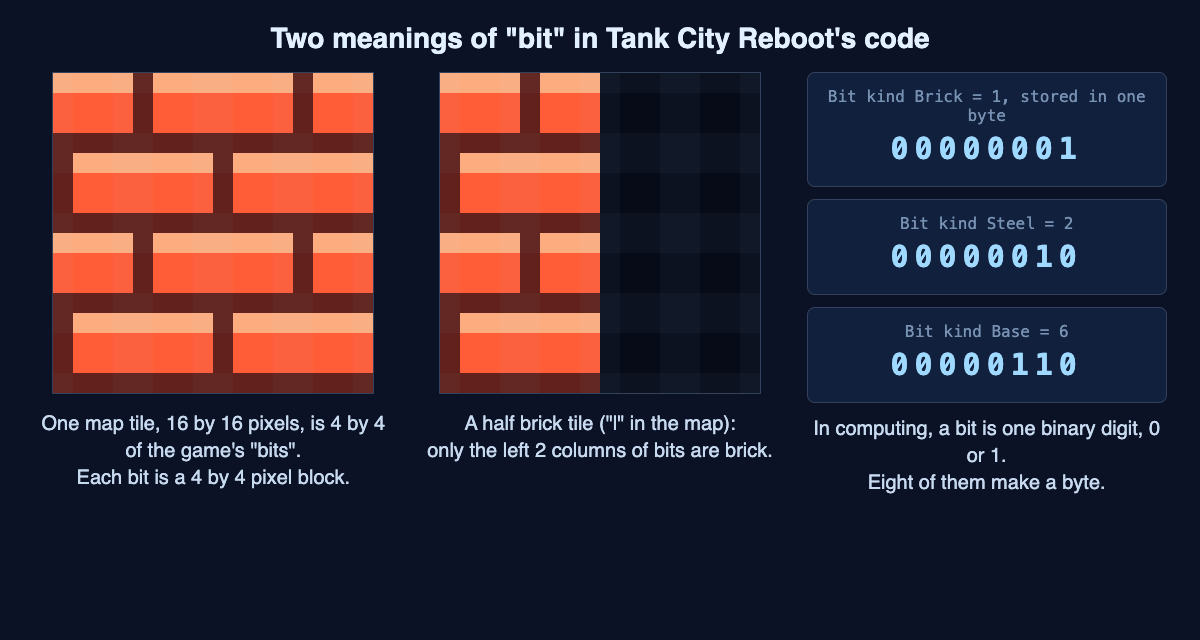
One map tile is 4 by 4 of the game's squares; each square's kind is stored as one byte. Drawn from the game's code.
Now do the sums yourself:
- Count the squares. 208 divided by 4 is 52, and 52 times 52 is 2,704 squares.
- Count the bytes. One byte per square makes 2,704 bytes for the whole board, a little over 2.6 kibibytes.
- Count the bits that really matter. Seven kinds fit in 3 bits, since 3 bits make 8 patterns. Brick is kind 1 (
00000001), steel is kind 2 (00000010) and the base is kind 6 (00000110, the 6 you just wrote). The other 5 bits of each byte are always 0. - Count the colors. The board is drawn into a picture with four bytes per pixel: red, green, blue and alpha (see-through). 208 times 208 pixels times 4 bytes is 173,056 bytes, or 1,384,448 bits.
So a board that takes about 2.6 kibibytes to describe takes about 64 times as much to draw. That gap between "what something is" and "how it looks" shows up all over computing, and our post on computer memory vs storage covers where those bytes live.
Why the small squares matter when you play
The 4 by 4 pixel square is also how walls break. When a shot touches firewall (the game's brick), it clears the firewall across its 16 pixel path, 4 pixels deep. That is exactly one row of squares. A fully powered shot clears 8 pixels, two rows, and breaks silicon too.
That is why a firewall block wears away in thin strips instead of vanishing all at once. Each strip is a row of bytes changing from "brick" to "empty." Our guide to destructible walls in games walks through this from the player's side.
Small counters show the doubling rule too. The OC display on the side panel has three pips for your cannon's overclock level, so four values from 0 to 3, which fit in 2 bits. In Tank City Zero Day the chain multiplier runs from x1 to x8, eight values that fit in 3 bits. Those are counts of the bits each value needs, not a claim about how the game stores them. Scores need more room: the first game gives you an extra life at 20,000 points, which is more than one byte (255) can hold but fits in two (65,535).
Bits vs bytes: b, B and kibibytes
Short forms trip people up, so watch the letter case:
- A lowercase b means bits, as in kbit/s or Mbps.
- An uppercase B means bytes, as in kB or MB.
Since a byte is 8 bits, divide by 8 to go from bits to bytes. Wikipedia's bit page gives the example 8 kbit/s = 1 kB/s. By the same sum, a line rated at 100 Mbps moves at most 12.5 megabytes a second.
There is one more wrinkle. The IEC, the body that sets electrical standards, says a kilobyte is 1,000 bytes, and it created the kibibyte (KiB) for 1,024 bytes. Some software counts in kibibytes but still writes "KB," so the same file can show two slightly different sizes.
Frequently asked questions
Is a bit a 0 or a 1?
Yes. A bit holds exactly one of two values, written 0 or 1. Which one it holds depends on the state of whatever stores it, such as a voltage level or an electric charge.
How many bits are in a byte?
Eight. That gives 256 patterns, which stand for the numbers 0 to 255.
What is the difference between b and B?
A lowercase b means bits and an uppercase B means bytes. Divide a number of bits by 8 to get bytes.
Does the game use real bits for its walls?
Not single ones. Its code calls each 4 by 4 pixel square a "bit," but each square stores one of seven kinds in a byte. Seven kinds would fit in 3 bits.
Get started
The fastest way to make this stick is to watch it happen. Open the first game, find a firewall block and fire at it a few times. Each shot takes off one thin strip, one row of the game's squares. Then pick up an Overclock power-up, watch the OC pips fill, and see how a fully powered shot bites two rows deep.
The game teaches the idea behind each name; it is not a security course and does not protect your computer. Play Tank City Reboot: it is free, plays in your browser on a computer or a phone, and playing never needs an account.
Comments
No comments yet.
Sign in or make an account to comment.