What Is a Carrier Enemy in Shooting Games? Explained
If you have asked yourself "what is a carrier enemy in shooting games?", the short answer is this: it is an enemy that exists mainly to hand you something or to put something on the field, rather than just to hurt you. The thing it carries can be a power-up, a pickup, or more enemies. Once you learn to spot carriers, you stop treating every target as equal and start playing with a plan.
What is a carrier enemy in shooting games?
A carrier enemy is a target with a payload. Killing it, or sometimes just hitting it, triggers a reward or a consequence that a normal enemy does not give you.
Most shooters mark carriers in some way. They blink, glow, change color, or fly in a different pattern. The marking is the contract between the designer and you: this one matters, so decide what to do about it.
The word "carrier" is not a formal rulebook term. Players and designers use it loosely, so you will see slightly different meanings from game to game. The common thread is the payload.
For the reward side, the Glossary of video game terms on Wikipedia defines a power-up as an object that temporarily gives extra abilities or buffs to the game character. A carrier is the enemy that delivers one.
The two main types: item carriers and spawner carriers
Almost every carrier falls into one of two groups.
Item carriers
These hold a reward. You shoot them, and a power-up, extra life, shield or weapon upgrade appears. They are the friendly kind of carrier. Missing one costs you an opportunity, not your life.
Spawner carriers
These hold a threat. A large ship releases a wave of smaller ones, a turret keeps firing, or a boss calls in reinforcements. Leaving a spawner alone makes the screen busier every second. Killing it early shrinks the fight.
The two types ask opposite questions. With an item carrier you ask, "Can I get this safely?" With a spawner carrier you ask, "How fast can I stop this?"
How carrier enemies usually work in shooters
The pattern is simple. A group of similar enemies comes on screen, and one of them looks different. It might flash or have a different color. Shoot it and a pickup drops. Ignore it and it may leave with the reward still inside.
Spawner carriers are usually larger bodies that launch smaller enemies. The big one is slow and tough, so you have time to choose: chase it down or deal with the swarm.
Both versions rely on one rule: the player must be able to read the situation at a glance. If you cannot tell the carrier from the crowd, the design fails. That is why carriers are almost always visibly marked.
Why game designers use carrier enemies
Carriers solve a few design problems at once.
- They control when power-ups appear. Instead of dropping items on a timer, the designer ties them to a specific enemy at a specific moment.
- They create a small decision inside a fight. Do you go for the blinking target and risk position, or hold your spot and stay safe?
- They reward attention. A player who watches the screen gets more than a player who only shoots the nearest thing.
- They pace difficulty. A carrier early in a stage can give you the tool you need for the harder part later.
Timing matters here too. Many carrier rewards expire, which turns a pickup into a short race. If that kind of timing interests you, our post on cooldowns in video games covers how a tank game times every action.
How to spot and prioritize carriers in a fight
Start with the visual cue. Look for blinking, flashing or an unusual color. Then read the battlefield before you act.
- Find it. Scan for the marked target when a new group arrives.
- Check the threats around it. A carrier next to three armed enemies is a worse trade than a carrier alone.
- Check your own state. If you are low on lives or your shield is gone, a defensive reward is worth more. If you are doing fine, you can pass on a risky one.
- Decide, then commit. Half-hearted attempts are how you lose position and the reward.
Visibility rules also matter. In some games, parts of the map hide whatever stands inside them, so a carrier can vanish from view. Which things sit on top of which is a design choice, and our post on draw order in 2D games explains why a hiding spot hides things.
Strategies to beat carrier enemies without losing your run
- Do not chase across danger. A reward is not worth stepping into a line of fire. Another carrier will come.
- Clear escorts first when you can. If a spawner carrier is guarded, removing the guards gives you a clean shot.
- Pick up rewards in a calm moment. Collecting a pickup often means moving to where it landed. Do that when the screen is quiet.
- Know whether the reward waits. Some pickups sit on the field for a limited time. Others disappear the moment you take your eyes off them.
- Do not let rewards overlap. If a new drop replaces an old one, grab the first before you trigger the next.
- Save area-clearing tools for after the carrier. A screen-wide wipe is great, but it may skip the reward you were after.
Carrier enemies in tank games and Tank City Reboot
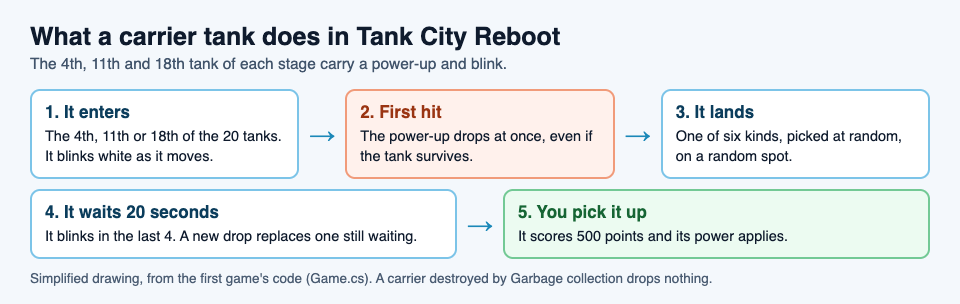
Tank City Reboot uses item carriers in a clear, readable way, so it makes a good worked example. In the first game, your antivirus tank guards the CPU core while twenty malware tanks come at it each stage, four at a time. In every stage, the 4th, 11th and 18th tank carry a power-up. They blink so you can tell them apart.
Here is how it plays out. The first hit on a carrier drops the power-up, even if the tank survives. The kind is one of six, picked at random, and it lands on a random spot on the field. The six are Patch, Overclock, Breakpoint, Garbage collection, Firewall rebuild and Backup. Picking one up scores 500 points.
The game also gives you a few rules that shape your strategy:
- The drop waits 20 seconds and blinks during the last 4. After that it is gone.
- A new drop replaces one that is still waiting. So tagging a second carrier before you collect the first can cost you the first reward.
- If Garbage collection wipes the field while a carrier is still on it, that carrier drops nothing. The tank still counts toward the stage's 20, but it scores no points.
Take stage 2, CACHE, as an example. The lineup is 14 worms, 4 trojans and 2 rootkits, and the 11th tank is a rootkit. Rootkits are armored and normally take four hits. A blinking rootkit is a good test of the "first hit" rule: you do not need to destroy it to get the reward. One shot makes the power-up drop. Then you can decide whether to finish the rootkit or go pick up the item first.
Stage 5, DATA BUS, adds a twist. All three carriers there are spyware, which fire fast shots. The reward is the same, but the risk is higher, because collecting it means moving near fast shots. This is a good place to remember that a carrier is a choice, not an obligation.
Here is a simple routine for the first game:
- Watch for the blinking tank as it enters.
- Tag it with one shot when you have a safe angle.
- Look at what dropped before you move. A shield or a freeze is worth more in a crowded moment than an extra life you do not need yet.
- Collect it within the 20 second window, ideally before the blink starts.
If you get Breakpoint, every enemy stops moving and firing for eight seconds. That is a good moment to clear space or tag the next carrier. If you get Garbage collection, every enemy on the field is destroyed, so check first whether a carrier is still on the board.
The second game, Tank City Zero Day, works differently. It has no blinking item carriers. Instead, you pick one of three upgrades after each wave. But it does have enemies that behave like spawners. A worm takes two hits and splits in two when destroyed, and the boss on every fifth wave calls in drones once it drops below half health. Treat those as threats that grow if you wait.
Frequently asked questions
Is a carrier enemy the same as a mini-boss?
No. A mini-boss is defined by being tougher than normal enemies. A carrier is defined by what it holds or releases, and it can be as weak as a basic enemy.
Do carrier enemies always drop power-ups?
No. Some carry threats instead, like a ship that releases smaller ships. In Tank City Reboot, a carrier killed by Garbage collection drops nothing.
Should I always kill the carrier first?
Not always. If the carrier is surrounded by danger or your position is weak, survive first. In Tank City Reboot you only need one hit to make the power-up drop, so you can tag it and deal with the rest.
What is the difference between a carrier and a spawner?
A spawner is a carrier whose payload is more enemies. A carrier in the wider sense can hold a reward or a threat. The word "spawner" only covers the threat side.
Get started with Tank City Reboot
The quickest way to understand carriers is to watch one blink onto the field and decide what to do. Tank City Reboot is free, plays in your browser on a computer or a phone, and needs no account to play. Play Tank City Reboot, press Play, and watch for the 4th tank of stage 1.
Comments
No comments yet.
Sign in or make an account to comment.