What Is a Game Over Screen For? Purpose, Design and Examples
If you have ever wondered what is a game over screen for, the answer is more than "telling you that you lost." A good game over screen ends a run cleanly, explains what happened, records how far you got, and hands you a clear next step. A bad one makes you wait, hides the cause of your loss, or buries the retry button. This post walks through each job the screen does, how the seconds before it shape how a loss feels, and how one small browser game handles losing a round.
What is a game over screen for? The short answer
A game over screen marks the point where a run cannot continue. It does several jobs at once. It stops play, so you know the loss is final and not a glitch. It tells you why the run ended. It shows a result you can compare against your past runs. And it gives you a choice: try again or stop.
A brief history: from arcade coin slots to instant retries
Wikipedia's game over page describes it as a message that tells you your play session has ended, usually because you reached a loss condition such as your character's death. It says the phrase lit up on electro-mechanical pinball machines as early as 1950.
In arcades the screen had a business job. Most early arcade games ended when a timer ran out, and Space Invaders (1978) made popular a game over that came when enemies got you, after a set number of lives. The message was often followed by "Play Again?" and a prompt to insert another coin to continue.
When games moved to home machines, the page notes, the continue prompt often needed only a button press, since it no longer earned money. Since about 2000 the hard game over has largely given way to unlimited lives, checkpoints and autosaves, though it is still the norm in arcades. Both styles serve different games: a short run built around a score wants a clear ending, and a long game built around progress wants you back in play fast.
The five jobs of a game over screen: closure, feedback, score, choice and pacing
1. Closure
You need to know the run is over. A frozen frame, a sound cue and a clear message do this. Without closure, a loss feels like the game broke.
2. Feedback
The screen should say why you lost. "You ran out of lives" and "the thing you were protecting was destroyed" are different failures. They ask you to change different habits next time.
3. Score
A number or a stage reached gives the run a shape. It turns a loss into a result. Showing your best score next to it gives you a target.
4. Choice
The screen should make the next action obvious. Retry, return to the menu, or quit. If you have to hunt for the button, the screen has failed at its most basic task.
5. Pacing
The screen is also a breath. After a tense run, a short pause lets your hands relax and your head catch up. Too short and the loss does not register. Too long and you get bored before you can retry.
Why the moment before game over matters: hit stop, screen shake and sound
Hit stop is a tiny freeze when something important happens. The game holds still for a fraction of a second so your eye can register the hit. Screen shake jolts the camera to sell the impact. If you want the full idea, our post on what screen shake is and why it works covers it in plain terms.
Both tricks depend on the game loop. Every frame, a game reads input, updates the world and draws it. In Tank City Zero Day, the play update and effects pause while hit stop lasts. Our explainer on how a game loop works shows where that pause fits.
The key design rule: scale the effect to the stakes. A small kill gets a tiny pause. Losing your tank gets a bigger one. The final loss gets the biggest jolt. If every event shakes the screen equally hard, the ending stops feeling special.
How fast should a retry be? Reducing friction without killing stakes
A useful way to think about it: separate the cost of losing from the time spent losing. The cost can stay high. You lose your score, your stage, your upgrades. The time can stay low. You see the result, take one breath, and start again.
Try this test on any game you are designing or playing:
- Lose on purpose.
- Count the seconds until you are back in control of something.
- Write down what you lost and what you kept.
If the count is long and you kept nothing, the screen is punishing you twice. If the count is short and you kept everything, the loss probably has no weight.
How Tank City Reboot handles losing a round
Tank City Reboot is a free site with two original tank games that run in your browser, on a computer or a phone, with no account needed to play. Both games show the ideas above in a small, concrete way.
The first game: two ways to lose, named on screen
In the first game, your antivirus tank guards the CPU core at the bottom of a circuit board while twenty malware tanks come at it each stage. You can lose in two ways, and the game over message tells you which. It reads THE CPU CORE WAS BREACHED or EVERY TANK WAS LOST, then REACHED STAGE and the stage number.
The rest of the screen does the score and choice jobs. From the game's code, it shows SCORE, BEST, NEW BEST! when you beat your best, and PRESS FIRE TO REBOOT. It does the pacing job too: when the run ends, the words GAME OVER rise over the field for about 3.4 seconds before the screen appears, and after one more second any button takes you back to the title screen.
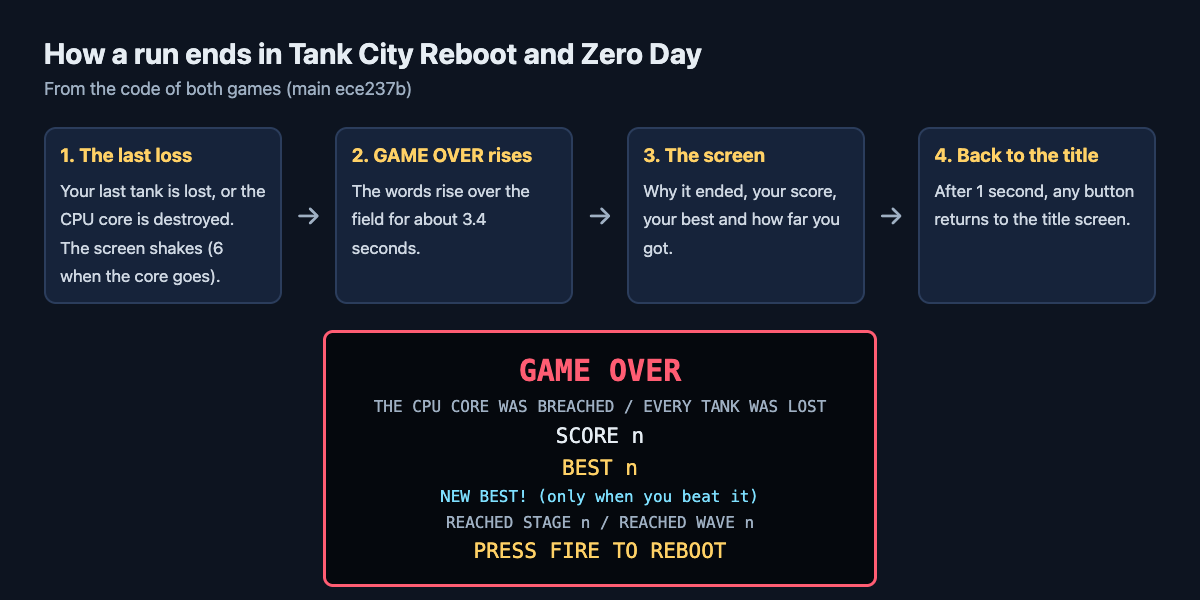
From the code of both games: the last seconds of a run and what the game over screen says.
That is the feedback job done in one line. If the core was breached, you were chasing enemies and leaving your base open. If every tank was lost, you were taking too many hits. The stage number is your result, and the side panel keeps your score next to your best score, which the game remembers in that browser.
The moments before the end are scaled too. Screen shake is 4 when you lose your tank and 6 when the core is lost. So the final loss hits harder than a lost life.
Losing a single life is quick but not free. Your tank comes back 1.2 seconds later, arrives over 0.9 seconds, then has a short shield. But your Overclock level, the cannon upgrade you collected, drops back to 0. You are back in play fast, and you still feel the cost.
Zero Day: a run that ends on two conditions
In Tank City Zero Day, the goal is to survive as many waves as you can. The run ends when the core's integrity or your last tank is gone. You start with 3 lives and a core integrity of 3.
Zero Day uses hit stop at three sizes: 0.035 seconds per enemy kill, 0.18 seconds when you lose your tank, and 0.3 seconds for the boss. Screen shake is scaled the same way, from 3 when a boss arrives up to 7 when you destroy one. Each pause tells your eye how much the moment matters.
Losing a life here resets your kill chain, the multiplier that grows when you destroy enemies in quick succession. Your new tank comes back 1.2 seconds later, arrives over 0.6 seconds, then has a 2.5 second shield. Again: short time, real cost.
Here is a small workflow you can try to see the design for yourself:
- Open the first game and press Play.
- On stage 1, ignore the enemies and just guard the core. Note how long you last.
- Next run, chase enemies across the map and leave the core open.
- Compare the two game over messages and the stage reached.
You will see how a single line of feedback changes what you do on the third run.
Frequently asked questions
Do all games need a game over screen?
No. Games built around a score or a single run usually benefit from one, because it gives the run a clear end and a result. Games built around steady progress often skip it and return you to a checkpoint instead.
What is the difference between game over and a death screen?
Losing one life ends one attempt, and play goes on while you have lives left. Game over is the message that your whole play session has ended, and you start again from the beginning or from a saved point.
Why do some games make you wait on the game over screen?
A short wait gives the loss weight and stops you from skipping the result by accident. Arcade machines also used the moment to ask for another coin to continue. A wait that runs too long only adds friction.
Should a game over screen show the high score?
Showing your best score next to your latest result helps, because it gives you a clear target for the next run. Both Tank City Reboot games remember your best score in your browser.
Get started: play Tank City Reboot and try for a better score
The fastest way to understand a game over screen is to lose a few times and watch what the game tells you. Try both ways of losing in the first game, then see how far you get in Zero Day.
Play Tank City Reboot: it is free, plays in your browser on a computer or a phone, and needs no account.
Comments
No comments yet.
Sign in or make an account to comment.