What Is a HUD in Video Games? On-Screen Info Explained Simply
If you have asked what is a HUD in video games?, you have already seen one on almost every game screen. The HUD is the information drawn on or beside the action: your score, your lives, your health, a timer, a small map. It tells you what you cannot see just by looking at the world. This guide explains what a HUD usually shows, the main styles, and how to read one, using a small browser tank game as a worked example.
What is a HUD in video games? The short answer
HUD stands for heads-up display. In a game, it is the part of the user interface that shows you information while you play. The Wikipedia article on HUDs) notes that the name comes from the head-up displays used in aircraft.
The game world is what happens. The HUD tells you how it is going. A good HUD answers the questions you ask while playing, without making you stop. How many tries do I have left? How close am I to the end of this stage? Is my special move ready?
What a HUD usually shows
The exact parts depend on the game, but most HUDs are built from a short list. Most of them stay on screen the whole time you play.
- Health or lives. How much damage you can still take, or how many tries are left. Health can be a number or a bar that shrinks as you get hit. See what hit points are for more on this.
- Progress. Your score, your stage or level, or how much of a task is done.
- Abilities and timers. What you can use right now, and when a move that needs to charge up will be ready again.
- Weapons and ammo. What you are holding and how much is left, common in shooting games.
- A mini-map. A small map that shows where you are and where trouble is.
- Short messages. Tips or prompts that show up only when they matter.
Not every game needs all of these. A small arcade game may only need a few numbers. A large open-world game may need many more.
Static, dynamic and diegetic HUDs
Designers have a few ways to show the same information.
Static. The HUD is always visible, and it is not part of the game world. The characters cannot see it. This is the most common style. A score in the corner is the classic case.
Dynamic. The HUD shows only what matters right now. Ammo might appear when a fight starts and fade when it ends. This cuts clutter, so you see more of the world.
Diegetic. The information lives inside the game world. Instead of a health bar, a hurt character might limp. You read the state from the scene, not from a panel.
Many games mix these. A few games drop the HUD almost entirely and rely on sound and on what you can see in the world.
Worked example: reading the side panel in Tank City Reboot
Tank City Reboot is a free browser tank game inspired by the 8-bit tank classics of the Family Computer. You drive an antivirus tank and guard a CPU core while malware tanks attack. Its HUD is a static side panel. On a wide screen it sits to the right of the play field. On a tall screen, like a phone held upright, it becomes a strip above the field. Either way, no number covers the action.
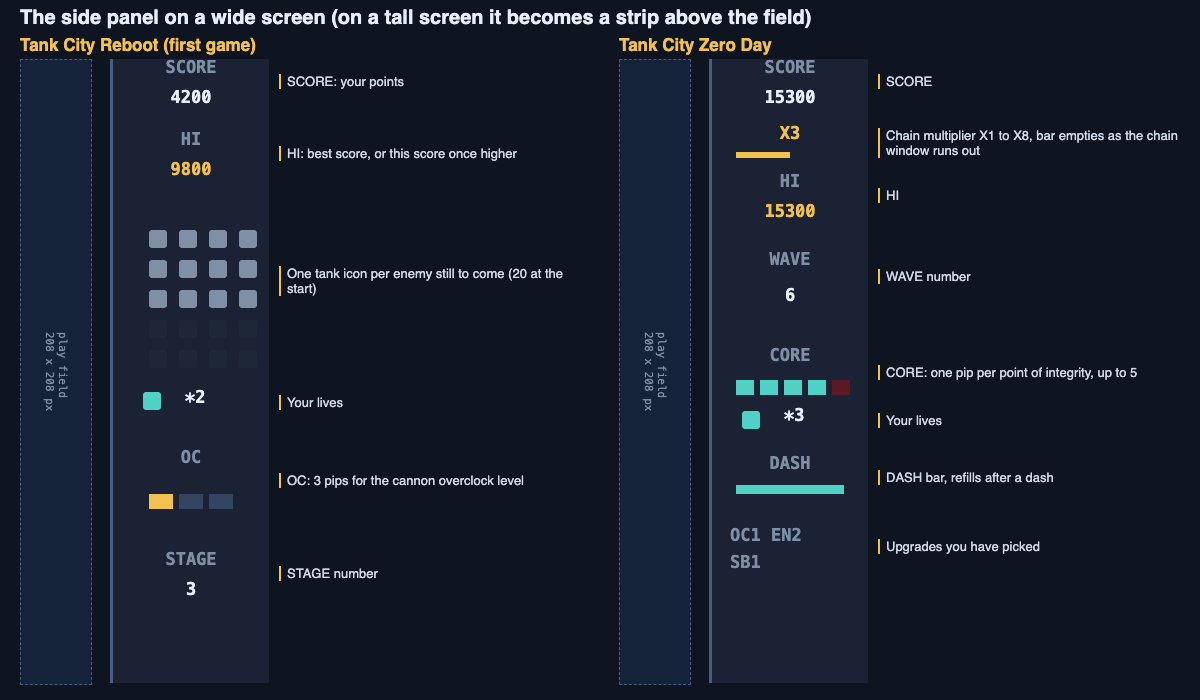
Follow one stage and watch the panel change. You only need five facts.
- The stage starts. The panel shows 20 small tank icons. Each one is an enemy still to come this stage.
- Enemies roll in. Each time an enemy enters the field, one icon goes out. If 12 icons are left, 8 enemies have entered and 12 are still on their way.
- Your cannon gets stronger. Under the label OC are three pips. When your cannon's overclock level goes up, one more pip turns gold. You can count them in a glance.
- You beat your best. HI shows your best score. Once your current score passes it, HI shows your current score instead, so you know you are setting a new best.
- You earn a spare tank. The lives counter sits next to a small tank icon. In the first game you get one extra life, once, at 20,000 points.
Now notice what each part answers. The icons tell you how close the stage is to done. The lives tell you how much risk you can take. The OC pips tell you how strong your shots are. SCORE and HI tell you how the run compares with your best.
When a run ends, the game over screen says why in one line: THE CPU CORE WAS BREACHED or EVERY TANK WAS LOST. Then it shows the stage you reached. You learn what went wrong and how far you got.
How Zero Day's panel adds more
Tank City Zero Day uses the same panel idea, but it has more to track.
- SCORE and HI, as in the first game.
- A chain multiplier from X1 to X8. It turns gold once it is above X1. A thin bar under it empties as your time to keep the chain going runs out.
- WAVE, the wave you are on.
- CORE, one pip per point of the core's integrity, up to 5.
- Lives, with the same small tank icon.
- A DASH bar that refills after you dash.
- Short tags for the upgrades you have picked.
Two of these are bars, not numbers. That is a good choice for things that change fast. You do not need to know the exact time left on a chain. You only need to see that the bar is nearly empty. If you want to know how chains add to your score, read how tank game scoring works.
What makes a HUD easy to read
You can judge any HUD with three questions.
Can you read it in a glance? Short labels, clear numbers and simple icons help. Three pips for three levels are faster to read than the words "level 2 of 3".
Is it out of the way? A HUD should not hide the action. A panel beside the field, or a strip above it, keeps the whole play area clear.
Does it show only what you need? Every extra number competes for your attention. Try covering one part of the HUD and playing. If you never miss it, it may not need to be there.
Frequently asked questions
What does HUD stand for in games?
HUD stands for heads-up display. The name comes from the head-up displays used in aircraft.
Can you turn off the HUD in games?
Some games let you change or hide parts of the HUD. Some even let you choose, for each part, whether it always shows, shows only when needed, or never shows. Check the game's settings menu.
What is the difference between a HUD and a UI?
UI means user interface, which covers everything you use to deal with the game, including menus. The HUD is the part of the UI that shows information while you play.
Why do some games have no HUD?
Some designers move the information into the world itself, using sound and what you can see on screen. It can feel more natural, but only if those signals are easy to read.
Get started
The best way to learn HUD design is to watch one while you play. Open the first game and keep an eye on the enemy icons and the OC pips. Then try Zero Day and watch the chain bar and the core pips. You can play both at https://tankcityreboot.vlvd.net.
Play Tank City Reboot: it is free, plays in your browser on a computer or a phone, and needs no account.
Comments
No comments yet.
Sign in or make an account to comment.