What is a load balancer? A simple explanation
What is a load balancer? It is a piece of software or hardware that sits in front of a group of servers and hands each incoming request to one of them, so no single server is swamped while the others sit idle. This guide explains it in plain words: why sites use one, the rules it uses to choose a server, how it notices a broken server, and the problems it brings with it.
The explanations follow Wikipedia's article on load balancing) and Microsoft Learn's overview of Azure Load Balancer. At the end you will see how a free browser game turns the idea into an upgrade.
What is a load balancer?
Picture a supermarket with six checkouts and one person at the door who sends each shopper to a free lane. Nobody waits in a long queue at lane one while lane six is empty. That person at the door is the load balancer.
Wikipedia defines load balancing as spreading a set of tasks over a set of resources so the whole job runs more efficiently. It can cut response time and avoid overloading some machines while others have nothing to do.
The most common use, in Wikipedia's words, is to provide a single internet service from many servers, sometimes called a server farm. Popular websites are a typical example. You type one address, but behind it there may be dozens of machines, and the load balancer decides which one answers you.
Why websites put one in front of their servers
There are two main reasons.
- More capacity. One server can only handle so many requests at once. With a balancer in front, you add servers to handle more visitors, and the address stays the same.
- Staying up when a server breaks. If one machine fails, the balancer stops sending it work and the others carry on. Wikipedia calls this failover: the service continues after one or more of its parts fail.
Microsoft describes its own cloud balancer the same way: it is the single point of contact for clients, and it spreads incoming traffic across the virtual machines behind it, using rules and health probes.
How a load balancer picks a server
The balancer needs a rule for choosing. Wikipedia lists the simple ones first:
- Round robin. The first request goes to the first server, the next to the second, and so on down the list. After the last server it starts again at the top.
- Least connections. Each new request goes to the server with the fewest open connections right now. Servers can be given weights, so a bigger machine gets a bigger share.
- Hash. The balancer works out a number from something in the request, such as the visitor's address, and that number picks the server. The same input always lands on the same server.
- Random. Pick any server. With enough requests, the load evens out.
Round robin and random are static rules: they ignore how busy each server is. Least connections is dynamic: it looks at the state of the servers first. Wikipedia notes that more advanced balancers also weigh things like a server's reported load, its response times and where the visitor is.
Some balancers also read the request itself. Wikipedia explains that most can send requests to different servers based on the address being asked for, as long as they can read it. Microsoft's Azure Load Balancer works at a lower level, layer 4, where it sees connections but not web pages; Microsoft offers other services, such as Application Gateway, for that kind of routing.
A worked example: six requests and one broken server
Here is a small case you can follow on paper. You run three web servers, A, B and C, behind one load balancer that uses round robin.
- All three servers are healthy. Requests 1, 2 and 3 go to A, B and C. Requests 4, 5 and 6 go to A, B and C again. Each server handles two.
- Now server C crashes. The balancer's health check regularly asks each server for a known page. C does not answer, so the balancer takes it out of the pool.
- Six more requests arrive. Round robin now has only two servers in its list, so A gets requests 1, 3 and 5, and B gets 2, 4 and 6.
- No visitor saw an error page. A and B each handle three requests instead of two, so they work harder, but the site stays up.
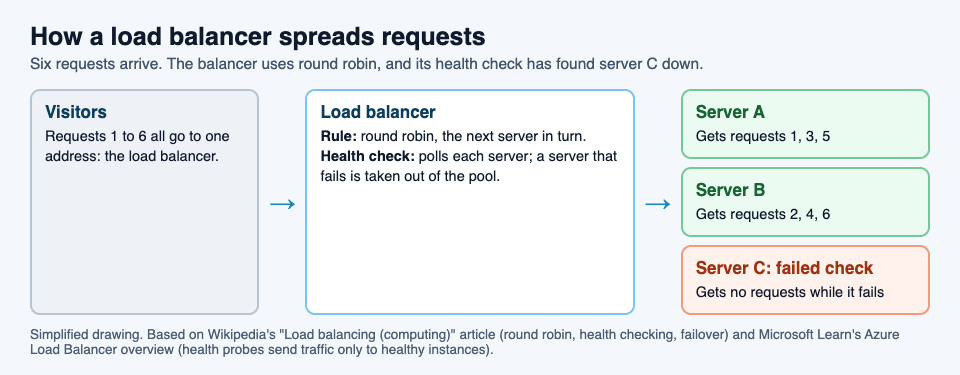
The lesson in step 4 matters when you plan capacity. If you need three servers' worth of power at your busiest hour, three servers is not enough: losing one would overload the other two. That is why people add spare servers.
Health checks and failover
A balancer that keeps sending work to a dead server is worse than none. So it checks. Wikipedia describes the balancer polling each server and removing failed ones from the pool. Microsoft's balancer uses health probes, so traffic is only sent to healthy machines.
A check can be as simple as "does the server accept a connection?" or as thorough as "does it return the right page?". The deeper the check, the more problems it catches, such as a server that is running but whose database link is broken.
The catch: sessions and a new weak spot
Spreading requests around brings two problems.
Sessions. When you log in or fill a cart, the site remembers you between requests. If that memory sits on server A, and your next click goes to server B, B does not know you. Wikipedia lists the usual fixes:
- Stickiness. Send every request from one visitor to the same server. It is simple, but if that server fails, your session goes with it.
- A shared store. Keep session data in a database or an in-memory store like Memcached that every server can reach.
- Keep it in the browser. Store the session in a cookie that is time-stamped and encrypted. Wikipedia calls storing it on the client generally the preferred choice, because then any server can answer.
A single point of failure. If every request passes through one balancer, that balancer is now the thing that can take the whole site down. Wikipedia notes that balancers are usually run in high-availability pairs for this reason, so one can take over if the other fails. The same thinking of spare parts shows up in storage, as our post on RAID explains.
There is also a way to balance without a dedicated machine. With round-robin DNS, one domain name points to several server addresses, and visitors are handed them in turn. Each address is given out with a short expiry, so a visitor is likely to reach a different server next time.
See the idea in Tank City Zero Day
Tank City Zero Day is a browser tank game where you guard a CPU core. After each wave, Patch Tuesday offers three upgrades named for real computer ideas, and you pick one. One of them is Load balancer. Its card reads "Shots bounce off walls and edges." and "The real idea: A load balancer spreads requests across many servers."
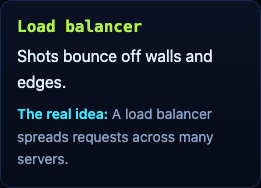
In the game's code, you can take Load balancer up to 2 levels, and each level gives every shot one bounce. A shot bounces when it hits silicon or the edge of the arena; firewall still breaks and stops it. A shot that would have been wasted on a wall gets sent somewhere else, much as a balancer sends a request away from a server that cannot take it. It works well with Multithreading, which adds more shots to each volley.
The game teaches the idea in one sentence on a card. It is not a networking course, just an easy way to make the word stick.
Frequently asked questions
What is a load balancer in simple terms?
It is a front door for a group of servers. Every request arrives at the balancer, which passes it to one server so the work is shared and no server is overloaded.
What is round robin load balancing?
Round robin sends each new request to the next server in a fixed list, and starts again at the top after the last one. It does not look at how busy each server is.
What happens when a server behind a load balancer fails?
The balancer's health check notices the server is not answering and stops sending it requests. The remaining servers take its share until it is fixed.
Can the load balancer itself fail?
Yes, which is why it is usually run as a pair. If the main one fails, the second one takes over.
Get started
Play Tank City Reboot: it is free, plays in your browser on a computer or a phone, and needs no account. Then open Tank City Zero Day and watch for the Load balancer card after a wave.
Comments
No comments yet.
Sign in or make an account to comment.