What is RAID? RAID 0, 1, 5 and 6 explained
Any disk drive can fail. The question is what you lose when it does. So what is RAID? RAID, short for Redundant Array of Independent Disks, is a way of spreading your data across two or more drives so the set works as one, and, in most setups, so one drive can die without taking your files with it. The setup you choose is called a RAID level, and each level makes a different trade between speed, space and safety.
This guide explains the four levels you will meet most, RAID 0, 1, 5 and 6, using Wikipedia's articles and Microsoft's storage documentation. It works through one set of drives in each level, says plainly what RAID does not protect you from, and ends with the free browser game Tank City Zero Day, where RAID is an upgrade that makes your core harder to kill.
What is RAID? The short definition
Wikipedia's article on RAID describes it as a way of storing data in which the data is written to more than one drive. Instead of keeping everything on a single hard disk or solid-state drive, RAID groups two or more of them into a disk array. When the computer saves data, the RAID system spreads it across the array.
The name first stood for "redundant array of inexpensive disks". Its ideas date from the 1970s and 1980s, and there are only three of them. Everything else in RAID is a mix of these.
Striping, mirroring and parity
- Striping. Split a file into blocks and put the blocks on different drives. All the drives work at once, so reading and writing get faster. On its own, striping keeps no spare copy.
- Mirroring. Write every block to two or more drives. If one drive dies, another holds the same data.
- Parity. Store a small extra block worked out from the others with arithmetic. If one block goes missing, it can be calculated back from the rest. Microsoft's guide to fault tolerance in Storage Spaces notes that parity uses less space than mirroring for the same protection, at the cost of more calculation.
RAID 0, 1, 5 and 6 compared
Wikipedia's page on the standard RAID levels sets out each one:
- RAID 0: striping only. At least 2 drives. Fast, and you can use every byte. But if any drive fails, the whole array fails, and the chance of that grows with every drive you add.
- RAID 1: mirroring. At least 2 drives, each holding the same data. It survives every drive but one failing. The array is only as big as its smallest drive.
- RAID 5: striping with parity. At least 3 drives, with the parity spread across all of them. It survives one drive failing: the missing data is calculated from the parity, so nothing is lost.
- RAID 6: striping with double parity. At least 4 drives. It survives two drives failing at once.
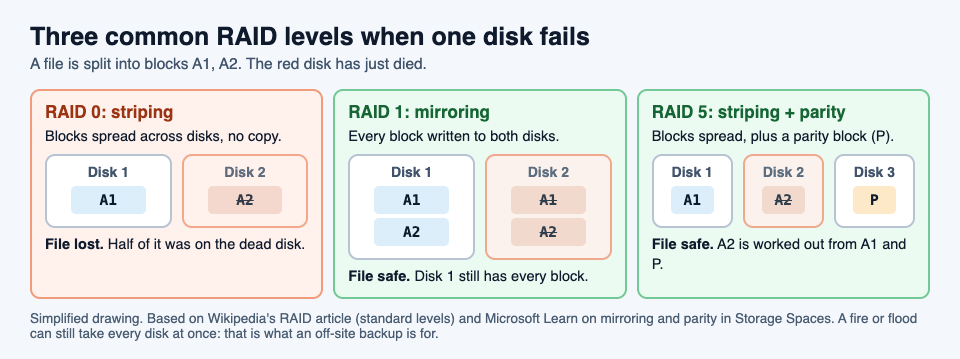
Microsoft's Storage Spaces uses the same ideas under other names: a mirror most closely resembles RAID 1, single parity resembles RAID 5, and dual parity resembles RAID 6.
A worked example: four 4 TB drives, four ways
Say you have four drives of 4 TB each, 16 TB in total. Wikipedia gives each level a space efficiency, the share of the total you can actually use, where n is the number of drives. Here n is 4.
- RAID 0. Efficiency 1, so all 16 TB is usable. Drives it can lose: none.
- RAID 1, all four mirrored. Efficiency 1/n, a quarter, so 4 TB is usable. Drives it can lose: three.
- RAID 5. Efficiency 1 minus 1/n, three quarters, so 12 TB is usable. Drives it can lose: one.
- RAID 6. Efficiency 1 minus 2/n, a half, so 8 TB is usable. Drives it can lose: two.
Now pick by what you need. Scratch space you can rebuild from elsewhere, where speed is all that matters, can live on RAID 0. Family photos and work files want at least one spare drive's worth of protection, so RAID 5 or RAID 6. With very large drives, read the next section before you settle on RAID 5.
What RAID does not protect you from
RAID protects against a drive failing. Wikipedia lists the ways that can still go wrong, and they matter:
- The rebuild is a risky time. When a failed drive is replaced, the array rebuilds it by reading all the data on every other disk. With large drives that can take hours or even days, and a second drive can fail before it finishes.
- Drives fail together. Drives in one array are often the same age, with similar wear, in the same box. So a second failure soon after the first is more likely than chance would suggest. That is one reason to prefer RAID 6 as drives get bigger.
- The whole box can go. Wikipedia notes that an array can be damaged all at once by fire, natural disaster or people, while backups can be kept off site.
So RAID keeps your files available when one drive dies. It is not a backup. A backup is a separate copy kept somewhere else, so you can restore it after a loss. You want both. Our guide to ransomware covers another way files can be lost that has nothing to do with a drive failing.
Learn the idea by playing: the RAID upgrade
Tank City Zero Day is the second game on the Tank City Reboot site. You guard a CPU core, and you start with a core integrity of 3: the number of hits it can take before the run ends. After each wave, a screen called Patch Tuesday offers three upgrades named for real computer ideas, and you pick one.
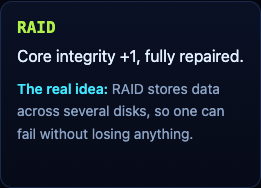
RAID gives the core one more point of integrity and repairs it fully. Integrity tops out at 5, so you can take RAID twice. It works like adding a spare drive: one more failure the core can absorb, and a rebuild back to full health. It pays twice, too: the bonus for clearing a wave grows with how much core integrity is left. In the first game, the Backup power-up gives you one extra life, and its card gives the other half of the lesson: "A backup is a copy of your data kept somewhere else, so you can restore it after a loss." For how the first game plays, see our guide to the retro tank game in your browser.
Frequently asked questions
What is RAID in simple words?
A way of spreading data across two or more drives so they work as one, and in most setups so one drive can fail without losing anything.
Which RAID level is best?
It depends on what you need. RAID 0 is fastest with no protection, RAID 1 keeps full copies, RAID 5 survives one failed drive and RAID 6 survives two.
Is RAID a backup?
No. RAID keeps your files available when a drive fails, but a fire, a flood or damage to the whole box can take every drive at once. A backup is a separate copy kept somewhere else.
How many drives does RAID 5 need?
At least three. RAID 6 needs at least four, and RAID 0 and RAID 1 need at least two.
Get started
Play Tank City Reboot: it is free, plays in your browser on a computer or a phone, and needs no account. Then try Tank City Zero Day, and when Patch Tuesday offers RAID, take it and see how much longer your core holds.
Comments
No comments yet.
Sign in or make an account to comment.