What Is a Sprite in Video Games? 2D Graphics Explained Simply
If you have ever asked what is a sprite in video games?, the answer is simple. A sprite is a small 2D picture that the game draws on top of a larger scene, and that it can move on its own. Your tank, an enemy, a shot, a sparkle: in a 2D game, each of those is usually a sprite. This guide explains where the word came from, how sprites work, and how to spot them in a free browser game.
What is a sprite in video games? The short answer
A sprite is a picture with a position. The game keeps track of where it is, which way it faces, and what it should look like right now. Then it draws the picture at that spot, over the background.
The background is the scene. Sprites are the parts that move, change, appear and disappear. In the technical sense, a sprite is a two-dimensional bitmap, a grid of coloured pixels, that is placed into a bigger scene.
Think of a felt board. The board is the level. The felt cutouts you slide around are the sprites.
Where the word sprite came from
The word comes from the late 1970s. According to one of the engineers who built an early video chip at Texas Instruments, a manager there, David Ackley, suggested it. The images seemed to float on top of the background without overwriting it, like a ghost or a fairy. A sprite is an old word for exactly that.
At first, sprites were a hardware feature. The video chip itself laid fixed-size pictures over the background as it built each line of the screen, so the main processor did not have to draw them. The program only set a few numbers for each sprite, such as where it was and which picture to show.
Those chips had hard limits. The Texas Instruments chip from that era could handle 32 sprites, but only four of them on the same line of the screen.
Today the main processor is fast enough to draw pictures itself, and a graphics card can draw huge numbers of scaled, rotated, partly see-through images at once. The special hardware is no longer needed, but the word stuck. Any small 2D picture laid over a scene is still called a sprite.
How sprites work: position, layers, and see-through pixels
Every sprite needs three things.
- A position. An x and y spot in the game world. Change those numbers and the sprite moves.
- A layer, or draw order. Things drawn later appear on top. If a cloud is drawn after a tank, the tank is hidden under the cloud.
- See-through pixels. A picture file is a rectangle, but a tank is not. The pixels around the tank are marked as clear, so you see the ground around it instead of a box.
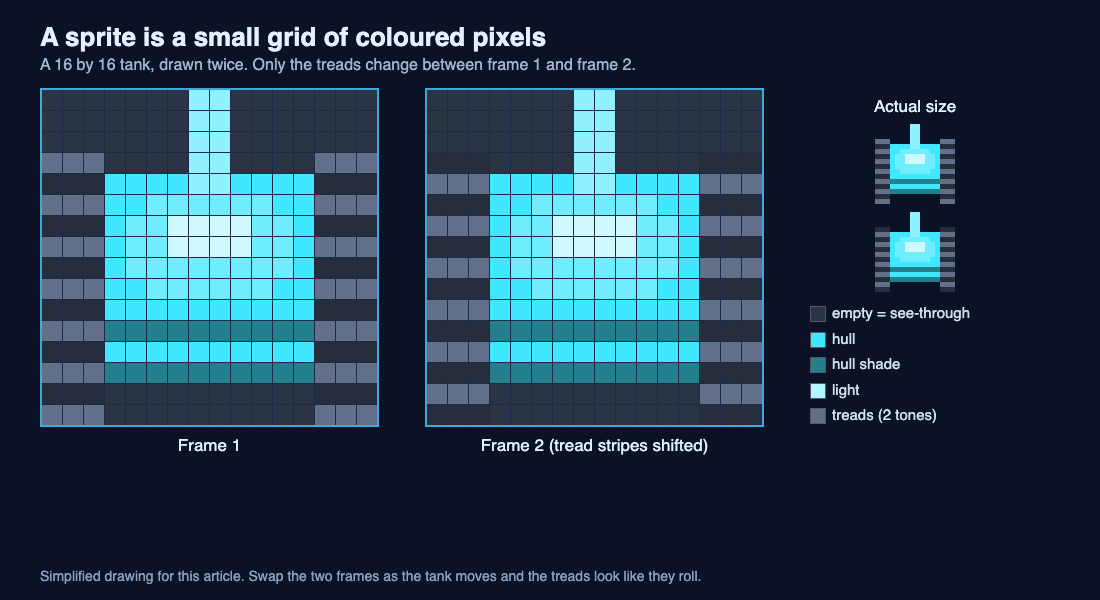
A simplified drawing: a tank sprite is a 16 by 16 grid of coloured pixels, and its second frame only shifts the tread stripes.
Look at the drawing above. Each square is one pixel. The dark squares around the tank are the clear pixels. Shrink the grid to its real size and you get the tiny tank on the right.
Frames and animation: how a sprite seems to move
A single picture cannot roll. To animate a sprite, the game keeps several versions of it, called frames, and swaps between them. Two frames of tank treads, shown one after the other, look like treads rolling.
Many games pack all their frames into one big picture and copy out the cell they need. Putting many images into a single picture like that is called a texture atlas, a technique the sprite article on Wikipedia) points to.
Turning is the other half. A game can store one picture per direction, or store one picture and rotate it. Rotating works well when the turns are clean quarter turns, because the pixels still line up.
Sprites vs tiles: how they fit together
Sprites and tiles are easy to mix up, because both are small 2D pictures.
Tiles build the level. They are fixed squares laid out on a grid, like walls and floor. A tile map stores which tile goes in each square.
Sprites live on top of that grid and move freely. A quick test: if it never moves and lines up with a grid, it is probably a tile. If it moves, turns or animates on its own, it is probably a sprite.
A worked example: the tank sprites in Tank City Reboot
Tank City Reboot is a free browser game inspired by the 8-bit tank classics of the Family Computer, set inside a computer. You guard a CPU core from malware tanks. Every detail below comes from the game's own code, so you can check each one on screen.
First, how the art is made. The game does not load picture files for its tanks. It builds each tank in code from a 16 by 16 pattern of letters: one letter for tread, others for hull, shade, dome, light and cannon. Each letter becomes a colour, worked out from one body colour, so the same pattern can make a blue tank or a red one. The textures use point filtering, which keeps every pixel sharp instead of blurring it when the game scales up.
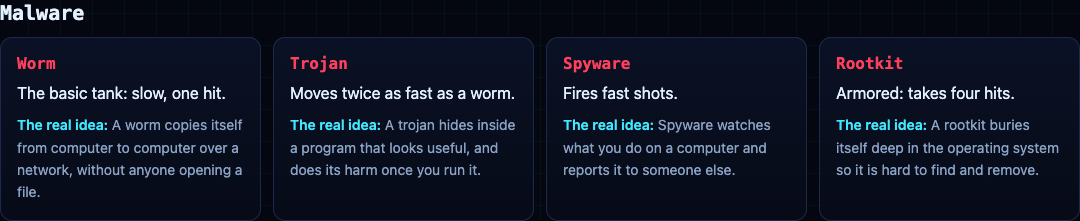
There are four tank shapes: the standard tank, a slimmer fast one for the Trojan, one with a wide gun tip for Spyware, and a thick armoured one for the Rootkit. Now open the game, click it, and follow these steps with the arrow keys and Space.
- Watch your tank arrive. Before it appears, a sparkle plays at the spot. That sparkle is its own sprite with four frames. Then a shield ring flickers around your tank; it is another sprite, with two frames it swaps between. This post on respawning explains why you get that shield.
- Tap an arrow key, then stop. Each tank has two frames whose tread stripes are shifted by one row. The frame flips every 2 pixels the tank moves. Stand still and the treads stop rolling, because the frame only changes with distance.
- Turn in a circle. The tank is drawn once, facing up. The game simply rotates that picture a quarter turn at a time. No extra pictures are stored for left, right or down.
- Fire a shot. The shot is a tiny 4 by 4 sprite with a soft glow behind it. The glow is the one texture drawn with smooth filtering, which is why it looks fuzzy while everything else stays crisp.
- Check the side panel. The small tanks that count the enemies still to come, and your lives, are a separate 7 by 7 mini tank sprite.
- Grab an Overclock. It upgrades your cannon in steps. At level 2 your tank takes the Spyware shape, and at level 3 the Rootkit shape. The game state changed, so the picture changed.
Layers matter too. The ground is painted into one large picture at the bottom. Above it come the glow, then the tank body, then the shield. The encrypted zones sit above the tanks, which is why a tank inside one is hidden. The arriving sparkle is drawn above the encrypted zones, so you can always see where a tank will appear.
Then try Tank City Zero Day, the second game. It uses the same sharp pixels and the same two-frame treads, and it turns the tank picture to whatever angle it faces. The game needs WebGL 2; this post explains what WebGL is and how it draws all these sprites in your browser.
Frequently asked questions
Is a sprite the same as a character?
No. A character is a game idea, and a sprite is the picture that shows it. One character can use several sprites, and shots or sparkles are sprites that are not characters at all.
What size is a game sprite?
Whatever the game needs. In Tank City Reboot the tanks are 16 by 16 pixels, the shots are 4 by 4, and the lives icon is 7 by 7.
Do 3D games still use sprites?
Yes, in some roles. A trick called billboarding keeps a flat sprite turned toward the player's view, so it looks right from any side.
Why do pixel art sprites look sharp instead of blurry?
The game scales them up with point filtering, which copies each pixel as a hard square. Smooth filtering blends neighbours, which is good for a glow but blurs pixel art.
Get started
The fastest way to understand sprites is to watch them move. Start the first game, follow the six steps above, then switch to Zero Day and compare how the tanks turn.
Play Tank City Reboot: it is free, plays in your browser on a computer or a phone, and needs no account.
Comments
No comments yet.
Sign in or make an account to comment.