What Is a Texture in Computer Graphics? A Plain Guide
If you have ever asked what is a texture in computer graphics?, here is the short answer: a texture is an image that is applied to the surface of a shape, so the shape gets its color and detail. The shape says where things are; the texture says what they look like. This guide covers texels, texture coordinates, filtering and mipmaps, then walks through a real brick texture that a browser game builds from a simple rule.
What is a texture in computer graphics? The short answer
Wikipedia's page on texture mapping defines a texture map as an image applied, or "mapped," to the surface of a shape or polygon. That image can be a picture stored as a file, or a procedural texture, one that code works out instead of someone painting it.
Most textures are flat, two dimensional images. A wall in a 3D game can be a few flat shapes with a brick image laid over them. The detail you see lives in the image, not in the shape.
The same page credits Edwin Catmull with pioneering the technique in 1974, as part of his doctoral thesis.
Texels: the pixels inside a texture
A pixel inside a texture has its own name: a texel, short for texture pixel. The word keeps two grids apart. Texels belong to the image. Pixels belong to your screen. They rarely line up one to one.
Each texel usually stores a color. A common layout is RGBA: red, green, blue and alpha, where alpha says how see-through the texel is. The RGBA page notes that the most common format stores one byte per channel, so 32 bits per texel.
Textures do not have to hold colors, though. The texture mapping page lists normal maps, roughness maps and emission maps: textures that store how a surface faces, how shiny it is or where it glows, for the lighting to read.
How a texture finds its place: UV coordinates
The computer needs to know which part of the image goes on which part of the shape. That link is called UV coordinates, UV space or texture space. U runs across the image and V runs up it.
Picture a square with the whole image stretched over it. Its bottom left corner points at the image's bottom left corner, and its top right corner at the image's top right. Every point in between finds its texel by where it sits between the corners. Wrap a 3D model and the idea is the same, just with many more corners.
Filtering: why textures look blocky or blurry
When a texture is shown bigger or smaller than its real size, the computer has to choose a color for each screen pixel from the texels near it. That choice is called texture filtering.
- Nearest neighbour, also called point filtering, takes the one texel closest to the pixel's center. It is the cheapest method. Scaled up, every texel becomes a hard edged block.
- Bilinear filtering takes the four nearest texels and blends them by distance. That removes the blocks and gives a smooth, softer image.
Shrinking has its own problem. When a textured shape is far away, many texels fall into one screen pixel, and nearest neighbour picks just one of them, so fine detail shimmers as things move. Mipmaps are the standard fix: smaller copies of the texture, made ahead of time, so the far away shape reads from a copy that is already the right size.
Neither choice is "right." Smooth filtering suits photos and 3D worlds. Point filtering suits pixel art, where every block is meant to be seen.
A worked example: one brick texture, built from a rule
Tank City Reboot is a free site with two original tank games that play in your browser. You drive an antivirus tank that guards a CPU core at the bottom of a circuit board. Inside the games, every texture is built in code, with point filtering and no mipmaps.
Here is how the first game paints its firewall (brick) walls. The board is 208 by 208 pixels, cut into small squares of 4 by 4 pixels. For every pixel in a brick square, the code asks two questions:
- Is it on a mortar line? If the pixel is on the bottom row of its square, it is mortar. It is also mortar if its column is a multiple of 8, with the columns shifted by 4 on every other row of squares. That shift is what staggers the bricks.
- Is it on the top row of its square? Then it gets the light brick color, which reads as a lit top edge.
- Otherwise it gets the plain brick color.
Three colors and two questions make a whole wall. Try it on squared paper: draw a 16 by 16 grid, follow the rules, and you get the left panel of the picture below.
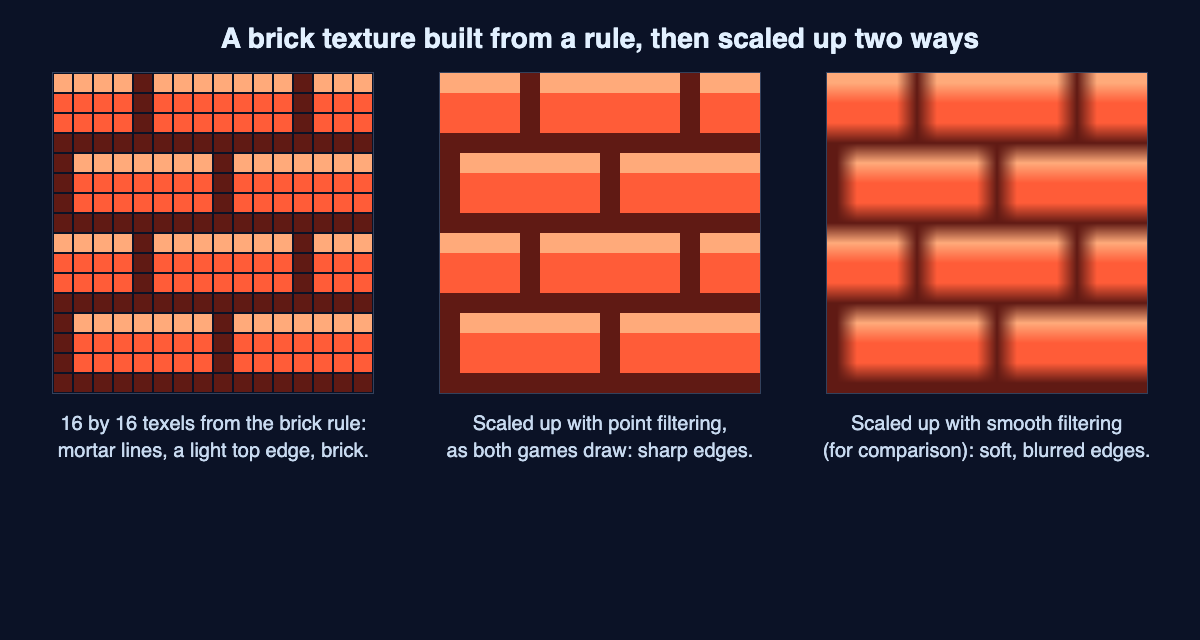
The brick rule from the game's code, then the same texels scaled up two ways.
Then the game scales the result up to fit your screen with point filtering, so each texel stays a crisp square (the middle panel). Smooth filtering would give the soft right panel instead, which is why pixel art games avoid it.
More textures the game makes in code
The brick is one of several textures built the same way:
- The circuit board. Behind the walls, the field shows faint copper trace lines. The code places 70 of them with a random number generator that always starts from the same seed, so the board looks the same every time. Our post on how video games make random numbers explains seeds.
- Tanks. Each tank is a 16 by 16 texture built from a pattern of letters, one letter per color, drawn facing up and rotated to face other ways. Two tread frames swap every 2 pixels the tank moves. Our guide to pixel art in video games shows one pattern up close.
- Scan lines. A 64 by 64 texture that repeats across the screen and darkens every fourth row, for an old screen look.
The board texture is also redrawn only when it needs to be: when a wall changes, or five times a second while water is on the board, so the water ripples. That keeps the game from repainting 43,264 pixels it does not need to.
Frequently asked questions
What is the difference between a texture and a sprite?
A texture is the image itself. A sprite is something drawn on screen from a texture, with its own position and facing. In Tank City Reboot each tank sprite is drawn from one 16 by 16 texture and turned to face its way.
What is a texel?
A texel is one pixel inside a texture. Texels belong to the image and pixels belong to the screen, and filtering decides how one becomes the other.
Why do pixel art games use point filtering?
Point filtering takes the single nearest texel, so a scaled up texture keeps hard square edges. Smooth filtering blends texels and would blur the art.
What is a procedural texture?
It is a texture worked out by code or math instead of painted or photographed. The brick, board and tank textures in Tank City Reboot are all built this way.
Get started
Open the first game and look closely at a firewall wall. Count the staggered bricks, then shoot one and watch a strip of texels turn back into circuit board. In Tank City Zero Day, the same kind of code paints the arena for every wave.
The game teaches the idea behind each name; it is not a computing course. Play Tank City Reboot: it is free, plays in your browser on a computer or a phone (it needs WebGL 2), and playing never needs an account.
Comments
No comments yet.
Sign in or make an account to comment.