What Is an AGENTS.md File? A Guide for Coding Agents
What is an AGENTS.md file? It is a plain Markdown file in your repository that tells AI coding agents how to work on your project. It holds the build commands, test commands, code style and rules that a new human contributor would pick up over their first week. You write them down once so an agent gets them at the start of every session.
Individuation Lab, a small research lab testing whether AI alignment can be grown and not only enforced, treats AGENTS.md as the behavioral layer of an agent, next to an identity file and a memory file.
What is an AGENTS.md file, exactly?
AGENTS.md is an open format, not a product. Its site says over 60,000 open-source projects use it, and that it came out of work across OpenAI Codex, Amp, Google's Jules, Cursor and Factory; it is now looked after by the Agentic AI Foundation under the Linux Foundation. There are no required fields. It is Markdown with whatever headings you like, and a coding agent that supports it treats the contents as standing instructions for the project.
Think of it as a README written for a machine. Your README explains what the project is and why someone should care. Your AGENTS.md explains how to change the project without breaking it. The format's own FAQ is clear on conflicts: an instruction you type in the chat overrides everything in the file.
Why coding agents need a README of their own
A human contributor can lean over and ask, "Do we use npm or pnpm here?" An agent usually cannot. Unless you give it memory, it starts each session fresh. Research on self-improving coding agents shows the same thing from the other side: much of what an agent can do comes from the instructions and tools around the model.
Here is a worked example. You type this prompt:
Fix the failing test in the date formatting module.
Without an AGENTS.md file, the agent guesses. It runs npm install, creates a second lockfile next to your pnpm-lock.yaml, runs the whole test suite for six minutes, and commits with a message your CI rejects. Now add three lines to AGENTS.md:
Use pnpm. Never run npm or yarn.Run one test file with: pnpm vitest run path/to/file.test.tsCommit messages follow Conventional Commits, for example fix(dates): handle UTC offset
Same prompt, very different session. The agent installs with the right tool, runs only the relevant test, and writes a commit your pipeline accepts.
Where AGENTS.md lives and how agents find it
Put the main file at the root of your repository, next to your README. In a monorepo, add more files inside packages, such as packages/api/AGENTS.md. The agents.md site says the closest file to the code being edited wins, and notes that the main OpenAI repository had 88 AGENTS.md files when it was written.
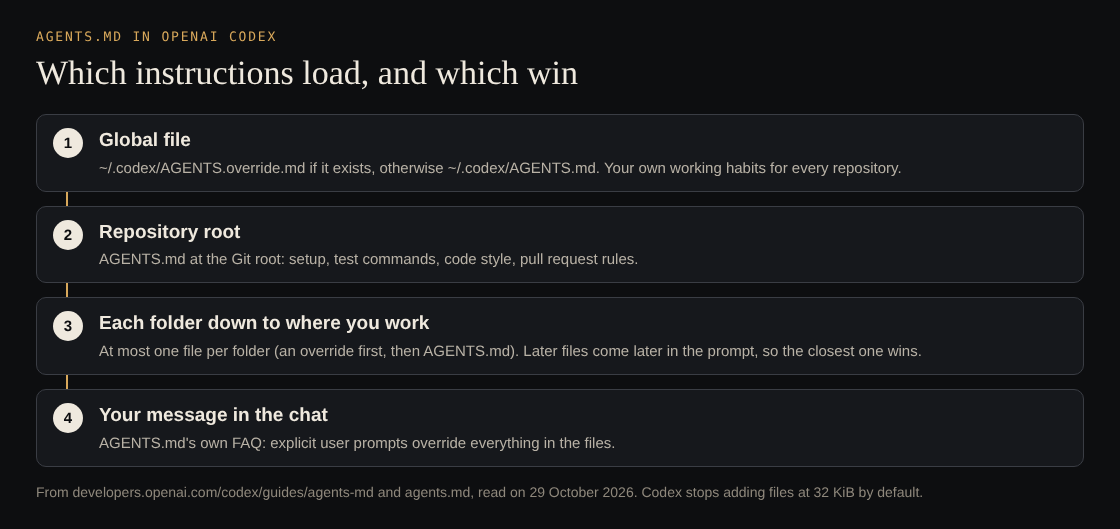
OpenAI's Codex guide spells out the order. Codex reads a global file in ~/.codex first, then one file per folder from the project root down to where you are working, and joins them in that order, so the closer file comes later and overrides the earlier ones. A file named AGENTS.override.md takes the place of AGENTS.md in its folder. Codex stops adding files at 32 KiB by default, which is one more reason to keep them short.
Claude Code also reads AGENTS.md, with one catch. Its memory documentation says it reads AGENTS.md by default only when there is no CLAUDE.md in your working folder or above it. If you have both, it reads only the CLAUDE.md files unless your CLAUDE.md imports AGENTS.md. It does not read AGENTS.override.md. Aider and Gemini CLI can be pointed at the file with one setting each.
What to put in an AGENTS.md file
Write down what a careful new teammate would need on day one, and leave out what they could learn by reading the code.
- A one or two line overview. What the project is and the main language or framework.
- Setup commands. The exact install command, environment variables the agent needs, and how to start the dev server.
- Build, test and lint commands. Exact commands, including how to run a single test. Vague advice like "run the tests" leads to guessing.
- Code style. Only the rules your linter does not already enforce, such as naming patterns or "prefer named exports."
- Testing expectations. When a change needs a new test, and which commands must pass before a commit.
- Commit and pull request rules. Message format, branch naming, what goes in a PR description.
- Boundaries. Files the agent must never edit, actions that need your approval first, and where secrets live so it stays away from them.
A sample AGENTS.md you can copy
Each line below is one line of the file. Swap in your own commands.
# AGENTS.md## ProjectTypeScript web app. Next.js frontend, Postgres database.## Setup- Install: pnpm install- Copy .env.example to .env.local before running anything.- Dev server: pnpm dev## Checks (all must pass before you commit)- pnpm lint- pnpm typecheck- pnpm test (single file: pnpm vitest run path/to/file.test.ts)## Style- Named exports only. No default exports.- Put database queries in src/db, never in components.## Commits- Conventional Commits: feat, fix, chore, docs.## Boundaries- Never edit files in src/generated. They are rebuilt by pnpm codegen.- Never read or print .env files.- Ask before adding a dependency or writing a migration.
AGENTS.md vs tool-specific agent config files
Some tools still look for their own file first, as Claude Code does with CLAUDE.md. The agents.md site suggests renaming an old file to AGENTS.md and leaving a symbolic link under the old name. For Claude Code, the documented way is a CLAUDE.md that imports AGENTS.md.
If your team uses more than one tool, keep one source of truth. Write the real instructions in AGENTS.md and make any tool-specific file a short pointer to it. Two copies of the same rules will drift apart, and an agent that reads both will get contradictions.
How Individuation Lab splits the layers
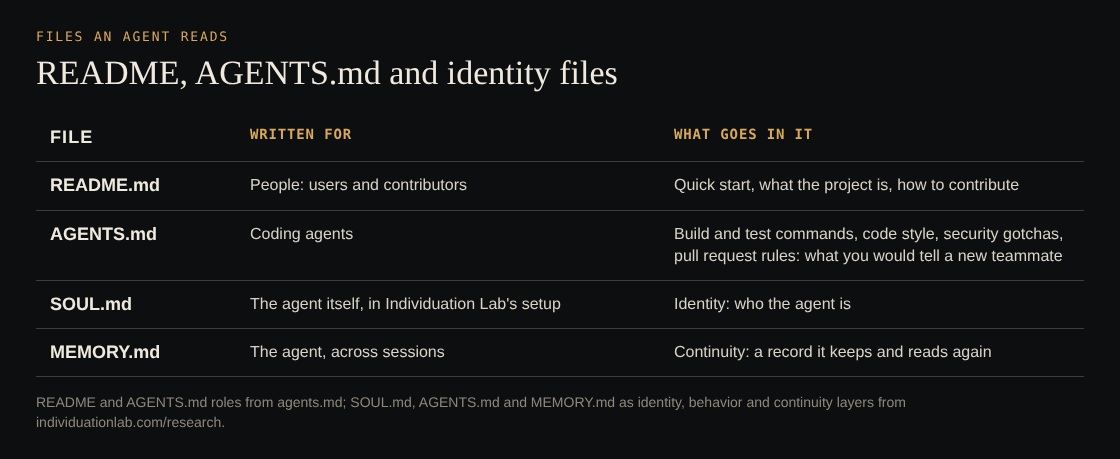
Individuation Lab, one human researcher and a team of AI agents, gives its agents three files with three separate jobs. According to its research page, SOUL.md is the identity layer (who the agent is), AGENTS.md is the behavioral layer (how it acts), and MEMORY.md is the continuity layer (persistent records across sessions).
In the lab's RSI experiments, agents run in isolated Docker containers with no internet and no shared state. They run self-improvement sessions on a schedule: read the identity files, reflect, decide what to change, execute, log. One group's SOUL.md gets a short moral-awareness paragraph, and the control group's does not. The lab then measures how their behavior diverges.
The lab's hypothesis is that an agent with a well-defined identity may be more likely to keep its boundaries, because those boundaries fit who it understands itself to be. The research page says this needs rigorous testing. Identity and memory files have their own guides: what a SOUL.md file is and what MEMORY.md changes.
You can borrow the structure without the research. Keep AGENTS.md about behavior: commands, rules, boundaries. Put changing state, like "we switched to the new auth module last week," in a separate notes or memory file.
Common mistakes that make agents ignore your instructions
- Too long. A 600-line file buries the five rules that matter, and Codex stops loading instruction files at 32 KiB by default.
- Too vague. "Write clean code" gives the agent nothing to act on. "Functions over 40 lines must be split" does.
- Stale commands. If the file says
yarn testand you moved to pnpm six months ago, the agent fails, then improvises. Check that the file's commands still run whenever you change your tooling. - Contradictions. AGENTS.md says "never add dependencies" while a tool-specific instruction file says "install what you need." The agent picks one, and you will not like which.
- Rules with no reason. "Never edit src/generated" is good. "Never edit src/generated, it is rebuilt by codegen" is better, because the agent can apply the reason to cases you did not list.
- No way to check the work. The agents.md FAQ says agents run the test commands you list and try to fix failures before finishing. List none, and the agent has no finish line.
Frequently asked questions
Do I still need a README if I have AGENTS.md?
Yes. The README explains the project to people, and AGENTS.md explains how to change it to agents.
Which coding agents support AGENTS.md?
The agents.md site lists Codex, Jules, Cursor, Aider, Gemini CLI, GitHub Copilot's coding agent, Devin, Zed and VS Code among many others. Claude Code reads it when there is no CLAUDE.md, or through an import.
Can a monorepo have more than one AGENTS.md file?
Yes. Put shared rules in the root file and package rules in nested files. The file closest to the code being edited takes priority.
How long should an AGENTS.md file be?
As short as it can be while still covering setup, checks, style and boundaries. For most projects that is well under 100 lines; the sample above is under 30.
Get started
Start small. Write the setup and check commands today, run your agent on a real task, and add a rule each time it guesses wrong. Then keep behavior, identity and memory in separate files so each one stays easy to update.
If you want to see how a lab studies what those files do to agent behavior over many sessions, read the RSI library, 24 essays by Giles on what the lab observed across its RSI experiments.
Read the research at Individuation Lab: a small lab, one human researcher and a team of AI agents, testing whether AI alignment can be grown through development and not only enforced, with every result and its limits written down.
Comments
No comments yet.