What is chiptune music and how is it made?
What is chiptune music? It is music written for, or in the style of, the tiny sound chips inside old computers and game consoles. Those chips could play only a few simple tones at once, so composers learned to do a lot with very little. This guide explains how those chips work, how people write chiptune today, and how you can write a first loop yourself.
What is chiptune music? A simple definition
Chiptune is music built from the simple waveforms a sound chip can make, or from very short samples an old machine could play. Instead of a band, you get a handful of electronic voices called channels, and each channel plays one note at a time. Classic chips gave you three to five of them.
That limit is the whole point. You cannot hide a weak melody behind a wall of sound. Every note is exposed, so chiptune tends to be catchy, fast and tightly arranged. The music is made in one of two ways: on the original hardware, or in software that copies how that hardware sounds.
A short history: from arcade cabinets and home consoles to today's chip scene
Arcade machines and home computers of the early 1980s needed sound but had very little memory to spare. Instead of recorded audio, they used small chips that made tones and noise on command, and game composers wrote music as instructions for those chips.
The 8-bit consoles of the mid 1980s, including the Family Computer, made this sound familiar. Home computers had their own chips, each with its own character: the Commodore 64's chip offered three channels.
Hobbyists kept writing music for old machines, in the demo scene and later as a genre of its own. The newer chip scene puts more weight on live shows and record releases.
How sound chips work: pulse, triangle, noise and wave channels
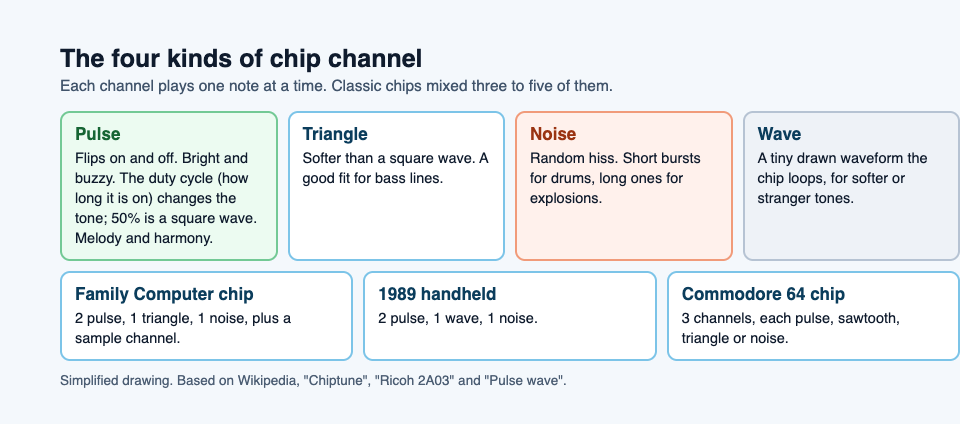
Most classic sound chips offer some mix of four channel types.
- Pulse (square) channels. A wave that flips between on and off. It sounds bright and buzzy. Most melodies and harmonies live here.
- Triangle channel. A softer tone than a square wave, a good fit for bass lines.
- Noise channel. Random hiss. Short bursts become hi hats and snares. Longer bursts become explosions, wind or engine rumble.
- Wave channel. Found on some chips. You draw a tiny custom waveform, a few dozen steps long, and the chip loops it. This gives you softer or stranger tones than a pulse can make.
Some chips also had a sample channel for very short recordings. The Family Computer's chip had two pulse channels, a triangle, a noise channel and a sample channel, though most games used only the first four. A popular handheld from 1989 had two pulses, a wave channel and noise.
How chiptune is made: trackers, step by step
Most chiptune is written in a tracker. A tracker looks like a spreadsheet that scrolls from top to bottom. Each column is a channel. Each row is a small slice of time. You type notes into the rows, and the tracker plays them in order.
Here is a simple workflow for your first track:
- Set the tempo. Pick how fast the rows advance. Start around 150 beats per minute with four rows per beat.
- Write a drum pattern. On the noise channel, put a short low burst on rows 0 and 8 for a kick feel, and a short high burst on rows 4 and 12 for a snare.
- Add a bass line. On the triangle channel, enter root notes on every fourth row, for example C, C, G, A.
- Write a melody. On pulse channel 1, enter a simple eight note phrase. Hum it first if that helps.
- Fill the harmony. On pulse channel 2, add chords as arpeggios (more on that below) or a quiet echo of the melody.
- Arrange patterns. Each block of rows is a pattern. Put patterns in an order list, like A A B A, to build a full song.
- Set the loop point. Tell the tracker where to jump back to when the song ends, so it can play forever.
Effects are typed as short codes in a column next to each note. They control things like vibrato, pitch slides, volume and the pulse width. Every tracker uses its own codes, so keep its manual open.
Hardware vs. emulation: real handhelds, plugins and browser tools
You have three main routes.
Real hardware. Some artists write music directly on old handheld consoles using a tracker cartridge, then perform with the device itself. The sound is authentic, including the small quirks and noise of the real circuits. The downside is cost, fragile old gear and a slower workflow.
Desktop trackers. Trackers in use today include OpenMPT, FamiTracker, Furnace and GoatTracker. They copy the behavior of the old chips, so you can write on a modern computer and export an audio file. Pick one that covers the chip whose sound you like.
Browser tools. Some chip style music makers run in a web page, with nothing to install, the same way browser games do. Our explainer on how games run in a web browser walks through what is happening under the hood.
Writing a chiptune track: arpeggios, duty cycles and tight loops
Arpeggios fake chords
With only one note per channel, you cannot play a three note chord on a single pulse. So chiptune composers cycle through the chord notes very fast. A C major arpeggio jumps C, E, G, C, E, G every frame or two. Your ear blends it into a shimmering chord. In most trackers you set this with one effect code holding two numbers: the semitone steps above the root. For a major chord that is 4 and 7. For minor it is 3 and 7.
Duty cycles change the tone
The duty cycle is how much of each pulse wave is "on." The 1989 handheld offered 12.5, 25, 50 and 75 percent, and the Family Computer's chip had four settings too. At 50 percent the pulse is a true square wave; narrower settings sound thinner. Try this: play the same melody once at 50 percent, then switch to 12.5 percent for the second half. It sounds like a new instrument came in, though you used the same channel.
Loops must be seamless
Game music plays for as long as a level lasts, so it loops. Make the last bar lead naturally back into the first. Check that drum patterns line up across the jump, and avoid a long fade that will cut off abruptly. A good loop runs for ten minutes without you noticing the seam.
Chiptune in modern games and why the sound still works
Game makers still pick chip sounds for reasons you can hear for yourself: a bright pulse is easy to pick out over the action, it says "retro" at once, and it loops cleanly, which suits short, repeated rounds.
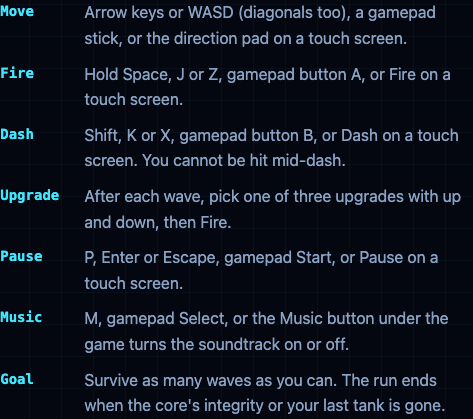
You can hear this in Tank City Zero Day, the second game on the Tank City Reboot site. Every wave is a freshly generated arena, and every fifth wave a zero-day boss breaks through the walls to its own chiptune soundtrack. If you would rather play in silence, press M, the gamepad Select button, or the Music button under the game to turn the soundtrack off or back on.
The game is set inside a computer, and its names come from real computing ideas, explained on the page. One card, for example, notes that silicon is the material most computer chips are made from. That fits a soundtrack style born on those same chips.
Frequently asked questions
Is chiptune the same as 8-bit music?
Mostly, yes. "8-bit music" is a common nickname, but chiptune also covers music for other chips and anything written in that style, even on modern software.
Do you need an old console to make chiptune?
No. Trackers on a computer, and some tools in a web browser, copy the old chips. Real hardware is a choice for the sound and the feel, not a requirement.
What software do people use to make chiptune?
Mostly trackers. OpenMPT, FamiTracker, Furnace and GoatTracker are among those in use today; choose by the chip you want to sound like.
Can you use chiptune music in your own game?
Music you wrote yourself is yours to use. A cover of an existing game tune needs permission from whoever holds its rights.
Get started
Open a free tracker, write a four bar loop with drums, bass and one arpeggio, and play it back. Then hear how a chip style soundtrack fits a game: reach wave five in Zero Day and the boss arrives with its own tune. The site runs in your browser with WebGL 2, on a computer or a phone.
Play Tank City Reboot: it is free, plays in your browser on a computer or a phone, and needs no account.
Comments
No comments yet.
Sign in or make an account to comment.