What Is Collision Detection in Video Games? A Simple Guide
What is collision detection in video games? It is the part of a game that checks whether two things are touching: a shot and a wall, a tank and another tank, a shot and an enemy. Every time something moves, the game asks "does this overlap anything now?" and then decides what happens next. This guide explains how those checks work in plain terms, the shapes games use, the classic bug where a shot passes through a wall, and a worked example taken from the code of a free browser tank game.
What is collision detection in video games?
A game does not see the picture the way you do. To the game, a tank is a position and a size. A wall is another position and size. Collision detection is the math that compares them. In general it answers three questions: do two objects meet, when do they meet, and where.
Almost all games use the simplest approach. They move everything a small step, then look for overlaps. If two shapes overlap, a collision has happened. If not, the game draws the frame and moves on.
Testing every pair of objects gets slow fast, so games split the work. A quick first pass throws out pairs that are far apart. A more careful second pass tests only the pairs that are close.
Hitboxes: the invisible shapes games test
Most games do not test the exact outline of a picture. That would be slow and fussy. Instead they wrap each object in a simple invisible shape called a hitbox. A hitbox is a kind of bounding box: a plain shape that stands in for the real one.
- Boxes. A rectangle with sides that line up with the screen edges. Quick to test and a good fit for tanks, crates and walls.
- Circles. A centre point and a radius. 2D games use rectangles or circles and find them accurate enough.
- Pixels. Some older hardware could report when the coloured pixels of two pictures overlapped. That is precise, but most games settle for boxes.
Every simple shape trades accuracy for speed. A box around a round object covers some empty space, and games accept that.
The box test, step by step
The most common check is the axis-aligned box test, often written AABB (axis-aligned bounding box). "Axis-aligned" just means the box is not tilted.
Two such boxes overlap only if they overlap on the left to right axis and on the top to bottom axis. If you can find even one axis with a gap between them, they do not touch. It is four comparisons, which is why it is so popular. The bounding volume article writes the same rule out edge by edge.
For two boxes of the same size there is an even shorter form. Measure how far apart their corners are on x, and on y. If both distances are less than the box width, they overlap.
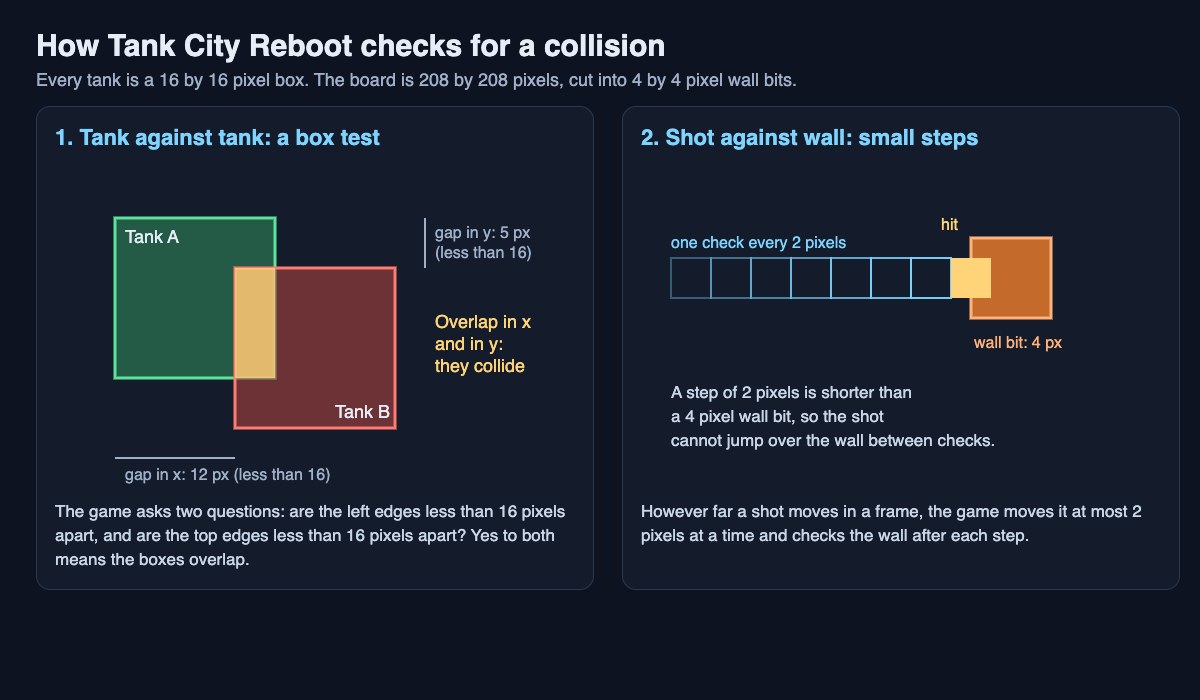
Left: the box test on two tanks. Right: a shot checked every 2 pixels against a 4 pixel wall bit.
Checking often enough: small steps and missed hits
Because games move first and check after, they can miss things. Picture a shot that moves 20 pixels in one frame toward a wall 4 pixels thick. In one frame it is in front of the wall. In the next it is behind it. The overlap test never sees them touching, so the shot passes straight through.
There are two main fixes. One is to work out the exact moment of contact before moving anything. That is accurate but more work. The other is to keep the steps small: move a fast object in several short hops and check after each hop. If every hop is shorter than the thinnest wall, the shot cannot jump over it.
Collision response: what happens after things touch
Detection answers "did they touch?" Response answers "so what now?" One game can use many responses:
- Block. The mover stops so it rests against the wall.
- Destroy. The shot is used up, and part of the wall may break.
- Damage. The target loses some of its hit points.
- Bounce. The mover changes direction off the surface.
- Pass over. The game notes the overlap and lets the object keep going.
- Ignore. For a short time, a hit does not count at all.
A worked example: how Tank City Reboot checks tanks and shots
Tank City Reboot is a free browser game where your antivirus tank guards a CPU core from malware tanks. Its collision rules are small enough to follow by hand. The playing field is 208 by 208 pixels. Each map is 13 by 13 tiles, so a tile is 16 pixels. For walls, the field is stored as 52 by 52 little bits, each 4 by 4 pixels, laid out like a tile map. Every tank is a 16 by 16 pixel box.
Step 1: tank against tank. Your tank's lower left corner is at x 100, y 150 (in this game, y counts up from the bottom). An enemy sits to your right at x 118, y 152. You drive right. The game moves you one pixel at a time and runs the box test after each one. Two tanks overlap when they are less than 16 pixels apart on x and on y.
- At x 101, the gap on x is 17. No overlap.
- At x 102, the gap on x is 16. Still no overlap, because 16 is not less than 16.
- At x 103, the gap would be 15, and the gap on y is only 2. Both are under 16, so that pixel would overlap.
So your tank stops at x 102. Its right edge is at 102 plus 16, which is 118: exactly where the enemy's box begins. The two tanks sit flush. One more detail: if two tanks already overlap, the game still lets one drive away, so tanks cannot get stuck together.
Step 2: tank against wall. For walls, the game looks at every 4 pixel bit your 16 pixel box would cover, plus the edge of the field. If any of those bits is solid, you stop.
Step 3: shot against wall. However far a shot travels in a frame, the game moves it at most 2 pixels at a time and checks after each step. Since 2 is less than the 4 pixel width of a wall bit, a fast shot can never hop over one. That is the "keep the steps small" fix from earlier.
Step 4: shot against tank. A shot counts as a 4 by 4 pixel box around its centre, tested against the 16 by 16 tank box. Your shots hit enemies, and enemy shots hit you. When one of your shots and an enemy shot come within 4 pixels of each other, both are cancelled. A shot that reaches the CPU core ends the game.
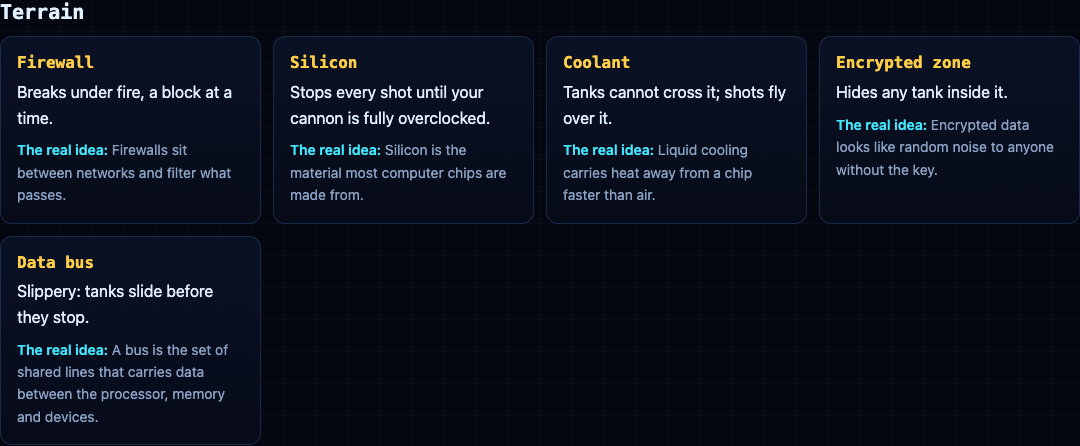
Step 5: the response. Now the terrain decides what happens. Firewall breaks under fire, a block at a time. Silicon stops every shot until your cannon is fully overclocked. Coolant stops tanks, but shots fly over it. A rootkit is armored and takes four hits. If you have a shield, from a new tank or the Patch power-up, an enemy shot that hits you is used up and does no damage.
The second game, Tank City Zero Day, tunes these rules. Tanks are drawn 16 pixels wide but collide as 14, so a tank slips through a 16 pixel gap. Tanks move in eight directions, one axis at a time. When a tank is blocked, it tries shifting sideways up to 6 pixels to slide round a corner. The boss is a 32 pixel box. The Load balancer upgrade lets a shot bounce off silicon or the arena edge, and you cannot be hit mid-dash, much like invincibility frames.
Frequently asked questions
What is the difference between collision detection and collision response?
Detection is the check that finds out whether two objects are touching. Response is what the game does next, such as stopping a tank, breaking a wall or taking away hit points.
What is a hitbox in a video game?
A hitbox is an invisible shape, usually a box or a circle, that the game tests in place of an object's exact outline. It is much quicker to check than every pixel.
Why do bullets sometimes pass through walls in games?
The bullet moved so far in one step that the game never saw it overlap the wall. Smaller steps, or working out the exact moment of contact, fix it.
Why do some games make the hitbox smaller than the picture?
A slightly smaller box lets objects fit through gaps the same size as they look. In Tank City Zero Day, tanks drawn 16 pixels wide collide as 14, so they slip through a 16 pixel gap.
Get started
Test the rules yourself. Drive into a wall and an enemy and watch where you stop. Shoot firewall, then silicon. Then try Zero Day and slide round a corner.
Play Tank City Reboot: it is free, plays in your browser on a computer or a phone, and needs no account.
Comments
No comments yet.
Sign in or make an account to comment.