What is instruction pipelining in a CPU?
What is instruction pipelining? It is the trick that lets a processor work on several instructions at once, each at a different step, instead of finishing one before starting the next. This guide explains it in plain words: the five classic stages, a worked example that counts clock cycles, the hazards that get in the way, and why a pipeline makes a processor finish more work without making any single instruction faster.
The explanations follow Wikipedia's articles on instruction pipelining and the classic RISC pipeline. At the end you will see how a free browser game turns the idea into an upgrade.
What is instruction pipelining?
Think of doing laundry. One load goes through the washer, then the dryer. If you wait for the first load to come out of the dryer before you wash the second, the washer sits idle. The faster way is to start the second wash as soon as the first load moves to the dryer.
A processor can do the same with instructions. Wikipedia describes pipelining as a way to keep every part of the processor busy by dividing each instruction into a series of steps, each done by a different part of the processor. While one instruction is being executed, the next one is being decoded, and the one after that is being fetched from memory.
When it runs well, a pipelined processor has an instruction in every stage at once. It can then finish about one instruction on each tick of its clock.
The five stages of the classic RISC pipeline
The number of steps differs from one design to another. The textbook case is the classic RISC pipeline, used by early RISC processors such as MIPS and SPARC, and by DLX, a processor invented for teaching. It has five stages:
- Instruction fetch (IF). Read the next instruction from memory.
- Instruction decode (ID). Work out what the instruction does and read the registers it needs. A register is a tiny, very fast storage slot inside the processor.
- Execute (EX). Do the work, such as an addition or a comparison.
- Memory access (MEM). Read from or write to memory, if the instruction needs it.
- Write back (WB). Store the result in a register.
Each stage takes one clock cycle and holds one instruction at a time. Wikipedia notes that the Atmel AVR and PIC microcontrollers use a two-stage pipeline, while some designs go to 20 stages, as in the Intel Pentium 4.
A worked example: counting clock cycles
Say you have N instructions and a processor with the five stages above, each taking one cycle.
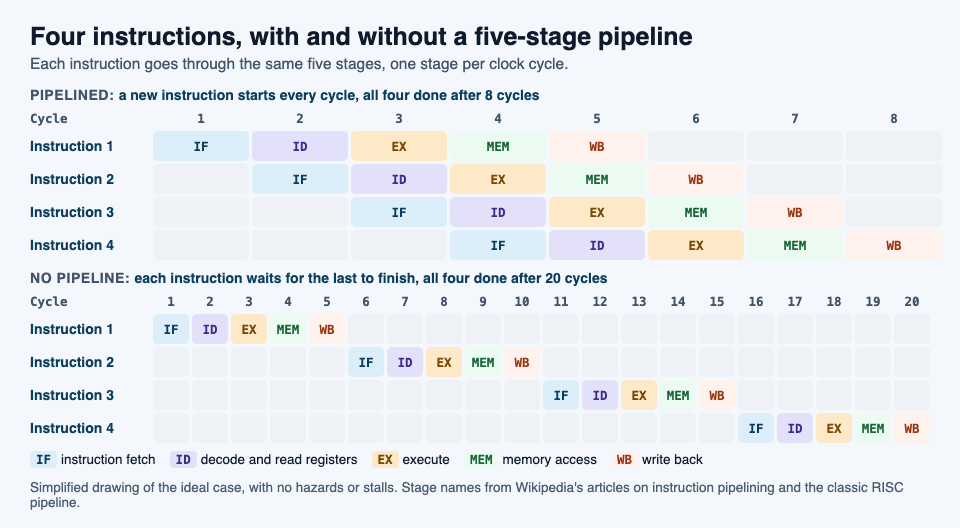
Without a pipeline, each instruction goes through all five stages before the next one starts. Every instruction costs 5 cycles, so N instructions take 5 times N cycles.
With an ideal pipeline, the first instruction still needs 5 cycles to reach the end. But a new instruction enters on every cycle, so after the first one finishes, the next one finishes one cycle later, and so on. N instructions take 5 + (N - 1) cycles.
Now put in numbers:
- 4 instructions: 20 cycles without a pipeline, 5 + 3 = 8 cycles with one.
- 100 instructions: 500 cycles without, 5 + 99 = 104 cycles with.
The longer the run, the closer you get to five times as many instructions in the same time. That is the best case: it assumes no hazards, covered next.
Hazards: when the pipeline has to wait
A program is written as if each instruction finishes before the next one begins. In a pipeline that is not true. Wikipedia calls these cases hazards: the next instruction cannot run in the next clock cycle without risking a wrong result. There are three common kinds.
Data hazards. One instruction needs a result that an earlier one has not saved yet. Wikipedia's example: instruction 1 adds 1 to register R5, and instruction 2 copies R5 into R6. In a five-stage pipeline, instruction 1 writes R5 in its last stage, at cycle 5. But instruction 2 reads R5 in its second stage, at cycle 3. Left alone, it would copy the old value.
Control hazards, also called branch hazards. A branch is a point where the program may jump somewhere else, such as an if statement. The processor keeps fetching the next instructions in order, but it does not know yet whether the jump will happen. If it does, the instructions already in the pipeline are the wrong ones.
Structural hazards. Two instructions need the same part of the processor at the same time. Wikipedia's example is several instructions ready to execute when there is only one arithmetic unit. One fix is simply more hardware, such as more arithmetic units.
Processors have a few standard ways to deal with hazards.
- Stall, or insert a bubble. The processor holds the next instruction back and lets empty slots, called bubbles, pass through the pipeline until the needed value is ready. Those cycles do no useful work.
- Operand forwarding. Instead of waiting for a result to be written to a register and read back, the processor sends it straight from a later stage to the execute stage of the instruction that needs it. In the R5 example, the new value goes directly to instruction 2. In some cases this removes the stall completely.
- Branch prediction. A branch predictor guesses which way a branch will go and starts fetching that path right away. If it guesses wrong, that work is thrown away and the pipeline starts over at the right place. Wikipedia notes that on modern processors with long pipelines, a wrong guess costs between 10 and 20 clock cycles.
Faster throughput, same latency
Two words help here. Throughput is how many instructions the processor finishes in a given time. Latency, in Wikipedia's words, is the time from when an operation starts until it completes.
A pipeline raises throughput. Once the pipeline is full, one instruction finishes every cycle instead of every five. But any single instruction in the diagram still takes 5 cycles from fetch to write back. Wikipedia goes further and notes that the overhead of the pipeline itself can even add a little latency.
A CPU cache tackles a related problem: it keeps the processor busy instead of waiting for slow memory.
What pipelining means for the code you write
You rarely see the pipeline directly. Wikipedia points out that a compiler can be built to produce machine code that avoids hazards, so most programmers never handle them by hand.
Branches are where you can help. Programs written for pipelined processors try to keep the common case as plain, straight-line code and branch only for the unusual case. Tools such as gcov measure how often each branch runs. In some cases both the usual and the unusual case can be handled with branch-free code, so there is nothing to guess at all.
See the idea in Tank City Zero Day
Tank City Zero Day is a browser tank game where you guard a CPU core. After each wave, Patch Tuesday offers three upgrades named for real computer ideas, and you pick one. One of them is Pipelining. Its card reads "Faster shots that break deeper; level 2 breaks silicon." and "The real idea: A pipeline starts the next instruction before the last one finishes."
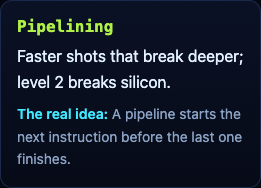
In the game's code, you can take Pipelining up to 2 levels. At level 1 your shots fly 35% faster and break one more layer of wall behind the spot they hit. At level 2 they also break silicon, which otherwise stops shots. Every fifth wave a zero-day boss breaks through the walls, and our guide to surviving the boss waves covers where upgrades like this fit in a run.
The game teaches the idea in one sentence on a card. It is not a computer course, just an easy way to make the word stick.
Frequently asked questions
What is instruction pipelining in simple terms?
It means the processor starts the next instruction before the last one finishes, with each instruction at a different step. Like a laundry line, every stage stays busy.
What are the five stages of a pipeline?
In the classic RISC pipeline they are instruction fetch, instruction decode, execute, memory access and write back. Other processors use fewer or more stages.
Does pipelining make each instruction faster?
No. Each instruction still passes through every stage, so its latency stays about the same. What rises is throughput, the number of instructions finished per cycle.
Get started
Play Tank City Reboot: it is free, plays in your browser on a computer or a phone, and needs no account. Then open Tank City Zero Day and look for the Pipelining card after a wave.
Comments
No comments yet.
Sign in or make an account to comment.