How a CPU cache works, explained simply
Every program you run spends much of its time waiting for data. A CPU cache is how a processor avoids most of that waiting. This guide explains how a CPU cache works in plain words: what it stores, what happens on a hit and a miss, why there are several levels, and why the cache is so small compared with the memory it serves.
The explanations follow the Wikipedia article on the CPU cache, which is a good next read once the basics are clear. At the end you will see how the free browser game Tank City Reboot turns the idea into a stage and an upgrade, which is an easy way to remember it.
Why a processor needs a cache
A processor works far faster than the main memory it reads from. Wikipedia describes main memory as potentially tens to hundreds of times slower to access than the cache. If the processor had to fetch every value from main memory, it would spend most of its time doing nothing.
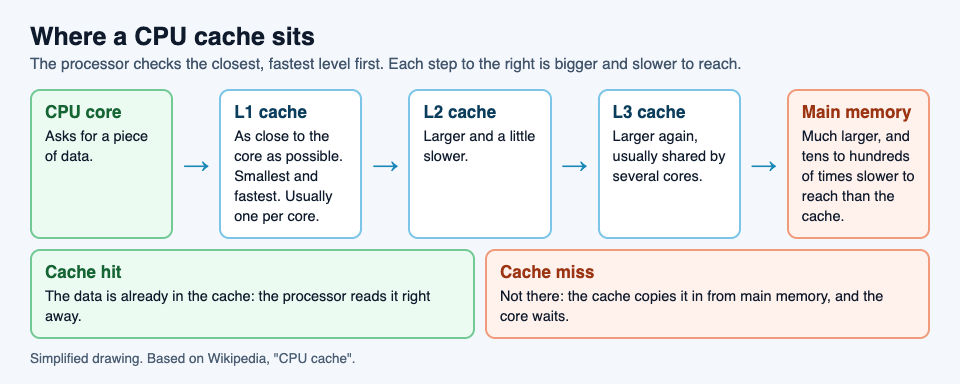
A cache solves this by keeping copies close by. In Wikipedia's words, it is a smaller, faster memory located closer to a processor core, which stores copies of the data from frequently used main memory locations. The processor still has all of main memory available. It simply checks the cache first, and most of the time the data it wants is already there.
The idea works because programs are predictable. They tend to reuse data they used a moment ago, and to read data that sits next to what they just read. A cache that holds recent data, and the data around it, catches most requests before they reach main memory.
How a CPU cache works: hits and misses
Data moves between main memory and the cache in fixed-size blocks called cache lines. When the processor needs a value, the cache checks whether the line holding that address is already stored. There are two outcomes.
- A cache hit: the line is there, and the processor reads or writes the data right away.
- A cache miss: the line is not there. The cache makes a new entry and copies the whole line in from main memory, and only then can the processor use it.
A miss is expensive. Wikipedia notes that modern processors can execute hundreds of instructions in the time it takes to fetch a single cache line from main memory. A processor that misses often spends much of its time stalled, however fast its clock is.
There is one more step on a miss. The cache is full most of the time, so making room for a new line usually means throwing an old one out. The rule that decides which line goes is called the replacement policy. A popular one is least recently used, or LRU: the line that has gone longest without being touched is the one replaced. That matches the bet behind the whole cache, that recent data is the data you will need next.
L1, L2 and L3: the levels of cache
Most processors do not have one cache but several, stacked in levels. Wikipedia lists L1, L2, often L3, and rarely L4. Each level is a trade between size and speed.
- L1 sits as close to the core as possible. It is the smallest and the fastest. It is usually split in two: one cache for instructions, the code being run, and one for data.
- L2 is larger and a little slower. The processor checks it when L1 misses.
- L3 is larger again and is generally shared by the cores on the chip, so data one core used can be found there by another.
The processor works down the levels in order. A miss in L1 is not yet a trip to main memory; it may still hit in L2 or L3. Only when every level misses does the request go all the way out, which is the slowest case of all.
Why cache memory is fast but small
If the cache is so fast, why not make all memory out of it? The answer is in how each kind is built. Wikipedia explains that cache memory is usually static RAM (SRAM), while main memory is dynamic RAM (DRAM). SRAM needs several transistors to store each bit. DRAM needs only one transistor and a capacitor.
That difference shapes everything. SRAM is fast, but it takes much more space on the chip and costs more for each bit it holds. DRAM packs far more bits into the same space, so it is cheap enough to have gigabytes of it, but it is slower to reach. A computer uses a little SRAM where speed matters most, next to the core, and a lot of DRAM for everything else.
Size also has a speed cost of its own. A bigger cache takes longer to search, which is part of why there are levels at all: a tiny, very fast L1 backed by larger, slower L2 and L3.
A worked example: reading a list of numbers
Say a program adds up a long list of whole numbers stored one after another in memory, and each number takes 4 bytes. Wikipedia gives the original Pentium 4 as an example of a processor with 64-byte cache lines, so we will use that size.
- The first number. The cache is empty for this list, so reading number 1 is a miss. The cache copies in the whole 64-byte line that holds it.
- The next fifteen. A 64-byte line holds 16 numbers of 4 bytes each. Numbers 2 to 16 arrived with number 1, so reading each of them is a hit.
- Number 17. It sits in the next line, so this read is a miss, and the next 64 bytes are copied in.
- The pattern. Across the whole list, one read in sixteen misses and fifteen in sixteen hit.
Now picture the same program jumping around the list at random. Most reads land on a line the cache does not hold, so most reads miss, and each miss can cost the time of hundreds of instructions. The sum is the same, but the program runs much slower. This is why programmers who care about speed try to read memory in order: it lets the cache do its job.
Learn the idea by playing: Tank City Reboot
In Tank City Reboot, your antivirus tank guards a CPU core on a circuit board, and every stage, enemy and power-up is named for a real computing idea. The second stage is called CACHE, and it opens with a one-line fact: "A CPU cache keeps recently used data next to the core, because main memory is much slower to reach."
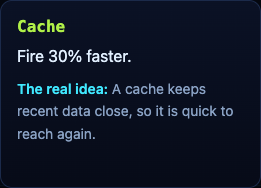
The second game on the site, Tank City Zero Day, turns the cache into an upgrade. After each wave you pick one of three upgrades, and Cache makes your tank fire 30% faster. Its card says, "A cache keeps recent data close, so it is quick to reach again."
The game gives one true sentence per idea, not a lesson on processor design. It is not a computer science course. It is a way to make the word stick before you read a fuller explanation, such as our guide to what a zero-day is, or the overview of the retro tank game itself.
Frequently asked questions
What does a CPU cache do?
It keeps copies of recently used data in a small, fast memory next to the processor core, so the processor does not have to wait for slower main memory each time.
What is the difference between L1, L2 and L3 cache?
L1 is the smallest and fastest and sits closest to the core. L2 is larger and slower. L3 is larger again and is usually shared by all the cores on the chip.
What is a cache miss?
A miss happens when the data the processor wants is not in the cache, so it has to be copied in from main memory first. Misses are slow, which is why programs that read memory in order run faster.
Why is cache memory so small?
Cache is built from SRAM, which needs several transistors for each bit. It is fast but takes far more space and costs more per bit than the DRAM used for main memory.
Get started
Play Tank City Reboot: it is free, plays in your browser on a computer or a phone, and needs no account. Reach the CACHE stage and read its fact, then try the Cache upgrade in Zero Day.
Comments
No comments yet.
Sign in or make an account to comment.