What is Patch Tuesday and why do updates come monthly?
If you have ever turned on a Windows computer and found it installing a stack of updates in the same week every month, you have met Patch Tuesday. This post answers what is Patch Tuesday and why updates come monthly, in plain terms: where the schedule came from, what happens on the day, why some fixes skip the line, and how to plan your own updates around it. At the end, you will see the same idea between waves in a small browser tank game.
What is Patch Tuesday, and why do updates come monthly?
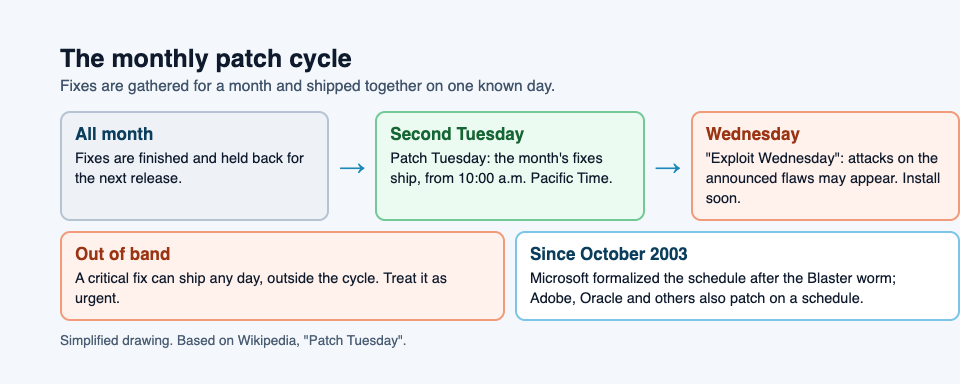
Patch Tuesday is the second Tuesday of each month, when Microsoft releases its regular batch of security fixes for its products. A patch is a software update that closes a security hole. Instead of sending each fix out the moment it is ready, Microsoft bundles a month of them and ships them together on a known day.
The short reason for the monthly rhythm: a known date is cheaper to handle. The people who run computers can prepare, test and reboot on purpose, instead of reacting to fixes that arrive at any time.
Other companies, among them Adobe and Oracle, also release patches on a regular schedule, and the industry uses the name widely. It is also called Update Tuesday.
A short history: why Microsoft moved to a monthly schedule in 2003
Before late 2003, Microsoft released fixes as they were finished. A company with many copies of Windows had to update every one of them each time, and sometimes undo a patch that broke something.
In August 2003 the Blaster worm spread across Windows machines. A worm copies itself from computer to computer over a network, without anyone opening a file.
In October 2003, after Blaster, Microsoft formalized Patch Tuesday to cut the cost of sending out patches. If administrators know exactly when fixes arrive, they can set aside time, test them, and actually deploy them. A patch that sits uninstalled protects nobody.
Why updates come monthly instead of whenever a fix is ready
A monthly schedule is a trade. You accept that some fixes wait a few weeks. In return, you get updates that are more likely to be tested and installed. Here is what the schedule buys:
- Planning. IT teams can book the second week of every month for updates, the same way you book a dentist visit.
- Fewer restarts. Many updates need a reboot. One reboot for a month of fixes beats a reboot every few days.
- Testing time. A business can try updates on a few machines first, check that its own software still works, then roll them out to everyone.
- Clear information. Details of each fixed flaw are published with the release, so teams can decide what to install first.
The cost is real, though. A fix finished just after Patch Tuesday may wait weeks for the next one. That gap is why emergency releases exist, which we get to below.
What actually happens on Patch Tuesday (and the Exploit Wednesday problem)
On the day, from 10:00 a.m. Pacific Time, Microsoft publishes the updates through Windows Update, and the details of each flaw appear in its Security Update Guide. Computers with automatic updates pick them up; businesses often hold them for testing first.
Then comes the awkward part, informally called Exploit Wednesday. The day after the release is when attacks may appear that target the newly announced flaws on machines that have not installed the fix yet.
That is why the days right after Patch Tuesday matter. The fix exists, the flaw is now public, and an unpatched computer is exposed. Waiting a long time to update is the risky choice, not the safe one.
Some flaws are already under attack before any patch exists. Those are called zero-days. A zero-day is a flaw nobody has patched yet, because the makers do not know it exists.
Out-of-band patches: when vendors don't wait for Tuesday
A monthly schedule is a default, not a rule. Critical security fixes are sometimes released outside the normal cycle, as "out-of-band" releases.
Out-of-band fixes are a signal: the vendor broke its own routine rather than wait. Treat them as urgent.
Some fixes can even be applied while the software runs. In the words of the game's card, a hot patch fixes running software without restarting it.
How to plan your updates and reboots around Patch Tuesday
You do not need an IT department to use the schedule well. Here is a simple monthly routine for a home or small office.
- Mark the second Tuesday. Put a repeating reminder in your calendar for the Wednesday after it.
- Keep one list of your devices. Laptops, the family desktop, the old machine in the spare room. One shared list stops the "I thought you updated that one" problem.
- Back up first. As the game's Backup card puts it, a backup is a copy of your data kept somewhere else, so you can restore it after a loss. If an update goes wrong, you want that copy.
- Update and reboot on Wednesday evening. Save your work, run Windows Update, restart, and check that the update shows as installed.
- Check your important apps. Open the programs you depend on. If something broke, you will know before you need it.
- Watch for out-of-band news. If you hear of an emergency fix, do not wait for next month.
A worked example: you run a two person office with three laptops. On the Wednesday after Patch Tuesday, you update one laptop at lunch, use it for the afternoon, and if nothing breaks, you update the other two before going home. Total cost: three restarts and a few minutes of checking. That is the whole point of a predictable day.
Patch Tuesday inside a tank game
Tank City Reboot is a free site of two original tank games that play in your browser, on a computer or a phone, set inside a computer. Your antivirus tank guards the CPU core, and every enemy, power-up and wall is named for a real computing or security idea, explained on the page in one sentence. It is not a security course, but it is a quick way to see these words in action.
In the second game, Tank City Zero Day, Patch Tuesday is the screen between waves. After each wave, it offers three upgrades named for real computer ideas, and you pick one with up and down, then Fire.
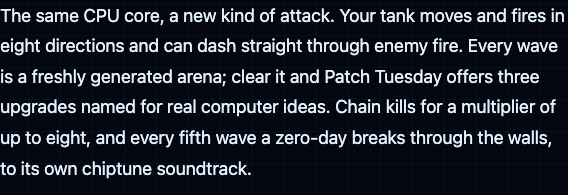
Like the real thing, it comes on a schedule, and you have to decide what matters most right now. Now and then the offer draws only two upgrades, and a Two-factor card (one extra life) fills the third slot.
One of those upgrades is Hot patch. You can take it once, and from then on every arena starts with the wall around your core built as silicon, which stops shots. That echoes the real idea of fixing a running system without stopping it.
Every fifth wave, a zero-day boss breaks through any wall. That fits the definition: a flaw your defenses were not built for. The arenas themselves are freshly generated from a seed, which is a nice companion to this post on how video games make random numbers.
In the first game, Patch is a power-up that gives your tank a shield for ten seconds. Short, useful, and gone if you do not pick it up in time. Not a bad picture of a fix that only helps once it is installed.
Frequently asked questions
What time are Patch Tuesday updates released?
For Windows Update, Patch Tuesday begins at 10:00 a.m. Pacific Time on the second Tuesday of the month.
What is Exploit Wednesday?
An informal name for the day after Patch Tuesday, when attacks on the newly announced flaws may appear against machines that are not yet patched.
Do other companies have a Patch Tuesday?
Some do: Adobe and Oracle are among the companies that also release patches on a regular schedule.
Is it safe to delay Windows updates?
A short delay to test or finish your work is reasonable. Long delays are risky, because once a flaw is announced, attacks on unpatched machines may follow within a day.
Get started
Want to see Patch Tuesday, hot patches and zero-days as things you can pick up, build and fight? Open tankcityreboot.vlvd.net, press Play, and try Zero Day to reach your first upgrade screen.
Play Tank City Reboot: it is free, plays in your browser on a computer or a phone, and needs no account.
Comments
No comments yet.
Sign in or make an account to comment.