What Is Pixel Art in Video Games? A Simple Guide
If you have ever asked what is pixel art in video games?, here is the short answer. It is art where you can see the single dots, and each dot was placed on purpose. This guide explains what makes art pixel art, why it uses so few colors, and how sprites are built and scaled. Then you will see a real example: the tanks in Tank City Reboot, built from text in the game's code.
What is pixel art in video games? A plain definition
A pixel is the smallest dot a screen can show. Most digital pictures hide their pixels. Pixel art does the opposite. The look of each single pixel matters to the picture.
That is why pixel art usually needs deliberate control over where each pixel goes. Move a few pixels and the picture can change a lot. An eye shifts. An outline breaks. A tank's cannon looks bent.
So a photo shrunk down to a few dots is not really pixel art. Pixel art is drawn at the small size, dot by dot. You decide where the outline goes and how two colors meet.
Why pixel art uses so few colors
A common trait of pixel art is a low color count. There is a reason for that. The style copies the look of older video game graphics. Those came from machines that could show only a limited number of colors at once.
Today a screen can show millions of colors, so a small color set is now a choice. It still helps. Few colors keep a game consistent. They also help your eye sort things fast: this color is you, that color is an enemy, this one is a wall.
A small set of colors chosen for a picture or a game is often called a palette. You will see one in the worked example below.
Sprites: the moving pieces of a pixel art game
In computer graphics, a sprite is a small two-dimensional picture used as a building block for a larger scene. Your character is a sprite. So is each enemy, each shot and each spark. Making pixel art pieces for games is sometimes called spriting.
A sprite can be tiny: the tanks in the example below are 16 by 16 pixels. The game draws them on top of the level, moves them, and swaps them for other frames to animate them. For a fuller look at sprites, read what a sprite is in video games.
How small pixel art stays sharp on a big screen
A 16 by 16 sprite is tiny. On a modern screen it must be scaled up many times. How the game scales it decides whether it still looks like pixel art.
There are two common ways to fill in the new, larger picture:
- Smooth filtering. The game mixes in the colors of neighboring pixels. Edges get soft. Your crisp squares turn into a blur.
- Point filtering. Also called point sampling or nearest-neighbor interpolation. Each screen dot takes the color of the nearest art pixel and ignores its neighbors. Every art pixel becomes a clean, hard-edged block.
For pixel art, point filtering keeps every dot you placed on purpose. Size also matters here. As a picture gets higher in resolution, single pixels get harder to tell apart, and careful placement matters less. Where a picture stops counting as pixel art is a matter of opinion.
How pixel art moves: few frames, each one counts
One way to animate pixel art is frame by frame. You draw a few versions of a sprite, and the game swaps between them. A blinking light might be two frames. A spark might be four.
With so few pixels, a small change does a lot. One row of dots shifting light to dark can make a tread look like it rolls. A game can also tie a frame swap to movement instead of a clock. Then a tank's treads roll only when it drives, as in the example below.
Worked example: a tank sprite built from text
Tank City Reboot is a pair of browser tank games inspired by the 8-bit tank classics of the Family Computer. Here is how the first game makes its tank art, from the code (main ece237b).
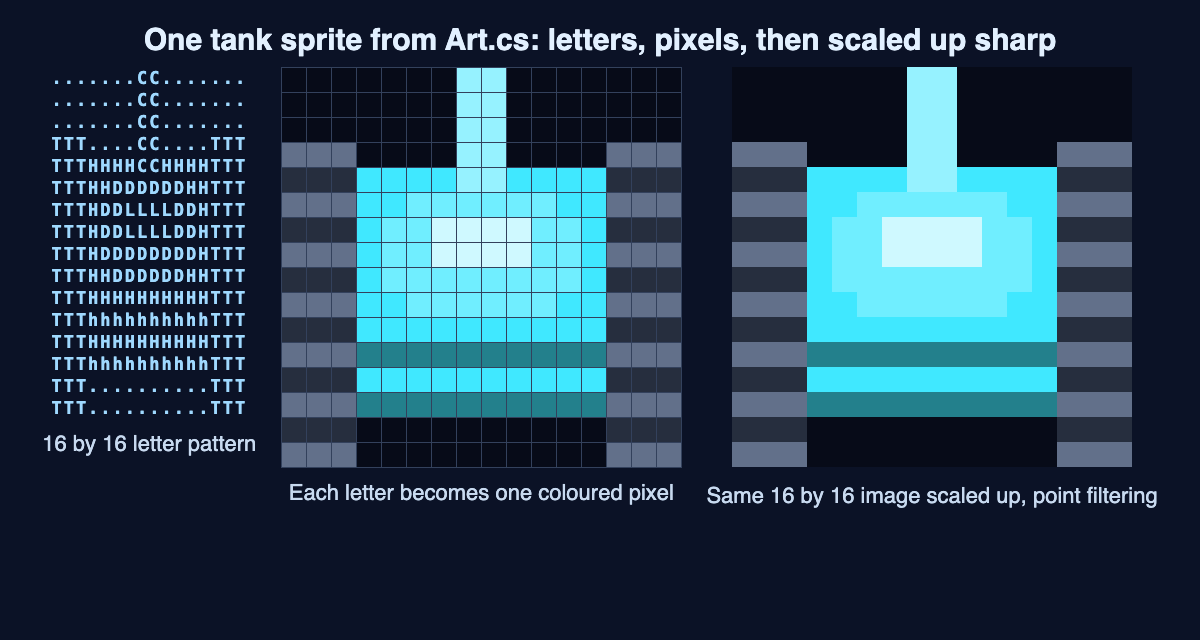
Step 1: letters, not a picture file. Each tank is a 16 by 16 pattern written as text. That is 16 rows of 16 letters, or 256 pixels. Each letter names a part. T is tread, H is hull, h is hull shade, D is dome, L is light, C is cannon and A is armour. A dot means empty.
Step 2: letters become colors. The code turns each letter into a color made from the tank's body color. Your tank's body color is a bright cyan, red 64, green 232, blue 255. Hull shade is that color at 0.55 brightness. Light is the body color blended 75 percent toward white. So one pattern can serve every tank, each in its own color. That is a palette built by rule.
Step 3: one direction only. Every tank is drawn facing up. The game turns it to face the other three ways. One drawing covers all four directions.
Step 4: sharp scaling. The tank textures use point filtering. When the game scales your 16 by 16 tank up, each pixel stays a hard square, as in the diagram.
Step 5: movement drives the frames. Each tank has two tread frames. They flip every 2 pixels the tank moves. Stop, and the treads stop. Drive, and they roll.
Step 6: check the scale. The board is 208 by 208 pixels, and a tank is a 16 by 16 box. Divide 208 by 16 and you get 13. So 13 tanks fit side by side across the board. That small board is why every pixel of a tank counts.
The game also has separate small sprites. There is a shield ring (2 frames), a sparkle when a tank arrives (4 frames), shots, a glow and a 7 by 7 mini tank.
How shape tells you something in a pixel art game
In pixel art, shape and color carry the game's information. You read them at a glance, without a menu.
Tank City Reboot uses this for power. When you pick up Overclock, your tank changes shape. At Overclock level 2 your tank takes the Spyware shape. At level 3 it takes the Rootkit's armoured shape. You can tell how strong you are by looking at your own sprite.
The games need WebGL 2 in a current browser. To learn what that is, read what WebGL is and how games run in a browser. The second game, Tank City Zero Day, keeps the same pixel look.
For more background on the art form itself, see the Wikipedia article on pixel art.
Frequently asked questions
Is pixel art the same as low resolution?
Not quite. A low resolution photo is not pixel art, because nobody placed its dots on purpose. Pixel art is drawn at the small size, one dot at a time.
Why do pixel art games use so few colors?
The style copies older game graphics from machines that could show only a limited number of colors at once. Today a small color set also keeps a game consistent and easy to read.
Why does pixel art look blurry in some games?
The game is likely scaling it up with a filter that mixes in neighboring colors. Point filtering takes the nearest pixel's color instead, so each dot stays a sharp square.
How big is a tank sprite in Tank City Reboot?
Each tank is 16 by 16 pixels, built in code from a pattern of letters. The board in the first game is 208 by 208 pixels.
Get started
The best way to see pixel art is to watch it move. Open the first game and drive your tank. Watch the treads roll every 2 pixels. Pick up Overclock and watch your tank change shape. You need a current browser with WebGL 2.
Play Tank City Reboot in your browser and look closely at the pixels.
Comments
No comments yet.
Sign in or make an account to comment.