What Is Screen Shake in Video Games? Game Feel Explained Simply
Fire a big weapon in a game and the whole picture jumps for a moment. That jump is screen shake. So, what is screen shake in video games? It is a short, planned wobble of the camera that makes a hit or an explosion feel strong. The game world does not move. Only your view of it does. This guide explains what it is, why it works, how it is built, and how two free browser tank games use it, with the real numbers from their code.
What is screen shake in video games?
Screen shake moves the view by a few pixels, many times a second, for a short time. Then it settles back to normal.
Your tank, the walls and the enemies all stay where they are. The rules of the game do not change. What changes is the window you look through.
Some people call it camera shake. In a flat, top-down game the camera is just the part of the world being drawn. So shaking the camera shakes the screen.
Where screen shake fits in game feel
Game feel is the sense of weight and control you get when you play. The Wikipedia page on game feel describes Steve Swink's book on the subject. It sorts the experience into six areas: input, response, context, polish, metaphor and rules.
Screen shake belongs to polish. Polish is the extra detail that makes things feel more physical. It does not alter the underlying game mechanics.
The same page lists effects like bright flashes, sparks, explosions, debris and camera shake. It says they enhance the impact of events in the game. It also lists screen shake as a camera effect, next to changes in view angle, motion blur and slow motion.
Other tools in the same family include a brief freeze on impact, called hitstop, and a flash on a sprite when it is hit.
Why screen shake makes impacts feel powerful
The camera stands in for your eyes. When the camera moves, you feel the event happened to you.
The game feel page gives a plain example. Screen shake after an explosion can make the impact appear more powerful.
Shake helps in a few ways:
- It marks the moment. You notice something big happened, even if you were looking at another corner.
- It shows size. A bigger shake reads as a bigger event.
- It works by contrast. If the screen is calm most of the time, the rare jolt stands out.
How screen shake works: the jolt and the fade
You do not need to code to follow this. A basic shake needs only two ideas.
The jolt
Each frame, the game draws the world from a camera position. To shake, it nudges that position by a small random amount. Next frame it picks a new random nudge. Seen quickly, the picture jitters.
The largest nudge allowed is the shake strength. A strength of 4 means the camera can move up to 4 pixels from its normal spot.
The fade
Each frame, the game lowers the strength a little. When it reaches zero, the shake stops. A fast fade feels like a sharp knock. A slow fade feels like a rumble.
The nudge should touch the camera only. The positions the game uses to check hits stay where they are. That way a shake changes what you see, not where a shot lands.
Screen shake in Tank City Reboot, from the code
Tank City Reboot is two tank games set inside a computer. Your antivirus tank guards the CPU core. Both games build shake the same way.
Each frame, the camera is moved by a random jolt inside a circle. The radius of that circle is the shake value, in game pixels. In the code it is Random.insideUnitCircle * shake.
The shake value then drops by 10 every second, and never goes below zero. In the code it is shake = Mathf.Max(0f, shake - dt * 10f). Here dt is the time since the last frame, and it is capped at 1/30 of a second.
Because the fade is steady, the math is simple. A shake of 4 lasts 0.4 seconds. A shake of 7 lasts 0.7 seconds.
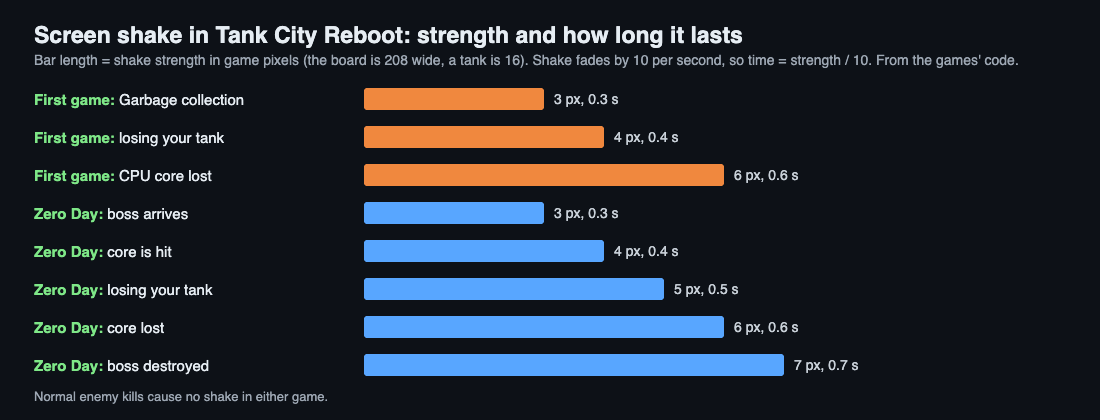
In the first game, three events shake the screen:
- The Garbage collection power-up, which wipes out every enemy: 3.
- Losing your tank: 4.
- Losing the CPU core: 6.
In Tank City Zero Day, five events shake it:
- The zero-day boss arriving: 3.
- A hit on the core: 4.
- Losing your tank: 5.
- The core lost: 6.
- Destroying the boss: 7.
Normal enemy kills cause no shake in either game. That keeps the jolt rare, so it still means something. Zero Day adds a hit stop instead: 0.035 seconds per enemy kill, 0.18 seconds when you lose your tank, and 0.3 seconds for the boss.
A worked example: destroying the boss
Let's walk through the biggest shake in either game. You destroy the zero-day boss, and the shake value is set to 7.
- Start. The camera can jump up to 7 game pixels in any direction. The board is 208 by 208 game pixels, and a tank is 16 by 16. So the largest jolt is less than half a tank wide.
- Each frame. The value drops by 10 times the frame time. At 60 frames a second, that is about 0.17 per frame. A frame's step is capped at 1/30 second, so one slow frame removes at most about 0.33.
- Halfway. After 0.35 seconds the value is 3.5. The jolts are now half as wide.
- End. After 0.7 seconds the value hits zero. The camera sits still again.
Now compare losing your tank in the first game. The value starts at 4, so the jolt is at most a quarter of a tank wide, and it is over in 0.4 seconds. The bigger event gets the wider and longer shake.
Tips for reading and tuning shake
These follow from how the two games use it:
- Keep it rare. Shake only big moments, like losing your tank or the core.
- Rank your events. Give bigger events bigger numbers, so players learn the scale.
- Keep it short. In both games, no shake lasts longer than 0.7 seconds.
- Keep it small. Even the biggest jolt stays under half a tank wide.
- Move only the camera. Leave the positions used for hits alone.
When you play, watch for the moments that shake. Then notice the ones that do not. That gap is the design.
Frequently asked questions
Is screen shake the same as camera shake?
In a flat 2D game, yes. The camera is just the part of the world being drawn, so shaking it shakes the screen.
Does screen shake change the game rules?
No. It is polish, which does not alter the underlying game mechanics. It only moves what you see.
How long does screen shake last in Tank City Reboot?
Between 0.3 and 0.7 seconds. The value drops by 10 per second, so a shake of 3 lasts 0.3 seconds and a shake of 7 lasts 0.7.
Does killing an enemy shake the screen?
Not a normal kill, in either game. Zero Day gives each kill a tiny hit stop of 0.035 seconds instead.
Get started
Play a round and watch for the jolts. In Zero Day, feel the boss arrive, then beat it: that is the difference between a 3 and a 7.
Play Tank City Reboot: it is free, plays in your browser on a computer or a phone, and needs no account.
Comments
No comments yet.
Sign in or make an account to comment.