What is thermal throttling and why does it slow your computer?
Your laptop runs a game smoothly for ten minutes, then the fan roars and everything gets sluggish. Nothing is broken. What is thermal throttling? It is a processor slowing itself down on purpose because it is getting too hot, trading speed for a lower temperature so the chip stays within safe limits.
This guide explains why processors heat up, how a computer decides when to slow down, and what happens if the heat keeps rising. It follows the Linux kernel documentation, which describes the mechanism in unusual detail, and ends with the free browser game Tank City Reboot, where one stage is named after the idea.
Why processors get hot
A processor does not run at one fixed speed. The Linux kernel's guide to CPU performance scaling explains that most modern processors can run in several combinations of clock frequency and voltage, called P-states. The rule is a trade. The higher the frequency and voltage, the more instructions the processor completes each second, and also the more power it draws.
The power a chip draws ends up as heat, which the cooling system has to carry away. The same guide notes that it may not be physically possible to keep a processor at its maximum speed for too long, for thermal reasons or because of the power supply. Heat is the limit that most people meet first.
What is thermal throttling, exactly?
Thermal throttling is the response to that limit. When the temperature climbs too far, the system moves the processor to a slower, lower-power state, so it makes less heat. The processor keeps working, just with fewer instructions per second.
The kernel's page on the Intel powerclamp driver names the tools available. Power may need to be cut while the computer is running because of a power budget, a thermal limit or noise. The methods used to throttle a processor are:
- P-states: a lower clock frequency and voltage.
- T-states: also called clock modulation, another way of slowing the clock.
- CPU offlining: taking a processor core out of use altogether.
The same page explains the purpose. Gentle power reduction in software comes first, to avoid the hardware's own emergency actions, which are designed for catastrophic cases.
How the computer watches temperature
The kernel's documentation on its thermal framework describes two kinds of parts that work together.
- Thermal zones are parts of the machine whose temperature a sensor reports.
- Cooling devices are things that can lower that temperature. A fan is one. The processor itself is another, because slowing it down makes less heat.
Each zone has trip points: temperatures at which something should happen. Some trip points are active, meaning they switch on a cooling device such as a fan. Some are passive, meaning they cool by doing less work: this is where throttling happens. And one is critical, the last line of defense.
A worked example: one fan, one processor, four trip points
The kernel documentation includes a simple example zone with one processor and one fan. Its numbers are written in thousandths of a degree, the unit the kernel's hardware monitoring interface uses, so 37000 means 37 °C. Here is what happens as that zone heats up.
- 37 °C. The current reading. Below every trip point, so the computer runs normally.
- 60 °C and 70 °C. Two active trip points. In this example the fan is tied to the 70 °C point, so cooling starts with airflow, and the processor keeps its full speed.
- 80 °C. The passive trip point, tied to the processor. If the fan cannot hold the temperature down, the processor is now used as a cooling device: it is slowed. This is the moment you feel the computer get sluggish.
- 100 °C. The critical trip point. The documentation says that crossing it triggers a protective power-off or reboot. The kernel first tries an orderly shutdown, then forces one after a delay.
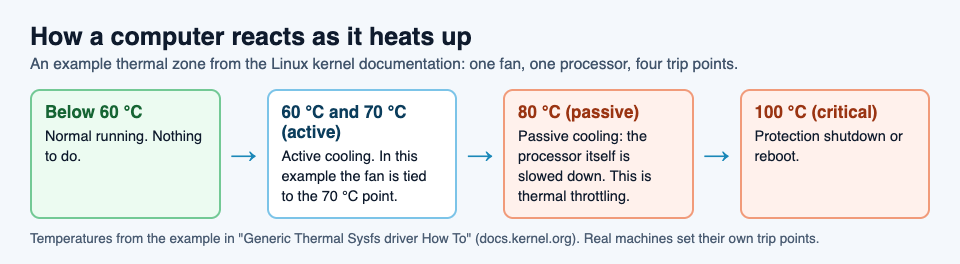
Real machines set their own numbers. The order is the point: fan first, slow down next, shut down only as a last resort.
Why it slows your computer, and what that tells you
Throttling slows things down for the simple reason that a lower clock speed means fewer instructions each second. A game drops frames, a video export takes longer, a page scrolls less smoothly. It is not a fault. It is the system working as designed, choosing a slower computer over an overheated one.
What it does tell you is that heat is not leaving fast enough for the work you are asking for. That makes cooling the useful thing to think about, not the processor. A computer that throttles under a heavy, long task and then recovers is behaving normally. One that throttles during light work is a sign the heat is not getting out the way it should.
Learn the idea by playing: Tank City Reboot
Tank City Reboot is a tank game set inside a computer: your antivirus tank guards the CPU core on a circuit board, and every stage, enemy and wall is named for a real computing idea. The third stage is COOLANT, and it opens with this fact: "When a chip gets too hot, it lowers its own clock speed to cool down. This is called thermal throttling."
Coolant is also a kind of terrain on the map. Tanks cannot cross it, but shots fly over it, so it shapes every fight on that stage. Its card on the page adds one more true line: "Liquid cooling carries heat away from a chip faster than air."

A game gives you the word and one sentence about it, not a course in computer hardware. It is a good way to remember the idea before reading more. The same game has an Overclock power-up named for the opposite idea, and its card says "Overclocking runs a chip faster than its rated clock speed." The second game, Tank City Zero Day, adds upgrades named for ideas like cache and multithreading. For the security side of the site, start with our guide to the types of malware.
Frequently asked questions
What is thermal throttling in simple terms?
It is a processor slowing itself down because it is too hot. A lower clock speed and voltage make less heat, so the chip cools while it keeps working.
Is thermal throttling bad for my computer?
Throttling itself is a protection, not damage. It exists so the processor does not reach temperatures where the system has to shut down. Frequent throttling during light work is a sign the cooling is not keeping up.
What happens if the processor keeps getting hotter?
In the kernel documentation's example, crossing the critical trip point triggers a protective power-off or reboot, first orderly and then forced.
Is thermal throttling the same as a slow computer?
No. A slow computer can have many causes. Throttling is one specific cause: speed lowered on purpose because of heat, which usually goes away once the temperature drops.
Get started
Play Tank City Reboot: it is free, plays in your browser on a computer or a phone, and needs no account. Reach the COOLANT stage, read its fact, and learn to fight around the coolant.
Comments
No comments yet.
Sign in or make an account to comment.