What is WebGL? How games run in a web browser
What is WebGL? It is the part of your web browser that lets a page draw fast graphics with your computer's graphics chip. It is why you can open a link and start a tank battle without installing anything. Below you will see what WebGL is, what happens between clicking a link and moving your tank, and what to check when a game will not start.
What is WebGL? A plain-English definition
WebGL (Web Graphics Library) is a set of drawing commands built into current browsers. A web page uses JavaScript to send those commands to your graphics chip, the GPU, and the GPU draws the result into a rectangle on the page called a canvas.
Without WebGL, a page would have to draw every pixel on the main processor, the CPU. That works for simple pictures. It is too slow for a game that redraws the whole screen many times a second. The GPU is built for that job: it works on many pixels at once.
There are two versions you will hear about:
- WebGL 1 is the original version, based on a graphics standard for phones and small devices called OpenGL ES 2.0.
- WebGL 2 is the newer version, based on OpenGL ES 3.0. Both Tank City games ask for it.
You never install WebGL yourself. It comes inside the browser, and a page simply asks for it.
How a game runs in a web browser, step by step
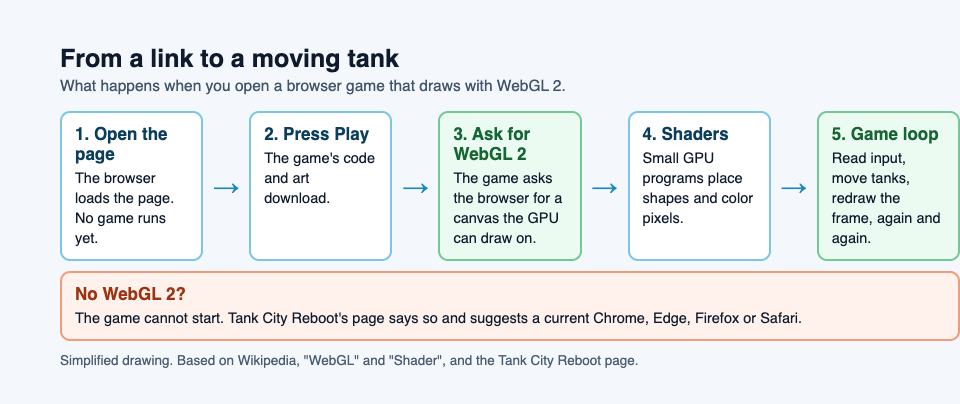
Here is what happens when you open a browser game. Take Tank City Reboot as the example.
- You open the page. The browser downloads the HTML, the text, and a few small files. At this point no game is running yet. Tank City Reboot only loads a game when you press Play or Full screen.
- The game files arrive. Once you press Play, the browser fetches the game's code and art. The browser keeps copies in its cache, so a second visit often starts faster.
- The game asks for a WebGL context. This is the game saying to the browser: "give me a canvas I can draw on with the GPU." If your browser or graphics driver cannot provide WebGL 2, the game cannot start.
- Shaders are compiled. Shaders are tiny programs that run on the GPU. One kind decides where each corner of a shape goes on screen. Another decides the color of each pixel. The browser hands them to your graphics driver, which turns them into code your GPU understands.
- The game loop starts. Many times a second, the game reads your input, moves the tanks and shots, checks what hit what, and tells the GPU to redraw the frame.
- Your input reaches the game. In Tank City Reboot, keys reach the game once it has focus. Click or tap the game to give it focus. While it has focus, the arrow keys and Space do not scroll the page, so your tank moves instead of the window.
The browser does the work an installer would do, but only for the parts it needs right now.
WebGL vs Canvas, WebGPU, and plugins like Flash
WebGL is not the only way to draw in a browser. Here is how it compares with the others you may see mentioned.
Canvas 2D
The canvas element has a simpler drawing mode called Canvas 2D. You ask it to draw a rectangle, a line, or an image, and the browser does it. It is easy to learn and fine for card games or simple puzzles. It gives you far less control over the GPU, so large numbers of moving objects and effects get slow sooner.
WebGPU
WebGPU is the newer graphics standard for the web. It can also run general math on the GPU, not only drawing. Chrome and Edge first shipped it in April 2023, and Safari and Firefox followed in 2025. Many games, the Tank City games among them, still draw with WebGL 2.
Plugins like Flash
Years ago, games in a browser usually needed a plugin such as Flash. A plugin was a separate program added onto the browser, with its own updates. Flash Player was discontinued on December 31, 2020. With WebGL, the graphics code is part of the browser and is updated with it.
Why browser games load fast and run without installs
A downloaded game copies itself to your disk, often with launchers and update tools. A browser game skips that. A few reasons it feels quick:
- Nothing to install. The browser already has WebGL and handles keyboards, gamepads and touch. The game brings its own logic and art.
- Load on demand. A page can wait until you press Play before it fetches the heavy files. Tank City Reboot does this, so the page itself opens quickly.
- Caching. Files you already downloaded stay in the browser cache for next time.
- No patch screen. When the site changes, your next visit gets the new version.
The trade-off is that a browser game keeps its saved data inside that browser. In Tank City Reboot, each game remembers your best score in the browser you set it in. Playing never needs an account, and unless you sign in, your best score stays on that device.
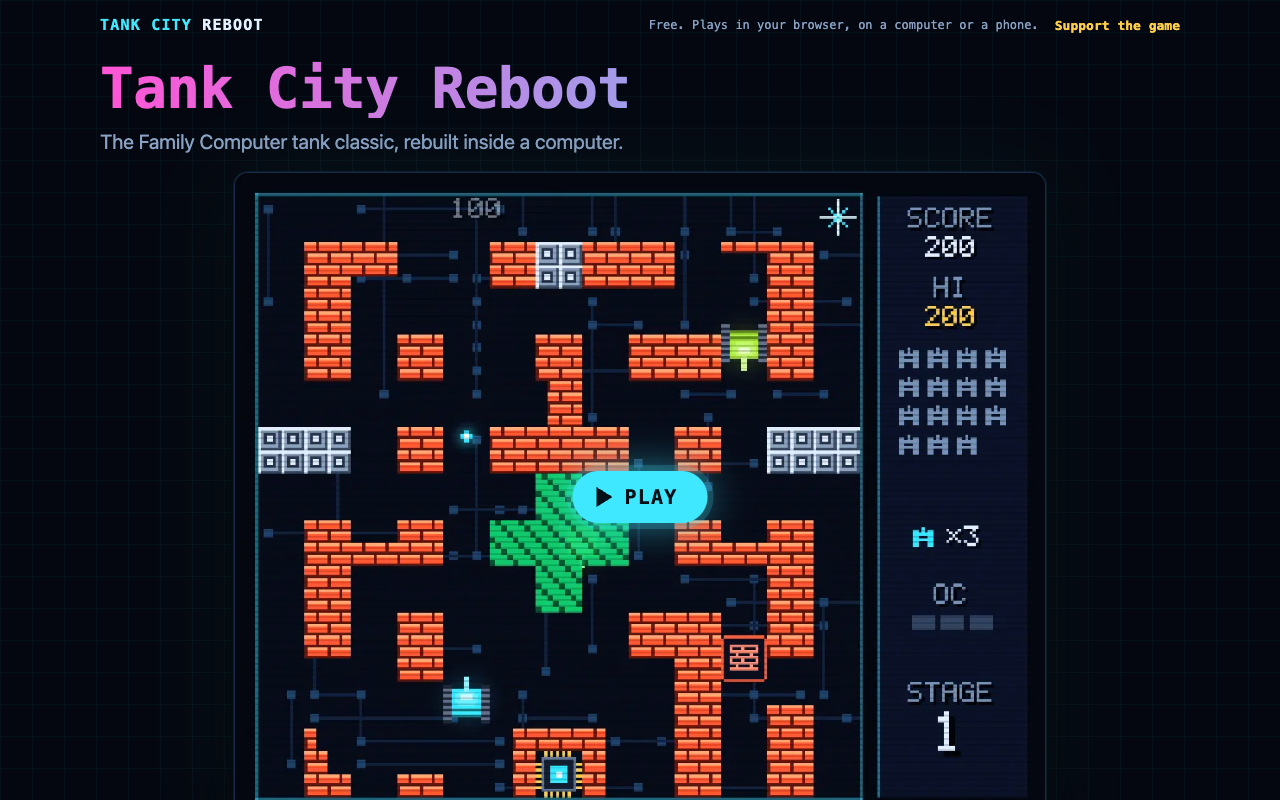
The game loads only when you press Play.
What your computer needs to play WebGL games smoothly
Check these four things:
- A current browser. Tank City Reboot needs WebGL 2, which means a current Chrome, Edge, Firefox or Safari. If your browser is old, update it first.
- Hardware acceleration turned on. Browsers have a setting that lets them use the GPU. If it is off, WebGL may fail or run very slowly.
- Up-to-date graphics drivers. On a desktop, the driver is the link between WebGL and your GPU, so an old one can stop WebGL from working.
- Some breathing room. Dozens of open tabs, a video call, and a game at once can share one GPU badly. Close what you do not need.
How Tank City Reboot uses WebGL in the browser
Tank City Reboot is a free site with two original tank games that play in your browser, on a computer or a phone, with nothing to install and no account needed to play. Both draw through WebGL 2. Here is a short workflow that shows the browser parts in action.
A first run on a laptop
- Open tankcityreboot.vlvd.net in a current browser.
- Press Play. This is the moment the game loads and asks for WebGL.
- Click the game so it has focus.
- Move with the arrow keys or WASD and fire with Space, J or Z. Pause with P, Enter or Escape.
- Want the whole screen? Press Full screen instead of Play.
A gamepad works too. In the first game you move with it and fire with button A.
A first run on a phone
On a touch screen, once the game has loaded, a touch pad floats over it. There is a round direction pad at the bottom left, Fire at the bottom right, and Pause at the top right. It works in portrait or landscape. The space between the buttons takes no touches, so a swipe there still scrolls the page, unless you are in full screen.
On an iPhone, the browser does not offer full screen for a web page. The player fills the window instead and gives you a button to leave.
The second game
Tank City Zero Day uses the same browser setup. Your tank moves and fires in eight directions and can dash with Shift, K or X. Each wave is a freshly generated arena, and a zero-day boss arrives every fifth wave with its own chiptune soundtrack. Press M to turn the music on or off.
Frequently asked questions
Is WebGL safe to use?
WebGL is part of the browser, so it runs under the same rules as any web page. Keep your browser and graphics drivers updated, as you would for any web content. For what a sandbox is, see what a sandbox is in cybersecurity.
Does WebGL work on phones and tablets?
Yes, in current mobile browsers. Tank City Reboot plays on a phone with an on-screen touch pad, in portrait or landscape. The controls guide covers every button.
How do I check if WebGL is enabled in my browser?
The quickest test is to open a WebGL 2 game and press Play. If your browser lacks it, the Tank City Reboot page tells you: "This game needs WebGL 2, which this browser does not offer," and suggests a current Chrome, Edge, Firefox or Safari.
Why is a WebGL game laggy or showing a black screen?
A game that will not start often means the browser could not give it WebGL 2, for example because hardware acceleration is off. Lag often comes from an old browser, an old driver, or too many busy tabs. Update, turn on hardware acceleration, close other tabs, and reload.
Get started
You now know the path from a link to a moving tank: the page loads, the game asks for WebGL 2, shaders compile, and the game loop draws each frame on your GPU. Try it yourself. Open the page, press Play, click the game, and guard the CPU core. Every enemy, power-up and wall is named for a real computing or security idea, explained on the page.
Play Tank City Reboot: it is free, plays in your browser on a computer or a phone, and needs no account.
Comments
No comments yet.
Sign in or make an account to comment.