When a music subscription ends: what happens to your videos
When a music subscription ends, most creators have one worry: what happens to the videos I already made with it? If you cancel, could last year's videos lose their music license? The answer depends on the service, so this guide looks at one, Wavecrate's Pro plan, where the pricing page answers it in plain words. It explains what stays covered, why the date you publish matters more than the date you download, and what to do for new videos afterwards.
Wavecrate licenses royalty-free music, sound effects, photos and videos, and every download comes with a license certificate and a code anyone can check on its verify page.

Why this question outlives the subscription
A video you post today may stay online for years. The music in it stays protected far longer than that. The U.S. Copyright Office's FAQ on how long copyright lasts says that, as a general rule, for works created after January 1, 1978, protection lasts for the life of the author plus 70 years.
A subscription, by contrast, can last a few months. So the useful question is not whether the music is still protected after you cancel. It is. The question is whether your license for those old videos is still in force, and that is set by the service's own terms.
When a music subscription ends on Wavecrate
Wavecrate's plans and licenses page asks this exact question, "What happens when Pro ends?", and answers it in two sentences:
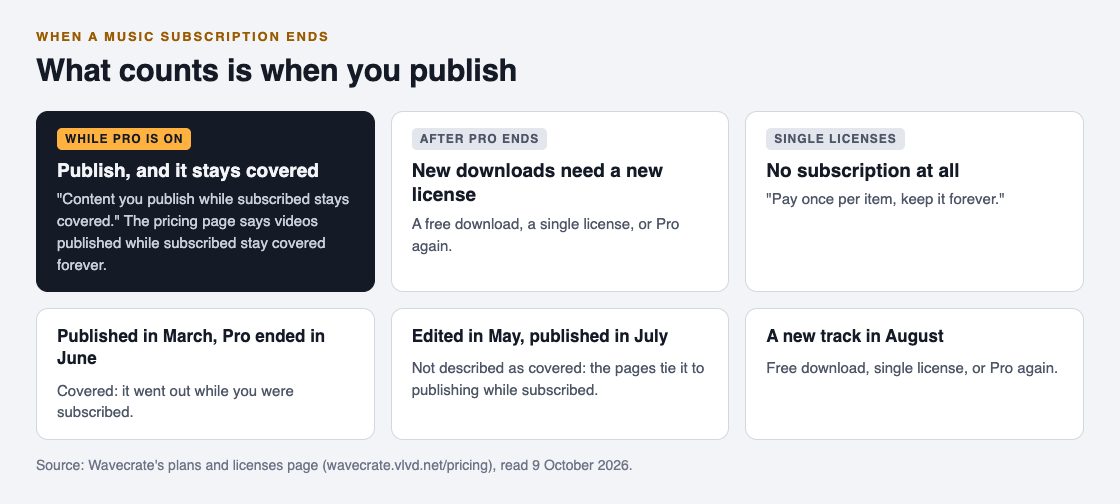
Videos you published while subscribed stay covered forever. New downloads after it ends need a free download, a single license, or Pro again.
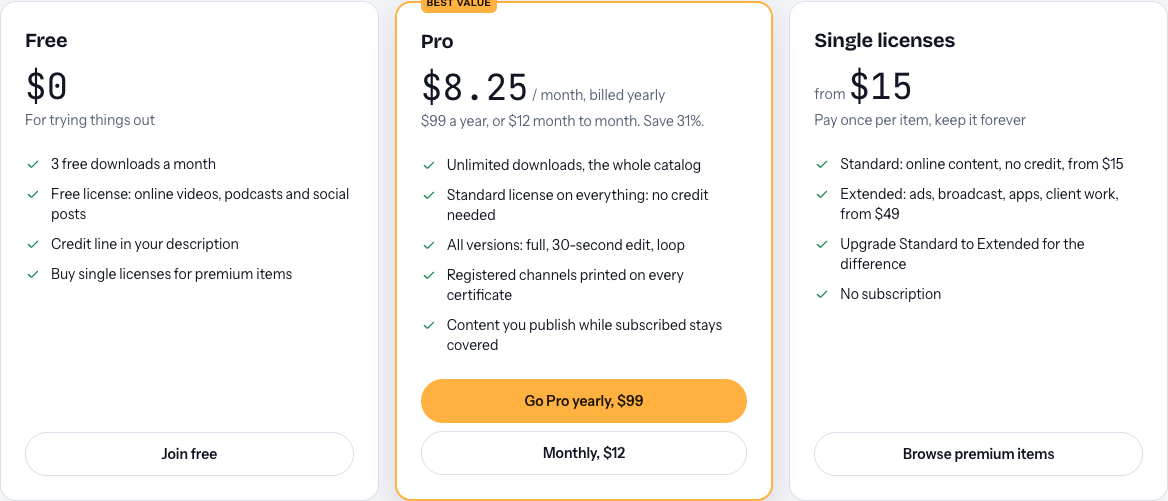
The Pro card on the same page says it the short way: "Content you publish while subscribed stays covered."
One thing to know first: Pro and the paid licenses are not on sale yet (Wavecrate says purchases open soon), so the prices below are the listed prices for when sales open, and items marked Free can already be downloaded with a free account. The rule above is what you can plan around before you ever subscribe.
So cancelling does not reach back into your channel. What you put out while Pro was active keeps its cover. What changes is what you can do next.
What counts is when you publish
Read those sentences closely and one word does the work: published. Both the answer and the card tie coverage to content you publish while subscribed, not to files you downloaded while subscribed.
That matters for anyone who edits ahead. Say you download a track in your last week of Pro, cut it into a video, and schedule the video to go live the week after Pro ends. The pages describe videos published while subscribed as covered. They do not describe a video published after Pro ends as covered, even if the file came from your Pro download. The same goes for re-uploading an old video as a new post later on: the pages do not describe it, so do not count on it.
Wavecrate has no separate license agreement page today, so the pricing page and the item pages are the full description. When a case is not clearly on them, treat it as not covered, and publish before you cancel.
Your three options for new videos
For anything you make after Pro ends, the pricing page names three ways to license new music:
- A free download. A free account gets 3 free downloads a month, only on items marked Free, under the Free license for online videos, podcasts and social posts, with a credit line in your description.
- A single license. "Pay once per item, keep it forever", with no subscription. On one track page read for this guide, Porch Light, Standard is listed at $15 and Extended at $49, for when sales open.
- Pro again. Listed at $99 a year, or $12 month to month, and not on sale yet.
Which one fits depends on how often you publish. A channel that uses one new track a month has different needs from one that uses ten.
Two details help you pick. First, the Free license is narrower than Standard. It covers online videos and podcasts with a credit line, but the "your own business and brand content" row starts at Standard, so a free download suits a personal channel better than a shop's videos. Second, look at what each option gives you per track. Pro lists all versions of a track: the full track, a 30-second edit and a loop. Porch Light's page lists the same three versions. Check the item page for the versions you need before you choose. And whichever you pick, the single license line says "keep it forever", so a track you license that way does not depend on any subscription at all.
A worked example: six months of Pro
Say you run a cooking channel. Once Pro is on sale, you take it month to month from January, at its listed $12 a month, and stop paying at the end of June. Here is how each video stands:
- Twenty videos published January to June. All published while subscribed, so they stay covered. You do nothing.
- One video edited in June and published in July. Published after Pro ended. Before it goes live, license its track again: a single Standard license for that track, or a free download if the track is marked Free and you add the credit line.
- A new video in August. New downloads need a free download, a single license, or Pro again.
Before you cancel, do one small job: keep a list of your videos with the license code for each track. Pro prints your registered channels on every certificate, and the verify page shows the licensee, the item, the license type and those channels, with no account needed to check. If a claim arrives on an old video, the pricing page says to send the platform your license code or certificate link. That list turns a worrying email into a two-minute reply.
What Pro never covered
Ending Pro cannot take away what Pro never gave. Pro gives Standard licenses on the whole catalog, never Extended. Paid advertising, TV, radio and cinema, apps and games, and client work are Extended only on the music table. So a paid ad or a client video you made during Pro needed its own Extended license all along, whether or not you cancel.
And neither Pro nor a single license makes the music yours. Wavecrate's pricing page says you get a license to use it and Wavecrate keeps the copyright.
Frequently asked questions
Do my old videos lose their license when I cancel Pro?
Not on Wavecrate. Its pricing page says videos you published while subscribed stay covered forever.
Can I use a track I downloaded during Pro in a video I post after it ends?
The pages tie coverage to content you publish while subscribed, so treat that video as not covered and license the track again before it goes live.
Does it matter whether Pro is billed monthly or yearly?
The pricing page gives one answer for when Pro ends and does not split it by monthly or yearly billing.
What should I keep after I cancel?
Keep the license code or certificate link for each track you used. Anyone can check them on the verify page without an account.
Get started
Browse Wavecrate: you can join free and download items marked Free now, paid licenses are not on sale yet (purchases open soon), and every download comes with a license certificate and a code anyone can check on its verify page.


Read the plans on the pricing page and note which one would fit how often you publish.
Comments
No comments yet.
Sign in or make an account to comment.