Whoosh sound effects for video transitions: a licensing guide
Whoosh sound effects are the small sounds that sell a cut: a rush of air as one shot slides into the next, a rising tone that pulls you into a reveal. They last a second or two, which makes them easy to grab from anywhere and easy to forget about when you think of licenses. This guide covers the four kinds of transition sound, where each one sits against the cut, and which license covers them in your own videos and in work for clients.
The four kinds of transition sound
Most transition sounds fall into four groups. Knowing which one you need saves a lot of scrolling.
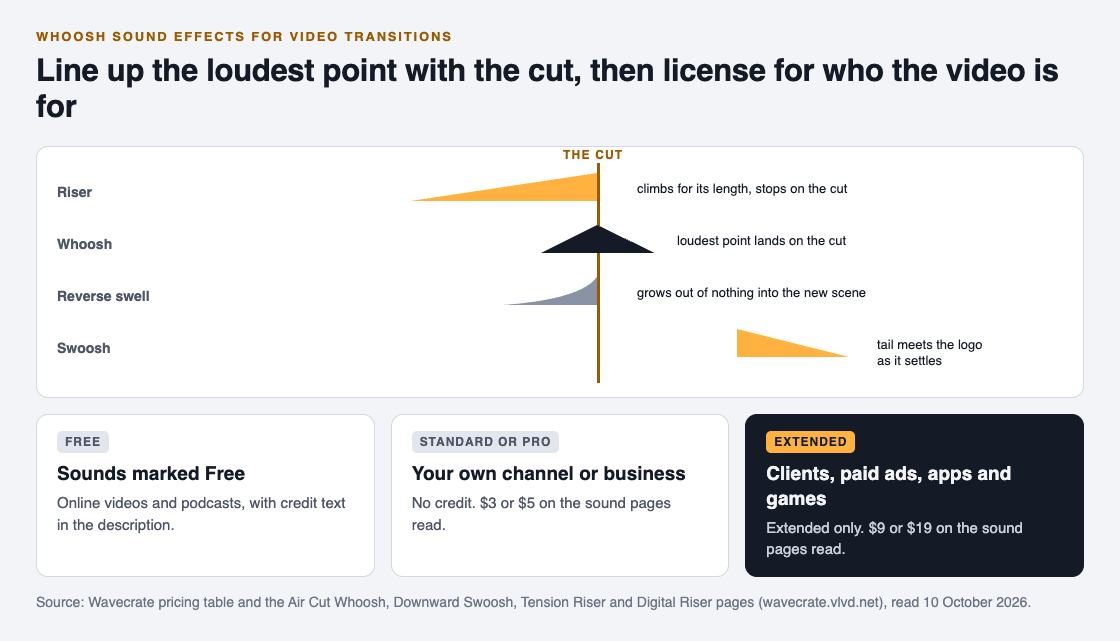
- Whoosh. A fast rush of air, peaking and falling in about a second. It suits swipes, whip pans and slides.
- Swoosh or drop. A whoosh that falls in pitch, so it feels like something landing. It suits a title or a logo dropping into place.
- Riser. A sound that climbs for a few seconds and stops at its peak. It builds tension before a reveal or a beat drop.
- Reverse swell. A soft sound that grows out of nothing, like a note played backwards. It eases the viewer into a scene instead of snapping them there.
Glitch swipes are a fifth kind: a whoosh with a digital stutter in it, which suits tech and gaming edits. On Wavecrate, you can play each kind against your cut and read its license before you pick one.

Where each sound goes on the cut
The rule that fixes most clumsy transitions: line up the loudest point of the sound with the cut, not the start of the file.
- A whoosh peaks in its middle, so start it a few frames before the cut and let the peak land on it.
- A riser peaks at its end. Start it as many seconds before the cut as it lasts, so it stops exactly on the new shot. One Wavecrate riser describes itself as "peaking on the cut."
- A swoosh lands at its end, so its tail should meet the moment the logo or title settles.
- A reverse swell ends where the new scene begins, then the scene's own sound takes over.
Keep transition sounds below your voice. If someone is talking across the cut, a quiet whoosh under the words works better than a loud one on top of them. And vary them: the same whoosh on every cut starts to sound like a tic by the third time.
Finding whoosh sound effects on Wavecrate
Open Wavecrate's sound effects and choose the Transitions category. On 10 October 2026 it listed 10 sounds, including:
- Air Cut Whoosh (marked Free, 0:01): "a clean, ready-to-drop sound effect for transition and swipe moments."
- Downward Swoosh (marked Free, 0:01): "for transition and drop moments."
- Tension Riser (0:04): "for build and trailer moments."
- Digital Riser, Long, Bright (0:04): a synth and noise riser that comes as a 24-bit WAV master and a 320 kbps MP3.
- Reverse Swell, Long, Warm (marked Free, 0:03), plus glitch swipes and a data whoosh.
You can also filter by length and by access (All, Free or Premium).
Why a one second sound still needs a license
Length does not change ownership. The U.S. Copyright Office's page What is copyright? lists sound recordings among the kinds of work copyright covers, and says copyright exists automatically in an original work once it is fixed. A whoosh someone recorded or designed is a sound recording like any other.
So the question is not whether a sound is short enough to be safe, but whether you have permission for the way you use it. That is what a sound effect license gives you.
Which license covers your transitions
Wavecrate's plans and licenses page puts sound effects in the same table as music:
- Free, only on sounds marked Free. It covers YouTube, TikTok, Instagram, Twitch, podcasts and monetized channels, with "credit text required in the description." A free account gets 3 free downloads a month.
- Standard: no credit line, and it adds "your own business and brand content." Your registered channels are printed on the certificate.
- Extended: everything in Standard, plus paid advertising, TV and radio broadcast, apps and games, and client work.
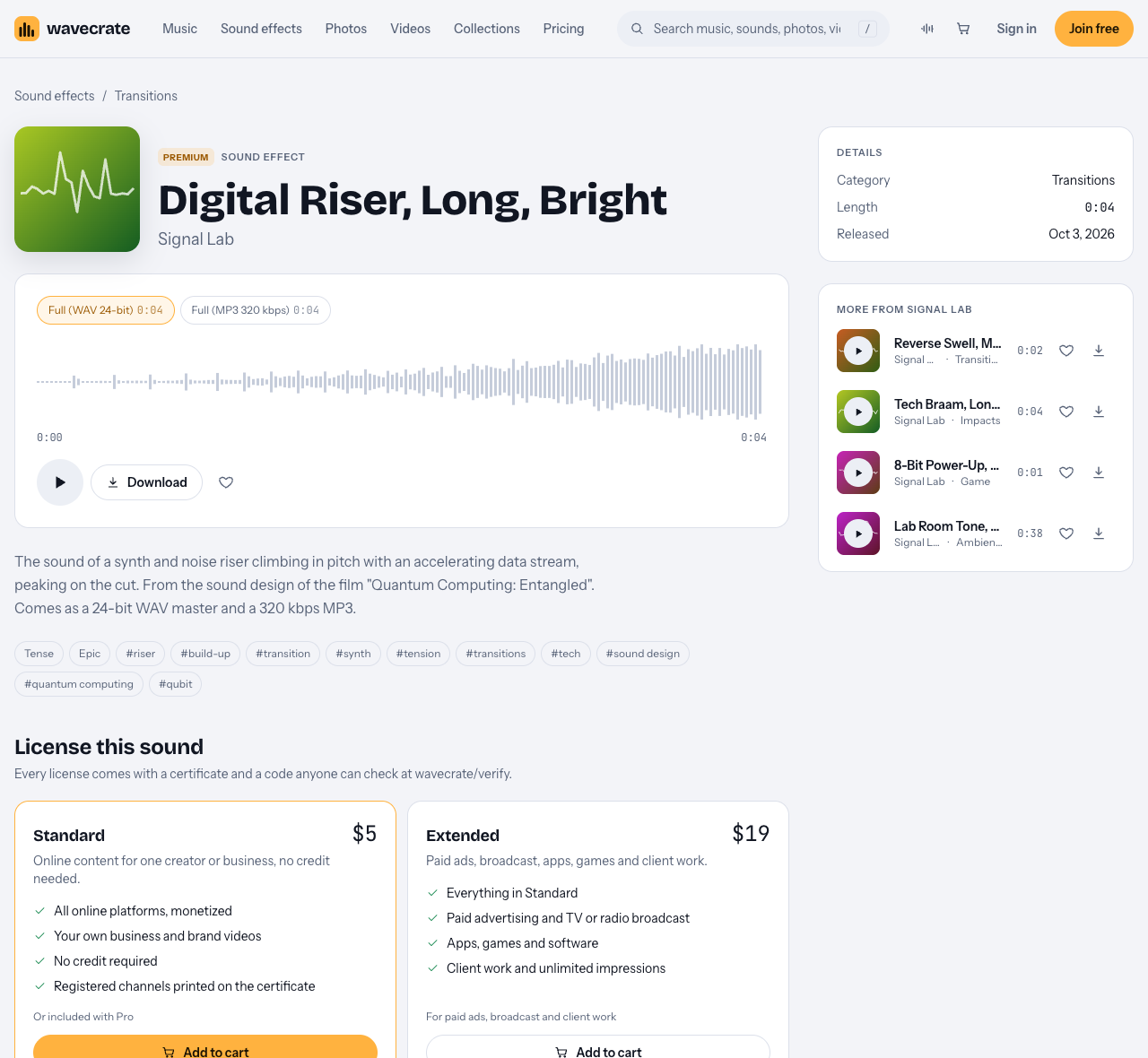
Listed prices differ by item, so read each page. On 10 October 2026, Air Cut Whoosh, Downward Swoosh and Tension Riser each showed Standard $3 and Extended $9, while Digital Riser, Long, Bright showed Standard $5 and Extended $19. Pro, listed at $99 a year or $12 month to month, gives Standard licenses on every sound in the catalog, but never Extended. Paid licenses and Pro are not on sale yet: Wavecrate says purchases open soon, so these are the listed prices for when sales open, while sounds marked Free can already be downloaded with a free account.
A worked example: a product video, then the same video for a client
Say you sell handmade candles and you are editing a 45 second video of a new scent for your shop's Instagram. You plan three transitions.
- The build. Digital Riser, Long, Bright runs for 4 seconds, so you start it 4 seconds before the reveal shot and let it stop on the cut.
- The swipe. Air Cut Whoosh goes under a whip pan from the candle to the label, with its peak on the cut.
- The logo. Downward Swoosh lands as your logo settles on the end card.
Two of these sounds are marked Free, but this is a video for your own business, and the table ticks "your own business and brand content" only under Standard and Extended. So all three need Standard, listed at $3 each for the whoosh and the swoosh and $5 for the riser. If you edit videos like this every week, Pro would cover Standard on all of them once it is on sale.
Now a friend who runs a bakery asks you to make the same kind of video for their page. That is client work, ticked only under Extended, so each sound needs Extended, listed at $9, $9 and $19 on those pages. It stays Extended even for the two sounds marked Free, and Pro does not cover it. The pricing page says that once purchases open, Extended will cost only the difference for a sound you already hold Standard on.
Either way, keep the license code for each sound. The verify page shows who holds the license, for which item and what it covers, with no account needed.
Frequently asked questions
Do I need a license for a one second whoosh?
Yes. A short sound is still a sound recording, which the Copyright Office lists among the works copyright covers, so you need permission for the way you use it.
Where do I put the credit for a free whoosh?
The Free license says the credit text goes in the description. If a video uses three Free sounds, credit all three.
Why do transition sounds have different prices?
Each sound has its own license cards. On the pages read on 10 October 2026, some showed Standard $3 and Extended $9, and one riser showed Standard $5 and Extended $19.
Does Pro cover sound effects in client videos?
No. Pro gives Standard licenses only, and client work is ticked only under Extended.
Get started
Browse Wavecrate: you can join free and download items marked Free now, paid licenses are not on sale yet (purchases open soon), and every download comes with a license certificate and a code anyone can check on its verify page.


Go to Sound effects, choose Transitions, and play a few whooshes against your cut before you pick.
Comments
No comments yet.
Sign in or make an account to comment.