Wireframe mountain loops for an outdoor gear launch: fit and licenses
You are planning a launch for a new piece of outdoor gear, and you want a background that looks bold and a little futuristic. This guide looks at wireframe mountain loops for an outdoor gear launch through one real clip on Wavecrate, the Wireframe mountains Loop. You will see what it shows, when it fits and when it does not, how to cut it, and which license each use needs.
What the Wireframe mountains Loop actually shows
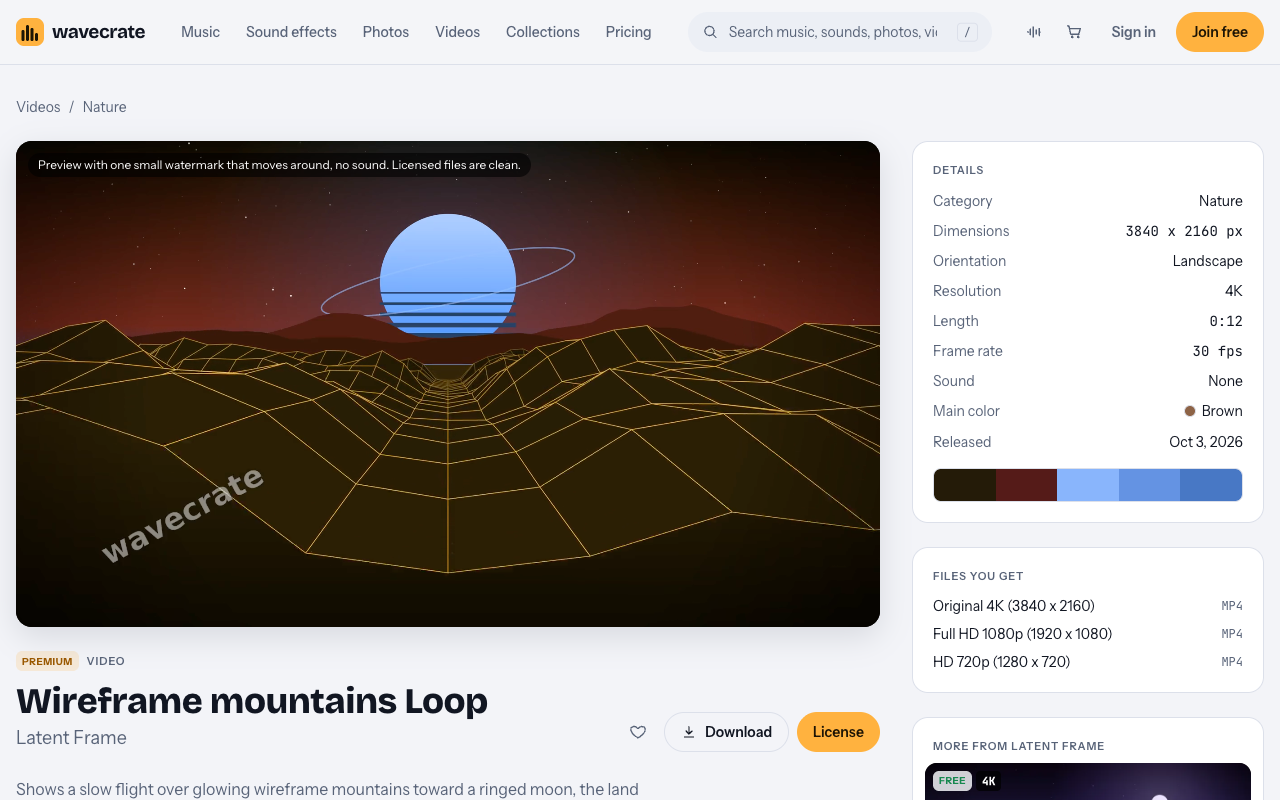
The Wireframe mountains Loop sits in the Nature category, by Latent Frame. The page describes it as a slow flight over glowing wireframe mountains toward a ringed moon, "the land rendered as a digital twin." It is a seamless 12-second 4K loop, "rendered in code," and it is silent.

Here are the details from the page:
- 3840 x 2160, landscape, 4K
- 12 seconds long at 30 fps
- No sound
- Main color listed as Brown
- Released Oct 3, 2026
- Files: Original 4K mp4, Full HD 1080p mp4 and HD 720p mp4
The tags tell you the mood: epic, nostalgic, synthwave, terrain, digital twin, moon, flight. The preview carries one small moving watermark and no sound. The licensed files are clean.
When wireframe mountain loops for an outdoor gear launch fit
This loop is a stylized, synthwave-style digital landscape. It is not footage of real mountains. Nobody will mistake it for a ridge they could hike.
That makes it a good match for some launches and a poor match for others. It suits gear where technology is the point:
- A GPS watch or a fitness wearable
- A mapping or route planning app
- A smart headlamp or connected light
- Any bold, retro-styled launch teaser where you want mood before detail
It does not suit a launch that sells the feel of a real place. If your story is mud, rain, rock and a long climb, a glowing grid will work against you. For real trail footage, film your own. Then use this loop, if at all, as a short title card or a transition between real shots.
How to cut a launch teaser from a 12-second loop
You do not need special software tricks. A few plain habits go a long way.
- Do the loop math. One pass is 12 seconds. A 24-second teaser is two passes. A 36-second one is three. Cut on a pass boundary so the seam stays invisible.
- Leave space for the product. The flight moves toward the moon in the middle of the frame. Plan where your product shot and your text will sit so they do not fight the motion.
- Crop for vertical. The file is landscape. For stories and short vertical posts, crop a 9:16 window and check that the moon and the horizon still read.
- Use slow fades. The motion is calm. Slow fades in and out match it better than hard cuts.
- Add your own sound. The clip is silent. Bring your own music or voiceover, and license that separately.
Start with the Original 4K file for your master edit. Use the 1080p or 720p file when you need something lighter for a quick draft or a web header.
Worked example: one loop, three uses
Say a gear brand is launching a GPS watch and picks the Wireframe mountains Loop as its teaser background. Here is how the license changes as the plan grows. The listed prices come from the cards on the item page and the pricing page. Paid licenses are not on sale yet (Wavecrate says purchases open soon), so these are the prices for when sales open, while items marked Free can already be downloaded with a free account.
First, note that this item is Premium. It has no Free card, so there is no Free option for any of these uses.
Use 1: the brand's own teaser
The brand puts the teaser on its own website, posts it on its social accounts and plays it in its launch presentation. That is its own marketing and presentations. The Standard license, listed at $29, covers it. Standard reads: "Your own websites, social, presentations and marketing, no credit needed." Pro would also cover it once on sale, because Pro includes Standard.
If the brand prints launch flyers with a frame from the loop, Standard covers printing up to 500,000 copies of its own marketing.
Use 2: the teaser becomes a paid ad
Next, the brand boosts the teaser post or runs it as an ad. The site does not define paid advertising beyond the card text, so treat a boosted post as a paid ad. That needs the Extended license, listed at $99. Extended reads: "Paid ads, broadcast, products for resale and client work."
Use 3: an agency cuts the video
If an agency cuts the launch video for the brand, that is client work. Client work is on the Extended card, so the agency needs Extended, listed at $99.
One more case. If the brand prints the frame on product packaging, or on a poster it sells, that is products for resale. Extended covers resale items, including prints and packaging, with unlimited print runs.
Standard, Extended or Pro: a quick guide
Here is the short version of the two cards on this item:
- Standard, listed at $29. Websites, social media, apps and presentations. Your own marketing and brand content. Print up to 500,000 copies. No credit required. Or included with Pro.
- Extended, listed at $99. Everything in Standard, plus paid advertising and TV broadcast, products for resale such as merchandise, templates, prints and packaging, unlimited print runs and client work.
Pro is listed at $99 a year or $12 month to month, and is not on sale yet. It gives you Standard on the whole catalog, never Extended. Content you publish while subscribed stays covered. So Pro is a fit if your team will use many clips for its own channels. It does not replace Extended for ads or client work.
Live events, trade show screens and screenings are not named in the license table. Treat them as not covered. If you plan to loop this clip on a booth screen, do not count on any card to cover it.
Every license comes with a certificate and a code. Anyone can check that code at the verify page without contacting Wavecrate. Keep the code with your launch files.
Free options for reviewers and creators
Maybe you are not the brand. You are a reviewer or a creator covering the launch on your own channel, and you want a free background. This loop has no Free card, so look at the Free items in the same category instead.
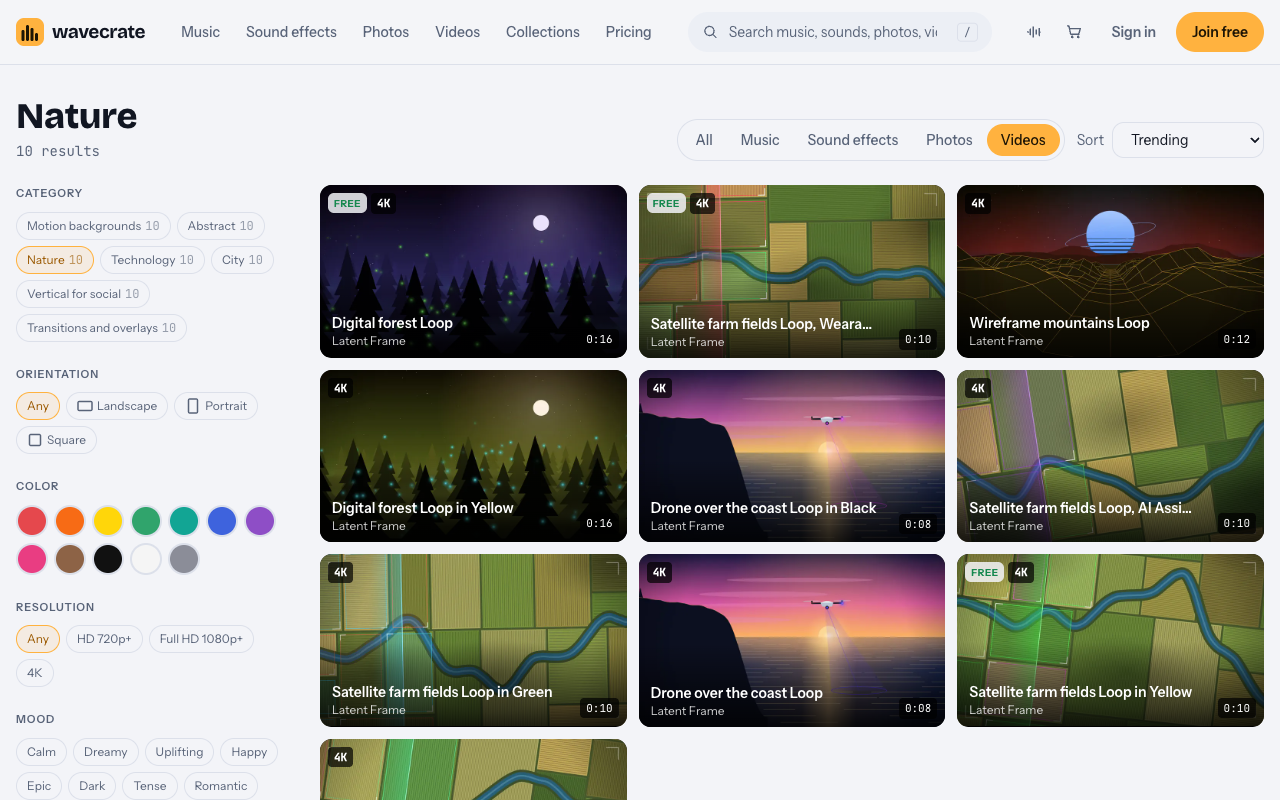
The Nature videos category holds 10 loops by Latent Frame. All of them are stylized scenes with technology in them, not filmed footage. On 11 October 2026, these three were marked Free:
- Digital forest Loop
- Satellite farm fields Loop in Yellow
- Satellite farm fields Loop, Wearables
The Free card for videos covers online and social posts, with credit. That includes websites, blogs, social media posts and monetized channels. The card asks for credit text "next to the photo or in the description", so for a video, use the description. The Free card does not cover your own marketing, so a brand should not use it for a launch.
Items can switch between Free and Premium. Read the item page on the day you download.
Frequently asked questions
Does the Wireframe mountains Loop show real mountains?
No. It is a stylized, synthwave-style digital terrain with a ringed moon. For real trail scenes, film your own footage.
Is there a Free license for this loop?
No. The item is Premium and shows only Standard and Extended cards. Check the page on the day you download, since items can switch.
Which license covers a boosted social post?
Treat a boosted post as a paid ad. Paid advertising is on the Extended card, which is listed at $99.
Does the loop have sound?
No. The clip is silent, so add your own music or voiceover and license it separately.
Get started
Browse Wavecrate: you can join free and download items marked Free now, paid licenses are not on sale yet (purchases open soon), and every download comes with a license certificate and a code anyone can check on its verify page.
Watch the preview, check the cards on the item page, and match each planned use to Standard or Extended before you edit. When you are ready, create a Wavecrate account.


Comments
No comments yet.
Sign in or make an account to comment.