XSS prevention: encode output for each place it lands
XSS prevention comes down to one habit: encode data for the exact place it lands. Cross-site scripting (XSS) means an attacker gets their text to run as script in another person's browser, on your site's behalf. It happens when your app writes user data into a page and the browser reads that data as code. OWASP's Cross Site Scripting Prevention Cheat Sheet is the plain source for this post. Below are its rules one place at a time, with a worked example.
A browser builds a page by following special characters. A < starts a tag and a quote ends an attribute. If user data holds those characters and your app writes them out raw, the data changes the shape of the page.
OWASP puts it this way: an attacker must be able to insert and execute malicious content in a page, so every variable needs protecting. One that is not validated and then escaped or sanitized is a possible weakness.
Start with the easy win: frameworks encode text output by default, so use that default and review every way around it. OWASP warns that no framework is perfect, and gaps still exist in popular ones such as React and Angular. Encoding and sanitizing fill them.
XSS prevention starts with the place the data lands
"Encode" is not one action. Browsers parse HTML, JavaScript, URLs and CSS in different ways, and OWASP says that using the wrong encoding method can introduce weaknesses or break your app. The same user string needs a different treatment depending on where it goes.
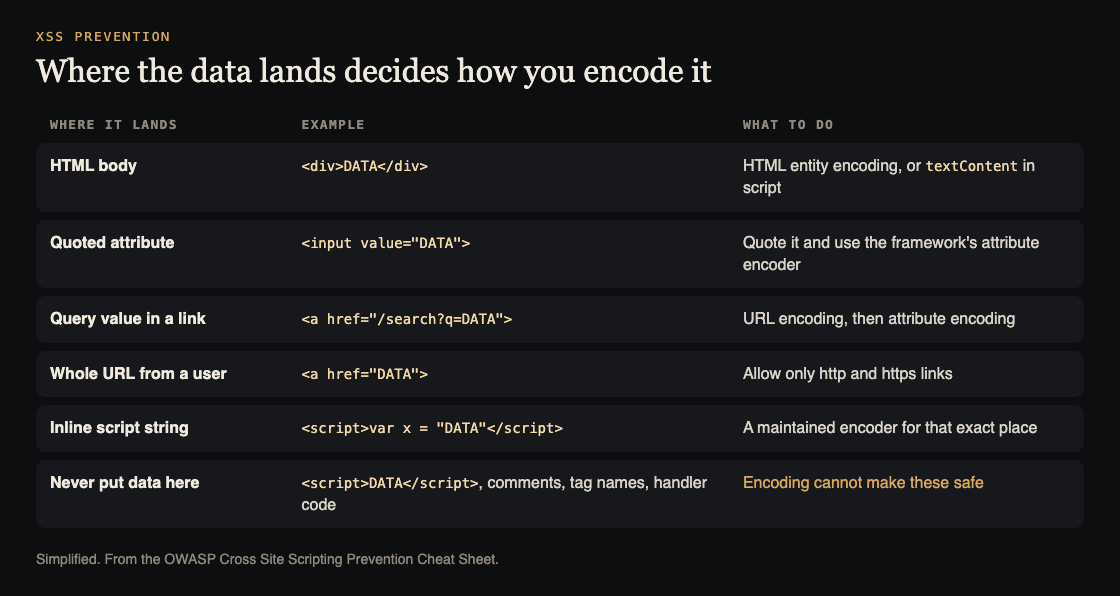
One row per place data can land. Simplified from the OWASP Cross Site Scripting Prevention Cheat Sheet.
Before you change code, make a list: every place a user-controlled value is written out, and which row of that table it falls into. To hunt for holes from the outside first, see our XSS testing post shows how.
HTML body and attributes
Body. When data goes between two tags, such as inside a <div>, use HTML entity encoding. OWASP lists the five characters:
&becomes&<becomes<>becomes>"becomes"'becomes'
Your template engine does this for you when you print a value as text. In browser script, the matching move is to assign the value to textContent of an ordinary element. That creates a text node and never parses HTML. It does not HTML-encode the value, so pass the original text; encoding first would show entities on screen.
Attributes. For ordinary text attributes such as title or value, always wrap the value in quotes, use your framework's or library's attribute encoder, and keep the element and attribute names fixed. You do not need to encode every space or non-alphanumeric character: a space does not end a quoted value, and the sheet calls that extra encoding unnecessary.
The rule has a limit. Attribute encoding does not make an event-handler attribute such as onclick safe, because the HTML parser decodes character references before the JavaScript runs. For handlers, prefer addEventListener() with a trusted function, and pass user values to it as data.
URLs, JavaScript and CSS
URLs. There are two jobs, easy to mix up. First, when a user value goes into a link, such as a search term in /search?q=..., use URL (percent) encoding on that value. Encode the parameter value, not the whole URL. In script, encodeURIComponent() does this for each untrusted query value. If the finished link then goes into an href or src, apply HTML attribute encoding after the URL encoding.
Second, when a user supplies the whole address, encoding is the wrong tool. OWASP's advice is to canonicalize the input, validate the URL, and allow only http and https. A javascript: link has no special HTML characters at all, and it still runs when clicked.
JavaScript. Putting server data into an inline script is the riskiest option. If you must, OWASP says to put the data only inside a quoted string, and to use a maintained encoder that is documented for both the JavaScript string and the enclosing HTML script. Do not escape quotes by hand. Never insert untrusted code, names or whole expressions. And once a value is encoded for that spot, it is still unsafe to hand it to eval() or any other function that runs strings as code.
If your server sends JSON, check that Content-Type is application/json, not text/html.
CSS. The only safe spot is a property value. When script changes a style, set a fixed property such as element.style.color and take the value from a list your app defines. Do not let user input pick the property or supply a whole block of declarations. A property that takes a URL needs URL checks as well.
Where encoding cannot save you. OWASP names places that should never hold variable data, because even encoded data may not stop XSS:
- directly inside a
<script>block, or inside a<style>block - inside an HTML comment
- as an attribute name or a tag name
- in callback functions, or in untrusted event-handler code
- in
eval(),setTimeout()andsetInterval()strings
If a feature seems to need data there, change the design, not the encoder.
A worked example: one profile page, four places
Say a profile page shows a display name, a website address and a short bio. Walk it with your list.
- Heading. The display name is printed as text between tags. Use the template's default output. Test value: a name that holds
<b>tags. It should show as literal characters on screen. - The name in a field. The same name fills
<input value="...">. Check the template quotes the value. Test value: a name with a double quote inside it. The field must show it, not break out. - The website link. The address goes in an
href. Allow onlyhttpandhttps, and reject the rest, includingjavascript:. Then let the template encode it for the attribute. - The bio. If it is plain text, treat it like the heading. If you let people write formatted text, see the next section.
Save each test value as a small regression test, so it runs again when someone swaps a template or adds a front-end library.
Sanitizing, extra layers and shortcuts to avoid
When users must write real HTML, as in a rich text editor, encoding would show their tags as plain characters. OWASP says to sanitize instead: a sanitizer strips dangerous HTML and returns a safe string, and it recommends DOMPurify. Do not change the content after sanitizing, check that any library you pass it to does not alter it, and patch the sanitizer often, because bypasses are found regularly.
OWASP calls framework protections, output encoding and sanitizing the best protection, and lists other controls as additions:
- Content Security Policy. An allowlist for what a page may load. It is easy to get wrong, so it is a second layer, never the main defense. Our Content Security Policy post covers writing one.
- Cookie attributes. They limit what injected script can do with cookies, but they do not stop the script from running. See the session cookie security post.
- Trusted Types. On Chromium-based browsers, they make risky browser-side sinks reject plain strings, which removes whole classes of DOM-based XSS. The DOM-based XSS post covers that side.
- Web application firewalls. OWASP calls them unreliable and does not recommend them for stopping XSS.
The sheet also names two shortcuts that look attractive. One is relying on a CSP header alone. The other is one filter or interceptor that encodes everything on the way out. A filter cannot know the output context of each value, it can encode twice, it cannot help with DOM-based XSS, and it misses data that comes from your own database or another service. Encode as close as you can to the place the data is written.
Frequently asked questions
Is input validation enough to prevent XSS?
No. OWASP lists validation next to encoding or sanitizing: each variable should go through both. A valid name can still hold a quote that breaks an attribute, so encode where you write it out.
Should I encode data before I save it?
No. The right encoding depends on where the value lands, and one value may land in several places. Store the original and encode at output, once. Encoding twice shows entities on screen.
Does my framework make me safe?
It covers text output by default, which is most of the work. You are exposed where you bypass it, such as writing HTML strings yourself or putting a user's address in a link. OWASP also notes gaps in popular frameworks.
Is a Content Security Policy enough?
No. OWASP says a CSP should not be your primary defense, because it is easy to make mistakes with. Use it as an extra layer behind encoding.
Get started
Start with the list: every place user data is written into a page, and which row of the table it falls into. Then search your code for innerHTML and for any template output that skips the default encoding, and fix those first. The full source is the OWASP Cross Site Scripting Prevention Cheat Sheet.
whitehatstoic tests web apps for weak spots and gives you a written report with fixes and a retest after fixes. No test can promise it finds every weakness, so treat a report as a strong check, not proof of safety. You pick a time and a topic on the booking page, and it confirms by email.
Building something that has to be safe? Book a meeting with whitehatstoic: tell us the product, the deadline and your biggest worry, and we reply with a plan.
Comments
No comments yet.
Sign in or make an account to comment.