XSS testing: find where user input runs as code
Cross-site scripting, or XSS, happens when your app takes text from one user and shows it to another user in a way the browser runs as code. XSS testing means finding every place that can happen. The fix rests on one habit: treat user data as text, never as markup, at the exact point where it goes on the page. This guide covers the three kinds of XSS, the defenses that work, and how to check your own app safely.
What XSS is and why it still shows up
A browser cannot tell the difference between HTML your team wrote and HTML that came from a user. If both arrive in the same response, it trusts both. That is the whole problem. A display name, a comment, a search term or a URL parameter can end up inside your page. If it is not encoded for that spot, the browser may treat it as part of your code.
When that happens, the injected script runs with your site's permissions. It can read what the page shows, act as the signed-in user, and send data elsewhere. The OWASP Cross Site Scripting Prevention Cheat Sheet calls XSS attacks serious and says no single technique solves XSS, so it matters most on pages that handle sign-in, payments and admin actions.
XSS keeps coming back because modern apps render data in many places. One component escapes correctly. Another, written in a hurry, inserts raw HTML to keep some formatting. A single gap is enough.
The three kinds of XSS
You will see three names. They differ in where the untrusted data comes from and where it gets turned into markup.
Stored XSS
The data is saved first, usually in your database, and shown later to other users. A profile bio or a support ticket is a common path. Stored XSS hits everyone who views that record, including your admins, which makes it the most serious kind.
Reflected XSS
The data comes in with a request, often in a query string, and the server puts it straight back into the response. A search page that prints "Results for" followed by the term is the classic spot. It affects users who follow a crafted link.
DOM-based XSS
The server never touches the data. Your own front-end JavaScript reads something like the URL fragment and writes it into the page using an unsafe API. Server-side filters cannot see this one, so you have to look at client code.
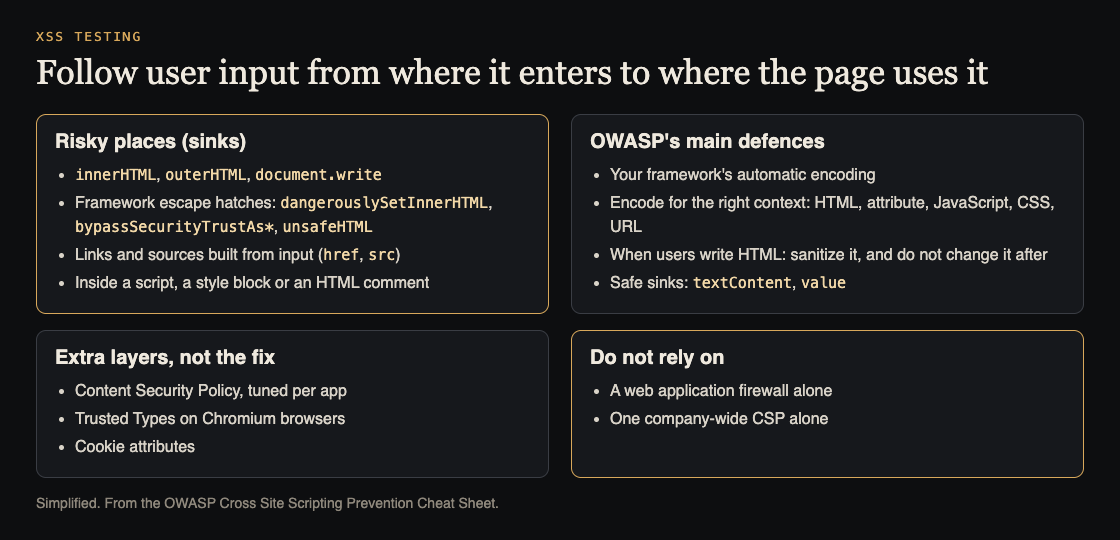
Where XSS lands, and what OWASP says stops it. Simplified from the OWASP Cross Site Scripting Prevention Cheat Sheet.
The defenses that work
No single control covers every case. Use these in layers, so a mistake in one place is caught by the next.
1. Encode output for its context
Encoding turns special characters into safe text. The right encoding depends on where the data lands: inside HTML text, inside an attribute, inside a URL, or inside JavaScript. Encoding for HTML text does not make data safe inside a script block or an href. Know the context every time you output user data. OWASP also lists places where encoding is not enough at all: directly inside a script, inside an HTML comment, or directly in CSS. Keep user data out of those.
2. Let your framework escape for you
React, which Next.js uses, escapes values you put inside JSX by default. Server templates in Node usually do the same if you use the escaping syntax. Your job is to not switch that off. The risky exits are well known. OWASP names React's dangerouslySetInnerHTML without sanitizing, Angular's bypassSecurityTrustAs* functions and Lit's unsafeHTML; add unescaped template tags on the server and HTML strings built by hand.
3. Avoid unsafe DOM APIs
In plain JavaScript, prefer textContent over innerHTML. Avoid document.write, eval and passing strings to setTimeout. These are the usual sinks for DOM-based XSS.
4. Sanitize when you truly need rich text
Sometimes users must be able to format text. In that case, run their HTML through a maintained sanitizer; OWASP recommends DOMPurify. Do not write your own filter with regular expressions, and do not change the HTML after sanitizing it, which OWASP warns undoes the work.
5. Validate URLs before you link to them
If users can supply links, only allow https: and http: schemes. A link with a script scheme in an href is a common miss, because escaping does not stop it. OWASP notes React 19 now blocks javascript: URLs in src and href, which still does not replace your own check.
6. Add a Content Security Policy
A Content Security Policy (CSP) is a response header that tells the browser which scripts it may run. A strict policy that blocks inline scripts and only allows scripts with a nonce or from known sources can stop many attacks even if an encoding bug slips through. Start in report-only mode, read the reports, then enforce. OWASP treats CSP as an extra layer tuned to each app, not the main defense, and adds Trusted Types on Chromium browsers, which make risky sinks such as innerHTML refuse plain strings.
7. Protect session cookies
Set your session cookie with HttpOnly, Secure and a suitable SameSite value. HttpOnly stops scripts from reading the cookie. It does not stop XSS, but it limits what an injected script can take.
A worked example: fixing a comment feature
Say you run a Next.js app with Postgres. Users can leave comments, and a developer wanted line breaks and bold text to show. So the comment component renders the saved body with dangerouslySetInnerHTML. That is a stored XSS risk on every page that shows comments, including the admin moderation screen.
Here is a safe workflow to find and fix it.
- Search the code for exits from escaping. Grep for
dangerouslySetInnerHTML,innerHTML,document.writeandeval. List every hit and the data it receives. - Trace each hit back to its source. For the comment, the source is user input saved to the database. That makes it high priority.
- Check behavior with a harmless marker. In your own development or staging environment, post a comment that contains
<b>marker</b>. If the page shows the word in bold, the app is rendering user input as HTML. If it shows the angle brackets as plain text, the output is encoded. - Fix the root cause. Remove
dangerouslySetInnerHTML. If you need formatting, store the comment as plain text or Markdown, render it with a library that escapes by default, and pass any HTML through a strict sanitizer. Patching one comment or blocking one string treats a symptom. - Add a CSP in report-only mode. Watch for violations for a while, fix the legitimate ones, then enforce.
- Retest. Repeat the marker check on every page that shows comments, including admin views and email previews.
- Write it down. Record what you found, what you changed and what is left. Then add the marker check to your automated tests, the way security tests in CI keep known attacks from coming back.
Only test systems you own or have written permission to test. Running checks against someone else's site without authorization can be illegal, even with harmless input.
XSS testing: scope it and cover the hiding places
A useful test starts with scope. Agree in writing which domains, environments and accounts are in play, what is off limits, and who to contact if something breaks. Use a staging copy when you can, with test data rather than real customer records.
Then cover the places XSS hides:
- Every form field that is saved and shown again, including names and file names.
- Query parameters and URL fragments read by the page.
- Admin and support screens, where staff view user content with higher privileges.
- Emails, PDFs and exports built from user data.
- AI features that show model output as HTML. A model can repeat content it was fed, so treat its output as untrusted, the same way you would any user input.
XSS is one weak spot among many. If your app fetches URLs that users supply, read the guide on SSRF testing too. If your product runs code generated by an AI agent, see AI agent sandboxing.
Why the report and the retest matter
The retest closes the loop. Fixes often cover the reported page and miss a second component that renders the same data. Checking again after the fix catches that.
whitehatstoic runs security tests on web apps and AI systems. The work covers web app and API review and prompt injection tests, and it ends with a written report, fixes and a retest after those fixes. Because whitehatstoic also builds web and mobile apps with Next.js, Node and Postgres, the same people who find a weakness can help fix it. Testing is scoped after a short call, and no test can promise to find every weakness. The aim is to find and fix weak spots before they cause harm. You can book a security testing call to talk through your app.
Frequently asked questions
Does React prevent XSS on its own?
React escapes values inside JSX by default, which blocks many cases. It does not protect you when you use dangerouslySetInnerHTML, put user URLs in href without checking the scheme, or write to the DOM directly.
Is input validation enough to stop XSS?
No. Validation helps, but the main defense is encoding output for the context where data appears. Data that is safe in one place can be unsafe in another.
Does a Content Security Policy replace output encoding?
No. A CSP is a second layer that limits damage when encoding fails. Keep fixing encoding bugs even after you deploy a strict policy.
Get started
Grep your code for the escape hatches above today, and run the marker check on the first page each one feeds.

Building something that has to be safe? Book a meeting with whitehatstoic: tell us the product, the deadline and your biggest worry, and we reply with a plan and a price.
Comments
No comments yet.
Sign in or make an account to comment.