Yokoten: apply one fix to every similar problem
Yokoten is the habit of taking a fix that worked in one place and checking every place where the same problem could happen. This guide covers yokoten: how to apply one fix to every similar problem. You will learn what the term means, how to find look-alike problems, and a five-step process you can run on your own work this week. You will also see how to keep the trail in one place, so the next person does not solve the same thing from scratch.
What yokoten means
The Lean Enterprise Institute's lexicon entry for yokoten defines it as a Japanese term for deploying concepts, ideas, or policies horizontally across the company. Its example is a defective valve found on one machine in a plant. Yokoten is the process that makes sure all similar valves in that facility, and in other relevant facilities, are examined for the same defect as well.
Notice the word examined. Yokoten is not "send a memo." It is "go and check whether this problem lives here too, and if it does, use what we learned."
Why fixing a problem once is not enough
Many problems you fix have siblings. A bug in one function may have been copied into others. A confusing step in one onboarding email may show up in the signup form too. If you only fix the one you noticed, any siblings stay broken and you meet them later.
There is also a cost to memory. If a similar problem appears two months later and you cannot remember what you did or why it worked, you pay for the same lesson twice. Yokoten turns one fix into a small search while the lesson is fresh. The post on how to stop solving the same problem twice covers the memory side in more detail.
How to spot problems that share the same root cause
Surface symptoms can look different while the cause is the same. Ask these questions about the problem you just fixed:
- What was the real cause? Not "the page crashed" but "we trusted user input without checking it."
- Where else does that cause appear? Same code pattern, same template, same handoff between people, same tool setting.
- Who else uses the thing that broke? Other teams, other projects, other copies of a checklist.
- What would the problem look like somewhere else? Write the symptom you would expect to see, then go look for it.
A good rule: if you can describe the cause in one plain sentence, you can search for it. If you cannot, you have not found the cause yet.
A simple yokoten process: fix, document, search, apply, verify
Here is the process, with a worked example from web security.
- Fix. You find that the
nextparameter on your login page will send people to any website. You change it so it only accepts paths on your own site. - Document. Write the problem in one line: "Login redirect accepts outside URLs." Write the fix and the outcome: "Allow only relative paths. Worked." Note what the fix needs, such as "a shared helper for checking redirect targets."
- Search. List every other place that redirects based on input: logout, password reset links, email confirmation, payment return pages.
- Apply. Use the same helper in each place. Where a spot is different (say, a payment return that must go to a partner site), adapt the fix and write down why.
- Verify. Test each one. Record which ones the fix worked for, which it partly fixed, and which still fail.
Do not skip step five. A fix that worked on the login page might fail on the reset page because the reset link is built in a different file. Recording that failure is as useful as recording the success.
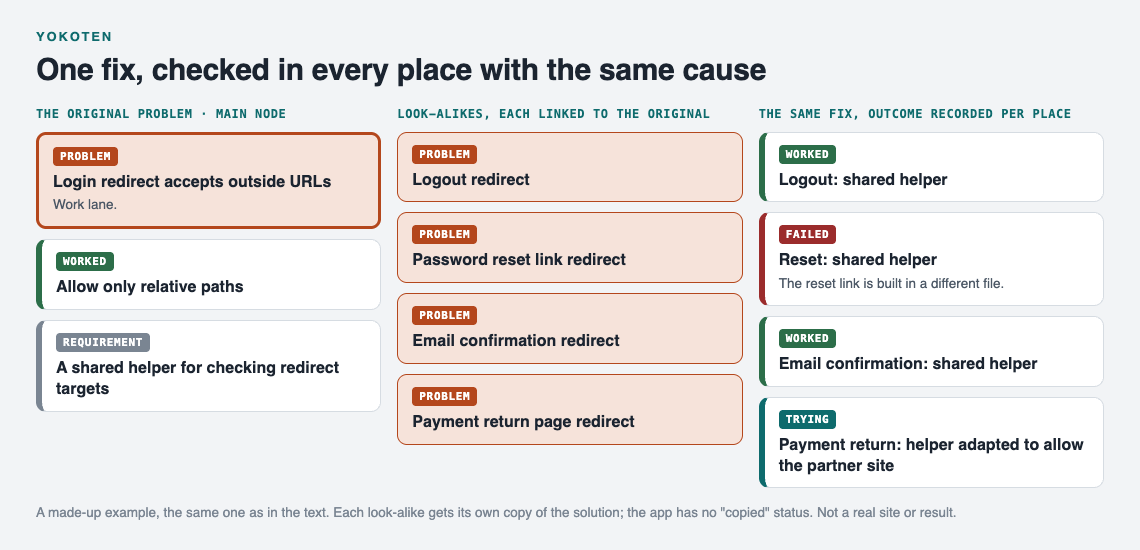
The made-up redirect example after one round of yokoten.
Yokoten examples from software, teams, and everyday work
Software
You track down a slow page and find a database query inside a loop. Fixing it there is step one. Yokoten means searching the codebase for the same loop pattern and checking each hit. If you keep a debugging journal, the entry for the first fix becomes the search query for the rest.
Teams and groups
A volunteer group misses a deadline because nobody knew who was booking the venue. The fix is a named owner for each task. Yokoten asks: which other events have unowned tasks? Keeping one shared list of group problems makes that question easy to answer, because the look-alikes sit next to each other.
Everyday work
A client call stalls because your screen share picks the wrong window. You fix it by running a short check before the call. Yokoten means using the same check before every walkthrough, interview, and workshop where you share your screen. Small fixes like this are easy to spread.
Common mistakes that stop a fix from spreading
- Writing down the symptom, not the cause. "Page broke" cannot be searched. "Query inside a loop" can.
- Copying the fix without looking. Yokoten means checking the new place first. A fix pasted into the wrong context can cause a new problem.
- Hiding failures. If the fix failed somewhere, that is information. Delete it and the next person tries the same thing.
- Keeping notes in scattered places. A chat message, a sticky note, a commit comment. Nobody can search across all three.
- No link between the original and the copies. When the fix changes later, you cannot find every place that used it.
Tracking yokoten with a problem graph instead of scattered notes
Yokoten is about connections: this problem looks like that one, and this fix worked here but only partly there. A list hides those connections. A graph shows them.
Problem Graph is a problem and solution journal drawn as a knowledge graph. Here is how the five steps map onto it.
Fix and document. Write the original problem in one line and press Enter. It lands on the graph straight away. Put it in a lane: personal, work, expert or scientific. Attach the solution you tried and mark the outcome as worked, partly or failed. The app also has a requirement node, so "shared helper for redirect targets" can sit on the map as something the fix needs.
Search and apply. Add each look-alike as its own problem and link it to the original. Links can cross lanes, so a work problem can connect to a personal one if they share a cause. Then attach the same solution to each look-alike and record what happened there. The home page puts it this way: patterns show up on the map that never show up in a list.
Verify. Because every solution carries its outcome, you can see at a glance which copies of the fix worked and which failed. The app's own words: "A solution that failed three times stays on the map as a failed solution, and that is exactly what the next person needs to know." If you prefer rows to a map, there is a List view beside it, plus filters by lane.
Spread it to other people. This is the part that makes it real yokoten. Mark the original problem as a main node. Only a main node can be shared, and when you share it, its solutions, their outcomes and the requirements they need go with it. You can share it into a private network (create one, give a few people the invite code) or make it public. Problems you only linked to it stay home, so your messy look-alike list stays with you.
Yokoten also runs the other way. Problem Graph can show you similar problems other people have shared, in any lane, and which of their solutions worked. You can borrow one into your own graph with one tap, and it keeps a link back to where it came from. You can also ask the AI for suggestions. It proposes new solutions grounded in what worked for others on problems like yours. Treat those as ideas to test, then record the real outcome.
Frequently asked questions
Is yokoten the same as best practice sharing?
They overlap. Sharing a good practice can stop at publishing the idea. Yokoten, as the valve example shows, means going to each similar place, checking whether the problem exists there, adapting the fix, and confirming the result.
How do I know which problems are similar enough?
Compare causes, not symptoms. If you can state the cause in one sentence and the other problem fits that sentence, it is a candidate. Check it before you apply the fix.
Who should own yokoten on a small team?
The person who made the original fix should start the search, because they understand the cause best. Each look-alike can then go to whoever owns that area, with the original fix linked so they do not start from zero.
Can yokoten work for solo developers and freelancers?
Yes. Your look-alikes are your other projects, clients, and past code. A single place where you record each fix, its outcome, and the problems linked to it is enough to make the habit stick.
Get started
Pick the last thing you fixed. Write it as one line, attach the fix with its outcome, then add two places where the same cause might be hiding and link them. That is your first round of yokoten. If you want to see how a filled graph looks first, the app offers a "Load example set" button on an empty graph.
Try Problem Graph: it is free, and you can look around the public network without an account. Write one problem down in a line and attach the first thing you will try.
Comments
No comments yet.
Sign in or make an account to comment.