Zero trust architecture: verify every request
Zero trust architecture rests on one rule: never trust, always verify. No person, device or service is trusted because it sits inside your network. Every request to every resource is checked. The OWASP Zero Trust Architecture Cheat Sheet builds on the US standards body NIST's guide, SP 800-207. This post explains the principles in plain words, the parts that make the decisions, and a first phase a small product team can start this month.
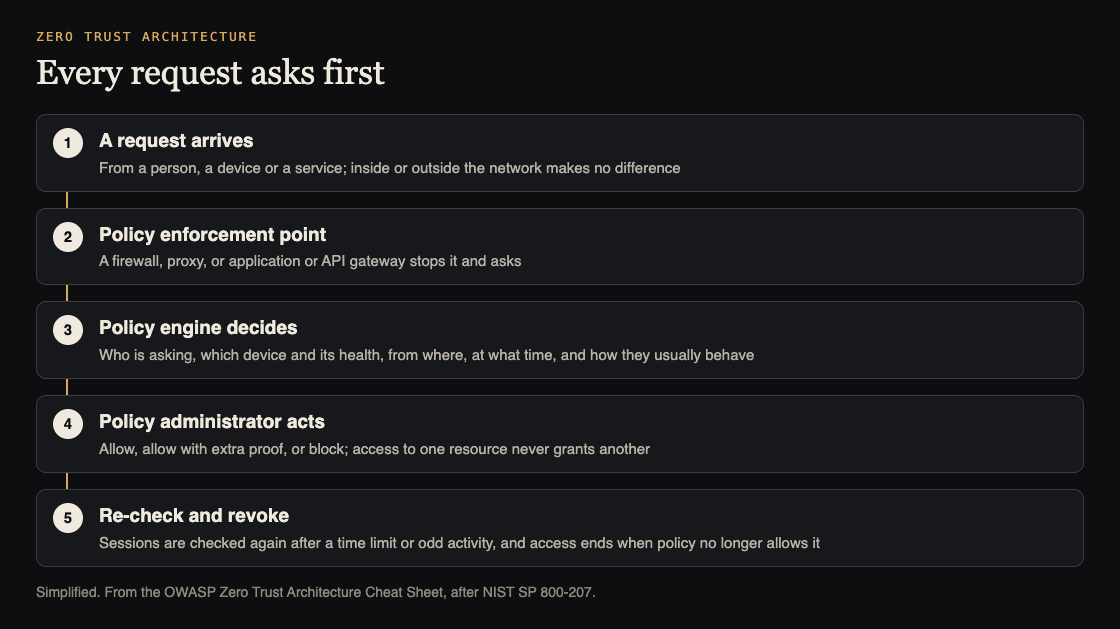
Every request asks first. Simplified from the OWASP Zero Trust Architecture Cheat Sheet.
Why the castle model fails
OWASP compares traditional security to a castle with walls: once you are inside, you can reach everything. That is why one stolen password or one infected laptop so often turns into a large breach. The attacker gets past the wall once, then moves freely.
Zero trust puts a guard at every door instead. OWASP's comparison of responses makes the difference concrete:
- Stolen credentials: access can be denied even with a valid password, when the device or behavior looks risky.
- Lateral movement: small network segments block movement between systems, and each connection is checked.
- A compromised device: its health is watched, and access is revoked when something is wrong.
- Admin abuse: admin rights are granted just in time and expire on their own, instead of being permanent.
The seven principles of zero trust architecture
The cheat sheet takes these from NIST SP 800-207:
- Everything is a resource. Servers, databases, cloud services and laptops each need their own controls. "Internal" is not a reason to trust.
- Every connection is secured. Encrypted and authenticated, whether it runs between offices, between your own services or from home. OWASP says to use TLS 1.3 or better.
- Access is per session, with least privilege. Access to one resource never grants another. OWASP notes this does not mean a fresh login for every request; a recent enough check is allowed.
- Policy is dynamic. Decisions weigh who is asking, from which device, from where, at what time, and how they usually behave.
- Every asset is watched. Patches, configuration and odd behavior are checked continuously, and assets that fall out of line lose access.
- Checks are enforced and repeated. Sessions are re-checked when policy says so, such as after a time limit or suspicious activity, and access is revoked when policy no longer allows it.
- Data improves the policy. Collect access and traffic data to make better decisions, while weighing the privacy risk and keeping sensitive data out of logs.
The three parts that make the decisions
- Policy engine: decides whether to allow or block, using identity, device health, location, behavior and risk. OWASP says the hard part is policies that are secure without making work impossible.
- Policy administrator: takes the decision and tells the enforcement systems what to do, such as "allow, but ask for extra proof".
- Policy enforcement points: the firewalls, proxies and application and API gateways that actually allow or block. Enforcement happens everywhere, not only at the edge.
What it means for your app and network
Network. Give each application its own segment, block traffic by default, watch traffic between systems and encrypt it. Prefer access to specific resources over broad network access; OWASP says a VPN connection alone must never grant access to other resources. Our guide to network segmentation shows how to draw the zones.
OWASP adds a few network controls on top: DNS filtering to block known malicious websites, web filtering to control which sites people can visit, and monitoring of every network connection, not only those crossing the edge.
Applications. Check identity at the app's front door, and check authorization again inside the app for every object and action. OWASP is clear that a web application firewall is extra defense, not a replacement for server-side authorization. For APIs, a gateway should authenticate every call, validate the request's shape and enforce rate limits, the same points our REST API security checklist covers. Between your own services, see microservices security.
Worked example: phase one for a small team
OWASP stresses that NIST recommends moving step by step, with old and new ways of working side by side. Its phases are examples, not a schedule. Here is the first phase as a small team might run it.
- Inventory. List every user, device, app and how data moves between them. OWASP warns this takes longer than you think, because you find forgotten systems and connections nobody wrote down.
- Strong MFA everywhere. Use phishing-resistant methods, and plan time to help people through the change. Our multifactor authentication guide covers the choices.
- Narrow remote access. Move suitable work to access per application. Test sign-in and authorization before you retire the old path, and restrict and watch any VPN that remains.
- Remove standing admin rights. Switch to temporary admin access that expires. OWASP admits this can slow some work at first.
Phase two splits the network starting with your most important apps, checks device health, and adds identity checks at each app's entry point. Later phases add behavior monitoring, which learns how users and devices normally act and asks for more proof when something looks off, and automated responses that isolate a compromised account or quarantine a suspicious device faster than a person could. OWASP says zero trust is never done: keep measuring how fast you detect and respond, how often policy is broken, and whether users are coping.
To track progress, the cheat sheet points to the CISA Zero Trust Maturity Model, version 2.0. It grades five areas, identity, devices, networks, applications and workloads, and data, through four stages: Traditional, Initial, Advanced and Optimal. OWASP stresses these stages describe what you can do, not calendar deadlines, and each area can move at its own pace.
Get an outside view
whitehatstoic's cybersecurity and AI safety testing covers a web app and API review, a written report with fixes, and a retest after you apply them, and its independent reviews give a plain written verdict on a project, codebase or vendor before you commit. Both are scoped after a short call. No test finds every weakness, but checking that each door really asks first is a good place to start.

Frequently asked questions
Does zero trust mean logging in for every request?
No. OWASP notes NIST allows a recent enough trust check. Sessions are re-checked when policy requires, such as after a time limit or suspicious activity.
Is a VPN zero trust?
No. OWASP says a VPN connection alone must not grant access to other resources. Prefer access to specific applications, and restrict and watch any VPN you still need.
Do we have to do it all at once?
No. NIST recommends moving step by step, with old and new workflows side by side. Start with an inventory, MFA and temporary admin rights.
Get started
List every place someone can reach your systems from outside this week, and remove one permanent admin right.
Building something that has to be safe? Book a meeting with whitehatstoic: tell us the product, the deadline and your biggest worry, and we reply with a plan and a price.
Comments
No comments yet.
Sign in or make an account to comment.