A3 problem solving example for a small team
Most guides to the A3 come from factories, with charts of defect rates and machine downtime. If you run a team of four or five, that can make the method feel too big for you. It is not. This A3 problem solving example follows one small team through one sheet of paper, box by box, with numbers that add up, so you can copy the shape for your own problem this week.
What an A3 is
The Lean Enterprise Institute describes the A3 report as a practice pioneered at Toyota: "getting the problem, the analysis, the corrective actions, and the action plan down on a single sheet of large (A3) paper, often with the use of graphics" (Lean Enterprise Institute, A3 Report). A3 is simply the paper size, 297 by 420 millimeters.
Three things about it matter more than the paper:
- It fits on one page. That forces you to leave out everything that does not help someone understand the problem.
- It reads left to right. The institute says the left side focuses on the problem or current condition, and the right on the countermeasures "considered, tested, and chosen".
- It has one owner. The owner's initials go in the upper right corner. That person does not need authority over everything on the sheet, but they are responsible for getting decisions made.
The same page also warns that "an 'A3' is not a template". The boxes guide your thinking; filling them in neatly is not the point.
The six boxes of an A3
The Lean Enterprise Institute lists what an A3 identifies. Here they are as six boxes, with the question each one answers:
- Current situation. What is happening now, with numbers, and what should happen instead?
- Nature of the issue. When you go and look, what is actually going on?
- Range of possible countermeasures. What could you do? List several, including the ones you will reject.
- Best countermeasure. Which one, or which mix, addresses what box 2 found?
- Who will do what, when. Names and dates, not "the team will".
- Evidence. Proof the issue has actually been addressed, checked the same way you measured it in box 1.
"Countermeasure" is the A3's word for a fix. Boxes 1 and 2 come before any fix is chosen, and box 6 checks the fix the same way box 1 measured the problem.
A3 problem solving example: the support inbox
Here is a made-up team of four who answer customer emails for a small online shop. The owner of the A3 is SK, the team lead.
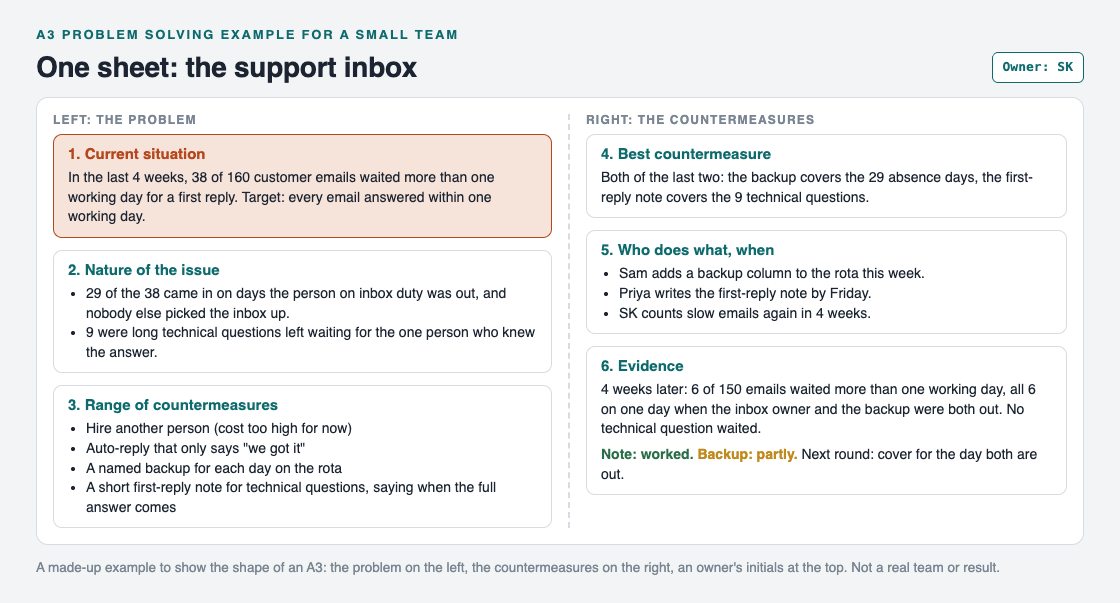
The whole A3 on one page: problem on the left, countermeasures on the right.
Box 1: current situation
SK counted rather than guessed. In the last four weeks, 38 of 160 customer emails waited more than one working day for a first reply. The target: every email answered within one working day.
Box 2: nature of the issue
SK went through the 38 slow emails one by one. The Lean Enterprise Institute calls this going to the gemba, grasping the current situation "through direct observation and inquiry before taking action" (Lean Enterprise Institute, Gemba). For an inbox, the gemba is the inbox. Two patterns showed up: 29 emails came in on days when the person on inbox duty was out and nobody else picked it up, and 9 were long technical questions left waiting for the one person who knew the answer. 29 and 9 make all 38.
Box 3: range of countermeasures
The team listed four: hire another person, set an auto-reply that only says "we got it", name a backup for each day on the rota, and write a short first-reply note for technical questions that says when the full answer will come. Hiring cost too much for now, and the auto-reply would not change how long a customer waited for a real answer.
Box 4: best countermeasure
Both of the last two, because box 2 found two causes. The backup covers the 29 absence days; the first-reply note covers the 9 technical questions.
Box 5: who does what, when
Sam adds a backup column to the rota this week. Priya writes the first-reply note by Friday. SK counts slow emails again in four weeks.
Box 6: evidence
Four weeks later, 6 of 150 emails waited more than one working day. All 6 arrived on one day when both the inbox owner and the backup were out. No technical question waited. So the note worked, and the backup worked partly.
The owner, and the questions
An A3 is not something a manager fills in for the team. The Lean Enterprise Institute describes it as a process "learned through dialogue about concrete problems", where leaders coach "by asking questions versus providing answers". In a small team, that can be five minutes at the end of a weekly check-in:
- How do you know that? Show me the count.
- What did you see when you looked at the slow emails?
- Which countermeasure answers which cause?
- When will we know whether it worked?
If a question has no answer yet, that box is not done. That is the whole review.
After the A3: the next round
Box 6 rarely closes the problem. The Lean Enterprise Institute says problem solving is "never-ending", and treats a plan as "a theory" of what will address the cause (Lean Enterprise Institute, Problem Solving). The evidence tests the theory.
Here, the test found a smaller, new problem: the inbox has no cover when two people are out on the same day. That becomes the next round. In the plan, do, check, act cycle, the last step is to "standardize and stabilize the change or begin the cycle again, depending on the results" (Lean Enterprise Institute, PDCA). The note becomes the normal way to answer technical questions. The rota gets another look. Our PDCA example walks through those rounds for a personal problem.
Keep the A3 as a map in Problem Graph
A paper A3 is good for one conversation. The trouble starts later, when the second round needs the first round's numbers and the sheet is in someone's drawer. Problem Graph is a problem and solution journal drawn as a map, and each box of the sheet has a place on it.
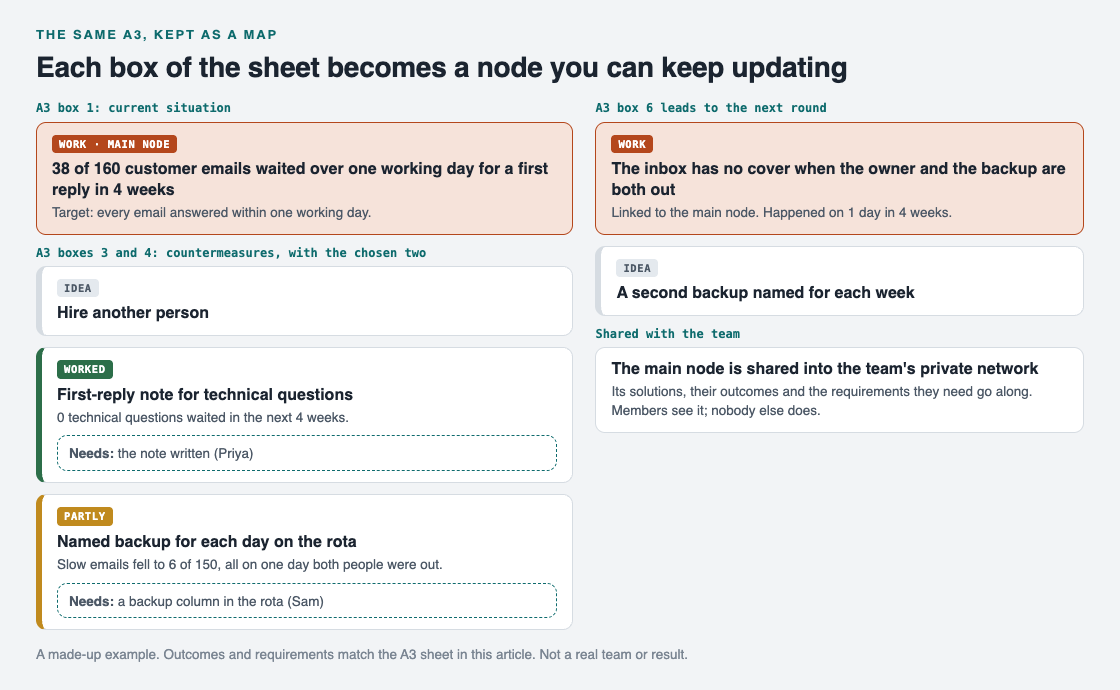
Box 1 is the problem, boxes 3 to 6 are solutions with outcomes and requirements, and the next round is a linked problem.
- Box 1 is the problem, written in one line in the work lane.
- Boxes 3 and 4 are solutions: add each countermeasure as an idea and mark the ones you are trying.
- Box 5 fits the requirements a solution needs, such as "a backup column in the rota".
- Box 6 is the outcome on each solution: worked, partly or failed. The rejected ideas stay too. As the home page puts it, "the graph is honest".
- The next round is a new problem, linked to the first.
To let the team see it, mark the inbox problem as a main node and share it into a private network: create a network and give the team the invite code. Its solutions, their outcomes and the requirements they need go along. Members see it; nobody else does. For more on that, see our guide to sharing problems and solutions with your team.
Frequently asked questions
What is an A3 in problem solving?
It is a one-page report, named after the A3 paper size, that holds a problem, its analysis, the countermeasures and the plan. The left side covers the problem and the right side the countermeasures.
Can a small team use an A3?
Yes. The six boxes work the same for a team of four and a slow inbox as for a factory line. Keep it to one page and one owner.
Is there an A3 template?
Many teams print one, but the Lean Enterprise Institute stresses that an A3 is not a template. The six questions matter more than the layout.
How long does an A3 take?
Boxes 1 and 2 take as long as counting and looking take. The rest can be a short team conversation, then a wait until the evidence is in.
Get started
Pick one problem your team keeps talking about. Fill in box 1 with a real count and box 2 with what you see when you look, before anyone suggests a fix.
Try Problem Graph: it is free, and you can look around the public network without an account. Write one problem down in a line and attach the first thing you will try.
Comments
No comments yet.
Sign in or make an account to comment.