How to share problems and solutions with your team
Most teams solve the same problem twice. The fix lived in one person's head, or in a chat thread nobody can find, and when the problem comes back the team starts over. This guide shows you how to share problems and solutions with your team so that does not happen: what to write down, when to share it, and how to share one problem without opening up everything else.
Why teams lose the fixes they already found
A fix gets lost in three common ways:
- It was never written down. Someone sorted it out on a busy afternoon and moved on.
- It was written down without the problem. A note says "use the rota", but nobody remembers what the rota was for.
- Only the winner was kept. The two ideas that failed first were never recorded, so a new person suggests them again.
Each of these is a sharing problem, not a memory problem. The team knew the answer once. It just did not keep it in a form someone else could find and trust.
What a shared problem record needs
A good record answers four questions for someone who was not there:
- What is the problem? One line, written as what actually happens. "Customer emails sent on Friday wait until Monday" beats "email issues".
- What did we try? Every fix, not only the last one.
- What happened with each? Worked, partly or failed, with a few words on why.
- What does the fix need? The things that must be true for the fix to keep working, such as a rota posted where everyone sees it.
The Lean Enterprise Institute's page on the A3 report makes the case for keeping it all together. An A3 puts the problem, the analysis, the actions and the plan on one sheet, and the finished report includes the "countermeasures tried" and the "experiment results". With "all the facts about the effort in one place", the page says, it is easier to get others on board (Lean Enterprise Institute, A3 Report).
Keep the failed fixes in
It is tempting to share only what worked. It looks tidier. But the failed fixes are often the most useful part of the record.
A failed fix tells the next person what not to spend a week on. It also tells them what the problem is not. If "everyone checks email at the weekend" failed because nobody knew whose turn it was, that points straight at the real gap: ownership, not effort.
The same thinking runs through a lessons learned log. Record the attempt, record the outcome, and keep both, even when the outcome is "failed".
When to share problems and solutions with your team
Sharing works best on a rhythm, not when someone remembers. The Lean Enterprise Institute describes hansei, Japanese for self-reflection, as reflection meetings held "at key milestones and at the end of a project" to identify problems, develop fixes and communicate the improvements "so mistakes aren't repeated" (Lean Enterprise Institute, Hansei).
You do not need a formal meeting. Three moments are enough for a small team:
- When a fix is first tried. Share the problem and the attempt, so nobody tries the same thing in parallel.
- When an outcome is known. Update the record with worked, partly or failed.
- At the end of a project or a busy season. Go through the open problems together and close what is done.
The A3 page adds one more benefit: a shared record moves a team from a "debate about who owns what" to a "dialogue around what is the right thing to do". Arguments about blame go quiet when the facts are on the page.
A worked example: weekend emails
Here is a small support team's problem, written as one shared record. The team is made up, but the shape is one you can copy.
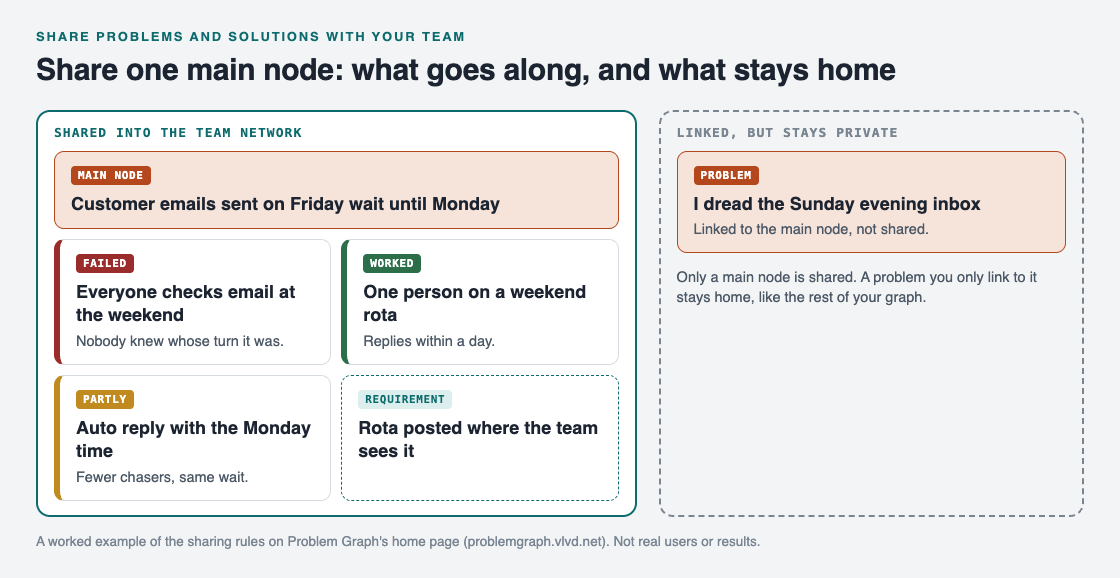
The main node and everything under it is shared. The linked personal problem is not.
- Problem: customer emails sent on Friday wait until Monday.
- Fix 1, failed: everyone checks email at the weekend. Nobody knew whose turn it was, so most weekends nobody did.
- Fix 2, worked: one person on a weekend rota. Replies now go out within a day.
- Fix 3, partly: an automatic reply with the Monday reply time. Fewer chasers, but the same wait.
- Requirement: the rota is posted where the whole team sees it. Without it, fix 2 slides back into fix 1.
A new team member can read this in a minute and know what to do, what not to suggest, and what has to stay in place. To find the cause behind a problem like this before you share it, the 5 whys is a quick way in.
Share one problem, not your whole notebook
Many people keep personal and work problems side by side. You may want the team to see one problem without seeing the rest. Problem Graph is built around that line.
Everything in it is private by default: your problems are saved to your account, and nobody else sees them. To share with a team, you mark one problem as a main node. Only a main node can be shared, and when it is, its solutions, their outcomes and the requirements they need go along. A problem you only link to it stays home.
In the example, the team lead also has a personal note, "I dread the Sunday evening inbox", linked to the main node. The team sees the email problem, the three fixes and the requirement. The personal note stays private.

The three ways to share, from Problem Graph's home page.
To set it up:
- Write the problem in one line in the work lane, and attach each fix with its outcome.
- Mark the problem as a main node.
- Create a network, give your team the invite code, and share the main node into it. Members see it; nobody else does.
- In the app, filter by Network to see only what is shared with the team, or by Mine for your own problems.
The app's text notes that anyone with the invite code can join, so give the code only to the people you mean to share with.
Frequently asked questions
Should a team share failed solutions too?
Yes. A failed fix saves the next person from trying it again and often points at the real cause.
How often should a team review shared problems?
When a fix is first tried, when its outcome is known, and at the end of a project. The Lean Enterprise Institute's hansei page describes reflection at key milestones and at the end of a project.
Can I share a work problem without sharing my personal ones?
In Problem Graph, yes. Only the main node you share goes along with its solutions; everything else stays private, which is the default.
Who can see a problem shared into a private network?
The members of that network, and nobody else. Anyone with the invite code can join, so keep the code to your team.
Get started
Pick one problem your team has solved twice. Write it in one line, add every fix you remember with its outcome, and share it before the next time it comes back.
Try Problem Graph: it is free, and you can look around the public network without an account. Write one problem down in a line and attach the first thing you will try.
Comments
No comments yet.
Sign in or make an account to comment.