AI Product Launch Checklist: 10 Steps Before You Go Live
An AI product launch checklist is a short list of things you confirm before real users touch your product. It matters more for AI than for ordinary software, because every request costs you money, the output can be wrong in new ways, and you depend on a model someone else runs. This post gives you ten steps, in order, each with a small example.
The lessons behind it are in the Launch, Price and Get Paid course on Age of AI Entrepreneur: three short lessons on the MVP, pricing AI products and landing your first ten customers. You sign in with your email and an emailed code to open it, and you can work through it next to this list.
Why a separate list for AI? A normal app has a fairly fixed cost per user. An AI product does not. Each click can trigger a model call, and each call has a price, so one heavy user can cost more than a hundred light ones. The output also varies: the same input can give a great answer on Monday and a poor one on Tuesday. Demos hide this, because you pick the inputs. Real users do not.
The AI product launch checklist starts with a problem and a person
Step 1: Write the problem in one sentence
Use this form: "[Person] struggles with [task], which costs them [time or money]." If you cannot fill in all three blanks from real conversations, you are not ready to launch. You are ready to talk to more people.
Example: "Front desk staff at small dental clinics spend about an hour a day rewriting appointment reminder messages." The numbers in this post are made up for illustration. Yours should come from people you actually spoke to.
Step 2: Name one person who has it
Not a market. A person. Write down a name, a job and where you can reach them. If you cannot name one real person who would try your product this week, your launch plan has a hole.
The Finding AI Opportunities course has a lesson on talking to customers without fooling yourself, which is worth doing before launch, not after.
Set a price and a cost cap before the first user
Step 3: Work out what one request costs you
Look up your model provider's price per token. Run ten typical requests and note the input and output size of each. Then multiply. The AI Product Stack course has a lesson on model APIs, tokens and what a request costs.
Here is a made-up example. Say a typical request costs you 0.02, and a typical user makes 100 requests a month. That is 2 a month in model cost for that user. A heavy user who makes 2,000 requests costs you 40. With a price of 15, the typical user leaves you 13 and the heavy user costs you 25 more than they pay.
Step 4: Decide the price and the cap together
Pick a price that leaves room above your cost per user. Then put a cap in the product: a daily request limit, a maximum input length, or a monthly allowance. Also set a spending limit with your model provider, so a bug cannot run up a bill overnight.
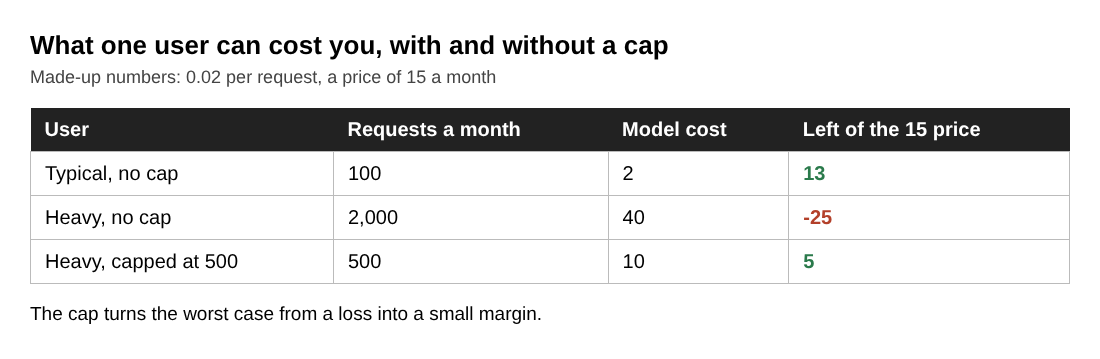
Write two numbers on one page: the price per user, and the most a single user can cost you. If the second is bigger than the first, change the cap or the price before launch. Here a cap of 500 requests keeps the heavy user at 10, which leaves 5 of the 15. The Pricing AI Products lesson in the launch course is on this subject, and the post on usage based pricing vs subscription for AI products compares two ways to charge.
Test quality on real examples, not demos
Step 5: Build a small test set and score it
Collect 30 real inputs from the people in step 2. Include the messy ones: short, long, misspelled, missing details. For each, write down what a good answer looks like. Then run your product on all 30 and mark each result pass or fail.
Example for the dental reminder tool:
- Input: a clinic note that says "mrs Ortiz tues 3pm cleaning, call if cant."
- Good answer: a polite reminder with the right day, time and visit type, and a way to reschedule.
- Fail: wrong day, invented details, or a tone that is too casual.
Now you have a pass rate you can improve. Change the prompt, run all 30 again, and see if the number went up or down. Without this, you are guessing. The Evals course has a lesson on building an eval set and judging outputs, and the post on how to test LLM prompts before release is a shorter checklist for the same step.
Your model choice affects this score and your cost. The post on how to choose an LLM for your AI product helps you compare options on your own test set.
Add guardrails for errors, abuse and downtime
Step 6: Plan for what goes wrong
Go through this list and make a decision on each line:
- The model call fails. Show a clear message and let the user retry. Never show a blank screen.
- The model is slow. Set a timeout and tell the user it is still working or that it failed.
- The answer is wrong. Make it easy for the user to see and edit the output before using it. Add a way to report a bad result.
- Someone sends huge or strange input. Limit input length and rate limit each account.
- Someone tries to make the model ignore your instructions. Keep secrets and keys out of the prompt, and do not let model output trigger actions you cannot undo without a human check.
- Your provider goes down. Decide whether you queue requests, show a status message, or switch models.
Prepare a landing page and a short signup
Step 7: Make the landing page say one thing
Your page needs a headline that names the person and the result, one real example of output, and one button. Skip the feature grid. For the dental tool: "Appointment reminders your patients actually read, written in 10 seconds," then a before and after sample, then "Try it."
Step 8: Keep signup short and test it yourself
Ask for as little as you need. An email is often enough. Then sign up as a stranger would, on your phone, with a fresh email, and time how long it takes to reach the first useful output. If it takes more than a couple of minutes, cut steps.
Not sure anyone wants it yet? The first project in the Your First Builds course is a landing page and a waitlist, which lets you test demand before you finish the product.
Plan where your first users will come from
Step 9: Write down your first ten
Do not plan "post it everywhere." Write ten names or ten specific places. The people you talked to in step 2 come first. After that, pick one or two channels where your person already spends time: a forum, a newsletter, a community, a direct message list.
For each, write the exact message you will send. Keep it short and specific: what it does, who it is for, and one link. Then follow up in person or by message. The Launching and the First Ten Customers lesson in the launch course is on this step, the Distribution and Moats course has a lesson on getting in front of customers over the longer run, and the post on how to get your first 10 customers for an AI product goes further.
Launch day and week one: what to watch
Step 10: Pick a few numbers and check them daily
Write these down each day:
- Signups and first successful outputs. How many people who sign up actually get a result?
- Cost per user. Compare it with your cap from step 4. Look for outliers.
- Failure rate. How many requests error out or time out?
- Bad output reports. Add each one to your test set from step 5.
- What users say. Talk to at least a few of them directly.
Each bad result becomes a new test case. Each conversation shapes the next change. This is the build, measure, learn loop from the first lesson of the launch course. Keep changes small, rerun your test set after each one, and ship again.
Frequently asked questions
What should be on an AI product launch checklist?
Cover the problem and the person, price and cost cap, a quality test on real examples, guardrails for errors and abuse, a landing page and short signup, your first user sources, and what you will watch in week one.
How many test examples do I need before launch?
Thirty real examples is a workable start. Include messy inputs, write what a good answer looks like, and grow the set with every bad result you see after launch.
How do I stop one user from costing me too much?
Set a request limit per user, cap input length, and set a spending limit with your model provider. Compare your price per user with the most one user can cost.
Should I launch before the product is perfect?
Launch when it works for one named person on real examples and your limits are in place. Then improve it with their feedback instead of guessing.
Get started
Open the Launch, Price and Get Paid course and work through its three lessons while you fill in this checklist; sign in with your email and an emailed code first. You can also browse the blog for longer reads on pricing an AI product and testing demand with a landing page.
Start Age of AI Entrepreneur: short hands-on lessons on how to build a business in the age of AI, with every side of the debate and the sources to read next.
Building a business in the age of AI, from a first project to a company.
Visit aientrepreneur.vlvd.net↗
Comments
No comments yet.
Sign in or make an account to comment.