Authorization testing automation: test every role
Authorization testing automation means a test suite that checks, on every release, that each role can call exactly the services it should and nothing else. The OWASP Authorization Testing Automation Cheat Sheet lays out one way to do it: write your authorization matrix down in a file, and let integration tests read that file and call every service as every role. This guide follows that approach and ends with a plan to build a first version in an afternoon.
Want an outside check of who can reach what in your app before you automate it? Book a meeting with whitehatstoic: it tests web apps and APIs for weak spots, writes up what it finds with fixes, and retests after you fix them.
Why authorization breaks between releases
Most teams think hard about permissions when they first build an app. OWASP points out where things go wrong afterwards: features get added or changed in later releases without anyone working out what that does to the authorizations, usually because of time or cost. A new endpoint ships without its role check. A refactor moves a check out of the path it used to guard. Nobody notices, because nothing tests it.
The fix OWASP recommends is to automate the evaluation of your authorizations and run it whenever a new release is built. Then the team learns that a change conflicts with the intended access before users or attackers do. If you have not yet decided what your checks should be, start with our post on authorization checks; this one is about proving they still hold.
The authorization matrix: features, roles and data
OWASP describes an authorization as having two dimensions: the feature, and the logical role that accesses it. Sometimes a third dimension, data, is added when access is also filtered at the level of business records, such as "only your own invoices". Listing both dimensions for every authorization gives you an authorization matrix, often kept in a spreadsheet. When you test it, each role is sometimes called a point of view: you look at the whole app as that role would.
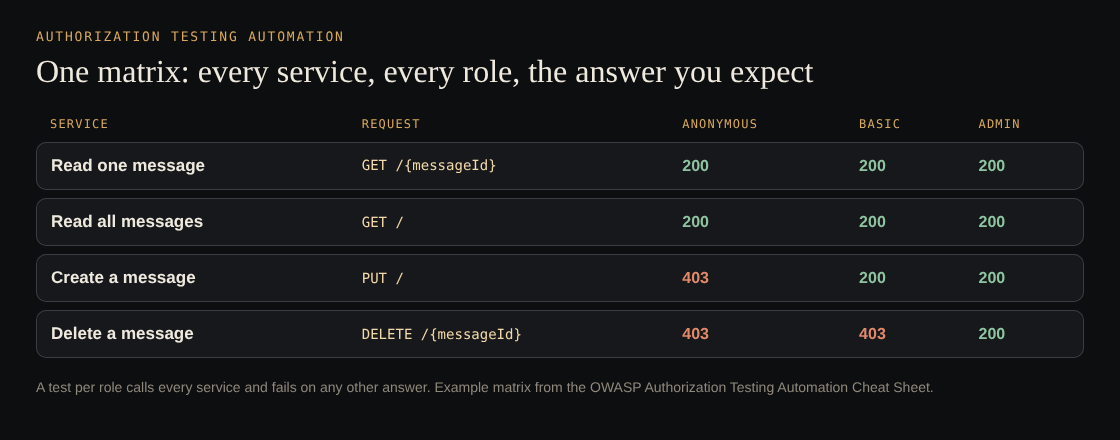
The example matrix from the OWASP Authorization Testing Automation Cheat Sheet.
In the sheet's example, anyone can read messages, signed-in basic users and admins can create them, and only admins can delete them. Every cell is a test: a 200 where access is allowed, a 403 where it is denied.
Keep the matrix in a file your tests can read
A spreadsheet on a shared drive cannot fail a build. OWASP's first step is to formalise the matrix in a file format that does four things at once:
- A program can process it.
- A person can read it and update it when access rules change.
- It sets up a hierarchy of authorizations, so new combinations are easy to make.
- It stays as independent as possible of the technology the app is built with.
The sheet's example uses XML with three sections. roles lists each logical role with a description. services lists each service with its URI, its HTTP method, the response code that means access was allowed, the code that means it was denied, and the roles allowed to call it. services-testing gives a test payload for any service that needs input beyond the URL, such as a JSON body for creating a message. Placeholders in braces, like {messageId}, mark where the tests fill in real values.
XML is the sheet's choice for its example, not a rule. What matters is that the file is the single source of truth for who may call what, and that it lives in the repository next to the code it describes.
One integration test per role, driven by the file
The second step is a set of integration tests that take the matrix file as their only input. OWASP lists two goals for them: as little maintenance as possible when the matrix changes, and, when a test fails, a clear pointer to the exact combination that broke the matrix.
The sheet's example gets there with one test case per point of view and shared code for everything else:
- Load the matrix file once, before the tests run.
- For each role, get an access token for a test account in that role. The anonymous test sends no token at all.
- Call every service in the file with that token, using its method, URI and test payload.
- Compare each response code with the matrix: the allowed code if the role is listed for that service, the denied code if it is not.
- Collect every mismatch and fail the test with the full list.
Two kinds of mismatch count. A response code that is neither the allowed nor the denied one is reported as unexpected. A code that is the wrong one of the two, such as a 200 where the matrix says 403, is reported with the code that was expected. Because each role has its own test, the report reads like "access issues detected using the BASIC USER point of view", followed by the service and the code it returned.
The sheet's sample is written in Java with JUnit, and its full prototype is on GitHub. The same shape works in any test framework that can read a file and make HTTP calls.
Render the matrix for review and audit
A file a program can read is not always easy for people to discuss. OWASP suggests rendering the matrix into a readable view on the fly, so inconsistencies are easier to spot and reviews and audits have something clear to look at. The sheet does this with an XSL stylesheet that turns its XML into a table. Whatever format you choose, generate the view from the same file the tests read, so the picture people approve is the one the build enforces.
This also gives product owners a way in. A changed row in the matrix becomes a visible part of a pull request, not a quiet change in a controller.
Start authorization testing automation in an afternoon
You do not need every service on day one. A first version that covers your most sensitive actions already catches the release that drops a check:
- Pick roles (20 minutes). List your logical roles, including anonymous. Create one test account per role in a staging environment.
- Pick services (40 minutes). Choose 10 to 20 services that change or delete data, touch money or show other users' records. Write each into the matrix file with its method, URI, allowed roles and the allowed and denied codes your app really returns.
- Write the runner (90 minutes). One test per role that loads the file, calls every service with that role's token and lists every mismatch.
- Run it and read it (30 minutes). Fix the matrix where it was wrong about your intent; open a ticket where the app was wrong.
- Wire it in (20 minutes). Run the suite on every release build, and require a matrix change in the same pull request as any new endpoint.
For record-level rules, the data dimension, add tests where one user asks for another user's record; our post on IDOR prevention covers that case, and testing broken access control covers the manual checks to run alongside.
Frequently asked questions
What is an authorization matrix?
A list of every feature or service against every logical role, saying which roles may use which features. Some matrices add a data dimension for record-level rules.
How often should authorization tests run?
OWASP recommends testing whenever a new release is created, because most authorization problems come from features added or changed after launch.
Do I have to use XML for the matrix?
No. XML is the format in the OWASP example. Any format works if programs can read it, people can update it, and it does not depend on how the app is built.
Does automated authorization testing replace a penetration test?
No. It checks that the rules you wrote down still hold. A manual test also looks for rules you never wrote down and ways around the ones you did.
Get started
Write down the matrix for your five riskiest services this week and turn it into one failing or passing test per role. whitehatstoic tests web apps and APIs for weak spots, with a written report and a retest after fixes. Book a meeting with whitehatstoic and tell us about your product, your deadline and your biggest worry; work is scoped after a short call.
Build it right. Test it thoroughly. Keep it safe.
Visit whitehatstoic.com↗


Comments
No comments yet.