Bluetooth headset sounds bad on a Mac? Record it right
Your wireless headset sounds great for music. Then you start a screen recording or a call, and your voice comes out thin and muffled, like an old phone line, and so does everything you hear. If your Bluetooth headset sounds bad on a Mac the moment you record, nothing is broken. The headset has switched modes. This guide explains the switch, how Cheap Recorder warns you about it, and a setup that keeps your voice clear while you still wear the headset.
Why a Bluetooth headset sounds bad on a Mac when you record
On a Mac, a Bluetooth headset that is used as a microphone switches into a low-quality mode. The change is not only in the microphone. While the headset is in that mode, your voice and anything you hear through it both sound thin, like an old phone line.
That explains a pattern many people notice. Music sounds fine. A video sounds fine. Then you open a recorder or join a call, the headset becomes the microphone, and everything drops in quality at once.
So the fix is not a setting on the headset. It is about which device you speak into. Use the headset to listen, and use a wired or USB microphone for your voice.
How Cheap Recorder shows you which microphone is which
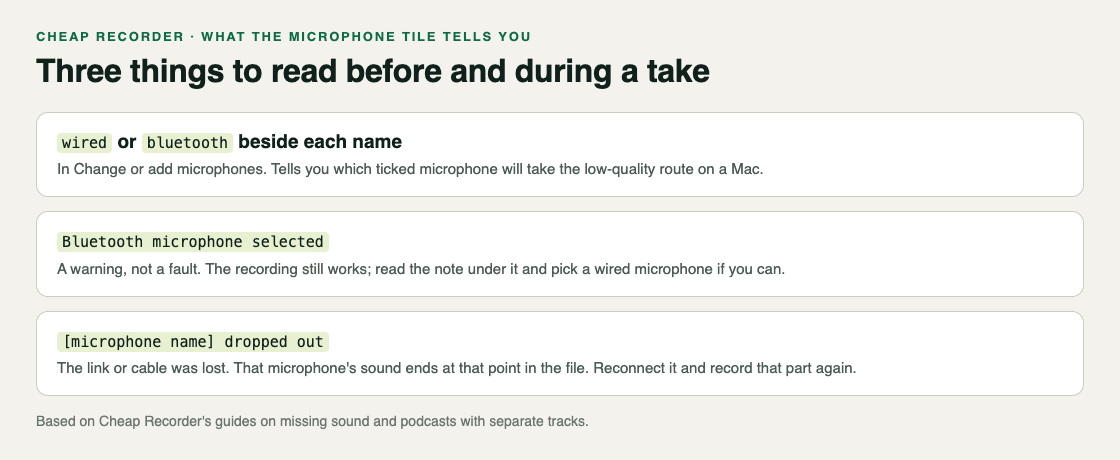
Cheap Recorder runs in Chrome, and its Microphone tile names the microphone it will record. Three things in and around that tile tell you about Bluetooth.
- The label beside each name. Open Change or add microphones. Each microphone shows wired or bluetooth beside its name, so you can see at a glance which one would switch the headset into low-quality mode.
- Bluetooth microphone selected. This appears when a Bluetooth microphone is ticked. It is a warning, not a fault: the recording works. Read the note under it, and for lessons or anything you will share, pick a wired microphone instead.
- Dropped out. A microphone's name followed by dropped out means it disconnected. A Bluetooth link is a common cause, as is a loose USB cable. Its sound ends at that point in the file, so reconnect it and record that part again.
The recorder remembers which microphones you ticked in this browser, so once you set it up, it stays that way for next time.
The setup that works: listen on Bluetooth, speak into a wire
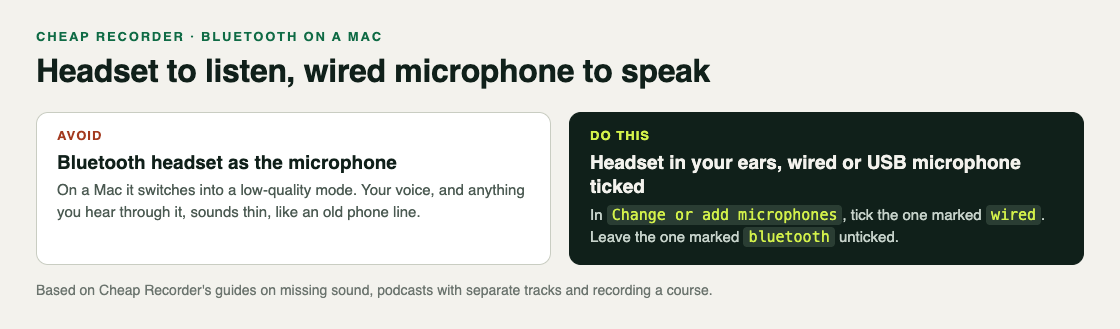
- Plug in a wired or USB microphone. A USB desk microphone, or a headset on a cable, both count. If you have neither, see the section on what to do below.
- Tick it in Cheap Recorder. Open Change or add microphones, tick the one marked wired and untick the one marked bluetooth. If the new microphone is not in the list, press Rescan.
- Keep the headset in your ears. The low-quality mode comes from using it as a microphone, so listening on it is fine. Headphones also stop other people's voices on a call coming out of your speakers and back into your microphone.
- Make the same choice in the call. The switch happens whenever the headset is used as a microphone. If you are recording a call, pick the wired microphone in the call's own settings too, so the headset is only used for listening.
- Watch the level bar. While you record, each ticked microphone has a level bar that moves with its sound. Yours should move when you talk. If it stays still, check the microphone's own mute switch and your Mac's sound settings.
The post on picking the right microphone for screen recording covers the other choices, such as when to tick Record the microphone untouched.
A worked example: a weekly lesson with wireless earbuds
Say you record a short lesson every Monday on a MacBook. You always wear wireless earbuds, and last week's lesson sounded like it was recorded over the phone. This week you also have a small USB microphone.
- You plug the USB microphone in and open Cheap Recorder in Chrome. In Change or add microphones you see your earbuds marked bluetooth and the new microphone marked wired. You untick the earbuds and tick the USB microphone.
- You switch Record my webcam off and do not pick a screen. That makes a sound-only test: the recorder saves an M4A audio file, which is an easy way to check your microphone on its own.
- You name it Mic test, press Start recording and read one paragraph of your lesson for 30 seconds, watching the USB microphone's level bar move.
- You press Stop and finish and play it back in the player on the page, with the earbuds in. Your voice is full, and the earbuds sound normal too, because nothing is using them as a microphone.
- You switch the webcam back on, pick the browser tab with your slides, name the recording Lesson 12 and record the real take.
A 30-second test at the start of a session catches a wrong microphone before it costs you a whole take. The post on recording audio only in Chrome explains sound-only recordings in more detail.
If the headset is the only microphone you have
You can still record. The warning is not a fault, and the file will have your voice in it. It will sound like a phone call, and so will everything you hear in the headset while you record.
For anything you will publish or share, a wired or USB microphone is the better choice. The guides on cheaprecorder.com say the same for podcasts: avoid Bluetooth headsets as microphones, because they drop to a low-quality mode when used that way. The microphone also matters for the live transcript, which is made from what Chrome hears on your microphone, so a clear voice helps the text too.
If your voice goes missing partway through, look for dropped out next to the headset's name. That is the link dropping, not the low-quality mode. The guide to a screen recording with no sound lists the other checks.
Frequently asked questions
Why does my Bluetooth headset sound bad only when I record?
On a Mac, using a Bluetooth headset as a microphone switches it into a low-quality mode. Both your voice and what you hear through it sound thin until it stops being used as a microphone.
Can I still wear my Bluetooth headset while recording?
Yes. Wear it to listen, and tick a wired or USB microphone for your voice in Change or add microphones.
Is the Bluetooth microphone selected message an error?
No. It is a warning, not a fault, and the recording still works. It tells you the ticked microphone is a Bluetooth one, so the sound will be low quality.
Why did my voice stop halfway through the recording?
If the microphone's name is followed by dropped out, it disconnected and its sound ends there. Reconnect it and record that part again.
Get started
The free plan needs no card and includes 12 hours of recording a month. Try Cheap Recorder in Chrome, tick a wired microphone, keep your headset on to listen, and your recording lands in a folder on your own disk.
Comments
No comments yet.
Sign in or make an account to comment.