Bug fix write-up: how to explain a bug you fixed to users
A bug fix write-up tells users what broke, who it hit, why it happened and what you changed. To explain a bug you fixed to users, lead with what they saw, give the dates, state the cause in one plain sentence, and say whether they need to do anything. Keep it short and keep blame out of it.
If you need a place to post it, Electrified gives you a page of your own where you can publish the write-up as a note or an article, and save it as a draft first.
A bug fix write-up is a short public post about one problem you have already fixed. It is not a changelog line and it is not a full incident report. It sits between the two. A changelog entry says "Fixed export bug." A write-up says what the bug looked like, who ran into it, and what to do now.
Users care for three reasons. Some of them hit the bug and wondered if it was their fault. Some of them worked around it and want to know they can stop. Some of them lost data or time and need to know whether anything has to be redone.
If you already keep a changelog, the write-up pairs well with it. Our guide on how to write a changelog for your project covers the one-line version. Use the changelog for the list and the write-up for the fixes that deserve an explanation.
Start with what users saw, not what the code did
Users do not know your function names. They know that the Save button did nothing, or that a file came out empty. Open with that.
Write the symptom the way a user would describe it to a friend. Then add one sentence that says it is fixed.
- Weak: "Fixed a null reference in the export handler."
- Better: "Some exports came out as empty files. This is fixed."
Putting the fix in the opening lines matters. A reader who only sees the first two sentences should still leave knowing the problem is over. The same habit helps any short post, and how to write a short article people finish reading goes into it further.
Say who was affected and for how long
This is the part most write-ups skip, and it is the part readers look for first. They are asking one question: "Was it me?"
Give them a way to check. Be specific about three things:
- Who: which users, plans, devices or versions. "Anyone who exported a report with more than one page."
- When: the start and end, with a time zone. "From 3 October, 14:00 UTC, to 5 October, 09:30 UTC."
- What was lost, if anything: say plainly whether data was lost, delayed or only hidden. If nothing was lost, say that too.
Only state numbers you actually have. If you do not know how many people were hit, write "we do not have an exact count" instead of guessing. A vague honest line beats a precise wrong one.
Explain the cause in plain language
You owe users a cause, but not a code review. One to three sentences is enough. Aim for a cause a non-engineer could repeat.
A good pattern is: what the system was supposed to do, what it did instead, and why. For example: "The export tool builds each page one at a time. When a report had more than one page, it stopped after the first page and saved the file before the rest was added."
Avoid these:
- Blaming a person, a team or a vendor.
- Passive phrases that hide who did what, such as "an error was introduced."
- Jargon with no gloss. If you must name a term, explain it in the same sentence.
If you do not fully know the cause, say what you know and what you ruled out. "We have not found why this started on 3 October, but the fix removes the failing step" is honest and useful.
Describe the fix and what users need to do
Now say what you changed, in one or two sentences. Then give the action, even if the action is "nothing."
Users should never have to guess whether they have a task. Pick one of these three outcomes and state it clearly:
- Nothing to do. "You do not need to change anything. New exports work."
- Do one thing. "Export your report again. Old empty files will not fill themselves in."
- Do a short sequence. Give numbered steps.
If it is the third case, write the steps as a numbered list with one action per line. How to write a step-by-step list in an article shows how to keep each step to a single action.
It also helps to say how the fix was checked. You do not need a test report. A line like "We re-ran the exports that failed and they now come out complete" tells the reader the fix was tried on the real problem.
A simple bug fix write-up template you can copy
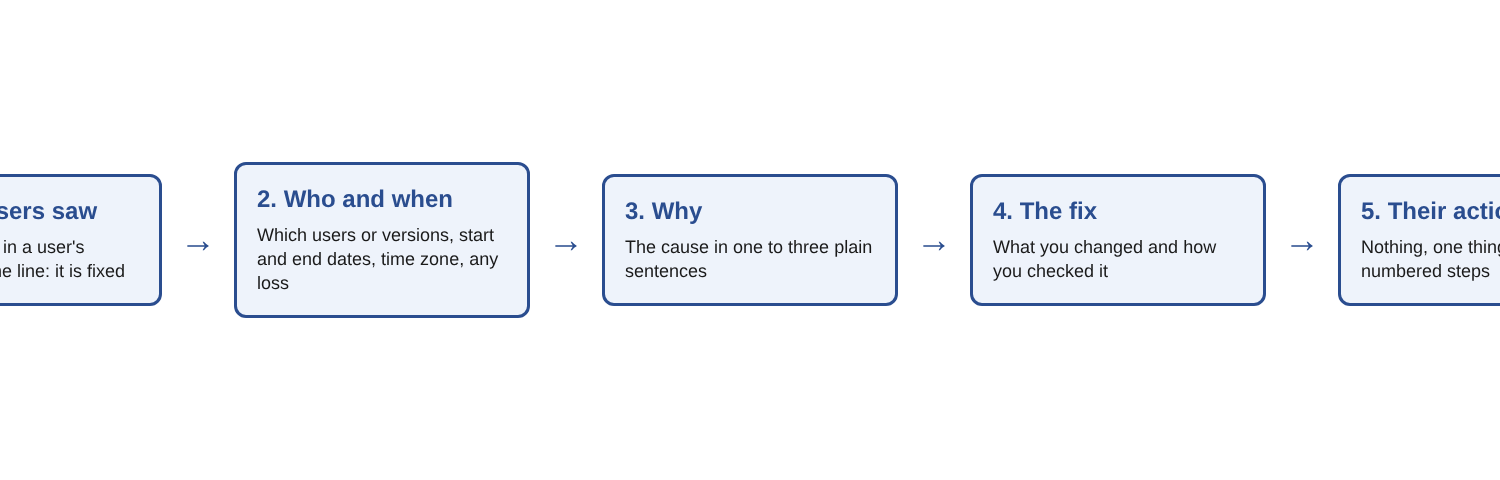
Paste this into your editor and replace the brackets. In the Electrified editor, an article takes a title and sections that start with ##, so each heading below can become a section.
Title: [What users saw], fixed Summary: [One sentence on the symptom.] This is fixed as of [date]. Who was affected: [Who, which version, which dates and time zone.] [Whether any data was lost.] What happened: [Two or three plain sentences on the cause.] What we changed: [One or two sentences on the fix and how you checked it.] What you need to do: [Nothing, one action, or numbered steps.] Still seeing it? [How to reach you.]
Keep every field short. If a field has nothing to say, write that plainly. "Data lost: none" is a useful line.
A before and after example
The product below is made up, so you can see the shape without any real details. Here is a typical first draft.
Before: "We resolved an issue in the PDF export pipeline where a race condition in the page assembler caused truncated output. A patch was deployed. Some users may have been impacted."
It is true, but the reader cannot tell whether they were hit, what to do or when it happened. Here is the same fix rewritten with the steps above.
After: "Some exported reports came out with only the first page. This is fixed. It affected reports with two or more pages, exported between 3 October, 14:00 UTC, and 5 October, 09:30 UTC. Your reports in the app were not changed. Only the exported files were short. The export tool saved the file before it had added every page. We changed it to wait until all pages are added. We re-ran the exports that failed and they now come out complete. If you exported a multi-page report in that window, export it again. Files you already downloaded will not update on their own. If a new export is still short, reply to this post and tell us the report name."
The second version is longer, but each added line answers a question the reader would have asked. The jargon is gone. The action is clear. Nobody is blamed.
Publishing it so people can find it again
You can write a small fix up as a note, which is a short post of up to 500 characters with no title. For a larger fix, use an article. Use the Preview tab to see the page as it will look, and use Save draft until you are happy with the wording. Only you can see a draft. Publishing is a step you take yourself on the site.
Add up to 5 topics, such as the name of your product, so your related posts sit together on topic pages. A published post keeps its address, so you can point to it from your changelog or a support reply. Your page also has its own feed at /@yourhandle/feed.xml, which lists your newest posts for anyone who follows by feed reader.
Frequently asked questions
How long should a bug fix write-up be?
As short as it can be while still answering four questions: what happened, who was hit, why, and what to do. Cut anything that does not answer one of them.
Should I apologize in a bug fix write-up?
Yes, once, and only if users were affected. Say it in a short, plain sentence, then move on to the facts.
Do I need to explain the technical cause?
You need a cause a non-engineer can repeat, in one to three sentences. Save deep technical detail for a separate post if your readers want it.
What if I do not know exactly who was affected?
Say so, and give the best check you can, such as a date range or a version number. Do not guess at a count.
Should I write a write-up for every fix?
No. Put small fixes in your changelog and save write-ups for bugs users noticed, lost time to, or asked about.
Get started
Pick the last bug you fixed that users noticed, and fill in the template above. Write what they saw first, then the dates, the cause, the fix and the action.
Make an account on Electrified: write about your product, topic or idea on your own page, one article at a time, and let readers follow along.
Comments
No comments yet.
Sign in or make an account to comment.