Car problems log: record each fault and fix
A car problems log is a simple record of every fault your car shows and every fix you try. If you keep one, you stop relying on memory when the warning light comes back or the mechanic asks "when did this start?" This guide shows you how to set up a car problems log that records each fault and fix in one place, what details to capture, and how to use the record at the garage, for warranty questions and when you sell.
Why a car problems log saves you money and stress
Car trouble is often not one event. It is a squeak that comes and goes, a battery that dies twice a winter, a check engine light that clears and returns. Each visit to the garage starts from zero unless you bring the history with you.
A log changes that. You can tell a mechanic exactly what was already replaced, so you do not pay for the same part twice. You can see that a "new" fault is really the third return of an old one. And you can stop worrying about forgetting, because the record holds the details for you.
The other benefit is honesty. A fix that did not work is useful information. If the coolant top up only bought you two weeks, that tells the next person looking at the car where not to start.
What to record for each fault: symptoms, date, mileage and conditions
Write each fault as one short line a stranger could understand. Then add the details that help someone reproduce it. For each fault, note:
- The symptom in plain words. "Grinding noise from front left when braking" beats "brakes are weird".
- The date you first noticed it. Add dates each time it returns.
- The mileage. Read it off the dashboard when the fault appears.
- The conditions. Cold start or warm engine? Rain? Motorway speed or parking? Turning left or right? Uphill?
- Any warning lights or codes. Note the light's colour and shape, or the code if a scanner gave you one.
Conditions matter most for faults that come and go. "Only on cold mornings, below 20 miles an hour" gives a mechanic something to test. "It makes a noise sometimes" does not.
What to record for each fix: who fixed it, parts, cost and whether it worked
Every attempt deserves its own entry, including the ones you did yourself and the ones that failed. For each fix, note:
- What was done. "Replaced front left brake pads" or "Cleaned battery terminals".
- Who did it. You, a friend, or the name of the garage.
- Parts used. Part names or numbers if you have them.
- Cost. Parts and labour, if you want to see the total later.
- The outcome. Did it work, partly work, or fail? Come back and update this after a few weeks of driving.
The outcome is the easy field to skip and the one that matters most. Without it, your log is a list of receipts. With it, you can see which repairs actually solved the problem.
How to set up your car problems log in Problem Graph
Problem Graph is a problem and solution journal drawn as a map. You write a problem in one line, attach the solutions you try, and mark each one as worked, partly or failed. It runs in your phone's web browser, so you can add a fault from the car park while the details are fresh.
Here is a worked example. The car, faults and repairs are made up to show the log, not repair advice.
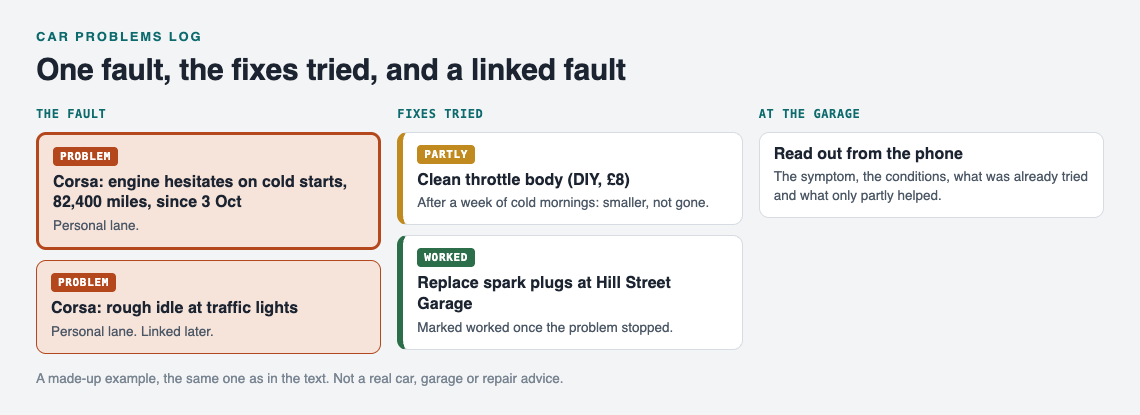
The worked example as a map: one fault, the fixes tried with their outcomes, and a linked fault.
- Open the app. Go to the app and create an account with a username and password. Your problems are private by default and follow you to any phone or computer you log in on.
- Write the fault as one line. Choose the personal lane and type something like: Corsa: engine hesitates on cold starts, 82,400 miles, since 3 Oct. Press Enter and it lands on the graph.
- Add the fixes as ideas. Attach solutions such as Clean throttle body (DIY, £8) and Replace spark plugs at Hill Street Garage. Mark the one you are trying now.
- Record the outcome. After a week of cold mornings, mark the throttle body clean as partly if the hesitation got smaller but did not go away. Mark the spark plugs as worked once the problem stops.
- Link related faults. If you later log Corsa: rough idle at traffic lights, link it to the cold start problem. Links show connections that a plain list hides.
Put the car's name at the start of each line. That keeps the list readable when you open the List view beside the map, and it makes each car's faults easy to pick out.
If you share a car with family, create a private network, give them the invite code, and share the car's main problem into it. Only a problem marked as a main node can be shared, and its solutions and outcomes go with it. Anything you only link to it stays private.
Spot repeat faults and fix the few that cause most trouble
After a few months, look at the map. You may see one or two problems with a cluster of failed and partly fixes around them. Those are the faults costing you the most time and money.
This is the idea behind the Pareto 80/20 rule: a few causes may drive most of the trouble, as the post on the Pareto principle for everyday problems explains. On a car, that might be a weak battery behind three different "electrical" faults, or one worn suspension part behind several noises.
When you see a cluster, ask a simple question: are these really separate problems, or one problem showing up in different ways? Link them, then spend your next repair budget on the shared cause instead of the latest symptom.
If you are stuck, Problem Graph is also built to show similar problems other people have shared publicly and which of their solutions worked. You can borrow one into your own graph with one tap, and it keeps a link back to where it came from. You can also ask for suggestions: the AI proposes solutions grounded in what worked for others on problems like yours. Treat each proposal as an idea to discuss with a mechanic, not as a diagnosis.
Use your log at the mechanic, for warranty claims and at resale
At the mechanic. Open the fault on your phone and read out the symptom, the conditions and what has already been tried. Say which fixes failed. That saves diagnostic time and keeps you from paying for a repeat of a repair that did not help.
For warranty questions. A clear timeline of when a fault first appeared, at what mileage, and what was done about it helps you explain your case. Keep your paper receipts too. Your log is your own record, so expect the warranty provider to ask for their own paperwork too.
At resale. A buyer cannot see the car's past. A history that shows each fault, each fix and whether it worked can answer questions before they ask. You can walk a buyer through it on your phone.
Review and close fixed car problems each week
A log only works if the outcomes stay current. Set five minutes aside each week. Open your car problems and ask:
- Did any fault come back? Add the date and mileage.
- Has a fix held for long enough to mark it as worked?
- Did a fix stop working? Change it to partly or failed.
- Is there a new noise or light you have not written down yet?
The habit is the same one described in weekly review: close the problems you solved. If you already keep a home maintenance log, review the car at the same time. Both are records of things that break and what fixed them, and one weekly check covers both.
Frequently asked questions
What should a car problems log include?
For each fault, record the symptom, date, mileage and the conditions when it happens. For each fix, record what was done, who did it, the parts, the cost and whether it worked, partly worked or failed.
Is a car problems log different from a service record?
Yes. A service record lists scheduled maintenance like oil changes. A car problems log follows faults and every attempt to fix them, including the attempts that failed.
How do I describe an intermittent car fault so a mechanic can find it?
Write down exactly when it happens: engine temperature, speed, weather, turning direction and any warning lights. Note each time it returns with the date and mileage, so the mechanic can see the pattern.
Can I track several cars in one log?
Yes. In Problem Graph, start each problem line with the car's name, such as "Corsa:" or "Van:", so you can tell them apart in the List view and on the map.
Does a fault and repair history help when selling a car?
It can. A clear history shows a buyer what went wrong, what was done and whether it held, which answers many questions before they ask.
Get started
Pick the fault that bothers you most right now. Write it as one line with the car's name, the mileage and the conditions. Then attach the first fix you plan to try, and come back to mark the outcome.
Try Problem Graph: it is free, and you can look around the public network without an account. Write one problem down in a line and attach the first thing you will try.
Comments
No comments yet.
Sign in or make an account to comment.