Commute problems log: delays and what you changed
A commute problems log is a short record of each time your trip to work went wrong, why it went wrong, and what you tried next. It is easy to rely on a vague feeling that "the train is always late." A log replaces that feeling with dates, minutes, and a list of fixes you can judge. This post shows you what to write down, how to track each change you make, and how to turn a pile of bad mornings into a few decisions.
Why a commute problems log beats memory
Memory is a poor record here. You may remember the 50 minute signal failure in March. You may forget the eight Tuesdays you lost 10 minutes each to the same crowded platform, which added up to more time.
Memory also forgets your fixes. You left 15 minutes earlier for two weeks, it seemed to help, then you slid back. Did it help? Without a record, you cannot say. A log keeps the attempt and the result side by side, so you stop retrying things that already failed and stop dropping things that worked.
What to record for every delay: date, route, cause, minutes lost
Keep each entry to one line, short enough to type at the stop. Four parts are enough:
- Date and day. Write the weekday, so patterns by day show up later.
- Route or mode. "Line 4 bus," "ring road," "bike via river path." Be consistent so entries group together later.
- Cause, if known. Cancelled train, roadworks, rain, a late start at home. "Unknown" is a fine answer.
- Minutes lost. Compared to your normal trip time, not the timetable.
A good line looks like this: Tue 6 Oct, Line 4 bus, skipped stop (full), 18 min lost.
In Problem Graph, one line is all a problem needs. You type it, put it in a lane (commute delays usually fit the personal or work lane), and it lands on the graph the moment you press Enter. It runs in your phone's web browser, so you can log the delay while you are still standing at the stop.
Here is a setup that keeps the map tidy. Create one problem for the recurring issue, such as Line 4 bus full by my stop most mornings. Then log each bad day as its own short problem and link it to that recurring one. The recurring problem becomes the hub. The daily entries become the evidence around it.
Logging what you changed and whether it worked
This is the half that is easy to skip, and it is the half that matters. A list of delays tells you that you have a problem. A list of changes and outcomes tells you what to do about it.
In Problem Graph, you attach solutions to a problem. Start by adding them as ideas. When you actually start one, mark it as the one you are trying. When you have enough days to judge, record the outcome as worked, partly, or failed.
A worked example for the full bus:
- Idea: Catch the 7:55 instead of the 8:10.
- Idea: Walk 6 minutes back to the stop before mine, where the bus is emptier.
- Idea: Ask about starting at 9:30 on Mondays.
You try the earlier bus for two weeks. Seats are free, but you arrive 25 minutes early with nothing to do. Mark it partly. You try walking back one stop. You get on every day, and the 6 minute walk costs less than the 18 minutes a full bus cost you. Mark it worked. The 9:30 idea stays an idea for now.
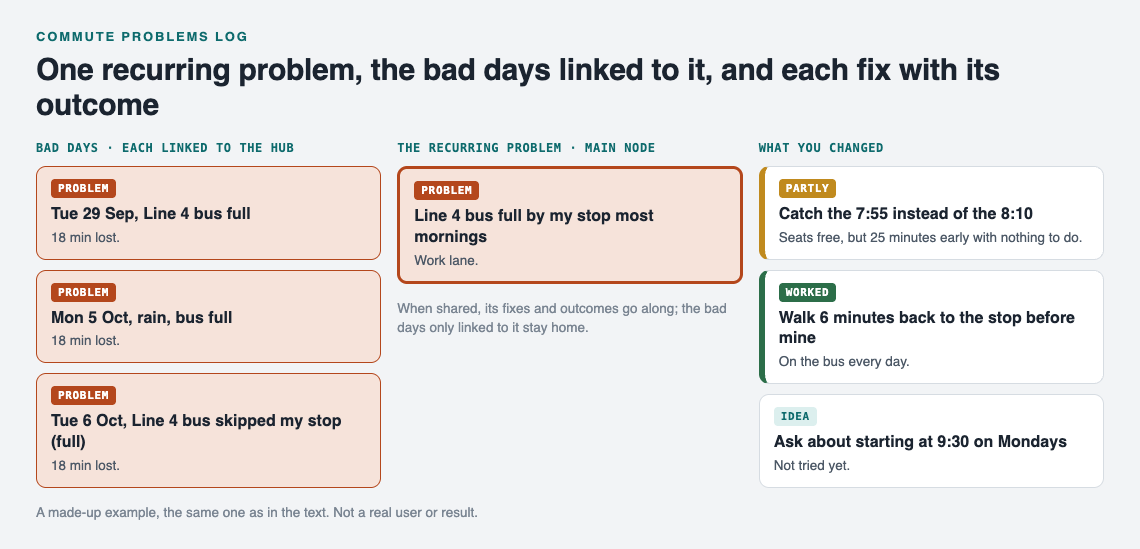
The worked example on the graph. A made-up example, not a real user or result.
Keep the failed ones on the map too. The page puts it plainly: "The graph is honest. A solution that failed three times stays on the map as a failed solution, and that is exactly what the next person needs to know." That next person is often you, six months from now, when the timetable changes and you start wondering about the same fixes again.
Common commute problems and fixes worth testing
These are starting ideas, not answers. Test each one against your own log.
Packed trains or buses
Try one departure earlier or later, boarding one stop upstream, or a different carriage position. Log the minutes, not just whether you got a seat.
Road congestion
Try a fixed alternate route for a full week rather than switching day to day. Switching daily makes the log impossible to read.
Late starts at home
Some "commute" delays begin before you leave. Packing the bag the night before or setting a leave-by alarm are worth a line each. Be honest when the cause was you.
Missed connections
Note the scheduled gap and how often you miss it. A connection you miss one day in five is a structural problem, not bad luck.
Weather
Rain slows bikes, buses, and roads differently. Record it in the cause so you can compare wet and dry weeks.
If you are stuck, the AI in Problem Graph can propose new solutions, grounded in what worked for others on similar problems. Treat each one as an idea to test, then let your outcome markings decide.
Spotting patterns: recurring delays by day, route, and weather
After three or four weeks, look at the log as a whole. You are looking for clusters:
- By day. Are Mondays and Fridays worse? A weekly pattern can point to a cause you can work around, like a school run or a market day.
- By route. Does one route have rare but huge delays while another has small daily ones? Total minutes per month is a fair way to compare.
- By weather. Do the worst days line up with rain or cold?
Linking helps here. "Patterns show up on the map that never show up in a list," as the home page says. When every daily delay links to its recurring problem, you can see which hub has the most entries hanging off it. You can also link problems across lanes. A commute delay in your work lane might link to a sleep problem in your personal lane, because the late start and the bad night are the same story.
The app also has a List view beside the map, and filters by lane. Switch between them when you want to scan entries in order instead of seeing clusters.
The same habit of one line per problem, then the fix, then the result, works outside the commute too. See how it applies to a budget problems log or a travel problems log.
Sharing the log with carpools, partners, or your manager
Your graph is private by default. Only you see it, and it follows you to any phone or computer you log in on.
To share, mark the recurring problem as a main node. Only a main node can be shared. When you share it, its solutions, their outcomes, and the requirements they need go along. The daily delay entries you only linked to it stay home, like the rest of your graph. That is useful: your manager sees "Line 4 bus full: earlier bus, partly; walk back one stop, worked; ask about 9:30 on Mondays, still an idea" without seeing every grumpy morning note.
You have two ways to share:
- Private network. Create a network, give the invite code to a few people, and share the main node into it. Members see it and nobody else does. Keep in mind that anyone with the invite code can join, so give it only to the people you mean. This suits a carpool, a household, or a small team. For carpools specifically, see one shared list for the drivers.
- Public. Put the main node out for everyone in the app. Others can link their own problems to it and borrow the solutions that worked.
Borrowing works the other way too. Problem Graph shows similar problems other people have shared, in any lane, and which of their solutions worked. You can borrow one into your own graph with one tap, and it keeps a link back to where it came from. Then you test it and mark your own outcome.
Frequently asked questions
How long should I keep a commute log before changing anything?
Two to three weeks of plain logging gives you a fair baseline. After that, change one thing at a time and give each change at least a week, so you can tell which fix moved the numbers.
Should I log small delays of a few minutes?
Yes, if they happen often. Five minutes four times a week is over an hour a month.
Can a commute log help me make the case for remote work or flexible hours?
It can give you facts to bring to the conversation: dates, minutes lost, and what you already tried. Sharing one main node into a private network lets you show the fixes and outcomes while your daily notes stay private. Whether the request is approved is up to your employer.
What is the easiest way to log delays on the go?
Use one line in a fixed order: day, route, cause, minutes. Problem Graph runs in your phone's browser, so you can type that line and press Enter before you board.
Get started
Open problemgraph.vlvd.net and look around first. The public network is open to browse with no account, and an empty graph in the app offers a Load example set button so you can see how problems, solutions, and outcomes connect. When you are ready to add your own, create an account with a username and a password.
Then do three things. Write your recurring commute problem as one line. Link today's delay to it. Add the first fix you plan to try as an idea.
Try Problem Graph: it is free, and you can look around the public network without an account. Write one problem down in a line and attach the first thing you will try.
Comments
No comments yet.
Sign in or make an account to comment.