Corporate background music for explainer videos: a guide
Good corporate background music for explainer videos sits under the voiceover. It sets the tone, keeps the pace moving and never fights the words. This guide shows how to pick a track by mood, tempo and arrangement, how to mix it under narration, and which license an explainer needs. The examples use real tracks and filters on Wavecrate, read on 10 October 2026.
Wavecrate licenses royalty-free music, including a Corporate genre you can filter by mood and tempo, and every download comes with a license certificate and a code anyone can check on its verify page.

What background music does in an explainer
An explainer has one job: get an idea across in a short time. Music helps when it does three things.
- It sets the tone early. Before the first word, the music tells the viewer whether this is calm, confident or playful.
- It holds the pace. A steady pulse makes cuts feel planned and stops long narration from dragging.
- It leaves room for the voice. If people notice the music more than the script, the track is wrong or too loud.
Steady and wordless usually wins. Everything below follows from that.
Pick corporate background music for explainer videos by mood
Start with the feeling you want the viewer to leave with, not the genre. A product launch wants confidence. An onboarding video wants calm. A video about a hard problem your customers face might want something hopeful.
Wavecrate has a Corporate genre, and on 10 October 2026 its Corporate music page listed 10 tracks. You can narrow it by mood (uplifting, confident, calm, hopeful and more) and by tempo.
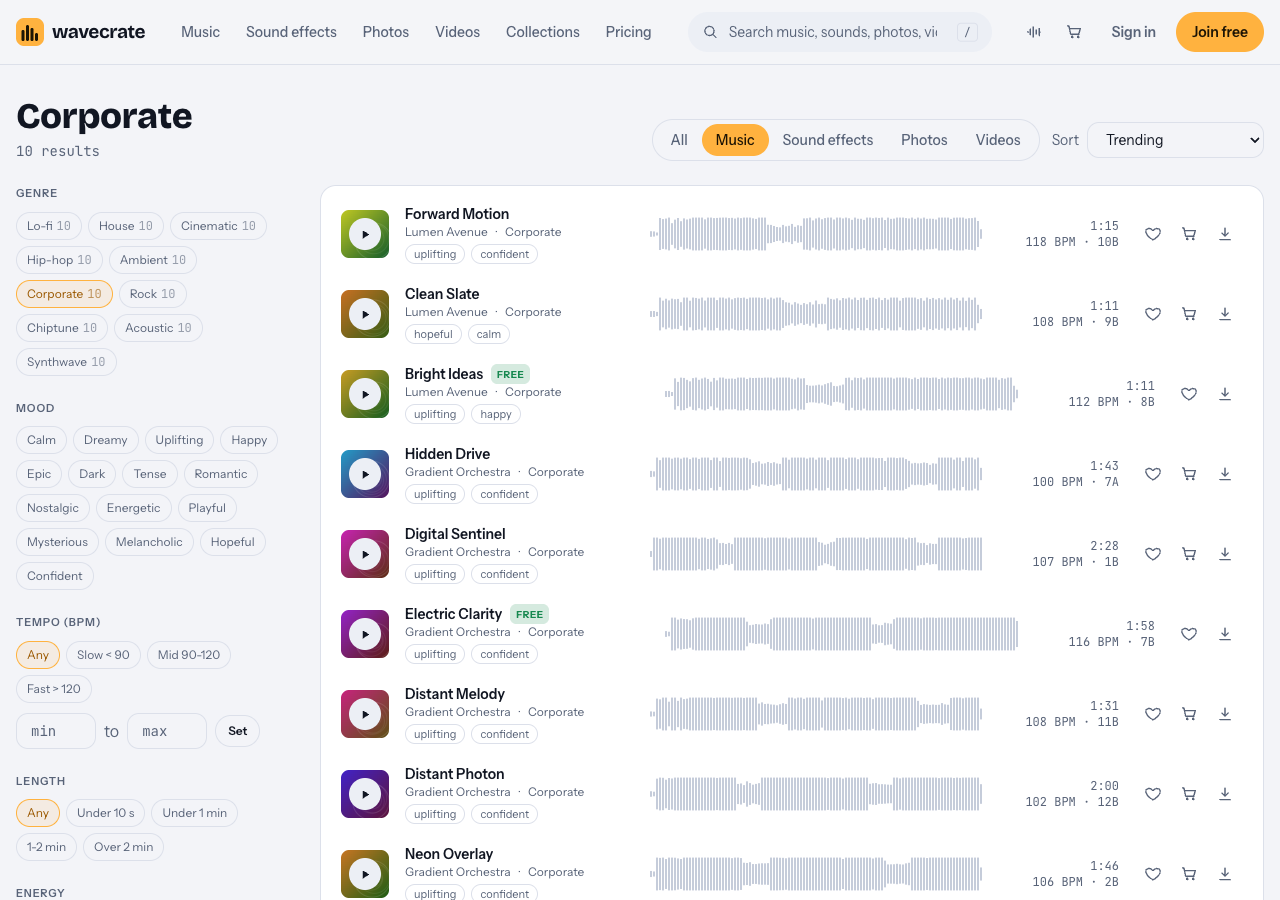
The Corporate genre with its mood and tempo filters, 10 October 2026.
Three tracks from that page show the range:
- Forward Motion: "Bright plucks and claps over a feel-good major progression. Uplifting and Confident, good for ads and presentation." 118 BPM, energy Driving.
- Bright Ideas: Uplifting and Happy, tagged ads, tech and tutorial. 112 BPM, energy Steady.
- Clean Slate: "Hopeful and Calm, good for tutorial and podcast." 108 BPM, energy Relaxed.
Pick one mood and stay with it. A brand video that changes feeling every minute sounds unsure of itself.
Tempo and energy for a scripted voiceover
Tempo shapes how fast a video feels, even with the same edit. Wavecrate's tempo filter has three ranges: Slow under 90 BPM, Mid 90 to 120, and Fast over 120. Each track page also shows an energy label, such as Relaxed, Steady or Driving.
- Dense, technical narration: Mid tempo, Steady or Relaxed energy. The viewer is already working hard on the words.
- Short, punchy product promo: the top of Mid with Driving energy, like Forward Motion at 118 BPM.
- A slower story about a customer: Slow, with Relaxed energy.
A simple trick: cut on the beat. Divide 60 by the BPM to get one beat in seconds. At 120 BPM that is half a second. Put your scene changes on beats and the video feels tighter with no extra work.
Length matters too. Many tracks come in three versions. For Forward Motion they are a full track (1:15), a 30 second edit (0:31) and an 8 bar loop (0:16). A 30 second cut can use the edit as it is. A two minute explainer can run the loop under the middle and bring the full track back for the ending.
Arrangements that stay out of the voice's way
When you audition tracks, listen for these points.
- No vocals. Lyrics compete with narration. Every Wavecrate track page has a Vocals field; Forward Motion, Bright Ideas and Clean Slate all say Instrumental.
- A clear, simple pulse. Plucks, claps and soft pads work. A busy lead melody pulls focus.
- Few big changes. Drops and key changes suit a trailer, not a tutorial.
Some tracks also come as a 24-bit WAV as well as a 320 kbps MP3. Northern Trust, a Corporate track at 116 BPM, is one. A WAV gives you more room when you lower and shape the music in your editor. Not every track has one, so check the versions on the page.
Which license an explainer needs
A license lets you use a track. It does not make it yours. Wavecrate puts it plainly: "You get a license to use it. We keep the copyright." Here is what each music license covers on the pricing page:
- Free, only on items marked Free: YouTube, TikTok, Instagram, Twitch, podcasts and monetized channels, with credit text in the description. A free account gets 3 free downloads a month.
- Standard: the same places with no credit line, plus your own business and brand content. Music item pages list it at $15. Pro (listed at $99 a year, or $12 month to month, and not on sale yet) gives Standard licenses on the whole catalog.
- Extended: adds paid advertising, TV, radio and cinema, apps, games and software, and client work. Music item pages list it at $49. Pro never includes it.
Most explainers are business videos, and that is where people slip. The Free license does not tick "your own business and brand content". So a product explainer for your own company needs Standard, even when the track is marked Free.
Paid licenses are not on sale yet (Wavecrate says purchases open soon), so those prices are the listed prices for when sales open, while items marked Free can already be downloaded with a free account.
A worked example: one explainer, three uses
Say you are making a 90 second explainer for your own software product. Narration is dense, so you want Mid tempo and Steady energy.
- Open the Corporate page, set tempo to Mid 90-120 and mood to Uplifting.
- Press Space to play a track and Shift with Right to move to the next one, so you can audition with the voiceover playing beside it.
- You land on Bright Ideas: 112 BPM, Steady, Instrumental, marked Free.
- Now check the use, not the price tag.
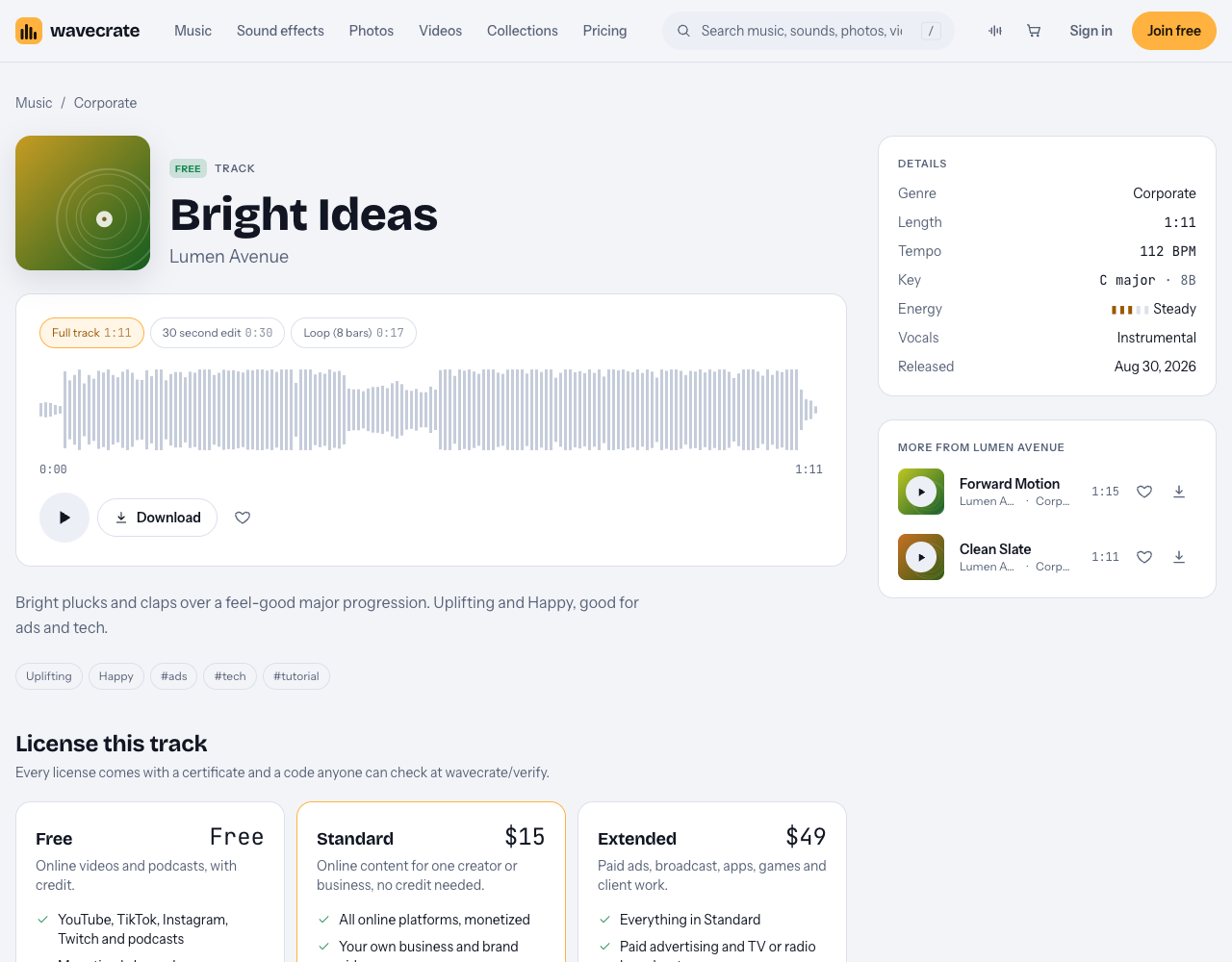
Bright Ideas is marked Free, but its Standard card is the one that lists your own business and brand videos.
- The video sits on your own YouTube channel as a tutorial, with credit text in the description: the Free license covers that.
- The same video goes on your company's site and product pages: that is your own business and brand content, so it needs Standard (listed at $15 on this page, or through Pro once it is on sale).
- You pay to run it as an ad, or an agency makes it for a client: both are Extended only (listed at $49 on this page). If you hold Standard, the pricing page says that, once purchases open, it can be upgraded to Extended for the difference.
Each download comes with a certificate and a code. The verify page shows the licensee, the item, the license type and your registered channels, so a reviewer can check it without contacting Wavecrate. It gives a reviewer something real to look at. It is not a promise about how any claim ends.
Mixing music under narration
Most explainer mixes go wrong because the music is too loud. This works in any editor:
- Set the voice first. Get the narration clean and even before music goes in.
- Bring the music in low. Raise it until you just notice it, then pull it back a little.
- Duck under speech. Lower the music a bit more while the narrator talks, and let it rise in gaps and at the end. Many editors can do this for you.
- Check on a phone speaker. If every word is clear through a small speaker, the mix works.
For screen demos, a steady loop handles pauses better than a track with a big build, because you can stretch or trim it to fit. If you record your face beside the screen, as in a side-by-side screen recording with your webcam, keep the music even quieter. For button presses, Wavecrate's Interface sound kit in its collections has "Clicks, pops and chimes for apps, games and explainers." Sounds are licensed one by one, the same way as tracks.
Frequently asked questions
How loud should music be under a voiceover?
Quiet enough that every word is easy to follow on a phone speaker. Start low, dip it further while the narrator talks, and let it come up only in gaps and at the end.
Is a track marked Free enough for a company explainer?
Not on its own. On Wavecrate the Free license covers online videos and podcasts with credit, but your own business and brand content starts at Standard.
Can I use one track across a series of explainers?
Reusing a track helps a series feel consistent. Check each video's use: Standard covers online content for one creator or business, while paid ads and client work need Extended.
Does Pro cover explainer ads?
No. Pro gives Standard licenses on the whole catalog, and paid advertising is Extended only.
Get started
Open the Corporate music page, set the tempo to Mid, pick a mood, and check the Vocals field says Instrumental. Then match the license to where the video will live before you download.
Browse Wavecrate: you can join free and download items marked Free now, paid licenses are not on sale yet (purchases open soon), and every download comes with a license certificate and a code anyone can check on its verify page.


Comments
No comments yet.
Sign in or make an account to comment.