Debugging journal: how to log the bugs you fix
A debugging journal comes down to one habit. Every time you close a bug, you write a short record of what broke, why it broke, what fixed it, and what you would do differently. This post gives you a template you can copy, tells you when to write each part, and shows how to keep entries findable so you reuse them instead of rediscovering the same fix six months from now.
Why keep a debugging journal at all
You fix a bug. Three months later a similar symptom shows up. You remember you have seen it before, but not how you solved it. So you spend another two hours retracing steps you already walked.
A debugging journal stops that loop. It is not a place for every thought you have while coding. It is a short record of bugs that cost you time, written so your future self can scan it in a minute.
There are three practical payoffs:
- Faster repeats. The second time a bug appears, you search your notes before you search the web.
- Visible patterns. After twenty entries you notice that half your bugs come from the same place: timezones, caching, a flaky dependency, environment variables.
- Honest records of what failed. The things you tried that did not work are often more useful than the fix. They keep you from repeating dead ends.
What to log for every bug you fix: symptom, cause, fix, lesson
Keep every entry to four parts. If you only have time for one line each, that is enough.
Symptom
Write what you saw, in the words you would search for later. Use the exact error message if there was one. "Login broken" is useless. "Login returns 500 only for users with a plus sign in their email" is searchable.
Cause
Write the root cause, not the trigger. "The deploy broke it" is a trigger. "The new URL encoder turned + into a space before the database lookup" is a cause.
Fix
Write what changed and where. A file name, a config key, a version number. Also write down what you tried first that did not work, and mark it as failed. That list is gold the next time.
Lesson
One sentence. What would have caught this sooner? A test, a log line, a check you now run first. This is the reflection the Lean Enterprise Institute calls hansei: looking back at how a process can improve so the mistake is not repeated. If there is no lesson, skip it.
If you want a deeper look at what to put in each field for any kind of problem, not only code, see this problem log template.
A simple debugging journal template you can copy
Copy this into whatever you write in. Fill it top to bottom.
- Bug: one line, the symptom as you would search for it
- Where: service, file, or feature
- First seen: date, and how you found out (alert, user report, your own test)
- Tried and failed: each attempt, one line each
- Tried and partly worked: anything that reduced the problem but did not end it
- Fix that worked: what changed and where
- Root cause: one or two sentences
- Needs: anything the fix depends on, such as a library version, a permission, or a config value
- Related bugs: past entries that look similar
- Lesson: one sentence, optional
Here is a filled example so you can see the length to aim for.
- Bug: Webhook handler times out on payloads over 2 MB
- Where: payments webhook endpoint
- First seen: retry storm in the logs on a Monday morning
- Tried and failed: raised the server timeout. Requests still dropped.
- Tried and partly worked: increased worker count. Fewer timeouts, same root issue.
- Fix that worked: return 200 right away, push the payload to a queue, process it in the background
- Root cause: the handler parsed and wrote the full payload before replying, and the sender gave up first
- Needs: a queue the web process can write to
- Related bugs: the email import timeout from last spring
- Lesson: webhook handlers should acknowledge first and work later
When to write the entry: during the hunt vs after the fix
Split the writing in two.
During the hunt, write only the bug line and each attempt as you make it. One line per attempt, marked failed or partly as soon as you know. This takes seconds and it keeps you from trying the same thing twice when you are tired. It also helps if you stop for the day and come back tomorrow.
After the fix, write the cause, the fix, the needs, and the lesson. Do it within the hour while the details are fresh. If you wait until Friday, you will write "fixed the timeout" and nothing else.
A rule that works: the entry is not done until the bug line reads like something you would type into a search box.
Tagging and searching past bugs so you actually reuse them
A journal you cannot search is a diary. Three habits make it reusable:
- Put keywords in the bug line itself. Start with the area: "Auth:", "Billing:", "Build:". Then the error text. The first line is what you scan, so make it carry the most weight.
- Link related bugs. When you write a new entry, look for an old one with a similar cause and connect them. Over time these links show you clusters, like "five of my bugs were all about time zones". Factories call the next step yokoten: when the Lean Enterprise Institute's example finds a defective valve on one machine, every similar valve is checked for the same defect. Do the same with code that shares the bug's pattern.
- Keep failed attempts attached to the bug. When you find an old entry, you see immediately what not to try.
This is where a graph helps more than a list. In Problem Graph, each bug is a problem node you write in one line and drop into a lane. For code, the work lane or the expert lane fits. Each thing you try becomes a solution attached to it, and you mark the outcome as worked, partly, or failed. Things a fix depends on can be recorded as requirements. You can link problems that belong together, even across lanes, and the clusters appear on the map rather than staying buried in a long page. The app filters by lane and offers a list view beside the map, so you can switch to scanning one line per bug when that is faster.
Using the example above, the map looks like this:
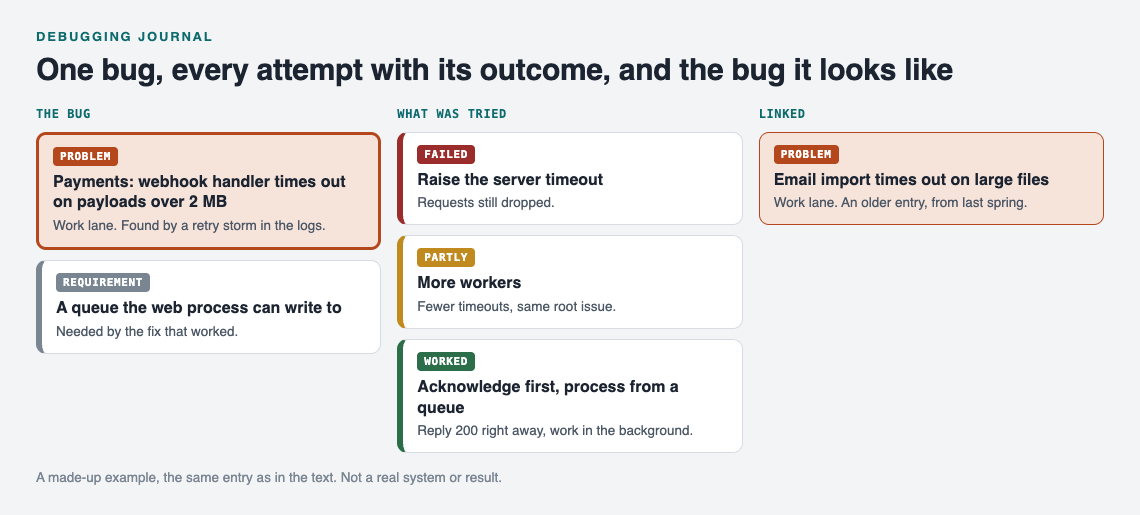
The made-up webhook bug above, kept as a map.
The failed solution stays on the map. Next time you see a timeout, you know the first idea already did not work.
From personal journal to shared team bug log
A personal journal works best when it is private by default. You can write "I spent two hours on a typo" without worrying who reads it. In Problem Graph, private is the default: your problems are saved to your account, follow you to any device you log in on, and nobody else sees them.
Some bugs are worth sharing, though. The tricky ones that a teammate will hit next week. For those, you mark the problem as a main node. Only a main node can be shared, and when you share it, its solutions, their outcomes, and the requirements go along with it. Problems you only linked to it stay private.
You can share a main node in two ways:
- Private network. Create a network, give your team the invite code, and share the bug into it. Members see it and nobody else does. Keep in mind that anyone with the invite code can join, so treat the code like a key.
- Public. Put the bug out for everyone in the app. Others can link their own problems to it and borrow the solutions that worked. Only do this for bugs with nothing internal in them.
Borrowing works the other way too: Problem Graph shows similar problems others have shared and which solutions worked, and a borrowed solution keeps a link back to where it came from. AI suggestions are proposals; log their outcome like any other attempt.
For more on running a shared log with a small group, see this guide to a shared problem log for a small business. The same structure works for a dev team.
Frequently asked questions
Is a debugging journal different from an issue tracker?
Yes. An issue tracker manages work that still needs doing. A debugging journal records what you learned after the work is done, including the attempts that failed, so you can reuse it later.
How detailed should each entry be?
Detailed enough that you could fix the same bug again from the entry alone. For most bugs that is five to ten short lines: symptom, cause, fix, failed attempts, and an optional lesson.
Should I log bugs that took only five minutes to fix?
Usually not. Log a bug when it took real time, when the cause surprised you, or when you suspect it will come back. A one-line entry is fine for a quick fix you have now seen twice.
What tool should I use for a debugging journal?
Any tool you will open every time works. If you want failed attempts kept next to each bug and related bugs linked visually, a graph-based journal like Problem Graph fits, and it runs in your web browser on a computer or phone.
Get started
The next bug you fix is your first entry. Write the symptom in one line. Attach each thing you try and mark it worked, partly, or failed. Link it to any older bug that looks similar. That is the whole habit.
To see a filled map first, an empty graph offers a "Load example set" button.
Try Problem Graph: it is free, and you can look around the public network without an account. Write one problem down in a line and attach the first thing you will try.
Comments
No comments yet.
Sign in or make an account to comment.