Decision log: record why you chose a solution
A decision log is a short written record of the choices you make and, more importantly, the reasons behind them. If you have ever looked at an old fix and wondered "why did I do it this way?", you already know the problem it solves. This guide shows you how to keep a decision log: record why you chose a solution, which options you turned down, and what happened next. It includes a template you can copy and a worked example from start to finish.
What a decision log is and why the 'why' matters most
It is easy to remember what you decided and lose why. Six months later, the choice can look odd or even wrong, because the conditions that made it sensible are no longer in front of you.
The "why" is the part that protects you. It tells you whether the decision still holds. If the reason was "the cheaper option had a two week wait," and that wait no longer exists, you know it is time to look again. If the reason still holds, you can stop worrying about it.
A good entry also stops you from reopening an option you already rejected. Without a record, the same idea can come back and you spend an afternoon arguing with yourself again.
What to record for every decision: problem, options, reasons, trade-offs
Keep each entry small. You need four things:
- The problem. One line. If you can't state it in a line, you probably have two problems.
- The options. Every option you seriously considered, including the ones you dropped.
- The reasons. Why you picked the one you picked. Write the facts you relied on, not just your feeling.
- The trade-offs. What you gave up. Every real choice costs something. Naming the cost now makes it easier to judge later.
Add a date and a "review by" date. That is enough.
A decision log template you can copy
Copy this into a notebook, a document, or anywhere you write. Fill it in at the moment you decide.
- Date:
- Problem (one line):
- Options considered: A, B, C
- Chosen:
- Why: the two or three facts that tipped it
- Trade-off accepted:
- Rejected options and why: one line each
- How I will know it worked:
- Review by:
- Outcome: worked, partly, or failed (fill in later)
Here is a filled-in example. Say you freelance and clients keep paying late.
- Problem: Client invoices get paid late.
- Options: ask for a deposit up front, send a reminder email a week after each invoice, shorten payment terms from 30 days to 14.
- Chosen: shorten payment terms to 14 days.
- Why: it needs no extra work each month, and both new clients agreed to it without pushback.
- Trade-off accepted: one older client may ask for longer terms, and I may have to make an exception.
- Rejected: deposits, because two regular clients said their accounts team cannot pay before work starts. Reminder emails, because I already forget to send them.
- How I will know it worked: the next three invoices arrive within their terms.
- Review by: end of next quarter.
Notice the "how I will know it worked" line. Decide that before you see results, or you will move the goalposts. There is more on setting that test in how to know when a solution has really worked.
How to log the options you rejected and why
Rejected options are easy to leave out of a decision log, and they are among its most useful lines. They answer the question your future self, or a colleague, will ask first: "did you think about X?"
For each rejected option, write one line with the specific reason. "Too expensive" is weak. "Costs more than the problem does each month" is useful, because you can check it again later.
Also note conditional rejections. Some options are not wrong, just wrong for now. "Deposits: rejected until the two regular clients change accounts process" tells you exactly when to reopen the idea.
Linking decisions to tests, results, and failed experiments
A decision is a bet. The log is only half finished until you record how the bet turned out. This is where a plain list starts to struggle. Decisions connect to other problems, earlier tests, and things that failed, and a list hides those connections.
Problem Graph is a problem and solution journal drawn as a map, and it fits this part of the job well. Here is how the invoice example would look:
- Write the problem in one line, "Client invoices get paid late," and put it in the work lane. It appears on the graph as soon as you press Enter.
- Add each option as a solution. Keep the reason in the line itself, for example "Shorten terms to 14 days (no monthly effort)."
- Mark the one you chose as the one you are trying. The others stay on the map as ideas.
- When the review date comes, record the outcome: worked, partly, or failed. Options you did not choose stay as ideas and failed ones stay marked failed, so you can see them next time.
- Link related problems, even across lanes. If late payments are linked to a personal problem like "Monthly budget keeps running short," the connection is visible on the map instead of buried in two separate notes.
The app also has a requirement node, so you can show what a solution depends on, such as "client agrees to new terms." When a decision fails, the requirement can explain why.
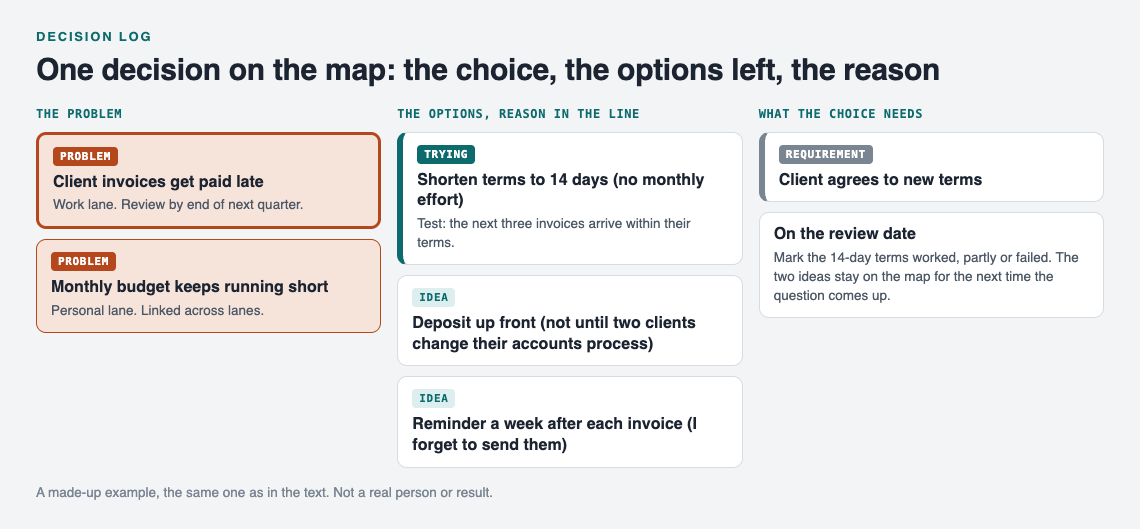
The made-up invoice decision from this post, as it sits on the map.
Failed results deserve the same care as wins. The home page puts it plainly: a solution that failed three times stays on the map as a failed solution, and that is what the next person needs to know. For a fuller method, see how to record experiments that failed. If you want to try an option small before you commit to it, how to test a solution before you commit to it walks through that step.
How to review and revisit past decisions without second-guessing
Reviewing a decision is not the same as doubting it. The goal is to check whether the reasons still hold, not to relive the choice.
When the review date arrives, ask three questions:
- Did it meet the test I wrote down? Yes, no, or partly. Record it.
- Are the reasons still true? Read the "why" line. If a fact has changed, the decision is open again. If not, it stands.
- Has a rejected option's condition changed? Check the conditional rejections.
Judge the decision by what you knew at the time, not by what you know now. A good decision can have a bad outcome, and a lucky guess can have a good one. Keeping the "why" lets you tell the two apart. If you want to make a habit of learning from the bad calls, a mistake log pairs well with a decision log.
Common decision log mistakes and how to avoid them
- Writing it after the fact. Reasons written later can get tidied up to match the result. Write the entry when you decide.
- Logging only the winner. Without rejected options, the log can't stop you repeating old debates.
- Vague reasons. "Felt right" can't be checked. Write a fact you could test again.
- No review date. Without one, entries are never revisited and the outcome line stays blank.
- Logging every tiny choice. Keep it for decisions that cost time or money to reverse. Small daily choices will bury the important ones.
- Deleting failures. A failed option is information. Mark it failed and keep it.
Frequently asked questions
What is the difference between a decision log and a problem log?
A problem log records what is wrong and what you tried. A decision log adds why you picked one option over the others, so the two fit together: each decision sits under the problem it answers.
How detailed should a decision log entry be?
Detailed enough that a stranger could understand why you chose what you chose. For most decisions, that is a one line problem, the options, two or three reasons, and the trade-off.
When should you write the entry, before or after deciding?
Start it before you decide, by listing the options, and finish it the moment you choose. Fill in the outcome later, on the review date.
Can a team share one decision log?
Yes. In Problem Graph you can mark a problem as a main node and share it into a private network that only people with the invite code can join. Its solutions, their outcomes, and the requirements they need go along with it, while the rest of your graph stays home.
Get started
Your problems are private by default and saved to your account, so they follow you to any phone or computer you log in on. If you want to see how a graph looks before adding your own, open the app and use "Load example set" on an empty graph. You can also switch to the List view next to the map, and filter by lane.
Take the next decision you are about to make. Write the problem in one line, add each option as a solution, and mark the one you choose. On the review date, record whether it worked, partly worked, or failed.
Try Problem Graph: it is free, and you can look around the public network without an account. Write one problem down in a line and attach the first thing you will try.
Comments
No comments yet.
Sign in or make an account to comment.