Foley sounds for short films and vlogs: a starter guide
Foley sounds for short films and vlogs are the small, recreated noises that make a scene feel real: shoes on a hallway floor, a jacket rustling as someone sits down, a mug set on a desk. Your camera mic picks up some of this, but usually too faint, too noisy, or buried under wind and room echo. This guide shows you how to record the basics at home with a phone, how to sync and layer them in your edit, and when a library sound saves you time.
Foley sounds for short films and vlogs: what they are and why you need them
Foley is sound you perform and record to match the picture after you shoot. The name comes from film sound work, but the idea is simple. You watch your footage, and you make the noises the scene should have.
Short films need foley because you often record dialogue with a mic pointed at faces, not feet. Footsteps, props and clothing end up thin or missing. When you cut out a noisy background, the small sounds go with it, and the scene feels empty.
Vlogs need less, but still some. A close shot of you pouring coffee looks flat without the pour. A B-roll shot of typing feels fake if it is silent. A few well-placed sounds make cheap footage feel finished. When a prop sound is hard to record, a library such as Wavecrate lets you hear each sound and read its license before it goes into your edit.

The three foley layers: footsteps, cloth, and props
Break every scene into three layers. Work on one at a time.
- Footsteps. Every visible step, matched to the floor in the shot. Wood, tile, carpet and gravel each sound different. Shoes matter too: sneakers squeak, boots thud.
- Cloth. The quiet rustle of movement. A character turning, reaching, or sitting. You rarely notice it, but you notice when it is gone.
- Props. Anything a person touches. Keys, cups, doors, paper, phones, keyboards.
Here is a worked example. Your scene is 20 seconds long. A character walks into a room, drops keys on a table, pulls out a chair, sits, and starts typing. Your foley list looks like this:
- Footsteps: six steps on a wood floor.
- Cloth: arm swing while walking, a rustle on the sit.
- Props: keys on table, chair scrape, chair creak, laptop opening, typing.
Write that list before you record anything. It keeps you from missing a sound and stops you from recording things you will never use.
A cheap home foley kit: props, surfaces, and a quiet corner
You do not need a studio. You need a few objects and a quiet spot.
- Props: a leather jacket and a cotton shirt for cloth, keys, a ceramic mug, paper and a cardboard box.
- Shoes and surfaces: hard soles and sneakers, a square of plywood, a spare floor tile, a small rug, and a tray of gravel on a towel for outdoor steps. Walk in place on them.
- A quiet corner: a small room with soft things in it, like a closet full of clothes. Turn off fans and heaters, and record a few seconds of silence first so you can hear what noise is left.
How to record foley with a phone or USB mic
A phone voice memo app or a basic USB mic is enough for most foley. The trick is distance and level, not price.
- Get close. Hold the mic about a hand's length from the sound for props. For footsteps, place it about a foot off the floor, pointed at your shoes.
- Set the level low. Do a test hit. If the loudest sound peaks near the top of the meter, turn it down. Distorted foley cannot be fixed later.
- Perform to the picture. Play the clip on a laptop with headphones and act along. Watch the feet, not your own feet.
- Do three takes of each. You will pick the best one in the edit.
- Slate every take. Say "keys, take two" before each one.
Naming files clearly matters once you have 40 short clips. The method in how to name recordings so every take stays in order works just as well for Foley.
Syncing and layering foley in your edit
Put each layer on its own audio track: one for steps, one for cloth, one for props. This lets you adjust each layer without touching the others.
Sync
Step through the video frame by frame. Find the exact frame where a heel hits the floor or the keys touch the table. Line up the start of the sound's waveform with that frame. Your take will drift, so cut it into single steps and place each one.
Layer
Real sounds are often two sounds at once. The chair in our example is a scrape plus a creak. Keys on a table are a metal jingle plus a soft thud. Stack them on separate tracks and nudge them a frame or two apart until it sounds natural.
Fill the gaps with room tone
Foley over dead silence sounds pasted on. Put a low bed of room tone under the scene so the sounds have a space to live in. If you did not record one, a looping ambience can do the job. The Wavecrate ambience sounds include room tone loops such as Lab Room Tone, 37 Second, Warm, which is marked Free, and Server Room, 20 Second, Warm, also marked Free.
Recording your own foley vs. using a sound library
Record your own footsteps and cloth. They have to match the exact movement, floor and shoes in your shot, and a library clip rarely lines up step for step.
Props are where a library helps, especially repeated, mechanical sounds that are hard to perform cleanly at home. Typing is the classic case. Your own keyboard may be too quiet, or the clicks may sound wrong for the shot.
Be clear about what you will find. The Wavecrate Foley sounds page listed 10 results on 10 October 2026, all desk, computer and body sounds. There were no footsteps, doors or cloth. What it does have fits the typing scene in our example:
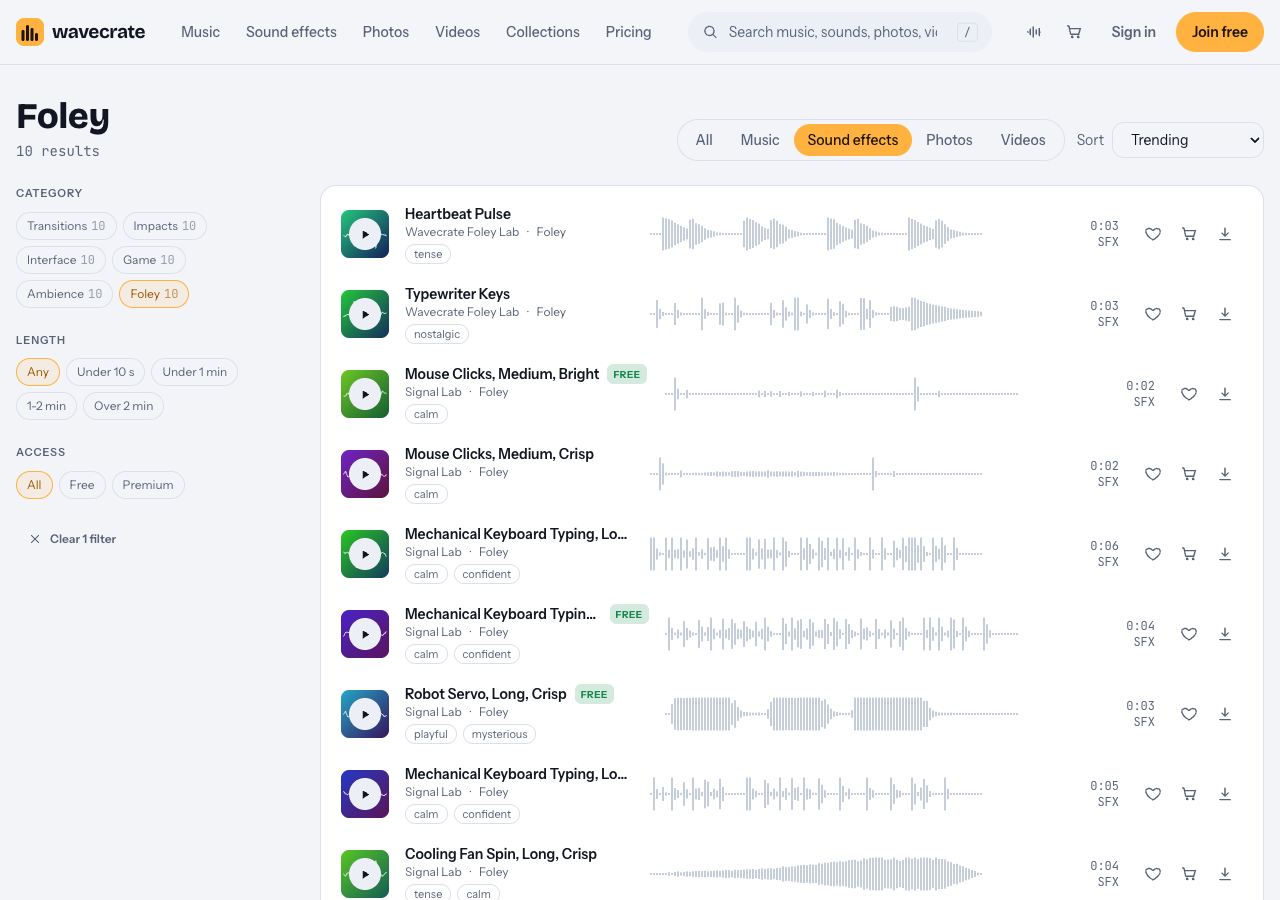
The Foley category on 10 October 2026: desk, computer and body sounds.
- Mechanical Keyboard Typing, Long, Warm, Plasma: marked Free, described as typing with words, spaces and an enter key. It comes as a 24-bit WAV and a 320 kbps MP3.
- Mouse Clicks, Medium, Bright: marked Free, with clicks, double clicks, scrolling and dragging.
- Typewriter Keys: Premium. Its page showed Standard $3 and Extended $9.
- Heartbeat Pulse: Premium, for heart and suspense moments.
- Robot Servo and Cooling Fan Spin sounds for tech and sci-fi shots.
Listed prices differ by item. The keyboard and mouse pages showed Standard $5 and Extended $19, while Typewriter Keys showed $3 and $9.
To audition, set the access filter to Free if you want to start there. Space plays or pauses, and Shift with Left or Right jumps to the previous or next item.
Which license covers a library Foley sound
Items marked Free have a Free license for online videos and podcasts, with credit text required in your description. Standard drops the credit and adds your own business and brand videos. Paid ads, broadcast (TV, radio and cinema), apps, games and client work need Extended. The pricing page lays this out, and Pro, listed at $99 a year ($8.25 a month billed yearly) or $12 month to month, covers Standard licenses, never Extended. A license gives you permission, not the sound: "We keep the copyright." Paid licenses and Pro are not on sale yet (Wavecrate says purchases open soon), so the prices here are the listed prices for when sales open, while items marked Free can already be downloaded with a free account.
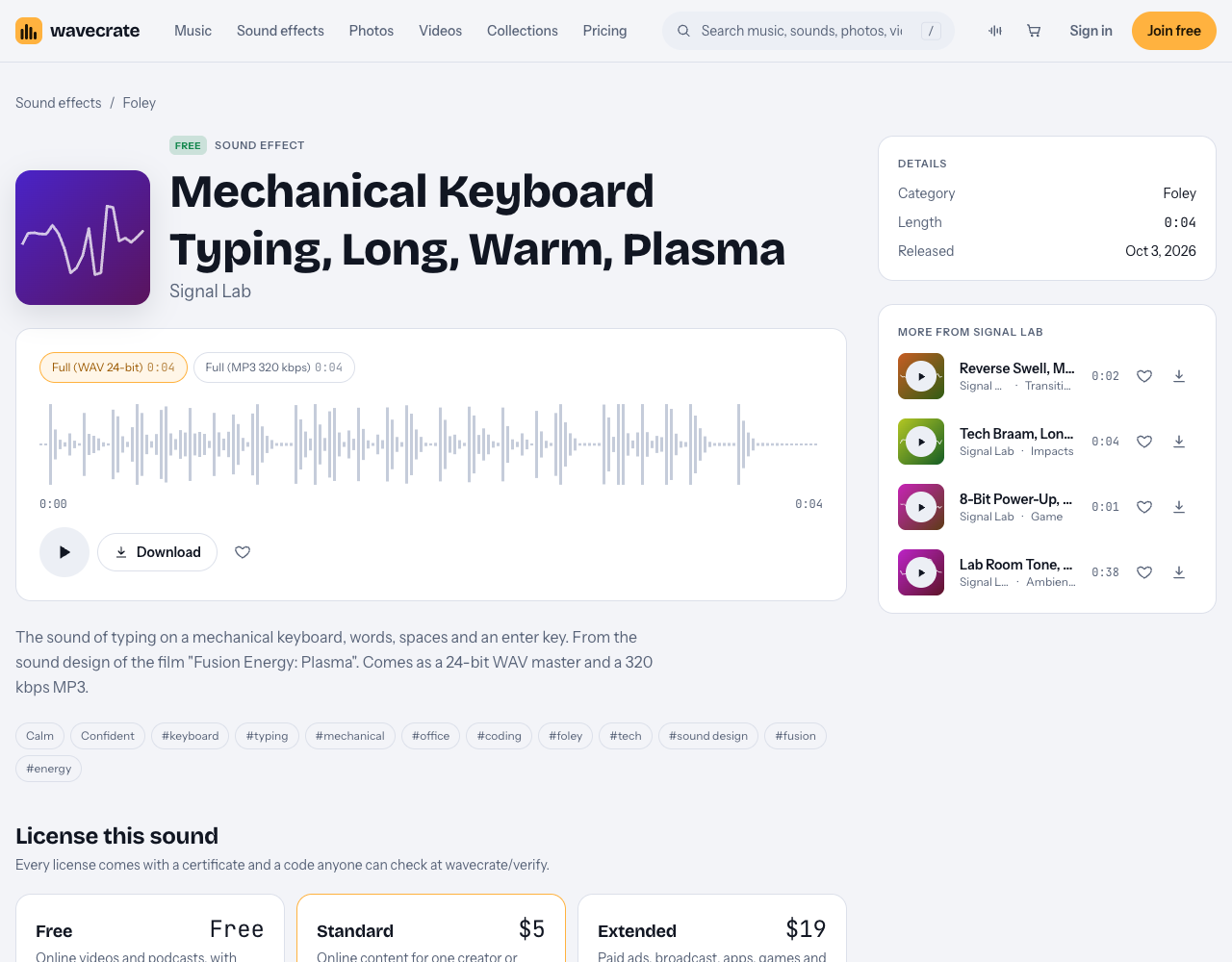
The typing sound from the example: marked Free, with Standard and Extended above it.
Take the typing sound from the example scene:
- Your short film on your own YouTube channel, with credit text in the description: the Free license covers it.
- A vlog for your own shop or brand: that is your own business content, so it needs Standard (listed at $5 on this page) or Pro, even though the sound is marked Free.
- A film you cut for a client, or one shown in a cinema: both are Extended only (listed at $19 on this page).
Every download comes with a license code, and the verify page shows who holds the license, for which item and what type it is.
Frequently asked questions
Do vlogs really need foley, or is on-camera audio enough?
For talking-head shots, on-camera audio is usually enough. Add foley to close-ups, B-roll, and any shot where you replaced or cleaned the original sound. Silent B-roll is the most common place a vlog sounds unfinished.
What everyday objects make the best foley sounds?
Keys, a ceramic mug, a leather jacket, paper, a cardboard box, and two pairs of shoes cover most scenes. A tray of gravel on a towel gives you outdoor steps. Celery and cabbage are useful for crunches and breaks.
How loud should foley sit under dialogue?
Well below it. Dialogue should always be clear, and foley should feel present only when you listen for it. Adjust by ear on headphones and on phone speakers, since most viewers watch on phones.
Can I use free Foley sound effects in YouTube videos?
On Wavecrate, items marked Free have a Free license that covers YouTube and monetized channels, with credit text required in your description, and a free account gets 3 free downloads a month. For other sources, read each sound's own license.
Get started
Record your footsteps and cloth at home, then fill the prop gaps your kit cannot cover. Start with the desk and computer sounds in the foley category and a room tone loop from ambience. Keep each file named by take and keep the license code with it.
Browse Wavecrate: you can join free and download items marked Free now, paid licenses are not on sale yet (purchases open soon), and every download comes with a license certificate and a code anyone can check on its verify page.


Comments
No comments yet.
Sign in or make an account to comment.